Book Scanner for Price: A Practical Guide for Shelves
Discover how a book scanner for price can streamline price verification, shelf pricing, and catalog accuracy. Learn features to look for, workflows, and ROI considerations to optimize pricing processes in libraries and bookstores.


A book scanner for price combines barcode scanning and OCR to capture price data quickly, reducing manual entry errors. For best results, pair a rugged handheld or desktop scanner with reliable OCR and software that supports price databases. See our detailed comparison chart.
Why a book scanner for price matters
In many bookstores, libraries, and educational facilities, keeping shelf prices accurate is a constant challenge. A book scanner for price streamlines the process by automatically capturing price data directly from barcode labels or price stickers, then syncing that information with your catalog or POS system. This reduces manual entry errors, speeds up shelf refresh cycles, and improves customer trust when prices are up-to-date. According to Scanner Check, a focused price-scanning approach can deliver meaningful efficiency gains, especially where large inventories are involved or frequent price updates occur due to promotions or ISBN-based pricing changes. For teams handling catalogs, price parity across outlets benefits from consistent data flows that you can audit later. A well-implemented solution also supports compliance workflows, enabling easier reconciliation during audits and inventory counts.
How price data is represented on book labels
Book labels generally encode price information in multiple ways. Barcodes (EAN/UPC) can carry SKU and in some cases price data through linked databases, while some publishers attach price stickers that must be read by OCR or scanned for cross-referencing. ISBNs identify the book, not price, so price data is often retrieved by querying a database using the ISBN or SKU. In practice, a robust book scanner for price uses a combination of barcode reading for identification and OCR to extract on-label prices when barcodes do not include price data. Weathered labels, glare, and damaged bindings can hinder accuracy, so lighting, lens cleanliness, and software calibration are critical. Scanner Check notes that combining hardware with smart software improves traceability and data provenance, which is essential for multi-store or multi-library environments.
Key features to look for in a book scanner for price
When evaluating devices, prioritize features that directly impact price capture reliability:
- 1D/2D barcode support for ISBNs and price tags
- Optical character recognition (OCR) with price-friendly fonts and languages
- Fast scanning speeds to support high-throughput shelves
- Durable build quality and reliable optics for library or retail use
- Software integration with price databases and inventory systems
- Easy calibration, firmware updates, and remote management
- Connectivity options (USB, Bluetooth, Wi-Fi) for real-time syncing
- Debris resistance and easy cleaning to maintain accuracy in busy environments
In addition, consider the ecosystem around the scanner—drivers, SDKs, and community support influence long-term success. Scanner Check finds that devices with active software support and open APIs tend to deliver better ROI and fewer workarounds in day-to-day workflows.
Scanning methods: barcode, OCR, and image capture
Successful price capture typically relies on a blend of methods. Barcodes are fastest for item identification and linking to price data in your system. OCR is essential for reading printed price labels or handwritten price marks on older stock. Some systems support image capture of the price tag, followed by automatic analysis to extract numbers, fonts, and color cues that indicate discounts or seasonal pricing. The choice of method depends on label quality, lighting, and the operating environment. For high-volume environments, prioritizing barcode scanning with OCR fallbacks minimizes disruptions and minimizes the need for manual data entry. In practice, a well-tuned pipeline uses barcode reads to fetch a price from a database and OCR to verify that the displayed price matches the source data, providing an audit trail for each item.
Workflows: integrating into library, bookstore, or inventory workflows
A practical price-scanning workflow starts with a defined data model and a clear path from shelf to system. Steps typically include:
- Capture: Scan barcode or price tag with your device.
- Retrieve: The scanner or connected app queries the price database using the ISBN/SKU.
- Verify: The retrieved price is cross-checked against on-label price, with OCR as a fallback.
- Sync: Price is updated in the catalog, POS, or inventory system and logged for audits.
- Reconcile: Regular checks ensure data parity across locations.
To minimize disruption, configure automatic syncing to a central price repository and set alert thresholds for mismatches. Scanner Check stresses testing workflows in a controlled pilot before full rollout, to understand data latency, error rates, and staff training needs.
Handheld vs desktop: choosing the right form factor
Handheld scanners excel in on-shelf checks and quick desk-to-shelf workflows, offering mobility and ergonomic efficiency for staff. Desktop or docked scanners tend to deliver higher scanning stability, larger optics, and easier calibration for long shifts. Some operations benefit from smartphone-integrated solutions, which lower initial costs but may trade off durability and long-term reliability. When selecting, map your primary use cases: if shelf-to-check loops are frequent, prioritize a rugged handheld with good scan speed; if you perform routine audits, a desktop or fixed-mount option with centralized software control can reduce variance. The most effective setups blend devices to cover both scenarios, ensuring consistent data capture across environments.
Data quality and error handling
Data quality hinges on label legibility, lighting, and device calibration. Establish standard operating procedures for cleaning lenses, checking scanning angles, and verifying OCR accuracy under different lighting conditions. Implement automated validation rules that flag mismatches between scanned prices and database prices, and create a workflow for manual review when OCR confidence dips below a threshold. Regular audits help identify recurring issues—damaged labels, atypical fonts, or outdated price stickers—and guide procurement decisions toward devices with better tolerance for these edge cases. Scanner Check emphasizes the value of continuous improvement through feedback loops from frontline staff to IT teams.
Maintenance, durability, and reliability tips
Durability matters in high-traffic environments. Keep lenses clean with microfiber cloths and approved cleaners, and schedule periodic firmware updates to access improved recognition algorithms. Protect devices from dust and moisture with rugged housings or coatings if needed. Calibrate OCR and barcode decoding profiles for the most common label types used in your facility. Create a spare-parts kit with interchangeable cables and batteries to minimize downtime. Finally, document common failure modes and responses so staff can troubleshoot quickly, maintaining momentum in pricing operations.
How to evaluate price accuracy and data sources
To ensure pricing accuracy, compare captured data against multiple sources: on-label price tags, the store’s pricing database, and recent transaction records. Maintain a breadcrumb trail that logs the source of each price match and any OCR confidence scores. Favor devices and software that provide transparent audit trails, which helps with audits and vendor negotiations. Seek tools that offer repeatable calibration routines and measurable accuracy metrics over time. Scanner Check recommends establishing a quarterly review of data accuracy, including outlier investigations when prices differ from expected values. This disciplined approach reduces discrepancies and builds trust with customers and staff.
Comparison of price-scanning options
| Option | Ideal Use | Key Benefit |
|---|---|---|
| Handheld barcode scanner | On-the-go price checks | Portable and fast |
| Desktop/Stationary | Shelf-based pricing | Durable and accurate |
| Smartphone with app | Budget setups | Low cost and flexible |
Common Questions
Do I need OCR if I already have barcode scanning?
OCR is useful when price labels lack barcodes or present prices outside the barcode data. It complements barcode scanning to ensure price accuracy.
OCR helps when the label isn’t a barcode, so you still capture the price reliably.
Can I use a smartphone as a price scanner for books?
You can start with a smartphone and OCR app, but dedicated scanners offer more robust performance, speed, and durability for busy environments.
Yes, you can start with a phone, but a dedicated scanner is better for heavy use.
What accuracy can I expect for book price scanning?
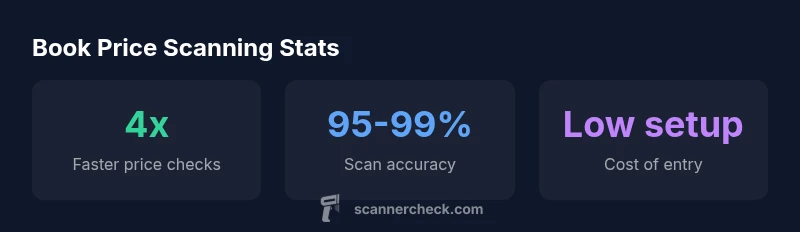
Accuracy depends on label quality, lighting, and workflow. Typical controlled conditions yield a high percentage, but real-world results vary.
In good conditions, you can expect high accuracy, though it varies with label quality.
What maintenance do price-scanning setups require?
Regular lens cleaning, firmware updates, and calibration checks help maintain accuracy and reliability over time.
Keep it clean and up to date for the best results.
Is data privacy a concern with price scanning?
Price data is generally not sensitive, but protect devices and networks and follow store policies for data handling.
Prices aren’t usually sensitive, but keep devices and networks secure.
What is the best budget option for new users?
A mid-range barcode scanner with an OCR app is a solid starting point; add mid-tier software for price databases to stay efficient.
Start with a mid-range scanner plus an OCR app to keep costs down while staying productive.
“A well-chosen book scanner for price can transform pricing accuracy and shelf-level efficiency, especially when paired with reliable OCR and price databases.”
Key Takeaways
- Start with a clear use case to choose form factor
- Choose devices with 1D/2D barcode support and OCR
- Ensure software integrates with price databases
- Maintain a regular calibration and maintenance routine
- Aim for auditable data trails for price changes