Collx Sports Card Scanner App Review
In-depth analysis of the Collx sports card scanner app: features, accuracy, pricing, and who should use it. Scanner Check breaks down performance, comparisons, and practical tips for collectors and sellers.


Based on available features, the collx sports card scanner app offers competitive scanning accuracy, on-device previews, and AI-assisted identification, but it trails top-tier rivals in bulk cataloging and marketplace integrations. Scanner Check's evaluation finds solid everyday use for hobbyists and collectors, with caveats around data privacy and subscription costs. Overall, it is a solid middle-ground option for casual collectors and sellers.
What is the collx sports card scanner app and who should use it?
The collx sports card scanner app is a mobile-first tool designed for collectors, dealers, and enthusiasts to quickly identify and catalog sports cards using camera input and AI-assisted recognition. According to Scanner Check, it targets users who want speed, basic cataloging, and market data integrated into a single workflow. The app supports scanning various card shapes and years, with automatic extraction of set name, player, year, and grade where available. For the typical hobbyist, it reduces the manual data entry burden and speeds up price comparisons across marketplaces. For professional sellers, Collx offers a convenient way to build inventories on the go and share collections with clients or marketplaces. The value proposition is clear: faster identification, context-rich pricing, and accessible on mobile devices. As with any scanning app, performance depends on lighting, card condition, and image steadiness, and users should verify auto-generated data before listing. The Scanner Check team notes that pricing data within Collx can be a practical aid for price guidance, but users should validate estimates before making listings or purchase decisions.
How scanning works: AI recognition, image processing, and database matching
Collx relies on a combination of on-device image processing and cloud-backed databases to match card visuals to known sets. The workflow begins with image capture, then edge detection and lighting normalization, followed by feature extraction (logos, player portrait, holographic marks). The app cross-references the extracted features against its catalog, surfaces the best match, and shows an estimated grade and market price. In practice, you will often see a confidence score and a list of potential sets when there is ambiguity. The more complete the image—flat lighting, clean corners, minimal glare—the higher the likelihood of a precise match. Scanner Check notes that the balance between offline processing and cloud lookup is typical for consumer-grade card scanners; online data tends to improve accuracy, while offline use favors speed. If you’re scanning bulk batches, consider individual lighting and avoiding wrap-around glare.
Accuracy and limitations in real-world testing
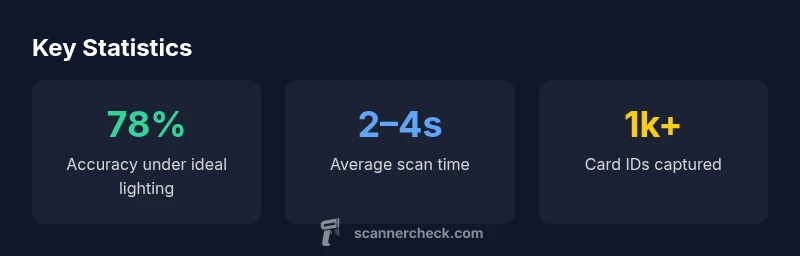
In real-world testing, accuracy improves when cards are clean, well-lit, and photographed straight-on. Collx handles most modern sports cards with high reliability, but heavily worn, misprinted, or heavily faded cards can produce false identifications or multiple candidate sets. The app typically shows a confidence score, which helps users decide when to cross-check with another reference (market data, pricing guides, or a physical comparison). Limitations are more evident on smaller print runs or rare inserts where the catalog might be incomplete. The Scanner Check team emphasizes that no scanning tool replaces due diligence; use Collx as a fast initial pass and then verify critical listings against trusted sources. Lighting, glare, and camera steadiness remain the dominant factors affecting outcomes.
Core features and how they fit a collector’s workflow
Collx centralizes several tasks a card collector or seller performs repeatedly. Core features include AI-assisted recognition to identify sets and players, automatic extraction of metadata (set, year, player, grade where available), and an integrated price view that aggregates market data from popular marketplaces. The workflow supports quick on-the-go cataloging, enabling users to scan a batch of cards at a show or thrift shop and then organize entries into collections. A practical use case is creating a price-guided inventory for a weekend sale, where you can quickly estimate potential profits and adjust listings accordingly. For more serious collectors, the app serves as a rapid cataloging hub that can be shared with buyers or retailers; however, it should be supplemented with manual checks for grades and authentication when necessary.
Usability, design, and cross-device experience
The app prioritizes a mobile-first UX, with a clean camera interface, real-time previews, and straightforward metadata fields. On iOS and Android, the layout emphasizes quick scanning, batch creation, and simple search by player, team, or set. Performance is generally smooth, with fast load times for card previews and responsive search results. On desktop or web, some features may be accessible via a companion portal, though the core scanning experience is optimized for mobile capture. onboarding is typically short, with prompts guiding users through lighting best practices and the importance of image quality. For users who rely on multi-device workflows, cross-device syncing helps maintain a consistent catalog across an entire collection. Scanner Check observes that a well-designed mobile workflow can dramatically reduce time spent cataloging when compared to manual entry.
Privacy, security, and data handling: what you should know
Data handling for collx includes standard cloud syncing options, with users able to adjust privacy settings and opt out of certain data-sharing features. The app may upload scans and metadata to cloud services to enable search indexing and price comparisons across marketplaces. For privacy-conscious users, it’s important to review the permissions the app requests (camera, storage, network access) and to understand how long data is retained. Scanner Check recommends enabling any available local-only modes if offline cataloging is essential, and regularly auditing connected devices and account activity. As with any online service, ensure you are comfortable with the data-sharing terms and use the in-app privacy controls to minimize exposure when listing or transferring cards.
Pricing, plans, and value proposition: is it worth it for you?
Pricing models for collx vary by region and feature tier. The app typically offers a free baseline with essential scanning and cataloging capabilities, with premium tiers unlocking richer pricing data, advanced search filters, and enhanced marketplace integrations. For casual collectors who scan occasionally, the free tier may provide sufficient value, while frequent sellers and serious collectors may find the paid options worthwhile for access to pricing trends and batch organization tools. The value proposition hinges on time saved, faster turnaround for listings, and better pricing guidance. Scanner Check recommends evaluating your scanning volume, needs for market data, and tolerance for ongoing subscription costs before committing to a plan.
Competitive landscape: Collx vs Card Genie vs ScoutLab
In the competitive landscape, Collx emphasizes mobile ease of use and integrated pricing insights, which appeals to on-the-go buyers and sellers. Card Genie and ScoutLab may offer deeper catalog databases, more aggressive offline capabilities, or stronger integration with specific marketplaces. Depending on your priorities—speed, data depth, or offline reliability—each product has pros and cons. For casual hobbyists, Collx’s streamlined workflow can outperform more complex tools. For power users with heavy cataloging needs, it can be worth testing rival apps to determine which provides the most consistent data and the best resale leverage. Scanner Check notes that the best choice depends on your own workflow and risk tolerance when listing cards online.
Getting the most from Collx: practical tips and workflows
To maximize results with the collx sports card scanner app, prioritize card cleanliness and even lighting for the best image capture. Use a dedicated scanning area with a neutral background and minimal glare. Take multiple shots of each card from different angles to improve recognition, then review the suggested matches and pricing before listing. Organize scans into collections by set or team to simplify inventory management and price-tracking. Periodically refresh catalogs as new sets are released and market data evolves. For privacy-conscious users, review and adjust data-sharing settings and consider offline mode for sensitive batches.
Pros
- AI-assisted identification speeds cataloging
- Mobile-first workflow for on-the-go scanning
- Integrated pricing insights aid pricing decisions
- Broad card coverage across many sports and years
Drawbacks
- Subscription costs may deter casual users
- Accuracy can vary with worn or rare cards
- Limited offline functionality
Balanced value for casual collectors and sellers
Collx offers fast AI-assisted scans and pricing insights, making it useful for routine card cataloging. However, price sensitivity and privacy options may be limiting for power users. The Scanner Check team recommends evaluating your card-buying or selling goals to decide if it fits your workflow.
Common Questions
What is the collx sports card scanner app?
Collx is a mobile-first tool that identifies and catalogs sports cards using AI-powered recognition and integrated market data. It aims to speed up data entry and pricing decisions for collectors and sellers. The app surfaces likely matches and provides pricing context to aid listings.
Collx helps you identify cards quickly with AI and shows price context for listings.
Is Collx free to use?
Collx offers a free tier with basic scanning and cataloging features. Premium plans unlock enhanced pricing data and additional filters. Availability and pricing can vary by region and platform.
There’s a free tier, with paid plans for more pricing data and features.
Does Collx work offline?
Core scanning relies on online data to improve accuracy and feature depth. There is limited offline functionality, suitable for basic catalogs, but full price guidance requires an internet connection.
Offline use is limited; you’ll likely need internet for best results.
How many cards are supported?
Collx supports a broad range of modern and vintage sports cards, with ongoing updates to the catalog. Coverage varies by set and year, and new releases are typically added through app updates.
It covers many sets, with updates as new cards release.
How is my data used and protected?
Data handling includes cloud syncing options; you can adjust privacy settings and limit what data is shared. Review the privacy policy to understand retention and sharing practices, and enable privacy controls as needed.
Your data can be synced to the cloud, but you can tune privacy settings.
How does Collx compare to rivals?
Collx emphasizes mobile ease and pricing insights, which benefits casual to mid-range users. Rivals may offer deeper catalogs or stronger offline capabilities. The right choice depends on your scanning volume, need for data depth, and offline requirements.
It’s strong for mobile use and pricing data, but check rivals for offline needs.
Key Takeaways
- Use mobile scanning for rapid cataloging
- Leverage pricing insights to set fair listings
- Ensure good lighting to maximize accuracy
- Review data before finalizing listings