How Small Can a QR Code Be to Scan? A Practical Guide
Explore the practical lower limits of QR code size, how device and printing factors affect readability, and proven techniques to maximize scan reliability across cameras and lighting.


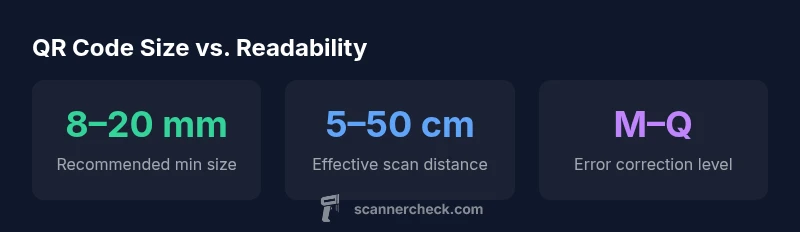
For reliable consumer scanning, a QR code should be at least about 8–20 mm on its shortest side. Codes smaller than ~8 mm often fail on many smartphones, while higher‑resolution cameras or good lighting can scan larger codes from farther away. The exact minimum size depends on camera quality, print sharpness, and distortion.
Why Size Matters for QR Scanning
When you ask how small can a qr code be to scan and still be readable, you’re really asking about a blend of three core factors: the code’s physical size, the quality of the print or display, and the scanning device’s capabilities. For most everyday uses, the size a code occupies in the real world is the easiest way to predict reliability. A code that is too small reduces the number of pixels that the camera can analyze, which increases the chance of misreads caused by blur, aliasing, or poor contrast. That said, there isn’t a single universal minimum size, because smartphones have different camera sensors, autofocus performance, and image processing pipelines. In practice, you’ll see reliable reads around the 8–20 mm range for the code’s shortest edge, with larger sizes improving robustness in challenging conditions. The key takeaway is that the smaller you go, the more you rely on printing precision, lighting, and device quality. According to Scanner Check, these practical limits shift based on the device’s sensor, not just the code itself.
QR Code Anatomy and Readability
A QR code is made up of square modules arranged in a grid, with finder patterns at three corners that aid alignment. As you shrink the code, each module becomes smaller in screen pixels, making it harder for the camera to distinguish one module from its neighbors. Error correction (levels L, M, Q, H) helps restore data if portions of the code are obscured or degraded, but it cannot compensate for insufficient module size when the camera struggles to resolve the tiny modules. When planning for very small codes, you must consider not only the overall footprint but also how the individual modules will reproduce on your chosen substrate. Higher module densities require crisper printing and cleaner edges to maintain readability.
Printing and Display Considerations for Small QR Codes
Printing quality has a disproportionate impact on scanability at small sizes. A code printed with jagged edges or a low-contrast transition between dark and light modules looks blurred to a camera, which leads to read failures. Factors such as ink spread, glossy vs. matte surfaces, and printer resolution directly affect readable edge definition. To maximize legibility, choose high-contrast color pairs (black on white is standard), maintain precise quiet zones around the code, and confirm that the module boundaries are sharp. On digital displays, ensure the code is rendered at native resolution and not scaled to a nearby color gradient, which can blur the edges in the camera’s field of view.
How Cameras and Lighting Influence the Lower Bound
Device differences matter more at small sizes than at larger scales. A modern smartphone with a high-resolution sensor, good autofocus, and effective demosaicing can often read smaller codes than an older device. Lighting also plays a crucial role: direct glare or deep shadows reduce contrast and introduce noise, making tiny codes harder to resolve. In bright, evenly lit environments, you’ll typically achieve better performance, while in low light, you may need a larger code or supplemental lighting. When evaluating feasibility, test across several devices and lighting scenarios to establish a practical minimum size for your audience.
Practical Guidelines and Testing Workflows
The most reliable approach is to test actual production samples. Start with the 8–20 mm target for the shortest edge and create test sheets printed at multiple resolutions. Use at least three devices spanning entry-level to high-end cameras to measure scan success rates under typical office and outdoor lighting. If you encounter frequent read failures at a given size, consider increasing the code size, improving print fidelity, or selecting a lower error correction level to boost data density. Document your test results to inform future iterations and to provide a data-backed baseline for stakeholders.
Common Scenarios: When Small Codes Fail and How to Fix Them
Industry practitioners encounter several recurring failure modes. Too-small codes often fail under even modest blur; low-contrast printing leads to uneven luminance; curved or folded surfaces distort the code; and reflective materials may create hotspots that wash out critical edges. Fixes range from increasing the code’s physical size, switching to a higher-contrast substrate, adding a matte overlay to reduce glare, or choosing a more robust error correction level. In cases where you must keep the footprint tiny, ensure your printing method preserves edge integrity and test under real-use conditions before going to production.
QR code size guidance by scenario
| Scenario | QR Code Size (short edge) | Notes |
|---|---|---|
| Minimum size for basic scanning | 0.8–2.0 mm | Depends on camera resolution and print sharpness |
| Small code for close range | 2–4 cm | Requires high-end camera and good lighting |
| Longer-distance readability | 4–6 cm | Larger code improves reliability in outdoor light |
Common Questions
What is the smallest QR code size that still reads reliably?
Reliability depends on device and print quality, but most scanners read codes around 8–20 mm on the shortest edge. Testing across devices is essential to confirm a safe minimum for your audience.
For most users, start at about 8 millimeters and test on several devices to confirm readability.
Does scanning distance affect the minimum size?
Yes. The farther the camera is from the code, the larger the code must be to maintain readability. Shorter distances allow smaller codes if print quality is excellent.
Distance matters: bigger codes read more easily from farther away, smaller codes require closer proximity and better printing.
How does error correction influence tiny QR codes?
Higher error correction (levels Q/H) improves tolerance to damage but reduces data density, which indirectly affects the minimum practical size for printing.
Higher error correction helps reading when the code is damaged or printed imperfectly, but it makes the code denser.
What printing tips help readability for very small codes?
Use high-contrast black and white, crisp borders, and a quiet zone around the code. Avoid glossy surfaces that cause reflections and print at native resolution.
Print with sharp edges, high contrast, and keep space around the code free of graphics.
Can small QR codes be scanned from screens?
Yes, but screens introduce pixel structure and glare. Ensure the code is displayed at native resolution and tested across devices.
Screens can work, but you should test at native resolution and minimize glare.
“The practical minimum size of a QR code is not a fixed number—it's a function of print quality, contrast, and the scanning device. In most cases, aim for larger codes to ensure reliable reads across varied hardware.”
Key Takeaways
- Aim for 8–20 mm minimum for reliable mobile scans
- Larger codes improve reliability in challenging conditions
- Printing quality and contrast are as important as size
- Test across devices and lighting to set a practical minimum
- Use higher error correction for tiny codes when needed