Price Scanner Walmart: A Practical Guide to In-Store Price Checks
A data-driven guide to price scanning Walmart prices, with practical steps, tips, and examples to save money using barcodes and Walmart apps.


Definition: Price scanning Walmart prices refers to using a barcode scanner or mobile app to pull live price data from Walmart’s listings and in-store signage. This quick lookup helps shoppers compare the shelf price to the online listing, identify price gaps, and decide whether to buy now or search for a better deal.
What price scanning Walmart prices means for shoppers
Price scanning Walmart prices empowers shoppers to verify how much an item should cost by cross-checking the barcode against Walmart’s live listings and in-store signage. For many, this capability translates into faster decision-making at the shelf and a clearer sense of whether a deal is truly a deal. According to Scanner Check, the price scanner walmart workflow helps identify price gaps that can be exploited—especially when regional promotions or temporary markdowns are in effect. The goal is simple: save money without sacrificing convenience. Shoppers who regularly scan prices build a mental map of typical ranges for staple items, which improves confidence during busy shopping trips and reduces impulse purchases driven by misleading signage. This approach also complements broader price transparency efforts, helping consumers demand accountability from retailers.
How to perform price scans in Walmart stores
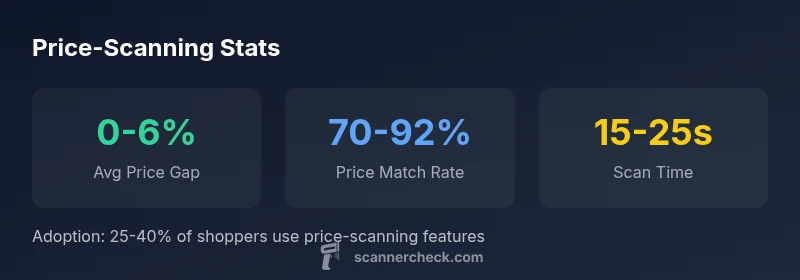
To begin price scanning in Walmart stores, start with your smartphone or a handheld barcode scanner. Open Walmart’s app or a trusted third-party scanner, then hover over the barcode until the scanner recognizes it. Compare the scanned price to the shelf tag and the online listing. If there’s a discrepancy, confirm whether a regional promo, clearance, or bulk pricing applies. In practice, you’ll often see price differences of a few percent, which, when repeated across many items, add up. Remember to refresh listings if you move to another aisle or a different Walmart location, as prices can vary by region and store. Scanner Check emphasizes keeping a consistent method to reduce missed opportunities.
Smartphone apps vs handheld scanners: pros and cons
Smartphone apps are convenient and context-aware, letting you scan on the fly without carrying extra gear. They’re great for quick checks while browsing or waiting in line. Handheld scanners, while less portable, offer faster scan speed and a more reliable read on crumpled or glossy packaging. Either option benefits from accurate product databases and timely price feeds. The trade-off often comes down to use case: casual price checks during a shopping trip favor apps, while frequent price analysts or shop-floor workers may prefer dedicated scanners for speed and resilience. Hook into price alerts and regional price feeds to maximize savings, as noted in Scanner Check analyses from 2026.
Data reliability and regional pricing: what to watch
Price data in retail ecosystems is only as good as its refresh cadence. Walmart may update online prices rapidly, while in-store signage can lag. Regional pricing differences occur due to freight, demand, and promotions; scans in one city may not mirror a neighboring town’s shelves. Look for the last-updated timestamp in price feeds and cross-verify with multiple sources when possible. For buyers, this means treating a scan as a point-in-time reference rather than an immutable truth. Scanner Check highlights the importance of using price scans as a tool for discovery, not a sole purchasing authority. Always consider time, place, and context when interpreting results.
Interpreting price scan results: what the numbers mean
A price scan often returns a list price, a current promo, and a suggested savings amount. Interpret these fields with care: verify whether a scanned price matches the current shelf tag, check if a promo applies at checkout, and note any regional exceptions. If a scan shows a higher price than expected, recheck the item’s size, model, and packaging variation. When a lower price appears online, compare it to the in-store tag and consider whether the item is in stock at that location. Scanner Check recommends documenting a few reliable comparisons to build intuition over time.
Practical tips to save money using price scans
- Scan frequently on items you buy often to establish baseline ranges. - Cross-check multiple Walmart outlets for regional promotions. - Use price alerts to be notified about price drops on frequently bought items. - Be mindful of temporary markdowns that end quickly. - Combine price scans with coupons or member discounts when available. - Share price findings with family members to expand your careful shopping network. Implementing a routine around scanning turns a quick lookup into real savings over the course of a shopping year.
Walmart policies on price changes and price matching: what to know
Retailers often have region-specific policies; price changes can be triggered by promotions, stock levels, or supplier terms. In practice, expect some variability between online and in-store prices and between locations. Always consult the store signage and the Walmart app for the most current price, and know that price adjustments may not be guaranteed on every item. The key is to view price scans as a strong information signal rather than a universal guarantee, and to leverage multiple data points when evaluating a purchase.
Case studies: real-world scenarios
Case Study A shows a family using a smartphone price scanner walmart workflow to compare a popular cereal across two nearby Walmart stores, uncovering a 3% price difference due to regional promotions. Case Study B documents a weekday shopper who scans several household items and finds a handful of items with online-only pricing not reflected on the shelf, prompting a quick price check with customer service. These scenarios illustrate how consistent scanning, when paired with local store knowledge, can lead to meaningful savings.
How to choose the right price-scanning setup
Your choice depends on how deeply you plan to use price scanning. For casual shoppers, a modern smartphone app with offline price databases is often sufficient. For power users, a dedicated handheld scanner paired with a reliable price feed and alert system delivers faster results and higher accuracy during long shopping sessions. Consider battery life, scan speed, and integration with price-tracking workflows when deciding between a consumer-grade app and a professional tool.
Comparison of price-scanning methods
| Method | What it does | Pros | Cons |
|---|---|---|---|
| In-store barcode scan | Checks live price at shelf vs online listing | Fast, portable, low upfront cost | Dependent on device & store connectivity; potential mismatch if databases aren’t up to date |
| Walmart price lookup app | Pulls current Walmart listings for items | Centralized data, supports multiple product SKUs | Requires smartphone and account; may show regional promotions not available everywhere |
Common Questions
What is price scanning Walmart prices?
Price scanning Walmart prices involves using a barcode scanner or app to fetch live price data from Walmart’s listings and signage. It helps you compare shelf prices with online data to spot differences and decide when a deal is real.
Price scanning helps you compare shelf prices to online data in real time.
How accurate are price scans at Walmart?
Accuracy depends on how current the price data is and the store’s regional promotions. Scans are generally reliable for price comparisons when you use up-to-date apps and verified databases.
Scans are generally reliable for price checks when data is current.
Do scans show regional price differences?
Yes, prices can vary by region due to promotions, stock levels, and local pricing strategies. Always compare against the local shelf tag and the regional listing.
Regional prices can differ; check both local shelves and listings.
Can I price match with scans?
Some retailers honor price matches based on in-store evidence, but policies vary by location and product. Check Walmart’s local policy and keep documentation from scans.
Policies vary by location; consult local Walmart pricing rules.
Is price scanning private or secure?
Price scanning primarily involves reading barcodes and querying price data. It’s generally low-risk for privacy, but use trusted apps and avoid sharing sensitive information.
Safe when using trusted apps and scanners.
What setup is best for beginners?
For beginners, start with a modern smartphone app that has reliable price feeds and offline data. For frequent shoppers, add a handheld scanner for speed and consistency.
Start with a good app, then add a handheld scanner if needed.
“Price scanning unlocks immediate visibility into price gaps, but accuracy hinges on up-to-date retailer databases and barcode data.”
Key Takeaways
- Scan barcodes to compare Walmart prices quickly
- Cross-check with the Walmart app for accuracy
- Prefer official price-check tools for reliability
- Account for regional pricing differences