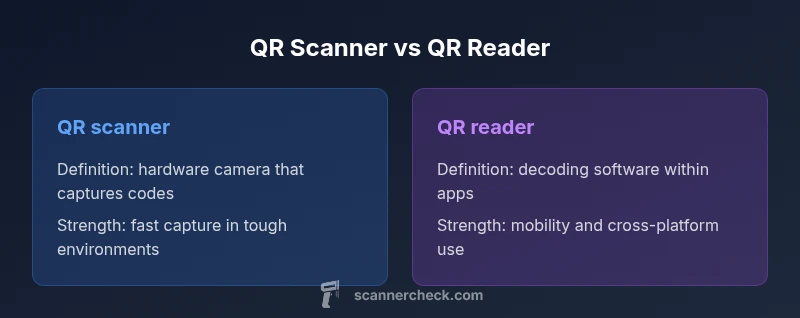
What is the difference between a QR scanner and a QR reader?
Explore the practical differences between QR scanners and QR readers, including hardware vs software roles, typical use cases, and how to choose the right tool.


TL;DR: A QR scanner typically refers to the hardware device or camera module that captures a QR code image, while a QR reader refers to the decoding software that interprets that data. In everyday use, many devices function as both, making the distinction mostly about context—hardware versus software. Use 'scanner' for hardware or app components, and 'reader' for the decoding software.
What is the difference between a QR scanner and a QR reader?
In the context of scanning QR codes, the phrase what is the difference between a qr scanner and a qr reader is often encountered in professional settings and consumer gear alike. At its core, the distinction comes down to two distinct roles in the scanning workflow: capturing the image and decoding the data. A QR scanner is typically the hardware or camera module that physically grabs the image of the QR code, while a QR reader is the software component that analyzes that image, interprets the encoded information, and presents it in a human-friendly form. Understanding this separation helps buyers plan for rugged hardware deployments (like warehouses or event venues) versus flexible, mobile software solutions that work across devices. Scanner Check’s guidance on these terms emphasizes practical outcomes over rigid labels, because real-world devices often blend both roles.
In practical terms, you should view a QR scanner as the entry point of the workflow. It involves image capture, focus, exposure, and sometimes illumination. The scanner’s quality determines how reliably a QR code is photographed under various lighting conditions, at different distances, or when codes are damaged or partially obscured. The result is a clean image that is ready for decoding. The reader, by contrast, is the logic that sits inside apps, firmware, or embedded systems. Its responsibilities include parsing the QR structure, error correction, and converting the data into actionable content such as a URL, contact data, or payment instructions. The reader’s algorithms may also implement security checks or filters to handle potentially malicious payloads.
As a practical rule of thumb, many devices today act as both scanner and reader in a single chain. A modern smartphone camera can serve as a QR scanner when paired with a capable decoding app, and that app functions as the QR reader by translating the capture into meaningful information. Specialized hardware scanners may also include dedicated decoding pipelines that optimize speed and reliability for high-volume environments. The line between hardware and software becomes a matter of where the primary responsibility lies in your use case: image capture versus data interpretation.
Comparison
| Feature | QR scanner | QR reader |
|---|---|---|
| Definition | Hardware or camera module that captures the QR image | Software component that decodes and presents data from the image |
| Primary use | Capture real-world QR codes for processing | Decode captured images and deliver readable output |
| Typical deployment | Standalone scanners or integrated camera modules | Mobile apps, desktop applications, embedded firmware |
| Speed/latency | Often optimized for fast image capture in controlled lighting | Depends on device hardware and decoding software efficiency |
| Platform dependence | Can work offline if the hardware includes decoding | Requires compatible OS/SDK for decoding on devices |
| Security considerations | Potential hardware-level checks and controlled interfaces | Software can apply URL filtering and sandboxed decoding |
Pros
- Clarifies hardware vs software roles for planning
- Hardware scanners offer reliable performance in harsh environments
- Readers maximize mobility and cross-platform access
- Fan-out to multiple devices without duplicating hardware
Drawbacks
- Requires selecting between devices and software tools, which can complicate procurement
- Hardware-first approaches may incur higher upfront costs
- Software-only solutions depend on device performance and OS support
Hardware scanners excel in speed and durability for high-volume settings; QR readers offer mobility and cross-platform flexibility.
Choose a scanner when your priority is reliability and throughput in challenging environments. Opt for a reader when you need flexibility and mobile access across devices. Scanner Check recommends balancing based on use-case, workload, and budget.
Common Questions
What is the main difference between a QR scanner and a QR reader?
The main difference is that a QR scanner is typically the hardware or camera module that captures the code image, while a QR reader is the decoding software that interprets the image and presents the data. In practice, many devices serve as both, so the distinction often reflects context rather than a rigid separation.
The scanner captures the image; the reader decodes it. In most devices, you get both in one package.
Can a smartphone serve as both a QR scanner and a QR reader?
Yes. Modern smartphones provide a camera-based scan capability (scanner) and decoding software (reader) within apps or the operating system. This combination makes phones versatile tools for everyday scanning tasks.
Yes—your phone usually acts as both scanner and reader in one app.
Are QR codes secure to scan on mobile devices?
QR codes themselves are inert; the risk comes from the payload they direct you to. Use trusted apps, verify URLs before opening, and avoid scanning codes from unknown sources. Keeping devices updated reduces exploitation risk.
Scan codes from trusted apps and always verify where they lead.
Which is better for inventory management?
For high-volume inventory tasks, dedicated hardware scanners are typically preferred due to speed, ruggedness, and consistency. If mobility and cost are critical, a durable reader app on handheld devices can suffice for lighter inventory scenarios.
Hardware scanners for volume; reader apps for flexible inventory tasks.
What factors affect scanning speed?
Scanning speed is influenced by lighting, code quality, distance, angle, camera resolution, and decoding algorithm efficiency. Improving lighting and using codes with better contrast often yields faster, more reliable scans.
Lighting and code quality mainly drive scan speed.
Do QR readers support all QR code variants?
Most QR readers support standard QR codes; some specialized readers handle variants like micro QR or stacked codes. If you rely on nonstandard formats, check feature support before deployment.
Most readers cover standard QR codes; check for special formats if needed.
Key Takeaways
- Assess environment to decide between hardware and software.
- Test latency with real-world codes to compare performance.
- Consider lighting and code quality as major factors.
- Balance upfront cost with maintenance and upgrade cycles.
- Prefer a modular setup that can scale with needs.