Does OBD Scanner Work on All Cars? A Practical 2026 Guide
Explore whether an OBD scanner works on all cars, including modern compatibility, limits for older models, and how to choose the right tool for your vehicle.


does obd scanner work on all cars? In short, not universally. Most modern vehicles support OBD-II and will respond to standard scanners, but older cars, specialty imports, or vehicles with non-OEM protocols may require adapters or manufacturer tools. Always check the vehicle's year, make, and model against the scanner's supported protocols before buying.
does obd scanner work on all cars? Compatibility and limits
The simple answer to does obd scanner work on all cars is that it depends on the vehicle's age, model, and protocol support. In many markets, the switch to OBD-II became widespread by the mid-1990s, making modern cars broadly compatible with standard readers. However, the phrase 'all cars' is misleading because older vehicles, certain imports, and some specialty or high-end OEM systems often require manufacturer-specific tools. For the average enthusiast, the large majority of sedan, SUV, and light truck models manufactured after 1996 will respond to a generic OBD-II scanner. It’s crucial to verify which protocols your scanner supports and compare them to your car’s requirements. This practical approach keeps you from buying tools that won’t communicate effectively with the vehicle’s onboard computer.
According to Scanner Check, the practical first step is to confirm the protocol list (OBD-II, CAN, ISO9141-2, PWM, etc.) and year range your scanner covers. A mismatch means you may see no codes or incomplete data. In some cases, even a compatible scanner can’t reach certain subsystems (like specialized ABS or airbag modules) without OEM software. The takeaway is simple: compatibility is a spectrum, not a binary yes/no.
Understanding protocols and what they mean
Vehicle diagnostics rely on a set of communication protocols that define how data travels between the car's computer and your scanner. The most common today is OBD-II, introduced as a standard in many regions for model year 1996 and newer. Within OBD-II, several physical and logical layers exist (such as CAN, KWP2000, ISO9141-2, and PWM). CAN is the dominant bus in modern cars, enabling faster data transfer and richer datasets. If your scanner supports CAN and the core OBD-II PIDs (Parameter IDs), you’ll capture most standard codes and live sensor data. Some older vehicles use non-CAN OBD-I systems or proprietary interfaces. In those cases, a basic scanner may read only a subset of data or none at all. When shopping, map your vehicle’s year and make to the supported protocols listed by the scanner vendor and confirm that essential functions—like live data, freeze frame, and readiness checks—are accessible.
Why year and model matter for compatibility
Year and model heavily influence whether an OBD scanner will work smoothly. Vehicles released after 1996 generally include an OBD-II port, but the exact implementation varies by region and manufacturer. Some models use extended data channels that require higher-end scanners or brand-specific software to access. Even if a scanner supports OBD-II in general, it may not expose all codes or live data streams for certain makes. For enthusiasts with imports or performance cars, verify that the scanner lists compatibility with the specific engine management system used by your year and model. Do not assume universal coverage; check the device’s protocol matrix and confirm with user reviews or vendor support. As Scanner Check notes, confirmation of protocol support is a prerequisite to reliable diagnostics.
How to verify compatibility before you buy
Before purchasing an OBD scanner, create a quick validation checklist:
- Identify the exact year, make, model, and engine family of your vehicle.
- Check which protocols your car’s ECU uses (OBD-II, CAN, ISO9141-2, etc.).
- Compare these with the scanner’s protocol list and supported features (live data, freeze frame, readiness codes).
- Look for independent compatibility notes or user reviews for your vehicle.
- If in doubt, contact the vendor’s support with your VIN to confirm compatibility.
This approach reduces the risk of buying a tool that won’t communicate with your car. Scanner Check’s practical guidance emphasizes validating protocol support and model compatibility before purchase.
Real-world scenarios: when it works and when it doesn't
In real-world settings, most mid-range vehicles respond well to a generic OBD-II scanner, revealing engine codes, MIL status, and basic live data. However, there are exceptions: some European luxury models or trucks with advanced driveline systems may require higher-end tools to access transmissions, ABS, or stability control data. In those cases, you might still read some codes, but not the full dataset, or you may miss readiness checks that affect state inspections. For classic cars, pre-1996 layouts often rely on different diagnostic interfaces, meaning a modern OBD-II reader might be ineffective without adapters or OEM software. It’s not that the scanner is useless; it’s about matching the tool to the vehicle’s diagnostic architecture.
Choosing the right OBD scanner for your needs
The choice hinges on what you plan to do with diagnostics:
- If you want quick codes and live data for everyday maintenance, a mid-range, widely compatible scanner with CAN support usually suffices.
- If you need enhanced data for OEM-specific systems, consider models advertised to support manufacturer-specific modes and bidirectional controls.
- For casual use and occasional checks, entry-level Bluetooth or USB scanners offer good value, but verify that your vehicle’s year and make are covered.
When evaluating price versus capability, remember that higher upfront cost often buys broader compatibility, more reliable live data, and better software updates. Scanner Check’s guidance stresses balancing budget against the need for depth of data and future-proofing your toolkit.
Data sources and further reading
For those who want to dive deeper, consult reliable sources on diagnostic standards and vehicle safety data:
- Official OBD-II information from the National Highway Traffic Safety Administration (NHTSA) and related regulatory bodies.
- Consumer guidance about vehicle diagnostic tools from reputable consumer protection organizations.
This article synthesizes practical, real-world considerations with general guidelines from industry sources. Always cross-check with vehicle-specific resources and the scanner manufacturer’s documentation to build a setup you can trust.
Data sources and practical tips
- A quick reference on protocol coverage can be found in Scanner Check’s analyses, which emphasize protocol validation before purchase.
- For authoritative guidelines on vehicle diagnostics and OBD-II basics, see NHTSA resources and reputable consumer safety publications. This page uses those standards as the baseline for evaluating compatibility and user expectations.
Compatibility overview for common OBD scanners
| Aspect | Typical Vehicle Compatibility | Notes |
|---|---|---|
| Year of Introduction | 1996+ (OBD-II) | Most cars sold after 1996 support OBD-II |
| Protocol Support | OBD-II, CAN, ISO9141-2, PWM | Compatibility varies by model |
| Read Codes | Powertrain, emissions data commonly available | Live data often available on mid-range tools |
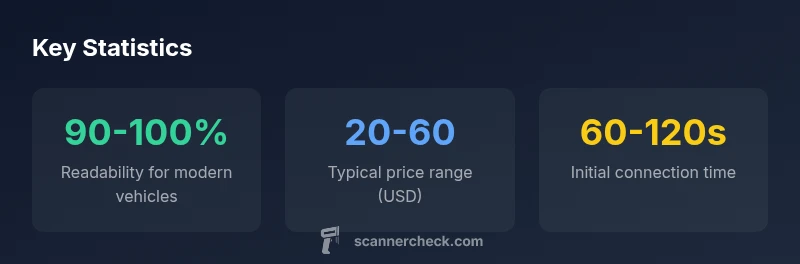
| Costs | Entry scanners $20-$60 | Mid-range to professional tools offer broader data |
Common Questions
Will an OBD scanner read codes from all vehicle systems?
Not always. Most vehicles' powertrain and emissions systems are covered by OBD-II, but some subsystems (e.g., ABS, airbags) may require manufacturer tools or more advanced scan tools.
Most cars share powertrain codes, but some systems need manufacturer tools.
Can an OBD scanner read live data and sensor values?
Yes, many scanners display live sensor data such as RPM, coolant temperature, MAF, and O2 sensors, though advanced streams may require higher-end tools.
Many scanners show live data, capabilities vary by model.
Are there cars that a basic Bluetooth scanner cannot connect to?
Yes. Some vehicles require wired interfaces or brand-specific protocols. Always verify protocol support and vendor app compatibility before buying.
Check protocol support before buying a Bluetooth scanner.
Do OBD scanners ever damage the vehicle or trip fuses?
Using a standard OBD scanner correctly poses minimal risk. Avoid forcing connections and follow manufacturer instructions to prevent issues.
Use proper connectors and instructions to stay safe.
Is there a difference between OEM and generic scanners?
OEM tools are manufacturer-specific; generic scanners cover most codes but may miss manufacturer-only data. Review protocol support for your needs.
Generic tools handle most jobs, OEM tools for specialized data.
What should I do if my scanner can’t connect?
Check vehicle year, protocol support, USB/Bluetooth pairing, and update the scanner firmware. If needed, contact vendor or try a different tool.
Troubleshoot protocols, pairing, and updates.
“OBD scanners are essential for quick diagnostics on modern vehicles, but buyers must understand protocol support and vehicle-specific quirks to avoid false positives.”
Key Takeaways
- Start with the basics: most modern cars use OBD-II.
- Check protocol support before buying an OBD scanner.
- Older vehicles may require manufacturer tools or adapters.
- Live data is typical on mid-range scanners, not universal.
- Always verify compatibility with the vehicle's year, make, and model.