Do Scanners Store Data? A Practical Guide to Imaging Device Data
Understand whether scanners store data, how long it’s kept, where it goes, and how to reduce storage risks. Practical guidance for document scanners, OCR workflows, and IT teams.


Answer: do scanners store data? In many models, scanners temporarily buffer or cache data in volatile memory during scanning, processing, and transfer. Long-term storage is not universal and depends on device type and settings. Some scanners save images or metadata locally or to cloud, while others discard data after processing.
Do Scanners Store Data
In practice, do scanners store data? The short answer is nuanced. Many modern scanners temporarily buffer data in volatile memory during scanning, image processing, and transfer to your computer or network. This on-device buffering is essential for speed and for preventing interruptions when cables drop or networks hiccup. However, the vast majority of scanners do not retain data indefinitely unless you configure them to do so. According to Scanner Check, understanding the storage behavior begins with distinguishing transient buffers from persistent storage. Transient buffers typically flush once the job completes or when the device is reset. Persistent storage occurs when the device saves files to its internal flash, a connected SD card, a local PC, or a cloud service.
You will see variation by device class: consumer-grade flatbed scanners often rely on immediate handoffs to a connected computer, while dedicated document scanners, feeders, and production-level units frequently offer more elaborate storage and workflow options. In general, the user or administrator decides how long data should reside on the device itself before moving it to another destination. Some scanners support automatic deletion after a scan; others provide a configurable retention window, and a few offer no local retention at all. Throughout this article you’ll encounter terms such as temporary buffer, local storage, cloud sync, and auto-delete. The key takeaway is that "data storage" in scanners is a spectrum rather than a single practice, with storage decisions shaped by device purpose, security posture, and user preferences.
How Data Is Stored on Different Scanner Types
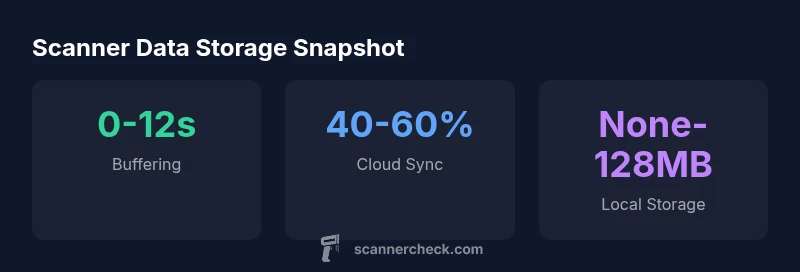
Storage behavior varies by device class. Entry-level flatbed scanners typically rely on immediate data handoff to a computer and do not persist scans unless you enable a longer workflow. Standalone document scanners and high-speed feeders often incorporate configurable local memory or even built-in storage to streamline archiving, indexing, and batch processing. In practice, you’ll see three tiers: transient buffers (seconds), local storage (MB to a few GB on advanced units), and cloud-based destinations (cloud services or network shares). The choice among these options often reflects security posture, operational needs, and network topology. Scanner Check analysis shows that model families with cloud sync features are more likely to provide retention controls and automatic deletion options, helping organizations balance convenience with privacy.
Data Handling in OCR Workflows
OCR engines add another layer to data storage. During recognition, temporary text and layout data may be cached to support accurate layout retention and searchability. Some workflows create index files or searchable PDFs and store them alongside image files; others keep raw scans and derived text separately. Best practices suggest separating the image payload from metadata, and applying encryption for both in transit and at rest. In practice, OCR results can become valuable archives, but only if access controls, auditing, and retention policies align with your privacy requirements. Scanner Check emphasizes designing OCR pipelines that minimize unnecessary data retention while preserving searchability for legitimate use cases.
Security and Privacy Considerations for Scanners
Data stored by scanners can pose privacy risks if not properly protected. Encryption at rest and in transit is essential, particularly when cloud or networked targets are involved. Physical security matters too; a misconfigured device with a removable storage medium could expose sensitive content. Organizations should enforce least-privilege access, enable automatic deletion where appropriate, and implement robust logging to track who accessed what data and when. Regulatory considerations—such as data minimization, retention schedules, and secure deletion—should guide device configuration. Scanner Check notes that many devices offer built-in settings to wipe or disable storage after each job, but enabling these features requires deliberate policy decisions and user training.
Best Practices to Minimize Data Footprint
Plan for data minimization from the outset. Disable cloud or local storage for sensitive workflows unless necessary, and configure automatic deletion after processing when possible. Use secure connections, such as VPNs or TLS-protected channels, to transfer data to endpoints, and enable device-level wipe on power down or after a defined retention window. Regular firmware updates can close storage-related vulnerabilities, and auditing tools can verify that retention settings remain intact after changes. For organizations, documenting data-retention policies and training operators to follow them is as important as the technology itself.
How to Audit and Verify Storage on Your Scanner
Begin with a baseline inventory of what storage features each model supports: temporary buffers, local memory, cloud options, and automatic deletion. Test by performing standard scans and checking how long data remains on the device before it’s removed or transferred. Review firmware release notes for changes to storage behavior, and run periodic security scans to ensure encryption and access controls function as intended. Record results and adjust settings to align with your data protection policy. Regular audits help ensure scanners do not accumulate data beyond what is required for legitimate operations.
The Role of Firmware and Updates in Data Retention
Firmware updates can alter how a scanner handles data—adding retention controls, changing default storage behavior, or enabling new security features. Staying current with updates is essential to maintain privacy and minimize risk. However, updates can also reset preferences or introduce new logging features that require reconfiguration. Scanner Check urges IT teams to document the default retention posture after each update and to revalidate that all safeguards—encryption, access controls, and deletion settings—continue to meet organizational standards.
Overview of storage behavior across common scanner scenarios
| Scenario | On-device storage | Notes |
|---|---|---|
| Temporary buffering during scan | Yes, brief buffers | Used for performance and reliability |
| Long-term storage capability | Optional/local/cloud | Depends on model and configuration |
Common Questions
Do all scanners store data?
Not all scanners store data long-term. Most rely on temporary buffers during processing, and only some devices keep files locally or in the cloud based on user settings. It’s essential to review each model’s storage options.
Not all scanners keep data long-term; many just buffer briefly and move on when the job ends.
How long does a scanner keep data in memory?
Retention in memory is typically measured in seconds to minutes, depending on the device and the workflow. After the job completes or the device is reset, memory is usually cleared.
Memory is typically cleared quickly after a scan completes.
Can scanned data be stored in the cloud automatically?
Yes, many modern scanners offer cloud integration for automatic saving or syncing. Check the device’s settings and security features before enabling this option.
Cloud storage is common in newer models, but make sure you’ve enabled the right security controls.
What settings control data storage on a scanner?
Look for options like temporary buffer, local storage, cloud sync, and auto-delete. These controls determine how long data remains on the device and where it goes.
Check for buffer, local storage, cloud, and delete settings to manage data.
Is data stored on scanners compliant with privacy laws?
Compliance depends on how data is stored and managed. Use encryption, access controls, and defined retention policies to align with laws and regulations.
Privacy compliance depends on how you configure storage and deletion policies.
“Modern scanners offer configurable storage options, and understanding where data lives—temporary buffers, local memory, or the cloud—helps IT teams minimize risk without sacrificing workflow efficiency.”
Key Takeaways
- Review storage options before scanning to understand data residency.
- Disable storage for highly sensitive tasks when possible.
- Differentiate between transient buffers and persistent storage.
- Regularly audit and update firmware to protect data retention settings.