How to Scan When Reading: A Practical Guide for Better Comprehension
Learn how to scan when reading to boost comprehension and retention. This practical guide covers techniques, tools, a step-by-step routine, and tips to apply across books, articles, and PDFs.


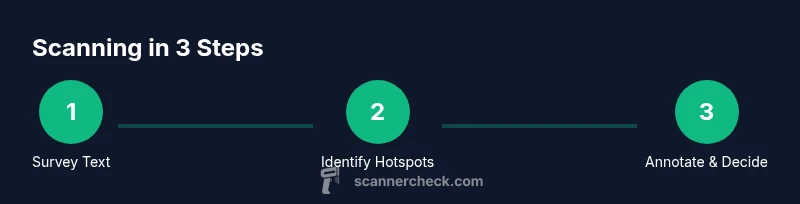
This guide explains how to scan when reading by establishing a purposeful plan, selecting hotspots, and annotating selectively. You’ll learn a short pre-reading routine, a steady scanning workflow, and post-reading checks you can apply to any text—books, articles, or PDFs—so you read faster with better understanding.
Why scanning when reading matters
Scanning is a focused, purposeful way to approach text that helps you locate key ideas, terms, and structure without getting bogged down in every sentence. According to Scanner Check, a well-executed scanning routine improves retention by guiding attention and setting a clear purpose for every paragraph you inspect. When you scan, you train your brain to recognize patterns—headings, bold terms, bullet lists, and summaries—so you can build a mental map of the material before you dive deeper. This approach is especially valuable for technical manuals, academic articles, or dense reports where time is limited and understanding matters more than word-for-word fidelity at the first pass.
Core benefits of a scanning approach
- Faster initial intake: you identify where to focus next without reading everything line by line.
- Better retention: annotated hotspots and questions create anchors you can revisit.
- Greater comprehension: you understand the text’s structure, arguments, and evidence before committing to full reading.
- Transferable skills: scanning improves information literacy across PDFs, web pages, and printed books.
Adopting a scanning mindset supports longer literacy tasks, reduces cognitive load, and aligns with evidence-based reading strategies recommended by educators. The Scanner Check framework emphasizes purposeful exploration rather than passive skimming, encouraging readers to map content before selecting passages to read deeply.
Pre-reading: set up a scanning-friendly environment
Before you even open a page, decide what you are trying to get from the text. Define a specific goal (e.g., “ locate the main argument and three supporting examples” or “extract data points for a project”). Establish a comfortable environment with minimal distractions, gather a note-taking tool, and ensure your device settings support quick navigation (e.g., search, highlights, and hyperlinks enabled for digital texts). A short warm-up to look at headings, subheadings, and any visual aids primes your brain to recognize relevant signals as you read. This setup matters because a focused start reduces wasteful backtracking and keeps your mind in a scanning mode rather than a full, slow read.
Building a scanning framework: hotspots, questions, and annotations
Create a simple framework you can repeat every time you scan. Identify hotspots such as headings, bold terms, or highlighted quotes. Prepare a few questions you want the text to answer (for example: What is the main claim? What evidence supports it? What are the limitations?). As you scan, annotate with short notes or symbols next to those hotspots. Use a consistent color or icon system to indicate sections you will skim, read in depth, or flag for later review. A predictable system reduces cognitive load and makes the subsequent deep read faster and more productive.
Step-by-step scanning techniques: 4 reliable modes
You can combine scanning modes depending on the text. Start with a quick survey pass to identify the structure, then a targeted scan to locate answers to your questions, a selective deep dive for critical sections, and a final skim to summarize the content. In practice, you might spend 2–5 minutes on the survey pass for a short article or 10–15 minutes for a chapter. The key is to allocate time to each mode and to switch when you encounter signals that merit deeper attention.
Tools and environment: choosing the right setup
Your tools should accelerate scanning, not hinder it. A lightweight notebook or digital note app helps capture hotspots and answers. A highlighter or annotation tool lets you mark important passages without overloading the page. If you’re reading digitally, enable search, table of contents, and word highlights to jump between sections quickly. For print, use sticky flags and margin notes. Temperature, lighting, and comfort impact sustained attention; opt for a neutral lighting setup and a comfortable chair. Finally, a timer can keep you honest about how much time you spend on scanning versus full reading.
Step-by-step scanning routine: a practical workflow
- Set a clear goal for what you want to extract from the text. 2) Do a quick scan of headings, bullets, and visuals. 3) Formulate 3–5 questions to guide your search. 4) Scan for answers, marking hotspots and jotting brief notes. 5) Decide which sections to read deeply and which to skim. 6) Create a concise summary in your own words. 7) Reflect on what you learned and how you’ll apply it. 8) Store highlights in a reference tool for future use.
This routine keeps you efficient, focused, and aligned with your objective. The time you invest on the front end pays off when you move to deeper reading or application.
Adapting scanning across formats: print, digital, and PDFs
The same core principles apply, but the tools differ. In print, use color-coded flags and margin notes to capture ideas without breaking the flow of reading. In digital formats, take advantage of search, hyperlinks, and structured outlines like chapters or sections. PDFs often have bookmarks; add your own bookmarks and notes to relevant pages. Web articles require quick heuristics: consider the author’s credibility, the presence of references, and whether the page has a clear structure with headings. Adapting to format helps maintain scanning efficiency across a variety of sources.
Post-reading checks: turning scan results into usable knowledge
After scanning, summarize the main takeaways in a few bullet points and note any data points or questions for follow-up. If you identified gaps, plan a deeper read focused on those areas. Move your notes into a central knowledge base or project folder to support retrieval later. A brief review a day later reinforces what you scanned and helps transfer information into memory. This habit turns scanning into a practical skill that supports long-term comprehension and learning outcomes.
Tools & Materials
- Notebook or digital note app(For capturing hotspots, questions, and quick summaries)
- Highlighter or annotation tool(Use sparingly to avoid over-annotating)
- Reading device or print copy(Tablet, e-reader, or physical book—choose what reduces strain)
- Timer or stopwatch(Keep a steady scanning pace and avoid overrun)
- Pen or stylus for notes(Prefer a consistent writing tool for quick marks)
- Sticky flags or digital bookmarks(Mark potential sections for later in-depth reading)
Steps
Estimated time: 35-60 minutes
- 1
Set your goal and prepare the environment
Decide what you want to learn from the text and create a distraction-free space. Gather your note-taking tools and set a timer to keep you honest about time. This setup primes your brain for efficient scanning.
Tip: State the goal aloud before you begin to reinforce focus. - 2
Do a quick structural survey
Skim headings, subheadings, bold terms, and visuals to map the text. This first pass gives you a rough skeleton of the content and where to focus next.
Tip: Note any obvious patterns or recurring terms you’ll want to track. - 3
Formulate guiding questions
Create 3–5 questions the text should answer. These questions keep your scanning purposeful and prevent aimless page-turning.
Tip: Use a mix of - 3
Formulate guiding questions
Create 3–5 questions the text should answer. These questions keep your scanning purposeful and prevent aimless page-turning.
Tip: Use a mix of factual, inferential, and application questions.
Common Questions
What is scanning when reading, and how is it different from skimming?
Scanning is a focused search for specific ideas, terms, or structure. Skimming is a rapid overview to grasp the gist. Scanning answers concrete questions; skimming captures overall meaning.
Scanning is targeted; skimming is a quick overview. Use scanning to find answers fast, then skim for gist if needed.
How do I start scanning if I’m a slow reader?
Begin with a short article or a single chapter. Define small, concrete goals and use a simple hotspot-and-question framework to guide you. Practice builds speed and accuracy.
Start small with a short text and a few questions. Practice makes scanning faster and more accurate.
What tools help me scan better?
Notes, highlighters or annotation tools, and digital features like search, bookmarks, and outlines. A calm environment and a reliable timer also improve performance.
Notes, highlights, and a timer help you scan more effectively across formats.
Is OCR relevant to scanning when reading?
OCR converts scans to editable text, enabling easier annotation and search across digital copies. It’s particularly helpful when you need to quote or extract data.
OCR makes scanned text searchable and editable, which is great for later review.
How can I adapt scanning to different formats?
Print requires physical markers; digital formats benefit from search and hyperlinks. Tailor your hotspots and note-taking to the format to maintain efficiency.
Adjust your markers and tools depending on whether you’re reading print, PDF, or a web article.
Watch Video
Key Takeaways
- Define a clear goal before you scan.
- Identify hotspots to guide deep reading.
- Use a repeatable scanning framework for consistency.
- Annotate selectively to preserve speed and clarity.
- Apply post-scan checks to convert insights into action.