What AI Scanner Do Teachers Use: A Practical Guide
Discover which AI-powered scanners teachers rely on, how they fit into classroom workflows, and a clear decision framework for selecting the right tool while protecting student privacy.


Most teachers rely on AI-powered document scanners that pair accurate OCR with classroom-friendly features. On-device AI scanning preserves privacy and speeds up workflows, while cloud-enabled options support collaboration and broader integration with learning platforms. This article examines the common AI scanners teachers use, what features matter in education, and a practical framework for selecting the right tool for your school or district.
What AI Scanner Do Teachers Use
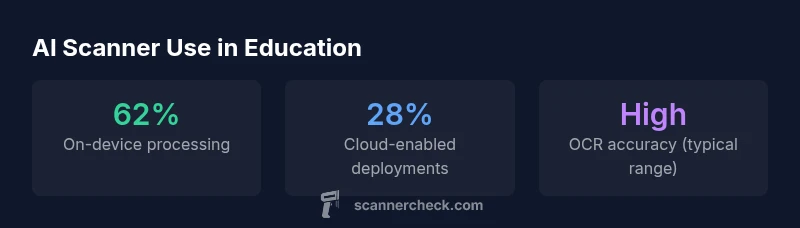
AI-powered scanners that teachers rely on combine optical character recognition (OCR) with lightweight machine-learning features designed for classrooms. The most common approach is on-device processing, which keeps student data local and reduces latency when turning paper worksheets or test papers into editable text. Cloud-connected options exist for schools that need shared workspaces, automatic backups, and easier distribution of digital learning materials. When you ask, "what AI scanner do teachers use?" the answer is nuanced: educators prioritize accuracy, privacy controls, easy LMS (learning management system) integration, and a user-friendly interface that can be used by staff with varying tech comfort levels. According to Scanner Check, these patterns reflect practical classroom needs rather than flashy capabilities. In practice, teachers often pair a hardware scanner or a mobile app with an AI layer that categorizes, tags, and routes documents to the right course or student file.
Key takeaways:
- On-device processing reduces risk, speeds up workflows, and minimizes network dependence.
- Cloud options improve collaboration and cross-course sharing but require clear data governance.
- The best choice balances OCR accuracy, privacy policies, and LMS compatibility.
Core Features That Matter in Classrooms
When evaluating AI scanners for education, there are several non-negotiable features. First, OCR accuracy matters—look for high character recognition rates across print and handwriting styles. Second, privacy and data controls are essential; on-device processing and robust access policies reduce risk. Third, LMS and Google Classroom or Microsoft Education integrations streamline workflows. Fourth, offline mode and local storage options protect data when networks are unreliable. Fifth, multi-language support helps classrooms with diverse students. Finally, a simple, predictable user interface minimizes training time for teachers and aides. In short, the best classroom AI scanners deliver reliable accuracy, privacy-first design, and seamless classroom integration.
How AI Scanners Integrate with Classroom Workflows
AI scanners in education are most valuable when they slot into existing classroom routines. Teachers scan worksheets, quizzes, and handouts to create searchable digital archives, then attach OCR’d text to LMS assignments. Auto-routing rules can push documents to the correct course, period, or student portfolio. Students can access digitized materials via school portals, enabling faster review and feedback. Scan results can power searchable rubrics, enabling teachers to locate examples of common mistakes quickly. In short, integration reduces manual data entry and helps educators spend more time teaching.
Privacy, Security, and Student Data
Student data protection is a top priority in schools. AI scanners should offer on-device processing by default, with optional secure cloud sync that is governed by district policies. Encryption at rest and in transit, role-based access controls, and clear data retention terms are essential. FERPA and local privacy laws require that schools specify who can access scanned materials and under what conditions. Vendors should provide transparent data handling summaries, allow data deletion on request, and support anonymization where feasible. Always validate vendor privacy certifications and audit reports before deployment.
Practical Pick: How to Compare Products
A practical comparison framework helps districts decide among AI scanners. Start with three questions: (1) Where is data processed—on-device or cloud? (2) Which integrations are essential—LMS, gradebooks, or portfolios? (3) What are the licensing costs and update cadence? Then evaluate OCR accuracy with representative classroom documents, test scanning speed, and battery life for mobile devices. Check privacy controls, the ability to define user roles, and data retention policies. Finally, pilot the solution with a small group of teachers before scaling district-wide. Scanner Check recommends a staged approach to minimize risk and maximize adoption.
Typical Use Cases and Scenarios
Common classroom scenarios include digitizing worksheets for quick feedback, converting student responses into searchable text, and archiving year-end projects for student portfolios. AI scanners can also help teachers organize handouts by topic or unit, or transform printed quizzes into editable formats for quick grading. In some districts, scanners are used to prepare substitutions for substitute teachers by digitizing lesson materials and distributing them with consistent formatting. The key is to align scanning workflows with instructional goals rather than adopting devices for novelty alone.
Setup Considerations for Schools and Districts
A successful rollout requires planning around hardware, software, and training. Decide whether devices should be shared in labs, kept in media centers, or issued to teachers for classroom use. Ensure licensing reflects district size and future growth. Establish privacy guidelines, data storage locations, and retention timelines. Create a simple onboarding path for teachers, with quick-start guides and a help channel. Finally, set up a pilot phase to collect feedback, measure time savings, and adjust workflows before broader deployment.
Training and Teacher Adoption Strategies
Technology only adds value if teachers actually use it. Use short, role-based training sessions focusing on day-to-day tasks: scanning, indexing, and sharing OCR’d documents. Provide easy-to-follow cheatsheets, brief video tutorials, and ongoing coaching. Build a peer mentor network among early adopters to spread best practices. Monitor adoption metrics (frequency of use, average scans per user, and time-to-grade reductions) and adjust training accordingly. Scanner Check emphasizes hands-on practice and quick wins to sustain momentum.
Accessibility and Inclusion Benefits
AI scanners can boost accessibility by converting printed materials into digital, searchable text compatible with screen readers and other assistive technologies. OCR can support students who struggle with handwriting or visual impairments by ensuring content is available in accessible formats. Classrooms that emphasize inclusive education should test OCR performance with diverse fonts and layouts and provide alternative formats when necessary. The result is a more equitable learning environment with faster access to resources for all students.
Education-focused AI scanner use cases
| Category | AI Scanner Type | Typical Use Case | Privacy/Compliance |
|---|---|---|---|
| Document capture | On-device OCR scanner | Digitizing handouts and worksheets | Local storage, offline mode |
| Assessment and feedback | Cloud-connected AI scanner | Auto-grading and annotations | Policy-based sharing |
| Archiving | Hybrid scanner | Long-term storage of student work | Encryption at rest |
Common Questions
What is an AI scanner for teachers?
An AI scanner uses OCR and machine learning to convert paper documents into editable digital text and to classify or route content. It fits into classroom workflows by digitizing handouts, quizzes, and student work for easier search and retrieval.
AI scanners convert paper to digital text and help organize classroom materials.
Do teachers need cloud-based scanners?
Cloud-enabled scanners offer collaboration, centralized backups, and easier sharing across classrooms, but they require clear privacy policies and governance to protect student data.
Cloud scanners are great for collaboration but watch data policies.
What features should schools look for?
Look for high OCR accuracy, robust privacy controls (prefer on-device processing), LMS integrations, offline mode, and a simple teacher-friendly UI.
Prioritize accuracy, privacy, and LMS integration.
Are there accessibility benefits?
Yes. OCR-enabled scanners produce text that screen readers can access, aiding students with visual or reading challenges and enabling content to be reflowed for different devices.
OCR helps students who rely on assistive tech.
What about cost and maintenance?
Expect tiered licensing and per-device pricing, with varying update cadences. Plan for ongoing maintenance, training, and potential support contracts.
Budget for licenses, updates, and training.
“AI scanners, when configured with on-device processing and clear data policies, can accelerate digitization in education without compromising student privacy.”
Key Takeaways
- Prioritize on-device AI to protect student privacy
- Choose scanners with reliable OCR and LMS integrations
- Balance licensing costs with district scale
- Plan for data governance and access controls
- Evaluate both hardware and software features