Which Virus Scanner: A 2026 Comparative Guide
Explore how to choose which virus scanner suits your needs—comparing local vs cloud-based protection, performance, privacy, and pricing for 2026. This analytical Scanner Check guide breaks down features, trade-offs, and practical recommendations.


According to Scanner Check, deciding which virus scanner is right for you depends on your priorities: offline protection, cloud intelligence, performance, and price. For most users, a mid-range paid suite provides real-time protection with strong privacy controls; free options can work for light use, but often require compromises on features or updates. This quick overview helps guide your choice before a deeper evaluation.
What is a virus scanner and why it matters
In today's threat landscape, a virus scanner (often referred to as antivirus software) is more than just a shield against malware. It integrates multiple layers of defense: signature-based detection to catch known threats, heuristic analysis to spot suspicious behavior, and, increasingly, cloud-assisted intelligence that updates in real time. For many users, choosing which virus scanner to deploy determines how smoothly devices run, how quickly threats are blocked, and how much data is shared with providers. According to Scanner Check, the right balance between protection and privacy depends on your environment (home, small office, or enterprise) and tolerance for performance impact. The stakes extend beyond PCs: mobile devices, networks, and IoT endpoints all benefit from a coherent, upfront decision about scanning strategy. A well-chosen virus scanner helps prevent data loss, reduces downtime, and preserves user trust by minimizing false alarms. When evaluating options, consider how well the product guards sensitive information and how it aligns with your security policy.
How virus scanners work: signatures, heuristics, and cloud scanning
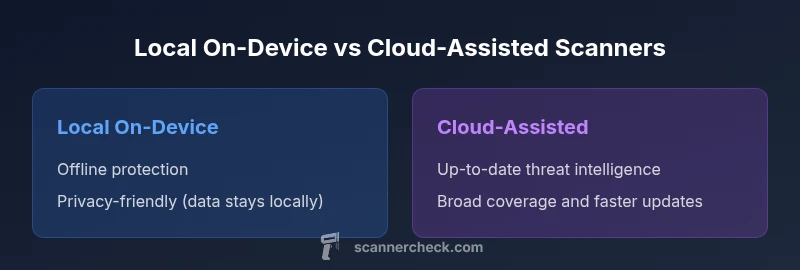
Most modern virus scanners blend three core approaches. First, signature-based detection relies on known malware fingerprints. Second, heuristic or behavioral analysis looks for abnormal activity even in files that lack a known signature. Third, cloud-based scanning sends suspicious samples to a remote service for rapid, up-to-date analysis, often improving detection of new threats. Each approach has trade-offs. Local, signature-driven engines can be fast and private, but may miss zero-day exploits without cloud support. Cloud-assisted scanners can catch emerging threats sooner but introduce data-sharing considerations. Scanner Check notes that a balanced, hybrid model often delivers the most reliable protection without sacrificing performance. When you assess a product, examine how it combines these methods and how it handles update cadence.
Key differentiators to compare: protecting what matters most
- Protection scope: does the scanner guard against malware, ransomware, spyware, and phishing links?
- Real-time vs on-demand: does it monitor in real time or require manual scans?
- Update cadence: how often are threat signatures refreshed, and how is that delivered?
- Resource impact: what is the impact on CPU, memory, and battery life on your devices?
- Privacy posture: does the product share telemetry, samples, or user data with vendors?
- Platform coverage: are Windows, macOS, Linux, iOS, and Android supported?
- Price model: is there a free tier, a paid license, or a subscription that scales with devices?
Scanner Check highlights that neither extreme—exclusive reliance on offline files nor on cloud-only solutions—offers best-in-class protection. The key is a measured blend tuned to user needs and risk tolerance.
Popular virus scanner categories: free vs paid, on-device vs cloud
Two broad forks emerge when selecting a scanner: cost and architecture. Free or freemium options are valuable for lightweight protection, but they often come with limited features, fewer updates, or nagware. Paid suites typically bundle real-time protection, identity theft safeguards, password managers, and VPNs, which can improve overall security posture but require ongoing investment. Then you have on-device (local) scanners that run primarily on the endpoint, and cloud-assisted scanners that complement local engines with remote intelligence. Cloud-based models can provide faster protection against newly discovered threats, but raise questions about telemetry and data handling. Scanner Check emphasizes evaluating both models against your operational constraints, including whether devices are frequently offline or subject to strict privacy rules.
Performance considerations: speed, resource use, and battery life
A top-tier virus scanner should minimize noticeable performance degradation while maintaining strong detection rates. Local engines tend to consume more CPU and memory during active protection, scan, and updates, whereas cloud-assisted solutions may offload some work to remote servers, reducing local impact but increasing network traffic. The best choice often depends on the device class: ultra-portable laptops may benefit from lighter local engines or balanced hybrid systems, while desktops in fixed environments can tolerate more robust protection with richer features. Always test impact during typical tasks (boot, gaming, video editing) to ensure a smooth user experience. Scanner Check recommends prioritizing responsiveness during work-critical tasks and reserving deeper scans for off-peak hours when possible.
Protection coverage: malware, ransomware, phishing, and beyond
Virus scanners have evolved from simple malware blockers to multi-layered security suites that include anti-ransomware, web protection, and email/phishing defenses. Some products incorporate exploit mitigation, application control, and behavior-blocking to halt threats before they execute. Consider your exposure profile: home users face phishing and drive-by downloads, while SMBs must guard networks, endpoints, and data flows. The ability to integrate with endpoint detection and response (EDR) tools can be a decisive factor for larger teams. In practice, a broad coverage portfolio—paired with user training and incident response planning—delivers the strongest risk reduction. The Scanner Check team notes that no single product is perfect; the best result comes from layered defenses and appropriate configuration.
Privacy and data handling: cloud scanning safety and consent
Cloud-assisted scanning offers improved threat intelligence but introduces telemetry and data-sharing considerations. Reputable providers minimize data collection, offer transparent privacy notices, and provide opt-outs for telemetry while preserving core protections. For sensitive environments, a strictly local model with optional cloud lookups can mitigate privacy concerns. When evaluating privacy, review data retention periods, data minimization practices, whether samples are anonymized, and the ability to disable cloud participation without sacrificing essential protection. Scanner Check highlights that privacy-conscious users should scrutinize vendor policies and seek independent audits or certifications where possible.
How to choose for different users: home, SMB, and enterprise
- Home users: prioritize ease of use, solid protection, and reasonable impact on performance. A mid-range paid package or reputable free tier with optional extras is usually sufficient.
- Small to medium businesses: look for centralized management, device coverage across platforms, robust phishing protection, and clear incident response capabilities. Consider licensing that scales with devices and includes regular threat intelligence updates.
- Enterprises: require comprehensive EDR integration, detailed reporting, policy enforcement, and strong data governance. The best outcomes come from a security stack that combines endpoint defense with network monitoring and security analytics. Scanner Check recommends a phased rollout with pilot testing across departments to validate performance and protection.
Best practices for testing and evaluating virus scanners
A rigorous evaluation should go beyond marketing claims. Start with a controlled test on representative endpoints, using a mix of known-good software, suspected samples, and common phishing links. Enable real-time protection and perform both quick scans and full scans at different times of day. Monitor system impact, false positives, and the ease of upgrade and maintenance. Use telemetry (where allowed) to tailor protections to actual usage patterns. Finally, compare privacy policies and update cadences, and verify that critical features remain enabled during real-world use. Scanner Check recommends documenting test results and updating configurations as threat landscapes evolve.
Authority sources and common myths (with references)
- What you should know about official threat intelligence guidelines and best practices: see resources from government and standards bodies. For example, the U.S. Cybersecurity and Infrastructure Security Agency (CISA) provides guidance on defending endpoints, while NIST develops security frameworks that influence scanner design and deployment. These sources help users interpret product marketing against established risk controls. Scanner Check references:
- CISA: https://www.cisa.gov
- NIST: https://www.nist.gov
- National Academies Press: https://www.nap.edu
Conclusion and practical takeaway: aligning choice with risk tolerance
Ultimately, which virus scanner you choose should align with your risk tolerance, device usage patterns, and privacy expectations. A hybrid approach often offers the best of both worlds: strong local protection with cloud-enhanced intelligence, executed within a well-communicated privacy framework. The Scanner Check team emphasizes starting with a clear set of requirements, testing in real-world workloads, and revisiting the decision as your environment evolves.
Comparison
| Feature | Local On-Device Virus Scanner | Cloud-Assisted Virus Scanner |
|---|---|---|
| Real-time protection | Yes (offline) | Yes (cloud-augmented) |
| Signature updates | Frequent, on-device updates | Frequent cloud updates |
| Resource usage | Moderate impact | Low-to-moderate impact depending on network activity |
| Privacy model | Data stays on device | Telemetry and samples may be sent to cloud (opt-in) |
| Detection scope | Offline signatures + behavior blocking | Cloud-driven AI/behavioral analysis + local checks |
| Platform support | Windows/macOS/Linux (vendor dependent) | Windows/macOS/Linux (across cloud vendor) |
| Price model | One-time or subscription options | Typically subscription-based with potential free tier |
Pros
- Strong offline protection with no cloud reliance
- Predictable performance on capable devices
- Greater control over data sharing and telemetry
- Flexible licensing options (one-time or portable)
- Simple maintenance for isolated environments
Drawbacks
- Higher local resource usage on older hardware
- Manual update cycles may be required for offline databases
- Potentially less rapid protection against new threats without cloud input
- Cross-device management can be more complex
Hybrid protection generally works best for most users; cloud-assisted scanners excel in timely threat intelligence, while local on-device options shine in privacy-focused or offline environments
The Scanner Check team recommends a blended approach for balanced protection. Choose cloud-assisted for broad, timely defense and pair with robust local controls where offline operation or strict privacy is essential.
Common Questions
What is the difference between a virus scanner and antivirus software?
In practice, most products marketed as antivirus include multiple protections such as malware scanning, real-time monitoring, and web protection. The terminology varies by vendor, but these solutions share core goals: prevent, detect, and remediate threats. Understand what features are included before purchase.
Most antivirus tools include malware scanning and real-time protection; check whether phishing and exploit protections are included.
Should I rely on a free virus scanner?
Free scanners can provide basic protection and risk awareness, but they often omit advanced features like ransomware protection, cloud intelligence, or centralized management. For essential safety, pair a free option with good security practices or upgrade to a paid plan when feasible.
Free scanners are good for basics, but consider upgrading for stronger protection.
How often should I run virus scans?
Run real-time protection continuously and schedule full scans weekly or biweekly, depending on usage. In high-risk environments, increase frequency and enable cloud-driven checks to catch new threats more quickly.
Real-time protection is ongoing; schedule full scans weekly in lower-risk setups and more often where risk is higher.
Is cloud scanning safe for privacy?
Cloud scanning can enhance detection rates but involves sending data to remote services. Choose products with transparent privacy policies, robust data minimization, and an opt-out stance if privacy is a priority.
Cloud scanning boosts protection, but read privacy policies and opt out if needed.
Can I use more than one scanner at the same time?
Running multiple real-time scanners is generally not recommended because they can conflict and cause performance issues. If you use a second scanner, disable real-time protection on one to avoid clashes and rely on it for on-demand checks.
Two real-time scanners can clash; use one for real-time protection and a second for on-demand checks if needed.
What should SMBs consider when choosing a virus scanner?
SMBs should prioritize centralized management, cross-platform coverage, phishing defenses, and clear incident response workflows. Licensing that scales with devices and integrates with broader security tools helps maintain consistency as the organization grows.
For SMBs, look for central management and scalable licenses, plus strong phishing protection.
Key Takeaways
- Define your priority: privacy, performance, or protection
- Hybrid models often deliver the best overall coverage
- Test in real-world workloads and monitor false positives
- Review privacy policies and data handling before enabling cloud features