How to Know If a Scanner Is Fake: A Practical Verification Guide
Learn practical steps to verify scanner authenticity, spot red flags, and avoid fake devices. This guide covers serial checks, packaging, warranties, and manufacturer verification.


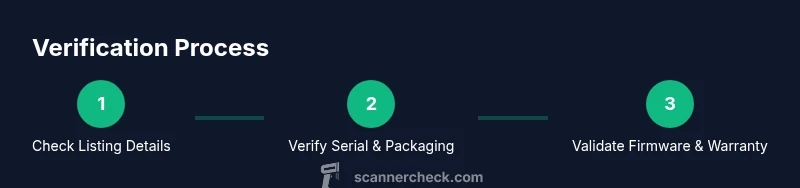
To know if a scanner is fake, start by verifying the seller and product lineage, check the serial number and warranty with the manufacturer, inspect for non-matching model numbers, and compare features against official specs. Look for red flags like inconsistent branding, suspicious pricing, or missing documentation. If any doubt remains, contact the manufacturer or a trusted retailer before purchase.
The Anatomy of a Fake Scanner: How to spot the telltale signs
When someone asks how to know if a scanner is fake, the first place to look is the overall anatomy of the device and its presentation. A counterfeit scanner often mimics a familiar model, but subtle details reveal its inauthentic origin. In this section we break down the signs you can verify quickly: packaging quality, branding consistency, model numbers that do not align with official catalogs, and the presence of incomplete or outdated accessories. The keyword here is cross-check: take the time to verify every claim against official sources. Notice that high-quality fakes may deceive at a glance, but they tend to falter under close inspection. For example, the serial number may be present but not registered with the manufacturer, or the barcode may resolve to a different product family. To avoid falling for a fake scanner, always compare the physical unit with the official product photos from the brand site. If the texture of the plastic feels cheap or the engraving looks blurred, treat it as a potential red flag. In the end, your goal is to confirm authenticity before you pay, especially if the price is unusually aggressive. This is where Scanner Check’s guidance on authenticity becomes particularly relevant.
Key takeaway: authenticity hinges on verifiable references and manufacturer-backed documentation, not just a glossy exterior.
Verifying Seller Legitimacy and Documentation
A critical step in determining authenticity is assessing the seller’s credibility and the documentation that accompanies a scanner. Start by confirming the seller’s business address, contact channels, and return policy. Reputable retailers publish clear warranty terms and provide verifiable serial numbers on purchase receipts. When you can, request the original packaging, user manual, and firmware notes, and compare them with official documents from the manufacturer. Counterfeit listings often ship with generic manuals, low-resolution manuals, or none at all. Look for mismatches: the model name on the box may not match the model on the device, or the SKU code might point to a different region. Validate the serial number through the manufacturer’s website or customer support. If the listing lacks a traceable origin or uses escrow services that seem unusual, pause and search for another source. Finally, review user reviews for consistency; a flood of suspicious reviews can indicate a fake or grey-market seller. This approach aligns with Scanner Check’s emphasis on source legitimacy and official verification channels.
Physical and Build Quality Checks
If you are evaluating a scanner in person or from detailed photos, physical and build quality is a reliable signal of authenticity. Inspect the chassis for consistent seams, precise button labeling, and uniform color. Genuine scanners use weighty plastic or metal where appropriate, with no flexing parts. Check the label for the manufacturer’s logo, model number, and regulatory marks (FCC, CE, UL) and cross-reference with official product pages. Many fakes imitate logos but misplace them or print them in the wrong font. Examine the ports and cables: OEM accessories usually include the exact cable type and a snug fit; counterfeit bundles often substitute cheaper connectors or omit essential adapters. Test an opening or lid mechanism if present; a loose hinge or inconsistent opening angle is a red flag. If the device powers on, note the startup screen and the presence of legitimate firmware prompts. When in doubt, compare the weight, gauge, and finishing with a trusted reference device from the same class. The details you observe at this stage can be decisive in telling a real unit from a counterfeit.
Firmware, Software, and Serial Validation
A fake scanner’s firmware may look similar but often lacks legitimate signing, updates, or cloud integration available on official builds. Start by connecting the scanner to a PC and checking for a software updater or firmware version that matches the manufacturer’s public release notes. Look for a digital signature or certificate on firmware files; absence can indicate tampering. Serial validation is critical: enter the device’s serial into the manufacturer’s portal and confirm it exists and is linked to your region and warranty status. If the device hooks into a mobile app, verify the app’s developer is the official brand and that the app’s permissions align with typical scanner features. Be wary of clumsy firmware dump residues or unfamiliar languages in the setup wizard. Finally, confirm whether bundled software supports official drivers and certification for popular operating systems. Mismatches are a strong signal of fakery and should be treated with caution.
Price, Packaging, and Warranty Flags
Price is often the earliest red flag: if a scanner is advertised well below market value from a source with limited return policies, treat it as suspect. Compare the listing with the manufacturer’s suggested street price and with trusted retailers. Packaging quality should reflect brand standards: logos, holographic seals, and language localization should be consistent with regional packaging. Short or missing warranty coverage is another warning sign; legitimate products include a documented warranty period and a serial-registered purchase. Verify that the warranty card matches the device’s serial and model numbers. Watch for yuan, euro, or dollar price mismatches across international listings; packages should mention the same region code as the device. If there’s no clear origin or the listing uses ambiguous terms like “as is” or “for parts,” step back. For peace of mind, always request a formal invoice and verify the retailer’s tax ID. Scanner Check cautions against bypassing official channels for bargain pricing.
How to Validate with the Manufacturer
Direct manufacturer verification provides a high level of confidence. Start by visiting the official brand site and locating the warranty and registration section. Enter the device’s serial number and model details to verify eligibility and warranty status. If the site cannot locate the serial, contact customer support with the box contents, photos of the barcode, and the device’s IMEI or serial plate. Keep a record of your conversation, including a reference number. Some brands also offer live chat or phone verification; use these channels to confirm the distributor’s legitimacy as well. If you’re buying from a marketplace, request a direct link to the official product page from the seller and compare the product images with the manufacturer’s model. Finally, ask for a proof of origin or import documentation if you’re in an area with strict regional restrictions. The manufacturer’s validation is the most reliable way to separate authentic devices from fakes, and Scanner Check endorses this approach as a best practice.
Practical Testing Steps You Can Do Before Buying
Before pulling out your wallet, run a practical checklist to test the device’s claims. Step through real-world use: scan a variety of document types, test OCR accuracy if applicable, and try typical workflow features like auto-feed or duplex scanning. If possible, compare results against a trusted reference model. Validate RGB color reproduction if color scanning is a feature, and check the consistency of edge-to-edge scanning. Take note of any error codes and research them against official documentation. Photograph each test phase to preserve evidence for future reference. If something feels off—like inconsistent color rendering, sluggish performance, or unusual error messages—pause and seek a second opinion from a known retailer or the manufacturer. This practical testing can save you from future headaches and confirm you are purchasing a legitimate scanner. Documentation of results creates leverage in case of disputes.
When to Walk Away and How to Report Suspect Scanners
If authentication cannot be established after multiple checks, walk away. Do not transmit payment or disclose sensitive information to sellers who avoid direct contact, refuse to provide serials, or pressure you with a tight deadline. Keep all product photos, packaging, receipts, and chat transcripts as evidence. Report suspected counterfeit devices to consumer protection agencies or the manufacturer’s fraud hotline. When you report, include the listing URL, seller details, and a summary of the verification steps you performed. By sharing your experience with Scanner Check and other buyers, you help reduce risk for the community. Remember: a cautious buyer who values official channels and documented verification reduces the market for fakes.
Tools & Materials
- Official retailer contact information(Have accessible phone/email for verification)
- Purchase receipt or invoice(Serial and model visible)
- Device photos (box, labels, ports)(High-resolution from multiple angles)
- Manufacturer website URL(For serial validation)
- Serial number on device(Compare with registry)
- Camera for documentation(Useful for test shots)
Steps
Estimated time: 15-30 minutes
- 1
Check initial listing details
Review the listing’s title, photos, and seller information. Cross-check the model name, SKU, and country of sale with official brand catalogs. Look for inconsistencies in language and image quality that suggest a rushed listing.
Tip: Screenshot the listing and save the seller’s contact page for later cross-checks. - 2
Inspect packaging and labeling
Examine the box for authentic branding, holographic seals, and regional language accuracy. Compare the label with official product pages for model numbers, barcodes, and regulatory marks. A mismatch here often signals a counterfeit.
Tip: Hold the box up to bright light to verify holograms and print quality. - 3
Physically inspect the device
Look for consistent build quality, precise logos, and correctly labeled ports. Weigh the unit and compare with a reference if possible. Any loose hinges, warped plastics, or misaligned seams should raise concern.
Tip: Ask for a close-up photo of the model label on the device. - 4
Validate serial and warranty
Enter the serial into the manufacturer’s registration portal to check eligibility and warranty status. If the portal rejects the serial, request documentation or a replacement unit from the seller.
Tip: Request a copy of the warranty card showing the device’s serial and purchase date. - 5
Check firmware and drivers
Connect to a computer and inspect available firmware updates and drivers. Look for digital signatures and official release notes. Absence of signing or mismatched software is a red flag.
Tip: Avoid devices that require non-official driver sources. - 6
Compare price and conditions
Assess price against official MSRP from the brand and trusted retailers. Be wary of aggressive discounts or unusual payment terms. Check for clear return policies and tax information.
Tip: If the deal seems too good to be true, walk away and verify elsewhere. - 7
Request official docs
Ask for original packaging, manuals, firmware notes, and a purchase invoice. Cross-verify documents with manufacturer references for consistency.
Tip: Never proceed without verifiable receipts and manuals. - 8
Run a practical test (if possible)
If you can test, run a few documents through the scanner and evaluate OCR accuracy, color accuracy, and processing speed against a known-good unit.
Tip: Document test results with photos or videos for your records. - 9
Document and report
Save all evidence and report suspicious activity to consumer protection or the manufacturer’s fraud line. Provide URLs, seller details, and a summary of checks performed.
Tip: Keep a concise timeline of verification steps for easy reference.
Common Questions
What is a fake scanner, and why is it a risk?
A fake scanner imitates a genuine model but lacks authentic serials, firmware, and warranty support. Risks include poor performance, data handling issues, and voided warranties. Verifying through official channels reduces these risks.
A fake scanner is a counterfeit device that imitates a real model and often lacks genuine serials, firmware, and warranty support. Verifying through official channels reduces risk.
Can a device pass reviews but still be fake?
Yes, some counterfeit products accumulate misleading reviews. Always corroborate reviews with serial verification, official documentation, and direct manufacturer validation.
Reviews can be misleading; always verify with serials and official docs.
Is a low price always a red flag?
Not always, but unusually low prices are a common indicator of counterfeit or gray-market devices. Compare with official MSRP and retailer policies before buying.
Unusually low prices can signal fakes; compare with official MSRP.
What should I do if I suspect a fake after purchase?
Contact the seller immediately, gather all documentation, and request a return. Report the issue to the manufacturer and consumer protection if needed.
If you suspect a fake after buying, contact the seller, collect docs, and consider reporting to the manufacturer.
How can I validate a serial number quickly?
Enter the serial on the manufacturer’s site or call support to confirm registration, region, and warranty status. Avoid proceeding if validation fails.
Use the manufacturer’s site or support to validate the serial quickly.
Do fake scanners void manufacturer warranties?
Yes, counterfeit devices typically void official warranties. Verification with the manufacturer helps protect coverage if the device is legitimate.
Counterfeits often void warranties; verify before purchase.
Watch Video
Key Takeaways
- Verify seller legitimacy and official documentation
- Check serials, warranties, and firmware signatures
- Compare packaging, branding, and model numbers with official sources
- Do not proceed with purchases that show red flags