How to Make a Scanner from a Link: DIY URL Scanner Guide
Learn how to make a scanner from a link with a step-by-step guide, covering environment setup, URL fetching, link parsing, safety checks, and reporting. Practical, beginner-friendly instructions with code examples and best practices for privacy and ethics.


Today you will learn how to make scanner from link: a practical, reproducible DIY that fetches a URL, analyzes its content and navigation structure, and checks external links against safety databases. By the end you’ll have a working prototype, clear code, and guidance on privacy, rate limits, and ethical use. This guide uses accessible tools and avoids proprietary hardware.
What is a Link Scanner and When It Helps
According to Scanner Check, a link scanner is a lightweight tool that fetches a web page, parses its hyperlinks, and evaluates where those links lead. It helps developers and IT teams identify broken links, red flags, or potentially unsafe destinations before a page is published or shared. For hobbyists, a link scanner offers a hands-on way to learn about HTTP, HTML parsing, and API-based safety checks. This section outlines practical use cases, from auditing a personal blog to validating enterprise pages before a deployment. You’ll discover how a simple script can save time, improve user trust, and reinforce security without requiring expensive hardware.
Key takeaways:
- You can detect broken or dangerous links early in the publishing process.
- A basic scanner provides tangible learning for HTTP, parsing, and API integration.
- Start with a narrow scope (one domain) before expanding to multiple sites.
Why this matters: clean, safe links improve user experience and protect visitors from phishing or malware.
Core Architecture: How the Scanner From Link Works
A functional link scanner follows a straightforward data path: input URL → fetch HTML → parse links → optional safety checks → report. The architecture remains deliberately simple to lower barriers to entry while still offering room for growth. The core components are:
- URL fetcher: handles HTTP requests with basic error handling and retries.
- Parser: extracts anchor tags and href attributes from the HTML document.
- Link validator: applies normalization (resolving relative URLs) and filters out non-HTTP schemes.
- Safety checker (optional): calls an external API or database to rate risk levels of destinations.
- Reporter: formats results into a readable summary and logs raw data for debugging.
By keeping the components modular, you can swap in faster parsers or richer safety services as needed. This section builds intuition for how data moves through the system and where to optimize for speed or accuracy.
Data Flow: From URL Fetch to Safety Check
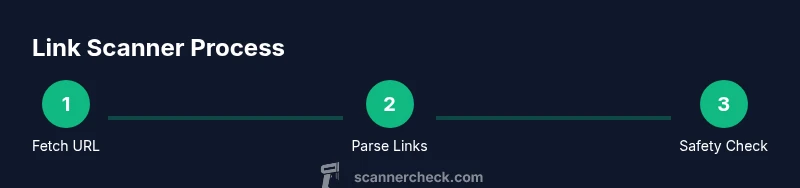
Understanding data flow helps you design robust code. The typical flow is:
- Accept a target URL and validate its format.
- Fetch the page content, honoring robots.txt and rate limits.
- Parse all links, normalize URLs, and filter out irrelevant schemes.
- If enabled, submit risky links to a safety API and collect verdicts.
- Generate a concise report detailing the domain, number of links, and any red flags.
This pipeline emphasizes minimal latency and clear logging. If you ever need to scale, you can batch requests or switch to asynchronous I/O to increase throughput. As you implement, consider adding a dry-run mode to test without hitting external services.
Choosing Tools, Libraries, and APIs
For a starter project, pick a language you’re comfortable with. Python is popular for quick prototypes, while Node.js excels at asynchronous I/O. Essential choices include:
- HTTP client: requests (Python) or node-fetch (Node.js)
- HTML parser: BeautifulSoup (Python) or cheerio (Node.js)
- URL utilities: urllib.parse (Python) or the URL module (Node.js)
- Safety checks: optional API keys for malware/URL reputation services
Tips:
- Start with standard library capabilities to learn the basics, then add libraries for robustness.
- Respect API rate limits; cache results when appropriate to avoid repeated checks.
- Write small, testable functions to keep debugging manageable.
Minimal Prototype: Sample Code Skeleton
Below is a minimal Python-like sketch to illustrate the structure. Replace placeholders with your chosen libraries and API endpoints.
import requests
from urllib.parse import urljoin, urlparse
from bs4 import BeautifulSoup

BASE_URL = "https://example.com"

def fetch(url):
    r = requests.get(url, timeout=10)
    r.raise_for_status()
    return r.text

def extract_links(html, base):
    soup = BeautifulSoup(html, 'html.parser')
    links = set()
    for a in soup.find_all('a', href=True):
        href = a['href']
        links.add(urljoin(base, href))
    return sorted(links)

def main(target_url):
    html = fetch(target_url)
    links = extract_links(html, target_url)
    # Optional: check links via safety API
    print(target_url, len(links), 'links found')

if __name__ == '__main__':
    main(BASE_URL)
Notes:
- This skeleton focuses on core steps: fetch, parse, and report.
- Add error handling, logging, and a reporting function to complete your prototype. This is a starting point for how to make a scanner from a link, not a finished product.
Performance, Privacy, and Ethics
Performance and privacy are critical in any link-scanning project. Use asynchronous requests or batching to improve throughput, but never overwhelm remote sites. Respect the target’s robots.txt and terms of service; avoid collecting or storing sensitive personal data without explicit permission. If you enable external safety checks, ensure you scrub or anonymize URL data before transmission, and consider local caching to minimize repeated lookups. Maintain a transparent privacy policy for users, outlining what data you collect, how you store it, and how long you retain it.
From a security standpoint, sanitize any outputs that might be displayed to users to prevent injection or leak of internal URLs. Finally, document the limitations of your prototype: it lacks context, may produce false positives/negatives, and should not be treated as a comprehensive threat-detection tool.
Scanner Check’s guidance emphasizes ethical use and responsible experimentation; always seek permission when scanning sites you don’t own or operate.
Common Pitfalls and How to Avoid Them
Common issues include failing to resolve relative URLs, ignoring HTTP vs. HTTPS mismatches, and missing error handling for rate-limited requests. To mitigate these, implement robust URL normalization, verify protocol consistency, and add retry/backoff logic. Another pitfall is over-reliance on third-party safety APIs; plan for outages by providing a local fallback or queuing mechanism. Finally, ensure your prototype remains transparent: emit useful logs and avoid exposing internal data unintentionally.
Extendability: How to Scale Your Link Scanner
Once the basics are solid, you can extend the tool with features like:
- Parallel fetch and parsing using async I/O.
- CAPTCHA and anti-bot detection handling (where appropriate and legal).
- Batch processing of multiple URLs with a simple queue.
- A UI or CLI that visualizes results and highlights high-risk links.
- Integration with CI pipelines to scan new pages before deployment.
With careful design, you can evolve a simple URL scanner into a robust utility suitable for personal projects or small teams. Scanner Check’s team would encourage moving slowly from prototype to incremental improvements while prioritizing safety and privacy.
Tools & Materials
- Computer with Python 3.10+ (or Node.js if you prefer)(Any OS; ensure you can install packages)
- HTTP client library(Requests for Python or node-fetch for Node.js)
- URL parsing utility(Python: urllib.parse; Node.js: URL module)
- Optional URL safety API key(Sign up for a malware/URL reputation service if you want automated checks)
- Text editor / IDE(VS Code, Sublime, etc.)
- Test URL list(A small set of public URLs to validate your scanner)
- Local data store (optional)(SQLite or even a simple JSON log for storing results)
Steps
Estimated time: 40-60 minutes
- 1
Set up your development environment
Install Python 3.10+ and create a virtual environment. Verify you can install requests and BeautifulSoup, then run a tiny script to fetch a page.
Tip: Use a clean venv to avoid dependency conflicts. - 2
Fetch the target URL
Write a function to perform an HTTP GET with timeout handling and basic error checks. Validate that the URL is well-formed before requesting.
Tip: Respect rate limits and robots.txt; start with a small test URL. - 3
Parse and extract links
Parse HTML to collect all anchor href attributes. Normalize relative URLs to absolute URLs and filter out non-HTTP schemes.
Tip: Use a robust HTML parser to avoid missing links due to malformed markup. - 4
Check links against safety databases
Optionally send the extracted links to a safety API and collect verdicts. Implement simple caching to minimize API calls.
Tip: Never send full user data unless you have consent and a privacy policy. - 5
Generate a readable report
Summarize the results: total links, status (safe/broken/unsafe), and notable examples. Consider exporting to JSON or CSV for further analysis.
Tip: Highlight high-risk links with color-coded output. - 6
Run and iterate
Test with multiple URLs, refine parsing, and add error handling. Document the limits of your prototype and plan next steps.
Tip: Use a dry-run mode before making external requests to validate logic safely.
Common Questions
What is a link scanner and what can it do?
A link scanner analyzes a web page's hyperlinks to assess safety, quality, and structure. It can help identify malicious destinations or broken links.
A link scanner analyzes a page's links for safety and quality.
Is it legal to scan URLs that aren’t mine?
In general, scanning public pages for safety is allowed, but you should respect terms of service and privacy. Avoid scraping private data without permission.
Respect terms of service and privacy; scan only URLs you have permission to access.
What are the privacy considerations?
Minimize data retention, avoid storing sensitive content, and prefer local processing when possible. If you use external services, anonymize data and document practices.
Keep data local when possible and anonymize data when using external services.
What skills do I need?
Basic programming, HTML parsing, and API usage. Knowledge of HTTP, JSON, and command-line tools is enough to start.
You need basic coding, parsing, and API usage.
How can I extend this to handle many URLs?
Use batching and asynchronous requests, plus a simple queue. Track rate limits and errors, and log results for auditing.
Process multiple URLs efficiently with batching and async calls.
Watch Video
Key Takeaways
- Define a clear data flow from fetch to report.
- Use reusable libraries for HTTP, parsing, and API calls.
- Respect privacy and legality when scanning URLs.
- Test with diverse URLs to improve robustness.