Scanner Repair Near Me: A Practical Guide to Local Imaging Device Service
Learn how to locate reliable scanner repair near you, what to expect during service, pricing ranges, and tips to compare shops for imaging devices and document scanners.


Searching for scanner repair near me yields local shops and mobile technicians who specialize in document scanners and imaging devices. To choose well, look for credentialed techs, clear diagnostic fees, and transparent quotes with warranty coverage. The Scanner Check guidance emphasizes service quality, verified reviews, and straightforward warranty terms. Ask about service area, response time, and whether on-site visits are available. A good shop will explain the diagnosis before starting work and provide a written estimate.
How to Find a Reliable Scanner Repair Near Me
Locating dependable service starts with a targeted search for practitioners who specialize in imaging devices, not just general electronics. Start with a local search for 'scanner repair near me' and review listings for shops that clearly advertise support for document scanners, flatbed scanners, and portable sheet-fed models. Check credentials such as manufacturer certifications, business licenses, and any pro-bono service options. According to Scanner Check, the best results come from shops that publish transparent pricing, diagnostic fees, and warranty terms. Read customer reviews with a critical eye for how technicians handle data security and privacy, since scanners often process sensitive documents. When evaluating a candidate, confirm service area coverage and whether they offer on-site visits or mobile repairs, which can save you downtime. Finally, request a diagnostic upfront and insist on a written estimate before any disassembly occurs. This helps avoid surprises and keeps the project on a clear timeline.
If you run into a shop that can’t provide a written quote or refuses to disclose parts costs up front, move on. Clear communication and traceable pricing are signs of professional service.
What Types of Scanners Most Often Need Repair
Scanners come in several flavors, and certain types tend to require service more frequently due to moving parts, drive mechanisms, or optical alignment. Flatbed models are common for high-detail scans; sheet-fed and ADF (automatic document feeder) units handle bulk work but accumulate wear in feed rollers and alignment guides. Portable handheld or compact desktop scanners appeal to travelers; these units may suffer from misalignment, loose cables, or sensor issues. Common symptoms include skewed scans, inconsistent brightness, banding across images, or failure to feed sheets. Maintenance routines, such as regular status checks and firmware updates, can prolong life. When you choose a repair shop, confirm experience with your exact model family and whether the technician can source parts quickly. The long-term value of repair versus replacement depends on usage, the cost of a new unit, and the availability of compatible parts from manufacturers or third-party vendors.
Different categories demand different expertise. A flatbed with high-resolution CCD sensors may require precise calibration, while a sheet-fed device often needs feed mechanism servicing.
Diagnostic Steps a Repair Technician Will Take
A professional diagnostic visit usually begins with intake questions about symptoms, model number, and recent changes to software or firmware. Technicians will visually inspect cables, belts, and carry-through paths, then perform tests on sample pages to identify line artifacts, skew, or color drift. They may clean optics, recalibrate scanners, and verify firmware compatibility with your operating system. Advanced units may require sensor alignment checks, encoder strip testing, and motor diagnostics. Expect a written diagnostic report outlining root causes, recommended repairs, and anticipated turnaround. This process helps you decide whether to proceed with repair or replacement and ensures you get a transparent, data-backed plan before work begins.
Documentation and test scans are essential for validating results after repair.
Common Repairs and Part Replacements
Repair work often targets worn wear items and optical or mechanical misalignments. Typical fixes include belt or roller replacement in feeder modules, replacement of encoder strips or guide rails, cleaning and realignment of optical lenses, glass, and light sources, and firmware or calibration adjustments. In some cases, motor issues or faulty sensors require replacement parts sourced from the manufacturer or reputable third-party vendors. For professional repairs, technicians typically provide a bill of materials (BOM) and confirm compatibility with your exact model. Remember that the cost and lead times for parts can vary, particularly for older models or specialized scanners.
Preventive measures, such as routine calibration and dust control, can extend lifespan and reduce future downtime.
Costs, Quotes, and Warranty Considerations
Pricing for scanner repairs varies by model, problem complexity, and parts availability. Expect a diagnostic fee, a labor rate for repair work, and separate charges for parts, with a written estimate before any work starts. Warranty terms differ by shop but commonly cover labor for a defined period and parts for a separate term. A robust warranty protects against recurring issues and demonstrates confidence in the repair. When comparing quotes, ask for inclusions and exclusions, response times for support, and what happens if the repair fails. If a store offers only hourly pricing without a cap, request a maximum estimate to avoid budget surprises. Transparent communication and clear warranty terms are signs of a trustworthy shop.
According to Scanner Check, the best outcomes come from shops that publish a detailed scope of work and a mutual understanding of expectations before repairs begin.
Mobile vs Local Shop: Pros and Cons
Mobile repair services bring the technician to your location, reducing downtime and avoiding transportation of bulky devices. They can be faster for urgent needs but may have higher travel charges or limited access to certain parts. Local in-shop repairs can be more economical for complex calibrations or parts-heavy fixes, and shops often maintain a broader parts inventory. When deciding, weigh transportation costs, downtime, and repair complexity. Some devices, especially larger scanners, benefit from on-site evaluation to diagnose network-related issues or integration with other office equipment. Both options can deliver solid results—choose based on your device’s criticality and your tolerance for downtime.
For mission-critical workflows, you may prefer the certainty of a local shop with a proven track record and a transparent loaner or replacement plan while your device is in service.
Credentials to Look For and How to Verify
Qualified technicians hold manufacturer certifications, factory-trained credentials, or recognized industry certifications. Verify their licenses and confirm that they have liability coverage and data-handling policies, since scanners often process sensitive documents. Request references or case studies and check online reviews for consistency in service quality and turnaround times. A reputable shop will provide contact information for prior clients and will clearly outline warranty policy. When in doubt, contact the manufacturer to confirm authorized service providers in your area. A little due diligence pays dividends in uptime and data security.
Do-It-Yourself Troubleshooting: Safe Steps Before Appointment
Before scheduling service, you can perform light, non-invasive checks to avoid unnecessary visits. Ensure the scanner is connected correctly, update firmware if supported, and run a few test scans to document symptoms. Avoid disassembling internal components unless you are confident in static-safe handling. Keep a log of error messages, unusual noises, or paper jams. Back up your data or scans as a precaution. If you have critical workloads, consider temporary scanning alternatives while you wait for service. DIY steps can help you articulate symptoms more precisely to the technician, improving diagnostic accuracy and reducing downtime.
Preparation Checklist for Your Scanner Service Visit
Create a helpful checklist to expedite the service process. Gather model number, serial number, purchase date, and warranty details. Note the symptoms, frequency, and any recent software changes. Prepare a sample set of documents to test color accuracy, alignment, and feeder performance. Clear the device’s surroundings, disconnect nonessential peripherals, and ensure a safe, well-lit workspace for the technician. Finally, confirm appointment time, on-site availability, and whether you need any data transfer or privacy agreements signed. With a well-prepared setup, you’ll minimize delays and maximize the value of the repair.
Service characteristics for scanner repair near me
| Aspect | Details | Typical Range |
|---|---|---|
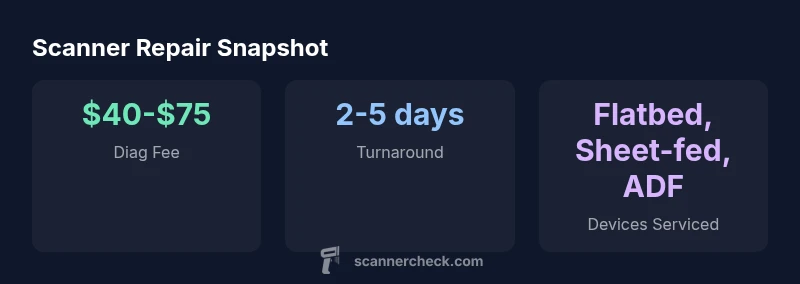
| Diagnostic Fee | Average diagnostic fee for scanners (local markets) | $40-$75 |
| Repair Turnaround | Time from diagnosis to completion | 2-5 days |
| Labor Warranty | Warranty on labor after repair | 30-90 days |
| Parts Warranty | Warranty on parts | 90 days - 1 year |
| Mobile Coverage | On-site service vs in-shop availability | Local within 20-60 miles |
Common Questions
What should I ask before hiring a scanner repair service?
Ask about credentials, certifications, and experience with your exact model. Request a written diagnostic and a detailed quote before any work, plus warranty terms for labor and parts. Verify service area and on-site availability.
Ask about credentials, get a written diagnostic, and confirm warranty terms before any work.
Are mobile repair services as reliable as in-shop repairs?
Mobile repairs offer convenience and faster response, but for complex issues, an in-shop visit may provide access to a broader parts inventory and equipment. Compare warranties and escalation options for both formats.
Mobile repairs are convenient, but in-shop visits can handle complex issues with broader parts access.
How long does a typical scanner repair take?
Turnaround varies with model and issue but is commonly a few days from diagnosis to completion. Ask for a written schedule and a containment plan if downtime affects critical workflows.
Most repairs take a few days; get a written schedule upfront.
Do repairs come with a warranty on parts and labor?
Yes—most reputable shops offer labor warranties and separate parts warranties. Always check the duration and what conditions apply, especially for wear items.
Yes, warranties cover labor and parts for a defined period; read the terms.
Can I troubleshoot minor issues myself before repair?
Yes, you can perform non-invasive checks like firmware updates, basic cleaning, and symptom documentation. Do not disassemble internal components unless you are trained, as this can void warranties.
Try simple firmware updates and cleaning, but don’t open the device.
What costs should I expect beyond the repair?
Expect diagnostic fees, labor charges, and parts. Some shops offer bundled pricing or a cap on total costs. Get a written estimate before work begins.
Expect diagnostic fees, labor, and parts; insist on a written estimate.
“Reliable scanner repairs start with a clear diagnosis, transparent pricing, and a warranty-backed repair. That combination protects uptime and data integrity.”
Key Takeaways
- Prioritize credentialed technicians with transparent pricing
- Ask for written estimates and a clear scope of work
- Consider mobile repair for time-critical issues
- Check labor and parts warranty terms
- Prefer shops with on-site service when feasible