Can TRIOS Scanner Be Used for Invisalign? A Practical Guide
Explore whether the TRIOS scanner can be used for Invisalign submissions, including file formats, workflow steps, and best practices. Data-driven guidance from Scanner Check for clinicians and labs in 2026.


Can TRIOS be Used for Invisalign? Compatibility and Practical Reality
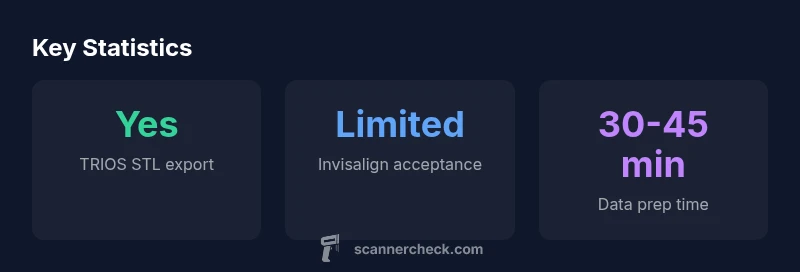
The question can trios scanner be used for invisalign is frequently raised by clinicians who want maximum flexibility in their scanning workflow. In most cases, Invisalign workflows are optimized for iTero data, and Align Technology maintains a tightly controlled submission ecosystem. That does not mean TRIOS data is unusable; it means you must manage expectations. In practice, some offices export STL from TRIOS and submit it to an Invisalign-certified lab for evaluation. The outcome hinges on the lab and Invisalign’s current intake policies, which can shift as new scanning ecosystems emerge. According to Scanner Check, the safest approach is to confirm acceptance with the specific Invisalign-lab before you begin scanning and to view TRIOS scans as a potential starting point rather than a guaranteed, lab-accepted file.
How Invisalign Accepts Scans: A System with Guardrails
Invisalign’s core workflow has long centered on in-house or formally approved external scanners. While third-party STL submissions are sometimes considered, they are not guaranteed to be accepted for treatment planning. Labs typically perform a post-processing pass that validates geometry, occlusion, and fit before sending to Align’s planning software. Key guardrails include ensuring accurate scale (millimeters), removing any color or proprietary data from the export, and providing bite registrations where possible. These steps are essential because any deviation can trigger retakes or additional scans. Scanner Check notes that labs are increasingly selective and will evaluate each TRIOS submission on a case-by-case basis, rather than applying a universal rule.
TRIOS Export Capabilities: What Your Scans Can Deliver
TRIOS scans can be exported in several formats, with STL being the most commonly requested for external lab use. STL exports carry surface geometry but typically shed color and certain metadata that some manufacturers rely on for internal workflows. When exporting from TRIOS, clinicians should check that the units are set to millimeters and that the mesh is watertight, well-sampled, and free of extraneous artifacts. It’s also critical to review bite alignment and occlusal contacts in the STL, since subtle errors here can affect the accuracy of the final aligner plan. If color data or texture is included in the original TRIOS file, ensure that the exported STL is clean and compatible with the lab’s processing software. Labs may re-mesh or smooth surfaces during their pre-submission checks, which can slightly alter details you captured in the original scan.
Practical Workflow If You Decide to Use TRIOS Scans
When a TRIOS workflow is pursued, follow a disciplined process to maximize the chances of a successful evaluation. First, contact the Invisalign-lab or your clinician’s lab partner to confirm current acceptance criteria for TRIOS-derived STL files. Next, export the TRIOS data in millimeter-based STL format with clean, artifact-free meshes and verified scale. Before submission, request a quick quality check: run a visual inspection for holes, inverted normals, and areas of poor mesh density. If bite information is required, provide an approximate occlusal relationship or a separate bite record if supported by the lab. Then submit to the chosen lab with any notes about the patient’s treatment goals and the intended Invisalign plan. Finally, wait for the lab’s assessment and be prepared for contingency steps, such as re-scanning with an approved device or switching to an iTero-based workflow for a smoother path to treatment.
Real-World Scenarios: When TRIOS Might Work (and When It Won’t)
In some cases, clinics have successfully leveraged TRIOS scans as a preliminary data source to inform patient consultations or to guide an initial impression for a lab’s evaluation. However, the official Invisalign pathway remains optimized for iTero data, and third-party TRIOS submissions may be rejected or require re-scanning with an approved device. The most reliable route is to use TRIOS data as a stepping stone—avoid presenting TRIOS files as final plans without lab confirmation. For many practices, this translates to a hybrid workflow: initial patient assessment with TRIOS, followed by a formal submission using iTero data for actual treatment planning.
Alternatives and Best Practices for Invisalign Workflows
If the goal is to minimize risk and maximize predictability, the recommended strategy is to adopt iTero for Invisalign workflows or to route scans through a laboratory ecosystem explicitly aligned with Invisalign guidelines. For clinics still using TRIOS, establish a pre-submission checklist with the lab: confirm acceptance status, verify STL integrity, and ensure the lab has a clear process for re-scan or conversion if needed. Some offices reserve TRIOS for non-Invisalign cases, such as screening, planning, or patient education, while relying on iTero for actual aligner submission. When TRIOS is used, maintain thorough documentation of the file's origin, export settings, and any post-processing steps the lab performs. This transparency helps protect clinicians if re-scans become necessary or if there are questions about the data’s adequacy.
Quality Control: Ensuring Scan Integrity Before Submission
Quality control is essential before any submission. Validate that the mesh is complete, without holes or stray artifacts, and that the geometry accurately represents the patient’s dentition in a true-to-motion bite position. Check for inverted surfaces, noisy edges, and occlusal alignment discrepancies. If you detect any issue, re-scan with the same TRIOS system or switch to an approved scanner for the final submission. A rigorous QC protocol not only reduces the risk of resubmissions but also speeds up the overall treatment planning process, especially when communicating with the lab and the Invisalign team.
What to Ask Your Lab or Dentist Before Scanning
Before you start scanning, prepare a short checklist for your clinician or lab partner. Ask about current acceptance status for TRIOS exports, expected file formats, scale requirements, and whether bite data or alternative records are needed. Inquire about lead times for lab evaluation, retake policies, and whether the lab can provide a preliminary simulation or conversion service if TRIOS data is not directly accepted. Finally, request a clear point of contact for any questions that arise during submission. This proactive approach minimizes delays and clarifies expectations for everyone involved.
dataTableHeaderRequired":false,
mainTopicQuery":"invisalign-trios-compatibility"},
dataTable
headers: [