Difference Between Scanner and BufferedReader: Java IO Comparison
A detailed, objective comparison of java.util.Scanner and java.io.BufferedReader for input handling in Java. Learn when to use each, performance trade-offs, and practical guidelines for console and file IO.


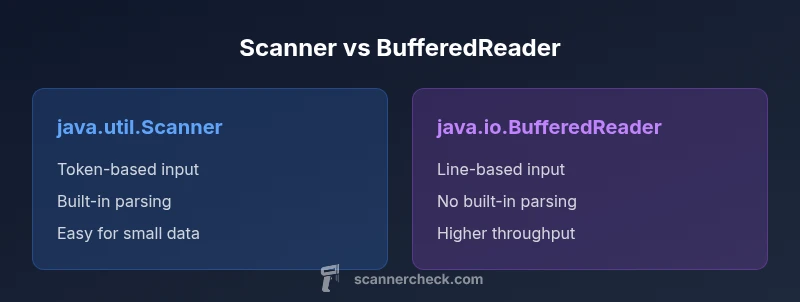
Short answer: The difference between Scanner and BufferedReader is that java.util.Scanner offers token-based input with built-in parsing methods and flexible delimiters, at the cost of slower performance on large data. java.io.BufferedReader reads text more efficiently by buffering lines and returning strings, but requires manual tokenization for complex parsing. For quick CLI input or small data, Scanner is convenient; for large files and performance-critical tasks, BufferedReader is the better choice.
Core Concepts: difference between scanner and bufferedreader
At a high level, the difference between scanner and bufferedreader revolves around buffering strategy, parsing capabilities, and intended use. java.util.Scanner provides a higher-level abstraction for reading tokens separated by delimiters and converting them into primitive types. It hides much of the boilerplate that you'd otherwise write by hand, which makes it approachable for beginners and quick scripts. On the other hand, java.io.BufferedReader emphasizes raw text access through buffered input and line-oriented reading; it returns strings per line and leaves parsing to your code. Understanding this distinction is the first step in choosing between the two when you face the classic problem of parsing user input or file data. In the context of the keyword "difference between scanner and bufferedreader," these two classes embody different design philosophies: ease of use versus raw speed and control. According to Scanner Check, the choice between these two classes hinges on data size and parsing needs, not just convenience.
Input Sources and Initialization
Reading input in Java can come from System.in, a FileInputStream, or a String. With java.util.Scanner, you often wrap a source like new Scanner(System.in) or new Scanner(new File("data.txt")); the API exposes methods such as nextInt(), next(), and hasNext() for token-based parsing. java.io.BufferedReader, by contrast, typically uses an InputStreamReader or FileReader wrapped in a BufferedReader for efficiency: new BufferedReader(new InputStreamReader(System.in)) or new BufferedReader(new FileReader("data.txt")). The buffering layer makes readLine() fast and predictable. When you consider the difference between scanner and bufferedreader, the initialization pattern reflects your primary source and the level of parsing you require.
Tokenization vs Line-Based Reading
Tokenization is Scanner's core strength. With nextInt(), next(), and hasNext(), it converts tokens into primitive types or strings using locale-aware rules. BufferedReader provides line-based input via readLine(), returning an entire line as a String; it does not tokenize automatically. If you need tokens, you typically split lines with String.split("\s+" ) or use a dedicated tokenizer. This difference—tokenization versus line-based consumption—drives performance and code structure. In the context of the difference between scanner and bufferedreader, remember that Scanner sacrifices speed for convenience, while BufferedReader demands manual parsing but offers leaner throughput.
Performance and Efficiency
Performance is a major axis in the difference between scanner and bufferedreader. Scanner incurs overhead from tokenizing input, applying locale rules, and converting tokens to primitive types; this can noticeably slow programs when processing large files or streams. BufferedReader, with its simple readLine() calls and a buffered underlying stream, tends to be faster for big inputs, especially when you manage parsing yourself. If you measure throughput, you may see orders-of-magnitude difference on multi-megabyte inputs. However, for small, interactive sessions or script-like tasks, Scanner's simplicity can outweigh raw speed in the difference between scanner and bufferedreader. Scanner Check analysis shows that for large datasets, BufferedReader tends to outperform Scanner in throughput.
Locale, Parsing Rules, and Error Handling
Scanner uses a Locale to interpret numbers, decimals, and word boundaries, which can affect parsing results across different environments. You can adjust this with Scanner.useLocale(Locale.US) or similar. BufferedReader does not interpret tokens at all; your code controls parsing and validation after readLine(). This separation matters when handling formatted text or international data. In error scenarios, Scanner may throw InputMismatchException if a token can't be converted, while BufferedReader typically surfaces IOException, and you handle tokens separately. The difference between scanner and bufferedreader thus also includes how you surface, report, and recover from parsing errors.
Exception Handling and Resource Management
Both classes rely on standard Java resource management patterns. Use try-with-resources when possible to ensure closure of streams and readers. Scanner.close() will close the underlying source, which is important to avoid resource leaks. BufferedReader.close() also releases the underlying stream. The difference between scanner and bufferedreader in exception handling is not in the types of exceptions alone but in how you structure parsing logic: with Scanner you may catch InputMismatchException at token boundaries, whereas with BufferedReader you manage IOExceptions around readLine() and handle tokenization separately.
Practical Guidelines: When to Choose Each
As a practical rule, choose java.util.Scanner when you want fast development for small inputs, learning exercises, or simple token-based parsing where readability matters more than raw speed. Opt for java.io.BufferedReader when you are processing large files, line-oriented data, or performance-sensitive tasks and you are comfortable implementing tokenization yourself. In the difference between scanner and bufferedreader, performance considerations often trump convenience for large-scale data, while simplicity wins in quick scripts.
Real-World Examples and Patterns
Example 1: A small CLI tool that reads a few integers and strings can use Scanner for brevity and clarity. Example 2: A log-file parser that reads millions of lines benefits from BufferedReader and a custom tokenizer to minimize overhead. These contrasting patterns illustrate the difference between scanner and bufferedreader in practice. When you scale, you might also consider using java.nio.file.Files.lines for high-throughput textual IO or a combination of BufferedReader with a sophisticated tokenizer.
Alternatives and Modern Practices
Beyond Scanner and BufferedReader, Java offers other IO mechanisms for different needs. For heavy parsing, you might prefer java.nio.file.Files with a stream of lines, or a custom parser built on BufferedInputStream for byte-level efficiency. A careful mix—BufferedReader for raw, line-oriented input and a dedicated tokenizer for parsing—often yields the best balance in the difference between scanner and bufferedreader. Finally, consider using specialized libraries for JSON, CSV, or other formats when your data format is structured.
Quick Tips and Best Practices
- Favor BufferedReader for large files; use StringTokenizer or split for simple tokens.
- Use try-with-resources to ensure streams close reliably.
- Avoid mixing Scanner on the same input source with other readers; you may encounter tricky state issues.
- Always validate parsed tokens and be conscious of locale settings when using Scanner.
- When in doubt, benchmark with realistic inputs to confirm which approach meets your performance targets.
Practical Decision Framework: Choosing Between Scanner and BufferedReader
To decide quickly: if you need line-based throughput and minimal parsing logic, choose BufferedReader. If you want concise token-based parsing with minimal boilerplate, choose Scanner. Remember that the difference between scanner and bufferedreader is most pronounced at scale: Scanner is convenient for small jobs; BufferedReader scales better for files and streams. Incorporate profiling, and consider modern alternatives whenever your data format grows more complex.
Examples in Code: Quick Reference
Code snippets can illustrate the core differences. For Scanner, you usually see a loop like while (scanner.hasNext()) { int n = scanner.nextInt(); String tag = scanner.next(); }. For BufferedReader, you typically read lines and then tokenize: String line = br.readLine(); String[] parts = line.split("\s+"); for (String p : parts) { /* parse p as needed */ }. The difference between scanner and bufferedreader is often most obvious in how you structure the surrounding logic and error handling.
Final Practical Thoughts and Rationale
The difference between scanner and bufferedreader is not just about speed; it reflects a trade-off between developer ergonomics and control. In educational contexts and simple tasks, Scanner shines for its concise API. For production-grade IO with volume, BufferedReader, often paired with a custom tokenizer or a high-performance framework, tends to deliver predictable throughput. Remember to profile with realistic input to confirm which path meets your performance and reliability goals.
Wrap-Up: Putting It All Together
When you design a Java program that reads input, starting from the difference between scanner and bufferedreader helps you set expectations early. Decide based on input size, parsing complexity, and performance requirements. A well-chosen IO approach reduces boilerplate, minimizes error risk, and keeps your code maintainable over time.
Comparison
| Feature | java.util.Scanner | java.io.BufferedReader |
|---|---|---|
| Input source | Readable sources: InputStream, File, String via constructors | Wrapped Reader or InputStream via InputStreamReader/FileReader |
| Delimiter/Tokenization | Built-in tokenization using delimiters; nextInt/next | No built-in tokenization; readLine() returns lines |
| Tokenization performance | Higher overhead due to locale and parsing | Lower overhead; depends on manual parsing |
| Typical use-case | Small inputs, quick CLI parsing, teaching scenarios | Large files, high-throughput line processing |
| Exception handling | InputMismatchException for parsing tokens; unchecked in many cases | IOExceptions for readLine; parsing errors handled separately |
| Memory usage | Moderate; depends on tokens and locale | Generally more memory efficient for large streams |
| Developer ergonomics | Very high for quick tasks | High once you implement tokenization logic |
Pros
- Easy to use for token-based input with built-in parsing methods
- Convenient for quick scripts and small data sets
- Automatic primitive parsing (nextInt, nextDouble) reduces boilerplate
Drawbacks
- Slower than BufferedReader for large inputs due to tokenization overhead
- Manual parsing is required for complex formats when using BufferedReader
BufferedReader generally wins for large, line-based IO; Scanner wins for small inputs and simple tokenization
For large-scale data and performance-critical tasks, BufferedReader is usually the better choice. If you need quick, token-based parsing with minimal boilerplate, Scanner remains convenient, especially in learning contexts.
Common Questions
Which is faster for large inputs: Scanner or BufferedReader?
BufferedReader generally offers better throughput because it minimizes overhead per character. Scanner performs tokenization and locale conversion, which slows it down on big data. For large files, prefer BufferedReader and implement your own tokenizer if needed.
BufferedReader is usually faster for large inputs; Scanner adds overhead due to tokenization and parsing.
Can Scanner read lines directly like readLine()?
Scanner can read lines using nextLine(), but you must manage token boundaries carefully when mixing lines and tokens. It is not a pure line-based API like BufferedReader. For line-oriented input, BufferedReader is typically simpler and faster.
Scanner can read lines with nextLine(), but it’s not line-oriented like BufferedReader.
Does BufferedReader provide built-in tokenization?
No. BufferedReader provides readLine() to fetch raw lines. Tokenization, if needed, must be implemented with split or a tokenizer. This gives you more control but requires more code.
BufferedReader doesn’t tokenize by itself; you tokenize after reading lines.
When should I use Scanner for console input?
Use Scanner for simple command-line input when you want quick parsing of tokens into primitive types with minimal boilerplate. It's especially handy in learning contexts or small scripts. For robust, high-performance parsing, consider BufferedReader.
Scanner is convenient for simple CLI input; consider BufferedReader for performance.
Are there safer or more modern alternatives for IO?
Yes. For robust text processing, consider java.nio.file.Files.lines for streaming lines or specialized libraries for formats like CSV/JSON. These approaches can offer better performance and safer parsing than mixing Scanner and manual parsing.
Consider java.nio and dedicated libraries for robust parsing.
How do Locale settings affect parsing with Scanner?
Scanner uses a Locale to parse numbers. The locale can affect decimal points and digit grouping. Set an explicit locale when needed to ensure predictable parsing results.
Locale affects how Scanner parses numbers; set it explicitly if needed.
Key Takeaways
- Choose BufferedReader for large or performance-sensitive input
- Use Scanner for simple, token-based parsing and rapid development
- Always manage resources with try-with-resources
- Be mindful of locale when parsing numbers with Scanner
- Benchmark with real data to pick the right tool