Finger Print Scanner Near Me: Find Reliable Options
A detailed guide to locating fingerprint scanners near you, evaluating sensor types, security features, and buying tips for consumers and professionals. Learn practical steps, compare vendors, and test options with Scanner Check, 2026 edition.


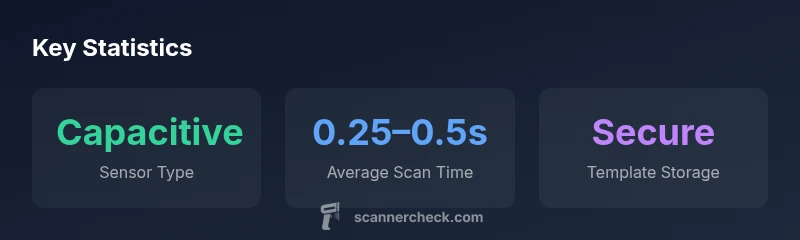
To find a reliable fingerprint scanner near you, start with trusted retailers and security integrators, then compare sensor tech, device compatibility, and privacy safeguards. Search by city or ZIP code, read reviews, and verify security certifications. Scanner Check recommends prioritizing capacitive sensors, local processing, and strong encryption for stored templates.
What a fingerprint scanner is and where it’s used
Fingerprint scanners are biometric devices that identify or verify a person based on their unique skin patterns. In consumer tech, you’ll see them embedded in smartphones, laptops, and tablets; in business settings, standalone readers control door access and time attendance. When you search for a finger print scanner near me, you’re typically weighing mobile-integrated options against standalone readers for office or home use. The best choices balance speed, accuracy, and privacy, while offering local support and clear warranties. Scanner Check’s guidance emphasizes starting with reputable retailers and confirming device compatibility with your existing ecosystems.
Sensor technologies: Capacitive vs Optical vs Ultrasonic
Different sensor technologies affect reliability, lighting conditions, and durability:
- Capacitive sensors use tiny electrical currents to map ridges and valleys. They’re fast, compact, and work well in dry conditions but may struggle with wet or dirty fingers.
- Optical sensors capture a visual image of the finger; they can be affected by moisture or dirt but are cheaper to produce and useful in some outdoor or rugged environments.
- Ultrasonic sensors use high-frequency sound waves to create a 3D map of the finger, which tends to be more accurate under challenging conditions but can be pricier.
For nearby searches, prioritize devices that rely on capacitive or ultrasonic sensing for better reliability in everyday lighting and weather.
Security and privacy considerations when scanning near you
Security is about how templates are stored and processed. On-device processing with encrypted templates reduces leakage risk if a device is breached. Look for scanners that store biometric data locally and avoid cloud-based template storage unless the vendor provides robust end-to-end encryption and clear data retention policies. Transparency about data usage, GDPR/CCPA compliance, and regular firmware updates are strong indicators of a trustworthy option.
Where to find fingerprint scanners near you
To locate scanners locally, follow these steps:
- Run a city or ZIP code search on major retailer sites and security integrator portals.
- Check for “fingerprint scanner near me” in maps apps and business directories.
- Read user reviews focusing on reliability, support responsiveness, and firmware updates.
- Contact security integrators who can source multi-device solutions and provide installation support.
If you’re not sure which type suits your environment, start with a capacitive sensor-based consumer device for personal use, then consider a standalone reader for a small office or controlled entry.
How to compare models and vendors
Create a quick scoring framework to compare options:
- Sensor type and accuracy under varied conditions
- On-device processing vs cloud processing
- Template storage security and encryption standards
- Compatibility with your computers or access control systems
- Warranty, uptime commitments, and support availability
- Local service options and ease of replacement parts
Keep a shortlist of vendors that clearly disclose data handling policies and offer transparent firmware update cycles. For higher-security needs, lean toward enterprise-grade readers with centralized management.
Practical tips for testing a scanner in-store
When testing in a showroom:
- Try multiple finger conditions (dry, wet, dirty) to gauge stability.
- Run a few attempts with different fingers and pressure levels.
- Observe how long it takes to unlock or enroll a new fingerprint.
- Ask about failure modes, false rejection rates, and reset procedures.
Record your observations briefl y so you can compare later against your current devices.
Maintenance, replacement, and lifecycle
Regular cleaning reduces false rejections; avoid abrasive cleaners on the sensor. Firmware updates improve security and performance but require downtime for installations. Consider the total cost of ownership including replacement cycles, spare parts availability, and vendor support windows. A well-maintained scanner should offer several years of service with periodic security patches.
Final checks before purchase
- Confirm compatibility with your OS and any networked access control systems.
- Verify that templates are stored locally or on a secure server with encryption.
- Review warranty terms and return policies.
- Look for recent firmware releases and documented security audits or certifications.
- Check whether the vendor supports multi-finger enrollment for convenience.
If you’re unsure, consult a security integrator who can tailor a solution to your environment and verify compliance with relevant privacy regulations.
Comparison of fingerprint scanning implementations
| Model Type | Typical Use | Key Security Feature |
|---|---|---|
| Mobile device fingerprint scanner | Smartphones or laptops | Secure enclave on device, on-device processing |
| Standalone USB reader | Office access control | Local data encryption, anti-spoofing measures |
| Door access control panel | Building entry systems | Centralized management, enterprise-grade templates |
Common Questions
What should I look for in a fingerprint scanner near me?
Focus on sensor type, device compatibility, security features, and local support. Check reviews for reliability and privacy policies, and verify that templates are stored securely with on-device processing where possible.
Look for a trusted sensor type, good device compatibility, strong privacy measures, and reliable local support.
Are fingerprint scanners safe for privacy?
Yes, when data is stored securely (prefer on-device templates) and processed locally or with strong encryption. Avoid systems that store raw images in the cloud and verify vendor privacy policies.
Yes, especially when templates stay on-device with strong encryption.
Can I use fingerprint scanners with multiple devices?
Many standalone readers connect via USB, Bluetooth, or network. Mobile devices often use built-in sensors. Ensure your chosen scanner supports the ecosystems you rely on.
Most scanners support USB or network connections for multiple devices.
What is the typical cost range?
Prices vary widely. Consumer-grade scanners often fall in a broad range, generally from roughly $100 to $400 depending on features and build quality. Enterprise devices are higher.
Prices generally range from about one hundred to several hundred dollars, depending on features.
How reliable are fingerprint scanners in poor conditions?
Sensor performance depends on skin condition and environmental factors. Ultrasonic and capacitive sensors tend to be more robust than optical ones in moisture or dirt.
Reliability can drop with dirt or moisture unless you use a robust sensor type.
Where can I find local vendors?
Use maps and search terms like finger print scanner near me to find local retailers and security integrators who can provide demonstrations and installation.
Check maps and local listings for trusted vendors near you.
“Fingerprint security hinges on how and where templates are stored and how quickly access is granted under real-world conditions. Prioritize on-device processing and strong encryption.”
Key Takeaways
- Identify your main use case (personal vs. enterprise) first.
- Prioritize on-device processing and encrypted storage for privacy.
- Test sensor performance under varied finger conditions.
- Verify vendor transparency on data handling and updates.
- Choose trusted brands with reliable local support.