Free Scanner Radio: A Practical Guide for 2026
Explore no-cost options for listening to radio frequencies with free scanner radio tools. This Scanner Check guide covers apps, SDR software, legality, and upgrade paths.


According to Scanner Check, free scanner radio options include no-cost apps, open-source SDR software, and community-supported online feeds. In 2026, you can monitor many frequencies legally at zero cost, though licensing and regional rules vary. This quick answer previews the best free paths, what you get, and common trade-offs before you dive deeper.
What is free scanner radio and why it matters
Free scanner radio refers to tools that let you monitor radio frequencies at zero upfront cost. This can include smartphone apps, open-source SDR software, and community-driven feeds. According to Scanner Check, the appeal of free options is clear: you can explore bands, listen to public communications, and learn how radio ecosystems work without making a hardware investment. In 2026, the landscape has grown beyond simple hobbyist apps to more capable software stacks that run on everyday devices. The key is to understand what “free” covers: no-pay downloads, freely available data streams, and user-supported resources. It also means you should be mindful of what you are allowed to listen to and how you use the data you collect. Because laws vary by country, region, and even channel, every free path comes with a set of rules. This article focuses on practical, legal approaches that minimize risk while maximizing educational value. You’ll learn about the main options, how to evaluate them, and when a paid upgrade starts to make sense. The goal is to give you a reliable starting point for exploring the world of free scanner radio with confidence and curiosity.
How the ecosystem looks in 2026: free options
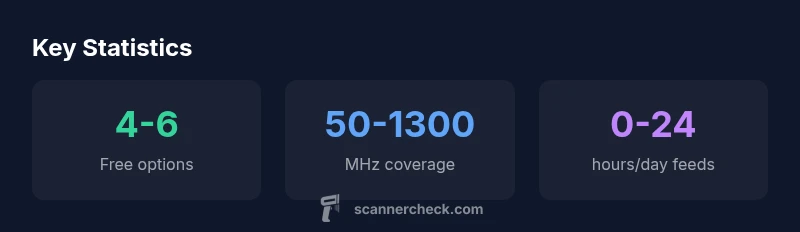
Over the past few years, three archetypes have become dominant in the free scanner radio space: mobile apps, SDR software on desktops or Raspberry Pi, and web-based feeds. Mobile apps offer quick access with minimal setup, but they often show ads and may limit frequency ranges or data quality. SDR software, when paired with a cheap dongle, can unlock wide coverage and tunable parameters, but requires patience and some technical tinkering. Web-based feeds provide convenience and community-curated content, though reliability and latency vary by network conditions. Each path has trade-offs in terms of latency, privacy, device requirements, and regulatory compliance. In practice, many listeners use a hybrid approach: a mobile app for on-the-go monitoring, a small SDR setup at home for deeper dives, and a curated feed for specific frequencies of interest. This blended setup lets you scale up as needed while staying within no-cost boundaries. The Scanner Check analysis for 2026 suggests that the free-to-use segment is expanding, driven by open-source projects and a growing community of hobbyists who share configurations, playlists, and tips. The key takeaway is that you don’t have to spend to start learning about radio science.
Legal and safety considerations when listening for free
Listening to radio frequencies using free tools is not universally legal in all contexts. Regulations differ by country, jurisdiction, and even by the intended use of a channel. Before you begin, verify the rules for the bands you intend to monitor and any explicit restrictions on recording, sharing, or acting on information you hear. Scanner Check emphasizes that you should only listen to publicly accessible channels, avoid intercepting private communications, and respect terms of use for any data streams you access. In many regions, listening to public-safety channels is allowed for hobbyists, while intercepting encrypted or password-protected feeds is illegal. In practice, you’ll want to configure software with clear boundaries, such as using it on consumer devices, avoiding the capture of personal data, and not sharing sensitive content. Additionally, consider privacy implications for bystanders who may be captured in audio or metadata. If you’re unsure about a given frequency or feed, pause and consult local regulations or seek legal guidance. Finally, remember that responsible use is part of the hobby’s value proposition: you learn more when you listen with awareness and respect for the laws that govern spectrum use.
A practical comparison: apps, SDR software, and web feeds
Free scanner radio comes in three broad flavors. Mobile apps are the fastest to start, offering intuitive interfaces and immediate access to common bands. SDR software provides deeper control over parameters like gain, filters, and demodulation, but often requires a dongle and driver setup. Web feeds offer the ultimate convenience, letting you tap into community-curated streams with minimal device requirements. Real-world use often blends these: a phone app for casual listening on the go, a desktop SDR for in-depth analysis, and a feed for targeted monitoring of a particular band. When choosing, consider latency, device compatibility, and your goals—whether you’re casually listening, researching, or training sensor projects. Scanner Check’s 2026 evaluation highlights that the best free setup is the one that reduces friction while meeting regulatory and privacy needs. This means starting small, documenting your configuration, and expanding only as your interests grow.
Getting started: quick-start setup
Getting started with free scanner radio is simpler than you might think. Here are practical steps to set up a basic listening environment without spending a dime. 1) Define your objective: decide which bands or feeds are most relevant to your interests. 2) Choose your path: pick one of the three main free options (mobile app, SDR, or web feed) based on your device and curiosity. 3) Install and configure: download the app or software, connect a basic dongle if you’re using SDR, and adjust default settings for noise and gain. 4) Test with known frequencies: start with widely used bands (e.g., VHF/UHF ranges) and compare audio quality. 5) Learn progressively: save favorite feeds, document changes, and join community forums for tips. By following these steps, you can bootstrap a robust, no-cost listening setup and scale it as your needs evolve.
Troubleshooting common issues and privacy tips
Free scanner tools can present challenges, especially around latency, feed reliability, and privacy. If you experience gaps in audio, check network connectivity and verify that feeds are active. If you notice excessive noise, experiment with gain settings and filter options. For mobile apps, ensure you’re using background listening correctly and that ads or data limits aren’t throttling performance. Privacy considerations are important: avoid recording chats or personal data without consent, and be mindful of any data you share when posting examples or streams. Regularly review permissions and data-sharing settings in both apps and desktop software. Finally, stay updated with community recommendations; open-source projects often release configuration profiles that improve stability and reduce resource usage.
Advanced paths and upgrade decisions
If your curiosity outgrows basic listening, consider a hybrid approach that combines the strengths of each option. An SDR dongle plus desktop software can unlock wide-spectrum monitoring and precise control, while a curated web feed can provide reliable, low-latency streams for specific interests. Upgrading tends to improve reliability, reduce latency, and expand coverage, but evaluate whether the improvement justifies the cost and complexity. For many enthusiasts, a staged upgrade plan works best: start with a free mobile option, then add a low-cost SDR dongle if deeper testing becomes essential, and finally explore paid feeds or premium apps if you need enterprise-grade stability or offline access. Scanner Check’s 2026 guidance emphasizes that patient, modular growth typically yields the best long-term results without sacrificing compliance or privacy.
Comparison of free scanner access methods
| Option Type | Typical Access | Key Trade-off |
|---|---|---|
| SDR software (free) | Local device + USB dongle | Steeper setup, high customization |
| Mobile freeware scanner app | Phone-based listening | Ads and limited channels |
| Web-based free feed | Browser-based listening | Latency and privacy considerations |
Common Questions
What is a free scanner radio, and how does it work?
A free scanner radio refers to tools that let you monitor radio frequencies at no cost, typically through apps, SDR software, or web feeds. These tools rely on publicly accessible frequencies and community-supported data streams. Always verify regional regulations before listening.
Free scanner radios help you listen to radio frequencies, usually through apps or SDR software. Check local laws before you start.
Are free scanner options legal to use everywhere?
Legality depends on your country and the frequencies in use. Some bands require licenses, and some feeds may impose terms. Always understand local regulations and respect privacy when listening.
Legality varies by location and frequency; check local rules and respect privacy.
Do I need hardware for free scanner tools?
Many free options run on a smartphone or PC, but wider coverage or higher fidelity may require hardware like an SDR dongle. Start simple and upgrade only if you need broader access.
Usually you can start with your phone or PC; an SDR dongle may be needed for wider coverage.
What are the trade-offs of free scanner tools?
Free options often come with variable reliability, ads, and limited channels. Latency and data privacy can also vary. Weigh these against convenience and zero cost.
Expect variable reliability and possible ads; privacy and latency vary.
Can I listen to encrypted or private channels for free?
Encrypted or private channels are typically inaccessible legally through free tools. Always comply with laws and respect authorized communications.
Most encrypted channels aren’t accessible legally; follow the law.
When should I upgrade to paid options?
Upgrade when you need consistent feeds, offline access, or broader frequency coverage. Paid options often offer reliability, support, and fewer interruptions.
If you need stable feeds or broader access, consider paid tools.
“Free scanner radio options can be powerful, but licensing, coverage, and privacy concerns matter more than the price.”
Key Takeaways
- Explore multiple free options across apps and SDR software.
- Verify local laws before listening to frequencies.
- Check licensing and feed restrictions for feeds.
- Expect privacy and latency considerations with free feeds.
- Budget for a paid upgrade if reliability matters.