How Big Is a Scanner? A Practical Size Guide for 2026
Discover the real dimensions of scanners—from compact portables to full-size flatbeds. Learn glass sizes, weights, and how to pick the right size for your workflow in 2026.


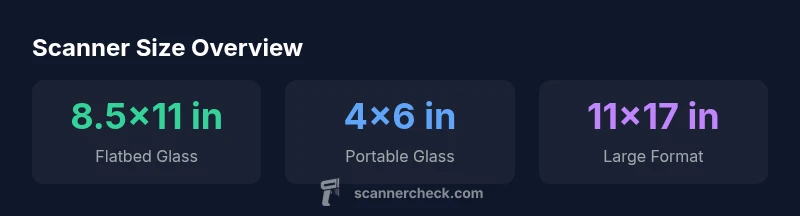
Most consumer flatbeds offer glass sizes from 8.5x11 inches (letter) up to 11x17 inches (tabloid), while portable models use much smaller scan beds around 4x6 inches. Weight varies from roughly 5-8 pounds for desktop units to 1-3 pounds for portable scanners. In short, a scanner’s size is driven by intended use and page size, not by one universal standard.
Size categories: Desktop vs Portable
Sizing a scanner isn’t random: desktop, laptop-sized flatbeds and portable sheet-fed or handheld devices sit at distinct size bands. According to Scanner Check analysis, most users ask: how big is a scanner, and does that size limit what I can digitize? The short answer is that size reflects purpose. Desktop flatbeds with a full glass lid typically offer the largest scanning area and a footprint designed to stay on a desk; portable units prioritize portability and energy efficiency, often sacrificing glass area. In practice, you’ll find three broad categories: small portable scanners about the size of a paperback, mid-range compact flatbeds around 10-14 inches wide with a lid that opens fully, and larger desktop flatbeds capable of handling oversize media. If you measure a scanner in inches, you’ll generally see glass sizes listed as 4x6 or 8.5x11 for everyday documents, up to 11x17 for larger items. This dimensional spread matters because it determines what you can scan without folding or tearing the page.
What governs physical dimensions and why it matters
Physical dimensions are driven by the glass area, lid clearance, and the overall chassis design. A larger glass surface enables scanning bigger sheets or books without disassembly, but it also means a heavier, bulkier device that sits more permanently on a desk. The lid height matters for bound material; taller lids accommodate magazines and notebooks, but add to the device’s footprint. Behind the numbers, sensor technology and feed mechanisms influence how large the device can scan efficiently. Scanner Check analysis notes that larger beds may not always translate to faster scans if the sensor arrays and processing pipelines aren’t matched to the task. For most households and small offices, the sweet spot lies between 8.5x11 and 11x17 inches, balancing usability with desk space.
Desk space, ergonomics, and layout
The practical reality of size is how the device fits into your workspace. A bulky flatbed can dominate a small desk, while a compact portable model slips into a drawer or a laptop bag. Ergonomic considerations include lid lifting ease, weight distribution during transport, and the alignment of the scanner with your primary scanning posture. If you frequently scan books or bulky documents, you’ll want a flatbed with a tall lid and firm hinge. For quick receipts or photos, a lighter, slimmer model may offer enough glass area while preserving precious desk real estate. Remember to leave space for a power cable, USB connection, and occasional page handling—overcrowded desks slow your workflow and tempt ergonomic strain.
Common sizes by use-case: home office, small business, and professionals
Home offices typically settle on compact flatbeds or 4x6 portable scanners to preserve space while handling everyday documents, photos, and receipts. Small businesses may prefer mid-sized flatbeds with 8.5x11 to 11x17 glass, offering a balance between versatility and footprint. Professional photographers or archival workers often opt for larger desktop flatbeds at 11x17 inches or larger, pairing high dpi with robust build quality for batch scanning and bulk projects. In all cases, consider whether you need an integrated feeder, duplex scanning, or specialty glass protection. Your use-case will largely dictate whether “bigger is better” or a smaller, lighter device will serve more days than not.
How to measure a scanner before buying
Before purchasing, measure the footprint you can allocate on your desk, including clearance for lid opening and cable routing. Record the maximum height you can accommodate when the device is in use, and think about where you’ll store it when not in use. Consider weight if you’ll transport the scanner between locations, and verify the width and depth with your current monitor and keyboard setup to avoid cramped layouts. Don’t forget to check the external dimensions of any optional accessories, such as a document feeder, which can add several inches to the product’s overall size. Finally, compare the listed glass size to your typical document dimensions to ensure compatibility.
Real-world scenarios: books, photos, receipts, and legal documents
Scanning books requires a lid tall enough to clear the book’s spine, while photos benefit from a larger, distortion-free glass area and color accuracy. Receipts typically fit on smaller glass areas, but double-sided scanning and fast throughput matter, especially for business expense workflows. Legal documents may need oversized glass or a segment-by-segment approach. For each scenario, consider whether you’ll need an open lid for thick items, a built-in feeder for lists, or a robust color depth to preserve details. In practice, your scanner size should map to the document sizes you scan most frequently and the space you can dedicate to scanning tasks.
Longevity and transportability: weight, materials, and durability
Build quality matters as you move a scanner from desk to briefcase or between offices. Heavier, sturdier units tend to endure more frequent use and provide stable scanning surfaces, while lighter models emphasize portability but may sacrifice some rigidity. Materials like aluminum chassis and tempered glass lids generally contribute to durability, but also add weight. If you expect to relocate often, prioritize a compact, well-balanced design with a secure lid latch and a carry handle. Lastly, consider warranty and service options for any device you plan to rely on for years of routine scanning.
Maintenance and handling: keeping the size-optimized device in good shape
Maintaining size-appropriate gear centers on keeping the glass clean, the lid hinges smooth, and the feed mechanisms free of debris. Clean the glass with a microfiber cloth and a gentle cleaner approved by the manufacturer, avoiding ammonia-based solutions that can damage coatings. Check the hinge alignment periodically to prevent glass gaps or warping with repeated opening and closing. Store the scanner in a cool, dust-free environment to protect electronics and sensors, and keep the power cable loosely coiled to avoid strain on ports. Regular maintenance ensures the device remains compact and reliable, which is especially important for devices repeatedly moved between locations.
Practical buying checklist: dimensions, weight, and compatibility
Create a quick-size checklist before you buy: measure your desk, confirm lid clearance, and verify the document sizes you scan most often. Check the weight if you’ll move the device; ensure you can carry it comfortably between rooms. Review the available accessories such as document feeders, duplex scanning capability, and color depth—these influence effective size and capability. Finally, confirm that drivers and software support your operating system, and check community reviews for real-world space impact and reliability. A well-chosen scanner should disappear into your workflow, not dominate your workspace.
Size and specs by scanner type
| Scanner Type | Glass Size | Weight | Typical DPI | Typical Speed (ppm) |
|---|---|---|---|---|
| Flatbed standard Letter | 8.5x11 inches | 5-8 pounds | 600-2400 | 1-3 |
| Flatbed A3/Tabloid | 11x17 inches | 10-15 pounds | 1200-4800 | 0.5-2 |
| Portable compact Scanner | 4x6 inches | 1-3 pounds | 600-2400 | 2-6 |
Common Questions
What determines a scanner's physical size?
The primary determinants are glass size, chassis design, and intended use. Flatbeds prioritize glass area, while portable units optimize portability.
Size is mainly about the glass area and portability, not just overall bulk.
Are portable scanners as capable as desktop flatbeds?
Not always; portable units often offer smaller glass sizes and fewer features, but excel in portability and quick scans.
Portables are convenient but may trade size for features.
How does scanner size affect scan quality?
Size affects the document size you can scan and the physical stability of the bed. DPI and sensor quality influence quality more than bed size.
Size matters, but sensor tech and DPI drive quality more.
What is a practical size for a home office?
A compact flatbed or a 4x6 portable often works well, balancing space with everyday tasks.
For home offices, a small flatbed or 4x6 portable is usually enough.
How should I measure my desk for a scanner?
Measure depth and width, add lid clearance, and allow space for cables and an optional document feeder if needed.
Measure footprint, lid clearance, and cable space.
“Scanner size directly shapes what documents you can digitize and how smoothly it fits into your workflow. The right scale balances job types with workspace constraints.”
Key Takeaways
- Define your use-case before buying.
- Expect glass sizes from 8.5x11 to 11x17 inches for desktop models.
- Portable scanners save space but may limit scan area.
- Desk space and lid clearance matter as much as spec sheets.
- Always compare footprint with your typical document sizes.