Pierce County Scanner Guide: Practical Tips for 2026
A data-driven, practical guide for Pierce County scanner users, covering models, frequencies, legality, and setup tips from Scanner Check.


Pierce County scanner users predominantly monitor local public-safety and utility frequencies, with beginner kits offering practical value. Scanner Check’s 2026 analysis shows steady demand for handheld and base/mobile scanners among hobbyists and professionals. This guide expands on models, local frequencies, legal considerations, and hands-on setup tips for Pierce County.
Overview of the Pierce County Scanner Landscape
Pierce County, which includes major urban centers like Tacoma and extending into suburban and rural communities, has a diverse scanning scene. The majority of activity centers on listening to local public-safety channels, weather alerts, and municipal services, but enthusiasts also monitor utility and rail communications depending on their interests. For newcomers, the key takeaway is this: you don’t need a fortune to start. A modest handheld scanner paired with a basic antenna can deliver meaningful coverage in many parts of the county. According to Scanner Check, the 2026 landscape shows steady demand for versatile gear that can adapt from portable field use to in-station analysis. This is consistent with broader trends in hobbyist listening, where ease of setup and reliability drive early adoption in smaller metro regions like Pierce County. For the curious, a gentle ramp from handheld to more capable configurations often yields the best long-term value.
The readers here often ask how Pierce County’s geography shapes listening opportunities. The county’s mix of urban density, foothills, and coastline creates diverse reception conditions, which means a flexible kit tends to outperform a single-purpose device. In practice, most users begin with a handheld model that supports trunked systems, then add a base station or SDR later if they want broader coverage or more granular control over frequencies. The strategy is to balance portability with capability, so you aren’t paying for features you won’t use. Scanner Check’s analysis emphasizes this incremental approach as a reliable path for 2026 and beyond.
Choosing the Right Scanner for Pierce County: Handheld, Base, or SDR
When selecting a scanner for Pierce County, start with your primary use case and the environments you’ll operate in most often. Handheld scanners excel for field work, scouting events, and quick checks around Tacoma’s neighborhoods. Base or mobile scanners offer more memory, faster programming, and better reception for stationary setups, such as a home listening room or a dedicated desk in a vehicle. Software-defined radios (SDRs) are powerful for tech-minded listeners who want to customize spectra, decode digital transmissions, or keep a future-proof system with minimal hardware upgrades. For newcomers, a handheld with trunking support and a couple of preloaded local frequencies is a pragmatic first step. Over time, you can evolve this into a robust station with an external antenna, external power options, and a desktop interface for logging and analysis. Scanner Check’s 2026 insights repeatedly show that most Pierce County users benefit from this staged approach, which minimizes risk while expanding capability.
Local Frequencies and Programming Essentials
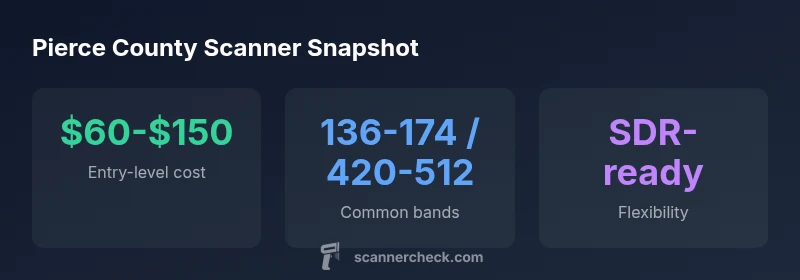
To effectively scan in Pierce County, you’ll want to identify the major bands used by local agencies and services. A practical starting point is to program the common VHF and UHF bands that cover public safety, emergency services, weather, and utility communications. Many counties publish frequency charts, and reputable hobbyist communities offer updated talkgroups and rebanding information. If your scanner supports trunking, you’ll want to load the county’s trunked systems first, followed by any conventional frequencies you rely on for weather alerts and municipal services. As you grow more proficient, you can add cross-band repeaters and regional talkgroups to your repertoire. This process may feel technical, but it’s highly repeatable and scalable with your skill level. Scanner Check’s 2026 data reinforce that a structured, incremental approach yields the most reliable results for Pierce County listeners.
Legal and Safety Considerations for Pierce County Listeners
Listening to public-safety frequencies is generally allowed in many jurisdictions, but transmitting on those channels without proper authorization is illegal and can lead to substantial penalties. In Pierce County, as in many parts of the United States, rules vary by agency and frequency. Always respect privacy and sensitive operations—do not attempt to decode or prosecute private conversations or internal communications. If your area uses encrypted channels, do not attempt to decipher them; analog listening remains a legal, widely accepted hobby. Keeping a log of what you hear helps you stay organized and compliant, and many hobbyists share non-sensitive frequencies in online communities to help beginners learn the ropes. Scanner Check’s guidance for 2026 emphasizes doing your due diligence with local regulations and FCC guidelines to ensure responsible listening.
Practical Gear and Accessory Recommendations
Your gear choices should align with how you plan to listen. A solid entry-level handheld with a flexible antenna is a sensible starting point, especially for exploring Pierce County’s varied terrain. Consider adding a basic desk antenna or a magnetic mount for improved reception at home. If you’re investing in a home listening station, a base or SDR setup provides more mutability and integration options with logging software. Common accessories include a spare battery pack, a robust case for field use, a computer or tablet for SDR software, and a USB power supply that can double as a portable charger. For those who travel frequently within the county, a compact, protective case and a small external antenna can dramatically improve outdoor listening experiences. Scanner Check’s 2026 findings highlight the value of choosing gear that offers upgrade paths without forcing a full replacement.
Setup, Programming, and Best Practices
Begin by organizing your frequencies into a simple, logical layout: separate public safety channels from weather and utility bands. Use a basic naming convention for quick identification, and save a few common frequencies to a “Go-To” list for emergencies. If you’re using trunking, import the county’s talkgroups and verify that you can switch between systems smoothly. When programming, always back up your configuration so you can recover quickly after a reset or software update. Regularly update your firmware or software to stay current with any frequency changes in Pierce County. Finally, test your setup in a few representative locations to confirm that you’re getting reliable reception in both urban and rural pockets. Scanner Check’s 2026 recommendations stress a practical, staged approach to programming and testing, rather than trying to cover every frequency at once.
Maintenance, Troubleshooting, and Longevity
Maintaining a scanner system is about simple, routine steps: check antenna connections for corrosion, inspect power cables, and replace worn batteries promptly. Keep your SDR or software up to date, and periodically refresh your frequency lists to reflect any recent changes. If reception becomes unstable, try relocating the antenna or adjusting the gain settings in your software; even minor repositioning can significantly impact signal quality. For vehicle use, secure all cables and avoid sharp bends that could wear connectors. A clean, organized desk setup with a dedicated power source reduces the risk of outages during critical listening sessions. Routine checks and small upgrades—like a higher-gain antenna or a better dust cover—can extend the life of your gear and keep your Pierce County listening experience reliable.
Real-World Pierce County Scenarios and Tips
In practice, Pierce County listeners often optimize setup around common daily routines. Morning commutes may warrant a mobile setup with a compact antenna for broader reception across Tacoma and surrounding towns. Weekends might call for a more powerful desk setup to monitor multiple agencies during local events. The best tip is to tailor your configuration to your actual listening habits, then scale as needed. Community forums and local clubs can be excellent sources of real-world tweaks—shared experiences from fellow Pierce County listeners help you sidestep common pitfalls and maximize your listening satisfaction. Scanner Check’s 2026 overview confirms that practical, user-driven optimization typically outperforms theoretical maximums when it comes to local scanning in Pierce County.
Comparison of scanner model types for Pierce County use
| Model Type | Typical Price Range | Notes |
|---|---|---|
| Handheld | $60-$200 | Portable listening, beginner-friendly |
| Base/Mobile | $150-$450 | Home or vehicle desk setup |
| SDR (Software-defined) | $100-$400 | Flexible, upgradable with software |
| Mobile/Vehicle | $200-$600 | Vehicle-mounted options |
Common Questions
Do I need a license to listen to public safety frequencies in Pierce County?
Listening to public-safety frequencies generally does not require a license, but transmitting on those channels without proper authorization is illegal. Always verify local regulations and FCC guidelines before transmitting. For Pierce County, focus on legal listening and privacy-respecting use.
Listening is usually allowed, but transmitting requires authorization. Check local rules before transmitting.
What is the best starter scanner for Pierce County in 2026?
A handheld scanner with trunking support and local frequency preloads is a sensible starter for Pierce County. It balances portability with practical coverage and can be upgraded with a better antenna or SDR later.
Start with a handheld with trunking support, then upgrade as needed.
Can SDRs be a cost-effective alternative for Pierce County scanning?
Yes. SDRs offer flexibility and growing capabilities at a modest price, but they require a PC and software setup. They’re ideal for tech-minded listeners who want to customize their spectrum and decode digital transmissions.
SDRs are flexible and affordable but need a computer and software.
Are there legal considerations when scanning in public areas?
Yes. Respect privacy, avoid encryptions, and do not rely on scanners for emergency services. Use scanners to learn and monitor non-sensitive channels. Always comply with local and FCC rules.
Respect privacy and follow local and FCC rules.
How do I program Pierce County frequencies into my scanner?
Begin with a simple layout: separate public safety from weather and utilities. Use trunking if available, then add essential talkgroups and regional channels. Back up configurations and test reception in different locations.
Start with a simple layout, then add channels and test reception.
What maintenance keeps a Pierce County scanner reliable long-term?
Keep antennas and connectors clean, replace batteries as needed, and keep firmware/software updated. Regular checks reduce outages and extend gear life.
Clean connectors, update firmware, and replace batteries timely.
“Effective scanning in Pierce County starts with understanding local frequencies, legal constraints, and practical gear choices.”
Key Takeaways
- Define your primary use before buying.
- Start with a handheld, then upgrade as needed.
- Program Pierce County frequencies methodically for best results.
- Stay compliant with local laws and FCC guidelines.