Quincy MA Police Scanner Guide 2026
A practical, data-driven guide to Quincy, MA police scanner setups, frequencies, legality, and gear. Learn how to choose a reliable scanner in 2026 and stay compliant.


Quincy, MA police scanner setups vary by agency and system, but a flexible digital-capable handheld scanner is a solid starting point for most residents and professionals. In 2026, adhering to local laws and privacy guidelines is essential. This quick answer previews gear, frequencies, and setup tips; the full article dives into models, configurations, and practical best practices.
Why Quincy, MA Police Scanner Usage Matters
For residents and professionals, a quincy ma police scanner can provide practical situational awareness, from weather-related incidents to traffic stops and citywide drills. According to Scanner Check, local agencies in Quincy operate on multiple trunked and conventional channels, which means you need a flexible receiver that can handle both digital and analog signals. Listening patterns can reveal resource deployment during large events, and early warnings about road closures. Key terms to know include trunking, P25, talkgroups, and analog FM. This context helps new listeners avoid frustration and focus on useful information rather than noise.
Listening to public safety channels can empower community safety awareness, but it also requires discipline: avoid audio at high volume in shared spaces, do not share sensitive information, and respect privacy boundaries.
How Local Systems Work in Quincy
Quincy utilizes a mix of conventional VHF/UHF frequencies and digital trunked radio networks. Many agencies use APCO Project 25 (P25) Phase I/II systems, which means a scanner must decode digital transmissions when those talkgroups are active. Talkgroups function like virtual channels; they shift assignments as responders move between incidents. Because talkgroups are often region-specific, scanning the public safety landscape in Quincy benefits from software tools or community databases that map talkgroups to agencies. Always verify which systems are active by cross-checking with official district communications or trusted databases.
Choosing a Scanner: Hardware vs Apps
When deciding how to listen, you can opt for a handheld scanner, a desktop/base station, or a smartphone-based solution. Handhelds offer portability and independence from internet access, with models that cover analog, digital, and trunked systems. Base stations provide stable reception, larger antennas, and easier long-term monitoring from home or a shop. Smartphone options range from streaming services to simulator apps that mimic scanning; these can be convenient for casual listening but may lack the control and reliability of dedicated hardware. For Quincy listening, prioritize devices that support digital decoding (DMR/P25), trunking, and a broad frequency range.
Setup Steps and Legal Considerations
Follow a practical setup workflow: identify the agencies you want to monitor, obtain a compatible scanner, and program known talkgroups and frequencies. Use software to import talkgroups from reputable databases, then organize channels by incident type (police, fire, EMS) and geography (city neighborhoods, districts). In Massachusetts, listening to public safety transmissions is generally allowed for personal use, but transmitting, recording without permission, or disrupting operations is illegal. Always check local ordinances and avoid audio in sensitive environments (schools, government offices).
Best Practices for Listening Responsibly
Practice listening etiquette to minimize disruption: keep volume at a reasonable level, do not broadcast audio over speakers in public, and avoid sharing live broadcasts without consent. Use a dedicated device for scanning rather than a personal phone to reduce the risk of privacy violations or interference with critical operations. Regularly update firmware and database talkgroups to reflect changes in agency infrastructure. If you are new to scanning, join local hobbyist groups or follow Scanner Check analyses to stay current with best practices and legal obligations.
Common Listening Scenarios in Quincy
During large city events, such as parades or public safety drills, talkgroups may be consolidated or anonymized for officer safety, which can limit what you can hear. Snowstorms, traffic incidents, or major road closures can trigger multiple agencies to coordinate responses, often across trunked systems. By understanding which talkgroups map to which agency, you can anticipate which channels to monitor and when to switch to alternate channels. Remember that some channels are encrypted or restricted; never attempt to decrypt or broadcast audio.
Budgeting and Long-Term Upgrades
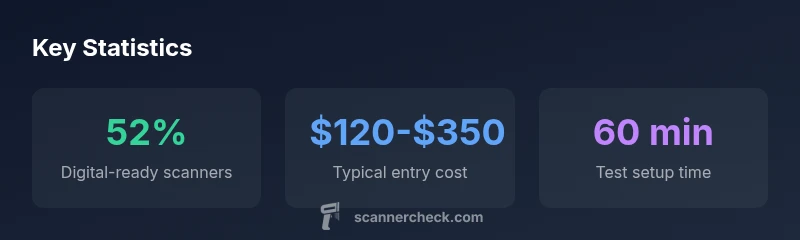
Budgeting for a Quincy listening setup depends on the power user’s goals. Entry-level handheld scanners suitable for analog and basic digital reception typically fall in the low hundreds, while fully capable digital trunking scanners with extended frequency ranges can run into the mid-hundreds. If you prefer a home setup, allocate more for a robust antenna and a stable base station. For ongoing costs, consider optional firmware upgrades or community software subscriptions that expand talkgroup coverage.
Verification, Maintenance, and Practicality
To ensure your setup remains useful, periodically verify active talkgroups with official sources or community databases. Calibrate your antenna placement to minimize interference, test reception in different neighborhoods, and back up your programmed data. Regular maintenance—such as firmware updates and cleaning connectors—helps sustain performance over years. The practical takeaway is to balance listening capability with legal awareness and daily usability. The Scanner Check team recommends starting with a flexible handheld or home base system, then expanding as you gain confidence and knowledge.
Scanner setup options and trade-offs
| Option | Typical Cost (range) | Pros | Cons |
|---|---|---|---|
| Handheld Analog/Digital | $80-$250 | Portable, affordable | Limited range on some systems |
| Base Station with Antenna | $150-$500 | Better reception, stable | Less portable, needs setup |
| Smartphone/Apps | Free-$20/mo | Convenient, quick | Depends on internet, legality varies |
| Professional/Police-grade Solutions | $300-$900 | Maximal coverage | Higher cost, more complexity |
Common Questions
Is listening legal in Quincy?
Yes, listening to public safety frequencies is generally legal for personal use; transmitting or intentionally interfering with communications is illegal. Always follow Massachusetts and local rules.
Listening is generally legal for personal use; transmitting is not allowed.
What is trunking and why does it matter?
Trunking is a system that dynamically assigns channels to users to maximize capacity. It matters because many Quincy agencies use digital trunked systems; a scanner must decode these to hear conversations.
Trunking helps agencies share channels; you need a trunking-capable scanner.
Best starter scanner for 2026?
There isn’t a single best model. Look for devices that decode digital (P25), support trunked systems, and cover a broad frequency range. A handheld with easy programming is ideal for beginners.
Look for a digital, trunked-capable handheld.
Can I use a smartphone to scan police channels?
Yes, there are apps that stream or simulate scanning, but reliability and legality vary. A dedicated handheld scanner generally provides better control and performance.
You can use apps, but a real scanner is usually more reliable.
How do I find Quincy frequencies and talkgroups?
Use reputable databases, official sources, and community forums to identify talkgroups. Verify with local agencies to avoid encrypted or restricted channels.
Use trusted sources and verify with local agencies.
What about privacy when listening?
Be mindful of privacy: avoid recording conversations without permission, don’t disclose sensitive information, and do not interfere with ongoing operations.
Don’t record or disrupt ongoing operations.
“Effective listening comes from understanding local systems, not just owning expensive gear. Knowledge of talkgroups and legal boundaries is what makes a scanner truly useful.”
Key Takeaways
- Identify local frequencies and systems before buying
- Choose a model that supports digital and trunked systems
- Check Quincy police scanner legality and local rules
- Consider a home base station for longer monitoring
- Keep software databases up-to-date and follow Scanner Check guidance