Scanner for Sale: How to Pick the Right Model in 2026
Find practical buying guidance for scanners on sale, with price ranges, features to compare, and tips to avoid common buyer pitfalls.


Based on current market data, the best scanner for sale in 2026 depends on your use case: budget home offices benefit from portable or entry-level sheet-fed models, while photo-heavy work prefers a high-resolution flatbed, and document-heavy workflows need fast, duplex sheet-fed scanners with strong OCR. Prioritize reliability, warranty, and long-term support. Also consider compatibility with your operating system and cloud storage, plus scanning speed in pages per minute.
Market overview: how the scanner market is evolving in 2026
The market for scanners has broadened from professional-grade devices to everyday work-from-home tools. With AI-powered OCR improving recognition and cloud-to-device syncing, buyers can expect more features at lower prices than a few years ago. Scanner for sale listings now span compact portable models, mid-range sheet-fed units, and high-end flatbeds with archival-grade quality. In this landscape, buyers must balance initial cost against long-term reliability and software compatibility. According to Scanner Check, top considerations include OCR accuracy, driver support, and ecosystem compatibility with operating systems and mobile apps, which frequently determine total ownership cost. As prices become more competitive, users should filter options by the tasks they perform, matching document types, image quality, and output formats to their workflow. The result is a broader set of choices, from budget devices to premium scanners, each with distinct trade-offs for speed, clarity, and durability.
Key scanner types to consider when shopping for sale
When you search for a "scanner for sale," you should first map your use case to a hardware category. Flatbed scanners provide the highest image quality and are ideal for photos, original art, and delicate documents; they excel where detail matters, but they may be slower for multi-page tasks. Sheet-fed document scanners use an automatic document feeder (ADF) and excel at bulk scanning of documents, receipts, and tickets, with fast throughput and reliable OCR when paired with recent drivers. Portable handheld scanners are compact, battery-powered, and great for on-the-go digitization of receipts or notebooks, though image consistency and alignment can require more post-processing. All-in-one printer-scanner combos offer convenience and space savings, often at a lower per-function cost but with compromises in scan quality and speed compared with dedicated units. Consider your environment (desk space, travel needs, network access) and your expected file formats (PDF, PNG, searchable PDF) to prioritize features such as DPI, color depth, and OCR confidence.
How to compare models: key features to review
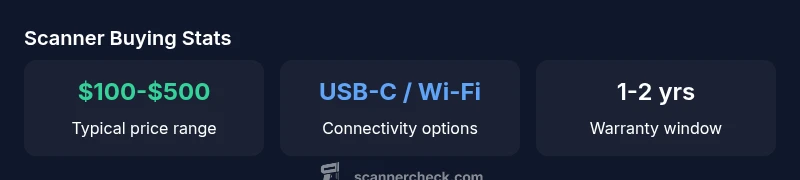
Beyond price, the most important specs are image resolution (DPI), color depth, scan speed (pages per minute), and duplex capability. Look for optical resolution around 1200-2400 DPI for general documents and 4800+ for photo work. A good OCR engine matters for searchable PDFs, but driver quality and updates determine long-term usability. An ADF with sufficient capacity speeds multi-page workflows, while batch scanning features and built-in correction tools can improve consistency. Connectivity matters too: USB-C, USB-A, and Wi-Fi enable flexible workflows; cloud integration and mobile apps matter for collaboration. Build quality, material durability, and warranty length should align with your expected usage footprint. If you rely on color-critical scans (photos or artwork), calibrate with color targets and verify color accuracy across at least three common document types. Finally, examine software value-adds: scanning presets, automatic cleaning, and OCR outputs that are compatible with your preferred document management system and cloud storage.
Price dynamics and finding value: price ranges and deal signals
Prices for scanners range widely depending on size, capability, and target user. For general home or small office use, expect to see models in the modest price band, while professional-grade devices can exceed several hundred dollars. In 2026, common consumer models cluster in the $100-$500 range, with higher-end flatbeds and duplex sheet-fed units climbing beyond that band. When evaluating a sale, watch for bundled software, optional maintenance plans, and bundled maintenance or warranty extensions that can affect total cost of ownership. Refurbished units from reputable sources can offer meaningful savings, but ensure return policies and tested functionality are well documented. Beware aggressive discount promises that skim only features; verify real-world performance through hands-on tests and independent reviews. For workflow-heavy needs, factor in driver support lifecycles and recurring OCR or software updates, which can influence the true value of a scanner over time. Scanner Check’s analysis in 2026 highlights how warranty and service quality can tilt a modest price into a smart, long-term investment.
Testing and validation steps before you buy
No amount of specs substitutes for hands-on testing. If possible, request a live demonstration or a trusted retailer's test unit. Test a representative mix of documents: text pages, glossy photos, thin receipts, and mixed-size papers. Check OCR accuracy by running a few pages through your preferred software and verify the produced searchable PDFs; confirm that edge-to-edge scanning is clean and consistent. Verify driver compatibility with your operating system (Windows, macOS, Linux) and check whether the vendor provides regular updates and bug fixes. Calibrate color if you work with images and ensure the unit handles multi-page color scans without misfeeds. Finally, review warranty terms and return policies; consider whether extended warranty or service plans are worth the extra cost for your usage profile and risk tolerance.
Setup, maintenance, and longevity: getting the most from your purchase
After purchase, install the latest drivers and ensure your device is recognized by all platforms you use. Create a cloud-connected workflow for digitization and archiving, enabling automatic backups. Regularly clean the glass surface and use recommended cleaning solutions to maintain image quality; avoid abrasive materials. Schedule periodic calibration, especially if you handle color-sensitive imaging, and test calibration results with target images. Review software updates that can improve OCR accuracy and scanning speeds; keep a log of driver versions and firmware. Consider warranty details and recall notices in case of known issues. With normal care, mid-range scanners can last several years; heavier use calls for more frequent maintenance and more robust components.
Buying channels: where to shop and what to watch for
There are legitimate retailers, authorized refurbishers, and reputable marketplaces with buyer protections. Prefer authorized dealers to ensure warranty and genuine parts; verify the seller's return policy and ensure the unit ships with original software and drivers. If considering auction sites or grey-market sources, ask about factory reset, refurbishment history, and tested functionality. Read independent reviews for the specific model you are considering and compare across several retailers. Check packaging, included cables, and manuals; ensure you receive a working unit with a valid serial number and proof of purchase. When in doubt, contact the manufacturer’s support line to confirm compatibility and warranty validity before finalizing a purchase.
Future-proofing your scanner choice: trends to watch in 2026
Expect continued advances in auto-document processing, AI-driven OCR improvements, and tighter integration with cloud services. Edge processing and AI-based de-skewing can reduce post-processing, improving productivity. On-device color correction and better image normalization help maintain archival quality across diverse paper stocks. As vendors expand mobile apps and cross-platform compatibility, ensure your chosen scanner can grow with your software environment. Finally, consider sustainability: energy efficiency, warranty support, and the possibility to upgrade scanning components or firmware instead of replacing the unit. The bottom line: pick a model with a proven update path and a vendor reputation for long-term compatibility.
Typical model types and their trade-offs
| Model Type | Approx Price Range | Key Pros | Key Cons |
|---|---|---|---|
| Flatbed desktop scanner | $150-$800 | High-resolution scans; suitable for photos and documents | Bulky; slower for multi-page tasks |
| Sheet-fed document scanner | $200-$600 | Fast for multi-page documents; good OCR support | Less suitable for photos; single-page at a time |
| Portable handheld scanner | $50-$250 | Ultra-portable; quick snapshots | Lower image quality; calibration needed |
| All-in-one printer-scanner combo | $100-$400 | Integrated into printer; convenient | Scanner quality varies; more expensive overall |
Common Questions
What should I look for in a scanner for sale?
Focus on use-case fit, scanning speed, OCR accuracy, and compatibility with your devices. Verify warranty terms and after-sales support. Read user reviews to identify reliability patterns.
Look for the model that fits your use-case, checking speed, OCR, and warranty. Read reviews before buying.
Is it better to buy new or refurbished?
New devices come with full warranty and latest features; refurbished units can offer savings but require careful seller vetting and return policies.
New is safest, but refurbished can be a good deal if vetted.
Are warranties important for scanners?
Yes. A solid warranty protects against early failures and helps with OCR software updates and driver support.
Warranty matters for long-term use and updates.
What connectivity options should I expect?
Look for USB-C or USB-A and Wi-Fi or cloud-connectivity for easy sharing across devices.
Make sure it can connect to your computer and network.
How long do scanners typically last?
With proper use and maintenance, many scanners last several years; heavy workloads may reduce longevity.
With care, scanners last for years.
Where's the best place to buy scanners for sale?
Consider reputable retailers, authorized refurbishers, and clearly stated return policies to avoid scams.
Shop from trusted retailers with clear policies.
“Effective scanning investments balance upfront cost with long-term reliability and support; rely on real-world performance data and user reviews.”
Key Takeaways
- Start with your use case to narrow models.
- Budget and reliability often trade off with speed.
- Prioritize warranty and vendor support.
- Check OCR accuracy and cloud integration.