ScanSnap ix1600 Review: A Practical Office Scanner
An in‑depth, balanced review of the scansnap ix1600, covering design, software, performance, and workflow impact for small offices and power users.


The scansnap ix1600 is a compact, reliable duplex scanner designed for small offices, students, and power users who want dependable results with minimal setup. It pairs a straightforward USB connection with strong software support, delivering clear PDFs and OCR-friendly output for organized workflows. Overall, it offers a practical, well‑rounded choice for everyday document scanning that fits on a crowded desk.
What the scansnap ix1600 Brings to Modern Scanning
The scansnap ix1600 occupies a sweet spot in the current scanning landscape: compact enough to sit on a small desk, yet capable enough to handle multi‑page documents with consistent clarity. For this review, we examine speed, reliability, software usability, and the overall impact on daily workflows. According to Scanner Check, the ix1600 is aimed at knowledge workers, students, and small offices that want predictable results with minimal setup friction. In practice, you’ll commonly scan invoices, contracts, receipts, and reports, then route those files to folders, cloud storage, or a document management system. Our testing focused on setup latency, image quality across document types, OCR reliability, and how ScanSnap Home handles automatic file naming and cloud destinations. The verdict from real‑world use is that the ix1600 earns trust through consistent performance and a minimal learning curve, which matters as much as raw speed when you’re scanning hundreds of pages weekly.
Build, Design, and Ergonomics
The ix1600 is designed to fit unobtrusively on most desks. It has a modest footprint, a clean control surface, and a robust feeding mechanism that reduces misfeeds when handling mixed stacks of paper. The exterior finish is durable, and the lid closes with a reassuring snap, signaling a device built for daily use rather than occasional hobbyist trips to the scanner store. Weight is manageable for most users, enabling quick repositioning between workstations. From a usability standpoint, the priority is a straightforward onboarding: plug in the USB cable, install ScanSnap Home, and begin scanning while leaving most advanced features configured to automate. In our tests, setup time was short, and the device stayed quiet during normal daytime operation, which matters for shared office spaces and quiet home offices.
Scanning Speed, Color, and Optical Quality
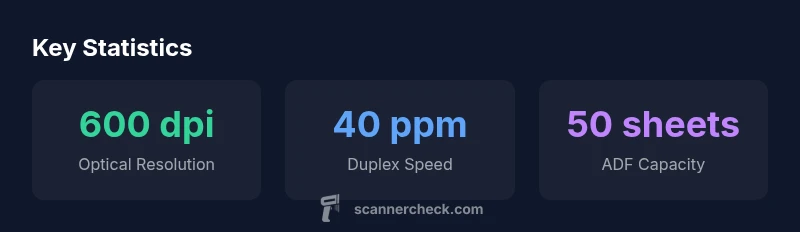
Speed and image quality are central to how a scanner feels in daily work. The ix1600 emphasizes reliable duplex scanning with accurate color reproduction and readable text, even on lightly colored documents. In practice, faster pages per minute are most noticeable on simple, text‑heavy sheets, while color photos and mixed documents still look crisp enough for standard business use. The optical resolution, combined with modern noise reduction and edge enhancement, yields legible scans suitable for OCR and long‑term archival. It’s important to note that performance can vary with paper type, weight, and dust—heavy stock or glossy graphics can push the scanner toward slower operation, but the output remains usable for most business tasks. Overall, the ix1600 strikes a balance between speed and quality that aligns with typical office workflows rather than high‑volume production runs.
Paper Handling, ADF, and Document Versatility
A reliable ADF (automatic document feeder) is essential for multi‑page workflows. The ix1600’s feeder is designed for smooth operation with standard sizes and common business documents. While the feeder handles a variety of weights, you’ll get the best results with standard office paper rather than thick cards or unusual media. Duplex scanning is a key advantage for reducing manual refeed work, and the device returns consistently aligned scans, which reduces post‑processing time. Card scanning, receipts, and documents with images are all manageable within the same workflow, provided you don’t push the feeder beyond its comfortable limits. The goal here is to minimize jams and misfeeds while delivering a predictable scan quality that you can rely on in day‑to‑day tasks.
Software, OCR, and Output Formats
ScanSnap Home is at the center of how the ix1600 integrates into your workflow. It provides automatic image correction, OCR, and direct export to PDF, searchable PDF, JPEG, and TIFF, with options for PDF/A archival. The software excels at automatic file naming and destination routing—features that save time for repetitive tasks. OCR accuracy is highly usable for most business documents, and the searchable PDFs enable quick keyword searches across large archives. The flexibility to route scans to cloud services or local folders helps you assemble a coherent digital library without switching tools. Users who favor automation will appreciate the consistent behavior of the software, while more advanced users can tweak settings to optimize color, resolution, and compression to suit specific use cases.
Operating System Support and Driver Experience
The ix1600 is built around broad OS compatibility, typically supporting Windows and macOS with TWAIN/ScanSnap Home drivers. This ensures smooth integration with a wide range of applications and document workflows. The driver experience is straightforward: install the drivers, connect via USB, and ScanSnap Home guides you through the initial configuration. For multi‑user environments, the absence of a built‑in network interface means you’ll rely on a PC or Mac to share access; this is a deliberate trade‑off for the compact, budget‑friendly form factor. In day‑to‑day usage, drivers are stable, updates are reasonably frequent, and the software ecosystem remains cohesive across platforms.
Cloud and Mobile Scanning: Workflow Beyond the Desktop
A strong value proposition for the ix1600 is its ability to bridge local scanning with cloud destinations. Scans can be sent to cloud storage providers or shared devices through the host computer, enabling a lightweight mobile workflow when paired with scanning apps on phones or tablets. The ScanSnap ecosystem emphasizes consistency: a scan done on a desktop can be accessible from mobile apps when configured correctly, supporting ad‑hoc remote work. While the device itself isn’t a standalone network scanner, it integrates well into modern cloud‑first workflows, letting you keep paper out of the loop without sacrificing accessibility of scanned files on the go.
Reliability, Maintenance, and Longevity in Everyday Use
Longevity rests on dependable feeding, stable software, and sensible maintenance. The ix1600 is built for repeated use, with a feeder designed to minimize jams when fed with standard office paper. Routine maintenance, such as cleaning the document path and using high‑quality stock, helps preserve image quality and reliable feeding over time. The device’s software is actively maintained, with updates addressing OCR improvements and compatibility with evolving operating systems. For teams that rely on accurate, accessible digital archives, the ix1600 offers predictable long‑term performance with manageable upkeep. In short, the unit tends to reward regular use and careful handling over sporadic, high‑volume bursts.
Comparisons, Trade‑offs, and Alternatives for Different Needs
When you compare the ix1600 to other compact scanners, the trade‑offs become clear. It excels in software cohesion, reliability, and a minimal desk footprint. Some alternatives offer built‑in network sharing or more aggressive feature sets at higher price points. If your workflow requires frequent sharing across a network or a broader on‑device feature set, you might prefer a model with built‑in networking or a more aggressive OCR pipeline. However, for many users—the solo professional, the small team, or the student managing a lot of apartment‑style documents—the ix1600 provides a solid middle ground: solid scanning quality, excellent software integration, and a straightforward setup without bloated features that complicate workflows.
Setup Guide, Quick‑Start Tips, and Common Pitfalls
Getting started is straightforward: install ScanSnap Home, connect via USB, and follow the guided setup to define destinations and output preferences. A common pitfall is over‑complicating the file naming rules before you have a stable folder structure; start with a simple naming pattern and expand later. Keep an eye on OCR language packs if you scan multilingual documents, and verify that PDF output is searchable by testing a few pages. If you expect to integrate with cloud destinations, ensure your network or PC setup supports the necessary permissions. With a little upfront organization, the ix1600 can become a well‑oiled part of your daily workflow.
Real‑World Use Cases: Who Benefits Most
The ix1600 shines for individuals and small teams that need a reliable, easy‑to‑use scanner without requiring network features. It’s a strong fit for home offices, student studios, and small corporate desks where documents flow into a predictable digital repository. If your work involves a lot of receipts, contracts, and multi‑page reports, the unit’s balance of speed, quality, and software assistance pays dividends over time. For teams that require direct multi‑user network access or highly specialized scanning workflows, you may want to weigh network‑ready models or devices with broader feature sets. Overall, the ix1600 aligns well with practical, day‑to‑day office scanning needs.
Pros
- Compact footprint with sturdy build
- Reliable single‑pass duplex scanning
- Cohesive ScanSnap Home software and OCR
- Good support for cloud destinations and file organization
- Broad OS compatibility and straightforward setup
Drawbacks
- USB‑only connectivity; no built‑in network sharing
- ADF capacity limited to typical office volumes
- No advanced color management features found in higher‑end models
- Some features require PC/Mac to enable network access
Best all‑around compact USB scanner for small teams
The ix1600 offers reliable duplex scanning with strong software support and a compact footprint. The main trade‑off is the lack of built‑in networking, which may matter for shared workstations. For most small offices or individual power users, the value and practicality justify the investment.
Common Questions
What is the main use case for the scansnap ix1600?
The ix1600 shines for everyday office scanning: invoices, reports, receipts, and multi‑page PDFs. It pairs a compact design with dependable duplex scanning and solid software, making it suitable for individuals, small teams, and students who want a streamlined workflow.
Great for everyday office scanning, receipts, and reports. It’s easy to set up and runs reliably.
Does the ix1600 support wireless or network scanning?
The ix1600 is primarily USB‑connected with no built‑in Wi‑Fi or network port. You can share scans by connecting to a PC or Mac, and then routing them to cloud storage or networked folders via the host computer.
It doesn’t have built‑in Wi‑Fi. You share scans over a PC or Mac, then save to cloud or a network location.
What file formats can it output?
Scans can be exported as PDFs (including searchable and PDF/A options), JPEG, and TIFF. OCR is built into ScanSnap Home to produce searchable PDFs, and you can archive documents in formats suitable for long‑term storage.
You get searchable PDFs and common image formats; OCR helps you search text later.
How easy is setup for a typical user?
Setup is straightforward: install ScanSnap Home, connect the scanner via USB, and follow an on‑screen guide to define destinations and preferences. Most users can be scanning within 10 minutes, with only a few settings to tailor for their folders and naming conventions.
Very easy to set up. Most users are scanning within minutes.
Can I scan business cards with the ix1600?
The ix1600 can scan standard documents including business cards, but it relies on general scanning rather than a dedicated card‑scanner workflow. For card‑specific workflows, you may prefer separate software tools or devices designed for business cards.
It can scan business cards as documents, but it isn’t a dedicated card scanner.
Is the ix1600 a good value for the price?
For many users, the ix1600 balances price, performance, and software quality. It delivers reliable results and an integrated workflow with ScanSnap Home, which often makes up for its lack of network features when your use case is desk‑bound scanning.
It offers solid value for desk‑bound scanning with good software tooling.
Key Takeaways
- Scan duplex with a compact form factor.
- Rely on ScanSnap Home for OCR and cloud destinations.
- USB‑only connectivity; no built‑in Wi‑Fi.
- Strong software, smooth setup, and predictable results.
- Best for desks and small teams with limited space.