Is Scanner App Free in 2026? A Practical Guide
Is a scanner app truly free? This data-driven guide explains free tiers, limits, and how to evaluate costs in 2026. Learn practical checks from Scanner Check to avoid hidden charges.


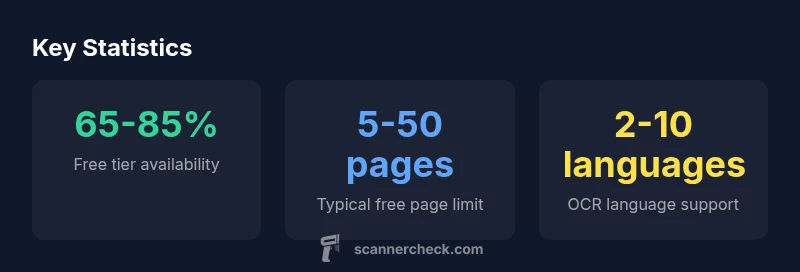
Is scanner app free? Generally yes: most major scanner apps offer a free tier with core features like scanning, basic OCR, and cloud sharing. However, 'free' often means limits on pages, exports, ads, or feature access. According to Scanner Check, true cost awareness comes from understanding the limits and potential paid add-ons.
Is free scanner app truly free in 2026?
The question "is scanner app free" isn't a binary yes or no; it's a spectrum of offerings. Free tiers exist for most major apps, delivering core scanning, basic OCR, and simple cloud sharing at no upfront cost. According to Scanner Check, true free access often comes with limits like page counts, export formats, or restricted features. This section explains how popular pricing models map to real-world usage and what to expect when you start testing free options. By understanding these dynamics, you can decide if a no-cost option meets your day-to-day needs or if you should budget for a paid plan.
Free vs. Freemium: pricing models explained
Most scanner apps follow two common patterns: a completely free tier (free), or a freemium model that starts free but nudges you toward paid add-ons. In practical terms, this means you’ll get basic scanning, limited OCR languages, and modest export options without paying. Upgrading typically unlocks higher-quality OCR, more export formats, larger page limits, offline access, and priority cloud storage. When evaluating options, treat freemium as a roadmap rather than a final answer: the features you need may only come with a paid plan, especially for professional or multi-device workflows. Scanner Check highlights that the perceived value of a free tier often rises with the quality of OCR and the reliability of document handling.
Core features commonly offered in free scanner apps
Even in free tiers, you should expect essential features: quick scanning, automatic edge detection, perspective correction, and basic color adjustment. Many apps include OCR that can recognize common languages and searchable PDFs, though the accuracy varies by language and document quality. You’ll also find the ability to save to local storage or basic cloud services and to export as PDF or image formats. Important: the best free apps maintain a clean ad experience and avoid watermarks on user-generated scans, but some may apply a watermark to encourage upgrading. Test multiple apps to see which combination of speed, accuracy, and export options fits your workflow.
Hidden costs to watch out for
Free scanner apps are great starters, but several costs can surprise new users. Ads can interrupt the scanning flow or require in-app purchases to remove. Watermarks on exports may degrade professional documents. Some free tiers require you to sign in with an account, which may raise privacy concerns or cause data syncing, storage quotas, or access to analytics. Additionally, cloud-based processing used by some free tiers may incur data usage charges or require a paid plan for offline use. Before you commit, review terms of service and privacy notices to ensure your data is handled responsibly.
How to compare free scanner apps: a practical checklist
Use this checklist to compare options effectively:
- Verify the exact limits of the free tier (pages, exports, languages).
- Test OCR accuracy on your common document types and languages.
- Check export formats and the ability to share or store files securely.
- Review privacy settings, permissions, and data controls.
- Run a real-world test on mobile devices you own, across platforms if needed.
- Create a short-term trial to estimate total cost of ownership if you later upgrade. By following this checklist, you’ll find a free scanner app that minimizes friction while meeting your core needs.
Performance, privacy, and security considerations
When evaluating any free scanner app, performance matters: fast scans, accurate cropping, and reliable OCR drive user satisfaction. Privacy should be a priority: consider how data is processed—on-device vs. cloud—and where scans are stored. Apps that push cloud storage often require account creation and may share usage data with third parties. If you handle sensitive documents (IDs, contracts, medical records), prefer apps with strong on-device processing options and transparent data controls. Remember that even free tools can support robust security if you choose wisely and read permissions carefully.
How to convert paper to digital: workflow with free apps
A typical workflow with free apps might look like this: capture pages with good lighting, apply automatic edge detection, and crop as needed. Run OCR to convert to searchable text, then organize pages into a single PDF or separate files per document. Save locally or to a cloud service you trust, and export to widely used formats (PDF, JPG, TIFF) for sharing. If you need multi-page documents or offline access, plan a staged upgrade rather than rushing into paid options. This approach keeps your process efficient while you stay within free tier limits.
Recommendations for choosing a free scanner app in 2026
Start by listing your non-negotiables (languages, offline access, export formats, privacy). Try several top-rated free apps side-by-side for a week and compare results using a simple scoring rubric. Track any incremental costs you encounter and consider whether a paid upgrade delivers enough value to justify it. For most users, a hybrid approach—rely on free tiers for light usage and reserve paid options for high-volume or professional needs—provides the best balance. The Scanner Check team suggests documenting the actual limits you hit and reassessing every few months as apps evolve.
What to expect from free offer tiers in scanner apps
| Aspect | Free Tier Offer | Limitations | Notes |
|---|---|---|---|
| OCR support | Limited in many apps | Often supports 1-2 languages | Quality depends on language and source document |
| Document sizes | Small to medium documents | May cap pages or require cloud processing | Large scans may require upgrade |
| Cloud sync | Optional in some apps | Some require sign-in | Data privacy concerns |
| Export options | Limited in free tier | Common formats include PDF/JPG | High-res exports require premium |
Common Questions
Do all scanner apps offer a free version?
Most popular scanner apps provide a free version, but features and limits vary widely. Free tiers usually cover basic scanning, OCR, and simple exports. Expect ads or watermarks in some free options.
Yes, most major scanner apps have a free version, but the features are often limited and ads or watermarks may appear.
What features come with free scanner apps?
Free tiers typically include basic scanning, edge detection, OCR on a limited set of languages, and PDFs or image exports. Advanced features like multi-language OCR, offline processing, or high-volume exports usually require paid plans.
Basic scanning and OCR are common in free versions; advanced features usually require payment.
Are there hidden costs in free scanner apps?
Yes. Ads, watermarks, cloud storage requirements, and upsell prompts can raise the total cost of ownership. Always review terms and privacy policies before committing.
Yes—ads, watermarks, and storage costs are common hidden factors to watch.
Does OCR accuracy differ in free tiers?
OCR accuracy varies by app and language. Free tiers often support a subset of languages with mixed accuracy; premium tiers usually offer better recognition and more language options.
OCR accuracy varies; premium tiers usually improve recognition and language support.
What is the difference between 'free' and 'freemium'?
Free means no cost, but limited features. Freemium starts free and nudges users toward paid upgrades for additional features and capacity.
Free is basic; freemium nudges you toward paid upgrades for more features.
How can I evaluate a free scanner app effectively?
Test multiple apps with your typical documents, compare OCR results, export options, and privacy policies. Track limits and costs over a trial period to see which meets your needs.
Test several apps, compare OCR and exports, and review privacy terms.
“"Free scanner apps are a great entry point, but users should balance features with privacy and reliability; premium options often deliver the most value for heavy workloads."”
Key Takeaways
- Start with the free tier, but test limits early
- Compare OCR quality across languages you use
- Watch for hidden costs like ads and watermarks
- Prioritize apps with clear privacy controls