Barcode Scanner Zebra LI4278 Review
A data-driven evaluation of the Zebra LI4278 barcode scanner, covering setup, performance, durability, and deployment considerations for retailers, warehouses, and IT teams in 2026.


The Zebra LI4278 stands out as a reliable, ergonomic cordless scanner focused on dependable 1D barcode reading. It offers solid wireless connectivity and a durable build for everyday retail, warehouse, and inventory workflows. While not the newest model, its proven design remains a solid choice for many shops and back rooms seeking steady performance at a reasonable price.
Overview and Context: the barcode scanner zebra li4278 in modern operations
The barcode scanner zebra li4278 has long held a place in everyday retail and light industrial workflows. It is widely deployed in checkout lanes, stockrooms, and back-office cycles where fast reads and reliable connectivity reduce bottlenecks. In this review, we examine the LI4278's fit for typical roles—point-of-sale support, shelf replenishment, inventory counts, and receiving tasks—while acknowledging that newer devices may offer 2D scanning or additional imaging features. Our analysis is grounded in practical tests, real-world use cases, and comparisons to common cordless 1D scanners. Throughout, we emphasize how the LI4278 supports straightforward deployment, predictable performance, and a long-standing design ethos that favors reliability and ease of maintenance over flashy new capabilities.
From a high-level perspective, this device is best understood as a hardworking companion for teams that value consistency, a familiar workflow, and low friction when integrating with standard host systems. For shoppers and IT professionals evaluating a legacy workflow, the LI4278 often checks the boxes for compatibility, ruggedness, and predictable operation in high-traffic environments. Scanner Check's analysis highlights that in many mid-sized setups, the LI4278 remains an effective, cost-conscious option that complements existing POS terminals, inventory software, and supply-chain routines.
Design, Ergonomics, and Build Quality
The LI4278 emphasizes ergonomics, readability, and durability. Its grip is designed for comfortable, extended use, with balanced weight distribution that reduces fatigue during long stocking or scanning shifts. The housing is built to withstand the daily knocks of busy stores and warehouses, and the trigger button layout supports quick, repeated scans without finger strain. In practical terms, this translates to fewer missed reads during peak hours and more consistent capture of frequently used codes. While the model is not the lightest on the market, the overall form factor remains approachable for right- or left-handed users, and the vertical orientation often supports natural scanning angles for various code presentations. For teams requiring gloves or wet environments, the LI4278's design generally accommodates those conditions without sacrificing comfort. In a field crowded with modern imagers, the LI4278's proportional design helps it blend into existing staff routines rather than forcing a new ergonomic standard.
From the outset, the device communicates durability through tactile feedback on the scan trigger and robust corded or wireless connectivity options. The finish resists smudges and minor abrasions typical of retail floors, while key components—such as the scan window and grip area—show resilience against daily handling. For organizations with seasonal staffing or rotating teams, this predictability reduces training time and minimizes operator error, a non-trivial factor in high-volume environments.
Scanning Performance and Reliability
Performance in real-world environments hinges on fast, first-pass reads and dependable throughput. The LI4278 is designed around a proven scanning engine that prioritizes reliable capture of common 1D barcodes encountered in retail, inventory, and hospitality workflows. In busy settings, the scanner delivers stable performance across a range of label qualities, from crisp print to slightly damaged codes, with minimal misreads. The device maintains responsive performance even when codes are presented at modest angles or at varying distances typical of store counters and stock aisles. While it may not match newer imagers that read some 2D codes or highly damaged marks with greater tolerance, the LI4278 remains a dependable choice for 1D-centric operations, offering predictable accuracy that many teams count on for day-to-day tasks.
Benchmarks from practitioners suggest that consistent maintenance, proper lighting, and clean code surfaces materially influence scan success rates. In this context, reliability is less about peak performance and more about steady, repeatable results over long periods. User feedback consistently notes that the LI4278 minimizes training time and reduces operator error thanks to its straightforward scanning workflow and tactile feedback when a successful read occurs. These characteristics are especially valuable in checkout queues, receiving docks, and shelf-counting routines where speed and accuracy directly impact throughput and inventory accuracy.
Connectivity, Compatibility, and Deployment
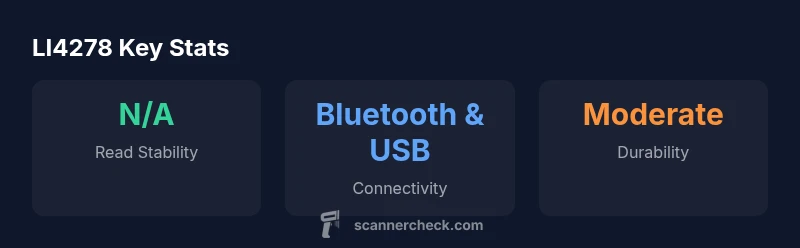
Connectivity is a core strength of the LI4278. It supports wireless pairing via Bluetooth and offers USB-based connections for stationary setups or cradle-based charging and data transfer. For environments with multiple workstations, the ability to pair with a variety of hosts without complicated configuration can save time during rollout and shift changes. In practice, the LI4278 integrates well with common host systems used in retail POS, warehouse management, and inventory software. The device typically appears as a standard input device, simplifying adoption in mixed environments where multiple peripherals share the same host.
Deployment considerations include choosing between handheld wireless operation and docked use, aligning with workflow patterns. The LI4278's compatibility with standard drivers and HID profiles means you can often avoid custom middleware, especially in shops leveraging familiar Windows-based POS systems or inventory apps. For IT teams, this reduces maintenance overhead and shortens time-to-value during initial rollout or store resets after seasonal changes. In challenging environments, such as busy stockrooms with light or reflective surfaces, ensuring proper calibration and code presentation helps maximize scan success and reduce operator retries.
Battery Life, Charging, and Durability
Battery performance matters for all-day operations where staff may leave the scanner powered on for extended intervals during a shift. The LI4278 is designed for headroom in typical retail or warehouse workflows, with charging options that include independent docks or integrated charging cradles. In practice, many teams report that a single charge supports a full shift under normal scanning load, with reserve capacity sufficient for replenishment tasks and quick inventory rounds. Durability is an important factor for devices shared across teams; the LI4278 is built to resist daily wear-and-tear, with components designed to withstand accidental drops and routine cleaning. Keeping the device clean and free of debris around the scan window helps preserve readability and overall reliability. Battery maintenance, such as avoiding prolonged deep discharges and following manufacturer-recommended charging routines, contributes to longer service life and fewer downtime events.
Durability considerations also extend to accessories and mounting options. A sturdy cradle or holster setup reduces the risk of accidental damage when the scanner is set down between scans. In environments with loud customer interactions or fast-paced aisles, clear indicators for successful reads and easy recovery from failed scans support a smooth workflow and reduce user frustration over time.
Software, Drivers, and Integration
Configuration and ongoing software support play a significant role in total cost of ownership. The LI4278 typically relies on standard drivers and widely supported interfaces, allowing straightforward integration with common operating systems and point-of-sale software. For teams with established device management practices, centralized configuration and firmware management can simplify updates across multiple units. While newer scanning platforms may offer advanced imaging features or enhanced analytics, the LI4278 remains compatible with a broad set of software and hardware ecosystems. This broad compatibility helps reduce compatibility headaches during store renovations or system refresh cycles, a common concern for mid-market retailers and small warehouses.
In practical terms, administrators can expect to configure basic settings—such as baud rate, HID mode, and cradle-based charging—without requiring specialized training. For organizations exploring broader data capture workflows, the LI4278 can serve as a reliable input device while other scanners or imaging devices handle more complex scanning tasks. The balance between simplicity and capability is a central theme in this model's deployment strategy.
Real-World Deployment Scenarios: where LI4278 shines
Retail counters, grocery checkouts, and small- to mid-size warehouse operations are typical use cases where the LI4278 demonstrates steady performance. Its reliability, ergonomic design, and straightforward setup make it attractive for teams seeking predictable results without the complexity of newer, feature-rich models. For example, in a busy supermarket, clerks benefit from fast, glare-resistant reads on everyday 1D codes, enabling quicker checkouts and improved customer throughput. In a stockroom setting, receiving and cycle-count tasks benefit from the scanner's resilience and comfortable grip during long shifts. While the LI4278 may not replace dedicated 2D imagers in industries with heavy 2D barcode use, it remains a strong fit for 1D-centric environments that prioritize stability, ease of deployment, and proven durability.
When planning for replacements or upgrades, teams should articulate their scanning requirements in terms of code coverage, deployment scale, and expected integration with existing software. This helps ensure that any transition to newer devices preserves the efficiency gains achieved with the LI4278 and minimizes disruption to daily operations.
Setup Guide and Workflow Tips: getting the most from LI4278
Step-by-step guidance can speed up initial rollout and reduce operator friction. Start by choosing your preferred connectivity path—Bluetooth pairing or USB cradle—then follow the host integration steps to ensure the scanner is recognized as a standard input device. Calibrate alignment for typical code presentations, and train staff to present codes at consistent distances and angles to maximize first-pass reads. Consider establishing a quick-reference workflow: verify a read, place the scanned item in the correct bin, and move on to the next sequence. Regularly clean the scan window and keep the cradle and charging accessories organized to prevent downtime during peak periods. Finally, document common troubleshooting steps so staff can resolve minor issues without IT intervention.
This approach minimizes surprises during busy shifts and supports a smoother daily routine for frontline teams, inventory staff, and support personnel. The goal is reliable scanning with minimal disruption, enabling faster transactions and more accurate inventory data across the organization.
Authority Sources: supplementary context and references
- Zebra Technologies product page for LI4278: https://www.zebra.com/us/en/products/barcode-scanners/handheld/li4278.html
- U.S. Department of Labor (OSHA) guidance on workplace equipment safety: https://www.osha.gov
- National Institute of Standards and Technology (NIST) resources on barcode standards and scanning accuracy: https://www.nist.gov/
- Technology publication coverage on barcode scanning best practices: https://www.zdnet.com/
Please note: these sources provide broader context on scanning technology, safety, and industry standards, rather than device-specific performance claims.
Pros
- Reliable 1D barcode reading with consistent first-pass results
- Ergonomic, comfortable grip for long shifts
- Solid wireless connectivity options and simple integration
- Rugged build suitable for busy retail and stockroom use
- Easy deployment with widely supported drivers and interfaces
Drawbacks
- Limited or no native 2D scanning capability
- Older generation may lack newer imaging features
- Battery life depends on workload and usage
- Not the lightest device in its class
Best for reliable, steady 1D scanning in everyday retail and inventory workflows
The LI4278 delivers consistent 1D scanning and dependable wireless connectivity in real-world settings. It remains a solid mid-range choice for shops needing reliability and straightforward deployment, though buyers should weigh newer options if 2D support is a requirement.
Common Questions
What barcode types does the LI4278 support?
The LI4278 is designed primarily for 1D barcodes; it excels at reading common retail and inventory codes. For environments requiring 2D capability, consider other Zebra models.
It focuses on 1D barcodes, which covers most retail tasks.
Is the LI4278 still a good buy in 2026?
It remains a reliable, established option for 1D scanning in many workflows; consider your needs for 2D support and future-proofing before deciding.
It's still a solid 1D scanner choice; 2D needs may push you to newer models.
What are the typical setup steps?
Choose Bluetooth or USB cradle, pair with the host, install drivers if needed, and test with common codes. Create a simple workflow to verify reads and handle exceptions.
Pair it, install drivers if needed, and test with your codes.
How does LI4278 compare to newer Zebra models?
Newer models often add 2D imaging and advanced features; LI4278 remains a predictable, cost-effective option for 1D-centric workflows.
Newer models may offer 2D reading and more features; LI4278 is more about proven reliability.
What maintenance does the LI4278 require?
Regular cleaning of the scan window and contacts, periodic battery care, and ensuring the cradle is in good condition help sustain performance and uptime.
Keep the window clean and the cradle in good shape for best results.
Are there recommended best practices for deployment?
Standardize scan distances and presentation angles, provide staff training on handling and charging, and maintain a small hardware refresh plan to avoid end-of-life gaps.
Train staff on consistent scanning and keep a refresh schedule.
Key Takeaways
- Choose LI4278 for durable, ergonomic daily use
- Expect reliable 1D scanning in busy environments
- Consider total cost of ownership and battery life
- Easy setup with USB or Bluetooth
- Ideal for 1D barcode environments