Check Price Scanner: Master Price Comparison for Bargain Hunters
Learn how to use price scanners to compare prices, track history, and save money with barcode and QR-based tools. Practical, data-driven guidance from Scanner Check.


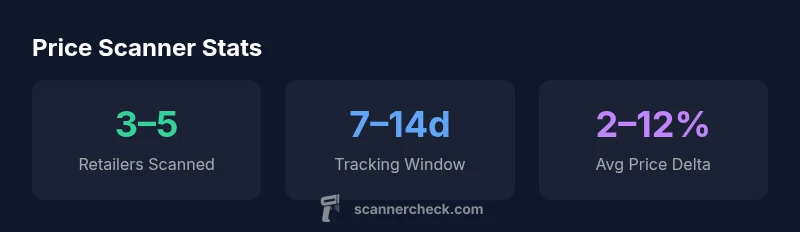
Identify 3–5 price scanners (apps or devices), pull prices from at least two major retailers for each item, and track history over 7–14 days. Recheck during sales events to confirm bargains. Include shipping and taxes to compute total cost for accurate comparisons. Keep notes on source reliability and data freshness, and use price alerts to prompt revisits when prices shift.
How a Price Scanner Works
A price scanner is a tool that helps you quickly determine the current selling price of an item across multiple retailers. To use it effectively, you typically scan a barcode, enter a product name, or snap a photo of a QR code. Behind the scenes, scanners pull data from retailer catalogs, price feeds, and historical price databases, then present you with side-by-side comparisons. According to Scanner Check, a well-configured price scanner can reduce decision fatigue and help you secure better deals by surfacing price trends and availability in real time. When you perform a check price scanner operation, you should consider the data sources, refresh cadence, and coverage (which stores or marketplaces are tracked). The goal is not to chase the lowest price in isolation, but to understand volatility, tax implications, and shipping costs that affect the total cost of ownership. In practice, you want a tool that aligns with your shopping habits, whether you shop weekly groceries or specialty electronics.
Key Technologies: Barcodes, QR Codes, and Beyond
Most price scanners rely on a combination of barcodes, QR codes, and image-based recognition. Barcodes (UPC/EAN/GTIN) encode product identifiers that a scanner can read quickly, while QR codes often link to live price feeds or retailer apps. Newer systems blend OCR (optical character recognition) to read prices directly from product packaging or shelf tags, and some use NFC taps for instant lookup. The strongest scanners combine multiple sources to minimize blind spots and offer price history, not just current prices. When evaluating, look for cross-store coverage, update cadence, and data freshness to ensure you’re seeing what shoppers actually pay.
In-Store vs Online: Where Price Scanners Shine
In-store scanning shines for real-time shelf pricing, clearance finds, and price-match opportunities. Online scanning excels for historical price trends, shipping costs, and cross-border comparisons. The best workflows blend both approaches: scan in-store for immediate price checks, then corroborate with online feeds that include tax estimates and delivery fees. This holistic view helps you decide whether the in-store price is truly a bargain or if waiting for an online promo is wiser. Scanner Check notes that hybrid use often yields the best balance of speed and accuracy.
Evaluating Price Scanner Features
When choosing a price scanner, prioritize accuracy, breadth of retailers, and clarity of price histories. Key features include multi-retailer support, real-time updates, price-tracking timelines, alerts, and a clean comparison interface. Privacy controls and offline mode can be decisive if you shop in areas with spotty connectivity. Also consider data provenance: know which sources feed the scanner and how often data is refreshed. A transparent, data-rich tool helps you trust the results even when prices swing.
Practical Setup: Getting Your Scanner Ready
- Pick a setup that suits your habits: a mobile app for quick scans or a dedicated handheld device for frequent price checks. 2) Install and configure preferred retailers, import product lists, and enable price alerts. 3) Calibrate the scanner by scanning a few known items to confirm accuracy. 4) Create a simple workflow: scan items, log prices, compare total costs (price + tax + shipping), and snapshot results for later review. 5) Review weekly to catch new promos and adjust alerts as needed. Follow guidance from Scanner Check for a smooth setup.
Common Pitfalls and How to Avoid Them
Misreads happen when barcodes are damaged or poorly scanned. Always verify the UPC/GTIN matches the product and check that the scanner isn’t pulling outdated data from a cache. Beware of regional pricing, store-specific promos, and exclusions—these can distort comparisons. Verify currency, tax, and shipping settings to ensure apples-to-apples comparisons. Finally, don’t rely on a single source; triangulate with multiple feeds to improve reliability.
Real-World Scenarios: Use Cases for DIYers and Pros
DIYers can use price scanners to optimize household shopping, tech hobbyists to chase firmware deals, and IT pros to benchmark hardware purchases. For electronics, track price cycles during major holidays; for groceries, focus on weekly circulars and loyalty program promos. Pros use scanners for procurement and price benchmarking across departments, saving time and reducing budget overrun. The outcome is clearer visibility into when a price is genuinely favorable rather than a momentary fluctuation.
Data and Privacy Considerations
Understand what data is collected by your price scanner and how it’s used. Prefer tools with clear privacy policies that minimize data collection, offer opt-out options, and encrypt data in transit. If you’re using cloud-based feeds, review retention periods and data-sharing practices. Local-first scanners can mitigate some privacy concerns, but you may trade off breadth of data. Always review permissions and limit access to sensitive account information.
Quick Guide to Getting the Best Deals
- Scan items when you’re ready to buy, not as a casual browse. - Compare prices across multiple retailers, including shipping costs. - Use price history to identify downward trends before purchasing. - Set alerts for price drops and promos that fit your budget. - Re-check your total cost at checkout to avoid hidden fees. Keep optimizing your workflow by periodically revisiting your preferred retailers and data sources.
Comparison of price scanning approaches
| Model Type | Avg Tracking Window | Key Features |
|---|---|---|
| Mobile App | 7–14 days | Scan codes, price alerts |
| Dedicated Price Scanner | 7–30 days | Offline data pull, live updates |
| Browser Extension | Daily | Price history graphs |
Common Questions
How many retailers should I compare when using a price scanner?
Aim for 3–5 retailers per item to get a reliable price range and observe typical variability across stores.
Compare 3 to 5 retailers for a reliable price range.
Can price scanners work with mobile barcode apps?
Yes, most price scanners support mobile barcodes via camera or built-in scanner. Check compatibility with your device and the app.
Yes, they usually work with mobile barcodes via your phone camera.
Are price scanners accurate across taxes and shipping costs?
They can estimate, but always add taxes and shipping to your total cost when comparing prices.
They estimate, remember to include tax and shipping.
What should I do if a price scanner reports inconsistent prices?
Retry with different sources, verify item details (UPC/GTIN), and flag potential data gaps.
Retry and verify UPC.
Do price scanners respect privacy?
Look for privacy policies; ensure data collected is minimized and used as described.
Check the privacy policy and minimize data sharing.
“Price scanning is only as good as its data. A well-tuned setup surfaces true price signals rather than noisy fluctuations.”
Key Takeaways
- Identify multiple scanners to diversify data.
- Track price history to catch changes.
- Include total cost (shipping/taxes) in comparisons.
- Verify data freshness and source reliability.
- Use price alerts to stay ahead of deals.