How to Make a Barcode Scanner: A Practical DIY Guide
Learn how to build a functional barcode scanner from off-the-shelf parts. Step-by-step guidance, hardware options, decoding libraries, and testing tips to help you prototype and start scanning barcodes quickly.


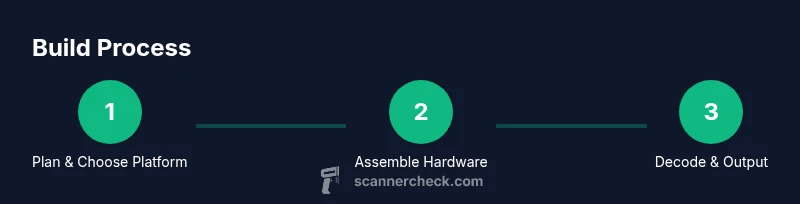
By the end, you’ll have a working barcode scanner built from accessible parts and open-source software. This quick guide outlines two viable paths: a camera-driven reader on a microcontroller or a compact module approach. It highlights key hardware, decoding libraries (Zxing, ZBar, OpenCV), and a practical testing workflow to help you prototype and start scanning barcodes quickly.
What you’re building and why this matters
A barcode scanner is a compact device that converts printed barcodes into digital data you can use in software, inventory systems, or point-of-sale workflows. You don’t need a full industrial scanner to learn the basics—many hobbyist builds leverage a camera, a microcontroller or single-board computer, and open-source decoding libraries. From a learning perspective, building your own reader strengthens your understanding of optics, image capture, and real-time data processing. It also gives you a hands-on sense of how scanning products and assets fits into larger logistics and software systems. In this guide we’ll tackle both the hardware and software sides, so you can pick the path that matches your skills and goals. The core question is: how do you make a barcode scanner? The answer involves selecting a platform, wiring a camera, choosing a decoding library, and wiring everything to output results.
High-level approaches to building a barcode scanner
There are two broadly practical paths for a DIY barcode scanner:
-
Camera-based reader on a microcontroller or SBC: This path uses a small computer (like an ESP32 or Raspberry Pi) with a camera to capture barcode images and decode them in software. It’s flexible and relatively beginner-friendly, and you can add a small display or LEDs to indicate results.
-
Dedicated barcode module with a camera and firmware: This option uses a compact module or breakout that includes a camera and pre-written decoding firmware. It’s faster to prototype, often with simpler wiring, but less flexible than a full software stack on a microcontroller.
Both approaches rely on the same decoding concepts, just implemented at different layers of abstraction. The choice depends on how much control you want, your power constraints, and whether you plan to scale this into a product.
Hardware choices: picking your platform and camera
Start by choosing a platform that matches your goals:
- ESP32-based setups: Great for battery-powered, compact builds. ESP32 boards offer built-in Wi-Fi/Bluetooth and multiple GPIOs for a camera, LED indicators, or a small display.
- Raspberry Pi Zero 2 W: A more powerful option for more complex image processing or using OpenCV confidently. It handles heavier decoding tasks and higher-resolution frames but consumes more power.
For the camera, you’ll typically select a module compatible with your board:
- For ESP32, a compact CSI or OV camera module is common, paired with a simple interface.
- For Raspberry Pi, a standard CSI camera module or USB webcam works well. Ensure the interface (CSI vs USB) matches your board.
Software libraries: decoding barcodes efficiently
Your choice of libraries will depend on the platform:
- Zxing (Zebra Crossing) is a popular Java-based library with ports to many languages; it’s robust for 1D and 2D codes.
- ZBar is another widely used library that supports multiple barcode symbologies and works well on embedded systems.
- OpenCV provides image processing capabilities and can be paired with ZXing/ZBar for decoding, especially if you’re handling lighting, perspective, or occlusion challenges.
Set up your development environment to compile and run the decoder. You’ll typically capture frames, preprocess them (grayscale, blur, contrast), and feed them into the decoding library to extract the data string for further use.
Step-by-step hardware integration: wiring and testing basics
Begin with a minimal setup: power, a microcontroller/SBC, and a camera connected securely. Confirm the camera is detected by the board and can capture a test frame. Then load a simple sample script that grabs a frame and passes it to the decoder library. Verify that recognizable barcodes return consistent data strings. Incrementally add features like a buzzer or LED indicator to signal a successful decode, and ensure the system remains responsive under typical lighting.
Crafting the software workflow: capture, decode, output
The core loop should continuously capture frames, preprocess for decoding, and pass candidate images to the barcode library. After a successful decode, store or print the payload, and provide user feedback (audio/visual). Implement error handling for unreadable frames and implement a retry policy to prevent duplicate reads for the same item. Consider adding a simple UI or serial output for debugging during development.
Lighting, focus, and image quality: practical calibration tips
Barcodes are sensitive to lighting and focus. Use a diffuse, stable light source to minimize glare. Avoid extreme reflections from glossy labels. Calibrate camera focus so code edges are crisp, especially at longer distances. If you’re scanning on a moving conveyor or in a busy environment, you’ll need to tune exposure and processing speed to maintain real-time decoding.
Hardware assembly and enclosure considerations
Plan a compact enclosure that allows stable mounting for the camera and board, along with a compact power source. Use cable management to avoid motion or vibration when reading barcodes. For field use, consider a rugged outer shell and a simple stand or clamp that positions the scanner at a consistent distance from the code. Document your build for future maintenance.
Testing and validation: building confidence in results
Develop a test plan with a mix of barcode types (1D and 2D), sizes, and label qualities. Track success rate, read distance, and decoding speed. Validate under different lighting conditions and at various angles to gauge reliability. Record edge cases that fail and refine preprocessing or tuning steps accordingly.
Power, durability, and portability considerations
If you plan to operate away from a desk, choose a battery solution with enough capacity and a power management strategy (sleep modes, duty cycling). Ensure the enclosure provides adequate heat dissipation if the processor will run decoders for extended periods. For a DIY product, consider reliability tests like drop tests and vibration tests to understand durability.
Common pitfalls and how to avoid them: a practical checklist
- Poor lighting: use diffused lighting and adjust exposure.
- Misalignment: ensure the camera is properly aimed at the barcode and held steady.
- Frame rate bottlenecks: optimize preprocessing and choose a decoder that matches your frame rate.
- Data formatting issues: define a consistent output format (string, JSON) for downstream systems.
- Power instability: include a stable power source or battery with safeguards.
Real-world use cases and customization ideas
A DIY barcode scanner can fit inventory checks, library book tracking, or restaurant order systems. You can customize features such as multi-stop scanning sessions, including timestamp data, or integrating a wireless link to a central database. As you build, consider adding capabilities like anti-tamper logging, error reporting, or additional sensors (temperature, humidity) to broaden use cases.
Next steps and further resources
If you’re eager to go deeper, explore more advanced image processing techniques, such as perspective correction and perspective-invariant scanning, as well as more barcode symbologies. Start simple, then add functionality in layers. The community around open-source scanners is active; you can share projects, compare notes, and learn from others’ builds.
Tools & Materials
- Microcontroller or single-board computer (e.g., ESP32, Raspberry Pi Zero 2 W)(Choose based on your desired balance of size, power, and processing power.)
- Camera module compatible with your board(Ensure interface compatibility (CSI vs USB) and driver support.)
- Barcode decoding library (Zxing, ZBar, or OpenCV)(Pick based on language and performance needs.)
- Power supply (USB-C, battery pack, or Li-Po battery with regulator)(Provide stable power; consider a low-dropout regulator for boards.)
- Connecting cables and adapters (jumper wires, USB cables, connectors)(Keep cable routing tidy to avoid motion or interference.)
- Enclosure or 3D-printed case(Optional for durability and portability.)
- Basic tools (screwdrivers, multimeter, soldering iron if needed)(Have a multimeter handy for power checks and continuity tests.)
- Optional indicators (LEDs or buzzer)(Helpful for immediate feedback on successful reads.)
Steps
Estimated time: 4-8 hours
- 1
Choose hardware path
Decide between an ESP32/RPi-based camera reader or a compact module with built-in decoding firmware. Consider power, size, and future needs when selecting your platform.
Tip: Start with a board you already own to reduce upfront costs. - 2
Assemble the hardware
Mount the camera to the board and verify reliable power connections. Secure the camera so it maintains a consistent focus on the barcode as you test.
Tip: Use a stable stand or bracket to reduce vibration. - 3
Install software tools
Set up your development environment (Arduino IDE or Raspberry Pi OS) and install the chosen decoding library. Ensure the library supports your barcode types.
Tip: Follow library documentation for platform-specific setup steps. - 4
Capture a test frame
Write a minimal script to grab a single frame from the camera and display it. Confirm the image is sharp and correctly framed for barcode capture.
Tip: Check exposure and white balance; adjust if the image is too dark or washed out. - 5
Integrate decoding
Connect the decoder library to the captured frame and verify it returns a readable string for known barcodes.
Tip: Test with both 1D and 2D codes to ensure compatibility. - 6
Output and log data
Add simple output (console or serial) to show decoded values with timestamps. This helps validate reliability during testing.
Tip: Format the output consistently to simplify downstream integration. - 7
Add feedback indicators
Integrate LEDs or a buzzer to signal successful scans. This is especially helpful in noisy environments.
Tip: Keep feedback in a single, obvious tone to avoid confusion. - 8
Fine-tune lighting
Experiment with diffuse lighting to reduce glare and shadows that hinder decoding. Adjust camera exposure as needed.
Tip: Prefer stable, ambient lighting over direct, flickering lights. - 9
Calibrate focus and distance
Test different distances and angles to identify a reliable scan range. Record an optimal distance and set a fixed mounting position.
Tip: Mark the ideal distance with a simple guide on the enclosure. - 10
Durability tuning
If the device will move or be used in rough conditions, add a protective enclosure and secure all connectors. Check for loose wires after handling.
Tip: Inspect for heat buildup; keep vents clear for cooling. - 11
Document your build
Create a simple build log with parts, firmware versions, and test results. This makes future maintenance easier and supports sharing with peers.
Tip: Photograph the final setup and draw a simple schematic. - 12
Plan next enhancements
Identify optional features to add, like wireless data transfer, a larger display, or integration with existing databases. Outline a roadmap for iterative improvement.
Tip: Start with a singular, tangible upgrade you can validate quickly.
Common Questions
What is the simplest way to start building a barcode scanner?
Begin with a microcontroller like ESP32 and a small camera. Load a lightweight decoding library and run a basic frame-capture loop to decode a known barcode. Expand features gradually as you verify the pipeline works.
Start with a single board and camera, load a basic decoder, and confirm a simple barcode reads correctly. Then build up features step by step.
Do I need specialized hardware to read 2D barcodes?
Not necessarily. Many camera-based setups use decoding libraries that support 2D codes like QR. A more powerful processor helps with faster decoding at higher resolutions.
Most camera setups can read 2D codes with the right software; speed depends on your processor and camera resolution.
Can I use a smartphone instead of a microcontroller?
Yes, a smartphone can run a barcode decoding app or a custom app using ZXing/OpenCV. It’s a great way to prototype quickly before building dedicated hardware.
A phone works well for quick prototyping; you’ll leverage the phone’s camera and processing power with the right libraries.
Which barcode types will this scanner read?
Most DIY readers support common 1D barcodes (EAN/UPC) and many 2D codes (QR, Data Matrix). Check the library’s documentation for supported symbologies.
Support varies by library; most readers cover common 1D and many 2D codes, but verify before building.
What is the typical cost to prototype a DIY scanner?
Costs depend on components and board choice. A basic ESP32 + camera setup can be inexpensive, with additional sensors or enclosures increasing the price modestly.
Costs vary, but you can prototype on a budget with basic boards and cameras. Upgrades come later.
Is it safe to build a DIY scanner for kids to use?
Yes, with supervision. Use a sturdy enclosure, avoid exposed wiring, and choose low-power components. Teach basic handling and safety practices.
With supervision, it’s a good educational project. Keep wires tucked away and use a solid enclosure.
Watch Video
Key Takeaways
- Plan hardware path before purchasing parts
- Choose libraries that fit your platform and barcodes
- Iterate on lighting and focus for reliable reads
- Document build steps and test results
- Consider future enhancements early