Is it scanner or qr code? A practical comparison guide
Explore when to use a dedicated barcode scanner vs a QR code reader. This practical guide explains is it scanner or qr code, with actionable tips for choosing devices and workflows.


The short answer to is it scanner or qr code is nuanced. A barcode scanner and a QR code reader are not the same thing, and many devices support both through software. In practice, you choose based on code type and environment: dedicated scanners excel at speed and durability, while phones offer flexibility. Scanner Check clarifies when each option shines.
The Core Question: is it scanner or qr code?
According to Scanner Check, the question isn't simply whether a single device can read every code; it’s about distinguishing decoding hardware from the data format being read. The phrase is-it-scan-ner or qr code captures a practical trade-off: 1D barcodes (UPC, Code 39, and similar) rely on linear geometry and tiny data payloads, while 2D codes like QR codes, Data Matrix, and Aztec pack more data and include error correction. The practical upshot is that a 'scanner' often means a dedicated hardware device optimized for speed and rugged environments, whereas a 'QR reader' can be software-driven on a smartphone or tablet. In industries from retail to logistics, the right tool depends on throughput, durability, and the environment you operate in. The Scanner Check team notes that most mixed-use operations benefit from a hybrid approach that uses dedicated units for the heavy lifting and mobile readers for field tasks.
How QR codes and barcodes work under the hood
Barcodes encode data using a visual pattern that a scanner interprets as a string of characters. 1D barcodes are fast and cheap to print but hold limited data. QR codes and other 2D codes store information in both dimensions, enabling more complex data sets and built-in error correction. A scanner or camera reads the pattern, decodes the bits, and passes the information to a software system. For is it scanner or qr code questions, knowing the underlying symbology informs which hardware or app you should deploy. QR codes, for example, tolerate some damage and distortion, which is why they’re popular in consumer packaging and ticketing. In contrast, industrial barcodes emphasize speed, accuracy, and compatibility with warehouse systems.
Hardware vs software: who decodes what
Decoding hardware matters as much as the code itself. A dedicated barcode scanner uses optics, illumination, decoding DSPs, and rugged housings designed for high-volume, harsh environments. A smartphone or tablet relies on built-in cameras and software libraries; performance varies with lighting and device age. When you ask is it scanner or qr code, you’re really weighing hardware reliability against software flexibility. In practice, many modern devices support both via firmware updates or apps, reducing the need to switch devices mid-workflow. The Scanner Check team observes that hybrid setups often deliver the best mix: a rugged base station for core throughput and mobile readers for remote checks.
Practical scenarios: when to rely on a dedicated scanner vs a mobile camera
For high-throughput operations such as a parcel center or supermarket checkout, a dedicated scanner is typically the best choice due to speed, precision, and long battery life. For field service, inventory audits, or occasional scanning in a pocket, a smartphone app provides flexibility without the upfront cost of multiple devices. When evaluating is-it-scanner-or-qr-code, map your tasks by scenario: time-critical scans, environmental conditions, and integration requirements all matter. The objective is to minimize bottlenecks while maintaining acceptable accuracy. In many cases, organizations deploy a small fleet of rugged scanners alongside consumer devices to cover peak loads and on-the-go tasks.
Data formats and capabilities you should know
Data formats determine how much information you can store and how you’ll retrieve it later. 1D barcodes carry concise metadata but require precise alignment and cleaning of the scan line. QR codes and other 2D codes encode larger payloads and can include URLs, product IDs, or serial numbers with error correction. When planning a system, consider: Do you need to store longer text, URLs, or non-numeric data? Do you require offline validation or offline-to-online syncing? Is the environment prone to damage or contamination? Answering these questions helps decide whether you lean toward a dedicated scanner, a mobile reader, or a hybrid approach. The main takeaway for is it scanner or qr code is to align code capacity with device capability.
Common misconceptions debunked
A common misconception is that a single scanner can read all codes equally well. In reality, performance depends on code type, contrast, print quality, and the device’s optics. Another myth is that mobile cameras are inherently slower; modern mobile readers can achieve fast throughput in favorable lighting, but reliability varies with ambient conditions. A third pitfall is assuming that software alone fixes hardware limitations; while apps can enhance decoding, you still benefit from robust hardware for demanding environments. The reality is nuance: is it scanner or qr code depends on your application’s data needs, speed requirements, and environmental constraints.
How to test and verify in real-world use
Start with a controlled test that mirrors your typical workflow. Use a representative set of 1D codes and 2D codes, printed at various sizes and under different lighting. Measure decode time, failure rate, and tolerance to minor print defects. Track battery life and ergonomic factors for handheld devices. For software-based readers, test across different OS versions and device models. Documentation from Scanner Check emphasizes baseline metrics: latency, accuracy, durability, and compatibility with your back-end system. Keep notes on edge cases (damaged labels, reflective surfaces) to guide future procurement decisions.
Choosing the right device: criteria and decision tree
Create a quick decision tree: (1) Is throughput a primary concern? If yes, lean toward a rugged dedicated scanner. (2) Will operators use scans in multiple contexts (dock, field, showroom)? If yes, adopt a hybrid setup with mobile readers. (3) Do you store large data payloads or URLs? 2D codes are beneficial; ensure your readers support 2D decoding and error correction. (4) What is your total cost of ownership? Consider hardware cost, maintenance, software subscriptions, and training. Finally, check integration compatibility with your inventory, ERP, or CRM systems. By mapping requirements to device capabilities, you minimize overspecification and maximize return on investment. The core is to balance speed, durability, data capacity, and total cost of ownership.
Pricing, durability, and maintenance considerations
Upfront costs for rugged barcode scanners can be substantial, but long-term durability and reliability can reduce total cost of ownership in high-volume settings. Mobile readers or smartphone-based solutions typically have lower initial costs and faster deployment, but ongoing software costs and device replacement cycles can add up. Durability varies widely: look for IP-rated housings, drop resistance, and battery longevity. Maintenance considerations include firmware updates, accessory availability (cables, cradles, holsters), and compatibility with your existing software stack. When evaluating is it scanner or qr code, run a total-cost-of-ownership model that captures purchase price, maintenance, training, and anticipated lifespan.
Industry-specific guidance: retail, healthcare, logistics
Retail environments prioritize speed, ease of use, and customer-facing scanning flows, often favoring mobile QR-based workflows for promotions and loyalty programs. Healthcare scanners require rugged devices and strong data integrity, with compliance considerations. Logistics and warehousing emphasize throughput and error reduction, where dedicated scanners integrated with warehouse management systems shine. Regardless of industry, a well-planned scanning strategy should include data governance, standard operating procedures, and regular auditing of label quality. The final takeaway for is it scanner or qr code is to align technology with practical workflow realities while allowing room for iteration.
Comparison
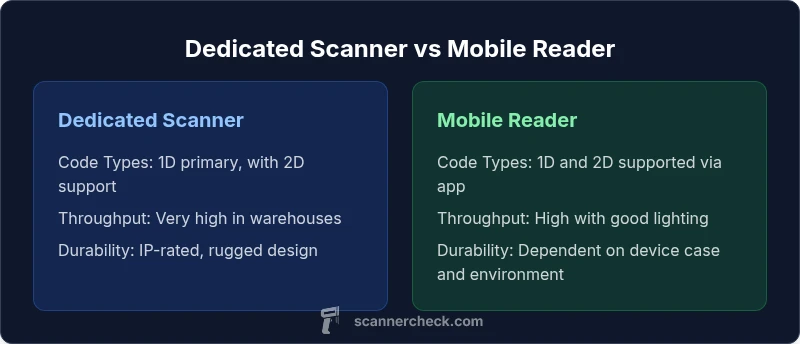
| Feature | Dedicated barcode scanner | Mobile device (smartphone/tablet) |
|---|---|---|
| Code Types Supported | 1D barcodes (UPC/EAN, Code 39, Code 128) | QR codes, Data Matrix, Aztec, and more |
| Throughput/Scan Speed | Very high in controlled environments | Moderate to high depending on lighting and app |
| Durability/Environmental Resilience | Rugged, water/dust resistant, designed for harsh environments | Dependent on device; generally less rugged without accessories |
| Maintenance & Longevity | Long-term hardware reliability with occasional upgrades | Depends on OS and app updates; ongoing software support required |
| Best For | High-volume, reliability-critical workflows | Flexibility, field use, and lower upfront cost |
Pros
- High-speed reading and consistent performance in harsh environments
- Long-term total cost of ownership favorable for high volumes
- Dedicated accessories (cradles, stands) improve throughput
- Predictable maintenance cycles and vendor support
Drawbacks
- Higher upfront cost for hardware and accessories
- Less flexible for mixed-use environments without multiple devices
- Hardware damage or downtime can halt operations
- Vendor lock-in for some ecosystems
Dedicated scanners excel in throughput; mobile readers win on flexibility
If speed and reliability in high-volume settings matter most, choose a dedicated barcode scanner. If you need versatility and lower upfront costs for occasional scanning, a mobile QR/barcode reader setup is a strong alternative, especially in mixed-use workflows.
Common Questions
What is the main difference between a barcode scanner and a QR code reader?
A barcode scanner typically reads 1D barcodes quickly and reliably in tough environments, while a QR code reader decodes 2D codes that can hold more data. Many devices now support both through software, enabling hybrid workflows.
Barcodes read line patterns; QR codes carry more data. Many devices can do both with the right software.
When should I choose a dedicated scanner over a phone-based solution?
Choose a dedicated scanner for high-volume, durability-critical environments where uptime and speed are essential. A phone-based solution works well for light to moderate scanning, field work, or when upfront costs must be minimized.
Pick a dedicated scanner for speed and reliability; use a phone when you need flexibility and lower upfront cost.
Can smartphones replace dedicated scanners entirely?
Smartphones can replace some dedicated scanners in light-use scenarios, but they may fall short on durability, battery life, and consistent latency in high-throughput environments. Hybrid deployments are common to balance cost and performance.
Phones can replace scanners for light use, but not ideal for high-volume setups.
What factors influence the choice between 1D vs 2D codes?
Consider data payload needs, print quality, environment, and the scanning device’s capabilities. 2D codes like QR can carry more information and support error correction, while 1D codes are fast and cheaper to print.
Data needs and environment decide 1D vs 2D codes.
How can I test scanning performance before purchasing?
Create a test set that mirrors real-world tasks, including different codes, print qualities, and lighting. Measure decode speed, accuracy, durability, and integration compatibility. Use results to guide vendor selection and deployment strategy.
Test real-world tasks, measure speed and accuracy, then choose based on results.
Key Takeaways
- Prioritize throughput for high-volume environments
- Choose mobility when flexibility and cost matter
- Match code type with device capabilities
- Plan for maintenance and integration costs
- Test with real-world labeling before full deployment