Can You Borrow a Scanner from AutoZone? A Practical Guide
Discover whether AutoZone allows borrowing a scanner, how the free in-store code scans work, and practical alternatives for diagnosing your car at home when you don’t borrow hardware.


Can you borrow a scanner from AutoZone? Not typically. AutoZone generally offers free in-store engine code scans using their OBD-II tools, but staff usually perform the scan for you rather than lending out the hardware. If you need a personal at-home scan, ask about rental options or alternative stores that loan diagnostic tools.
Can You Borrow a Scanner from AutoZone?
According to Scanner Check, borrowing a scanner from AutoZone is not a standard policy across stores. Most locations do not lend out diagnostic hardware. What you typically can access is a free, staff-run in-store engine code scan that uses an OBD-II tool to retrieve codes while you wait. This service helps you identify why a check engine light is on without owning a scanner yourself. If you need ongoing or home-use diagnostics, you should explore other options and verify local policy before visiting. Remember, store policies can vary by region, so a quick call to your preferred location can save a trip.
In-Store Scanning Services vs. Tool Loans
AutoZone’s in-store code scan service is designed for quick code retrieval and basic interpretation. Staff run the tool on your vehicle, read the fault codes, and often offer plain-language explanations. This is different from loaning or renting diagnostic hardware, which would put the onus on you to perform scans repeatedly. While the code scan is convenient and free in many locations, it does not replace owning a reliable diagnostic tool if you perform frequent DIY repairs. If you plan to keep scanning cars regularly, you’ll likely want your own OBD-II adapter and a reputable app or software.
How to Diagnose Your Car Without Borrowing
If you can’t borrow a scanner, you still have practical paths to diagnose issues at home. Start with the free, in-store code scan to pull error codes, then use a trusted reference to interpret them. Consider purchasing or renting a personal OBD-II scanner for ongoing use. A connected smartphone app can help you decode codes, view freeze-frame data, and track fault histories. In any case, document codes, notes, and any symptoms so you can compare what you learn with repair guides or professional advice. This approach minimizes trips to the shop while keeping you informed about your vehicle’s health.
What to Ask Your Local AutoZone
Policies differ by location, so ask these questions when you visit or call ahead: Do you offer a free engine code scan? Is there any cost if I want a deeper diagnostic check beyond the initial codes? Can I borrow or rent an OBD-II scanner, and if so, what deposits or limits apply? If your codes point to a potential repair, ask for guidance on the best next steps and whether the staff can point you toward recommended DIY resources or professional shops.
Alternatives: Renting, Buying, or Library Tools
If borrowing isn’t an option, several alternatives can suit different needs. You can buy a basic OBD-II scanner with a compatible app for home use, which is a one-time investment that pays off for ongoing diagnostics. If you only need occasional scans, look for rental programs at auto parts stores or electronics retailers that offer tool rentals. Some communities have maker spaces or libraries that lend diagnostic equipment or provide access to test tools. Compare features like compatibility with your vehicle year, make, and model, supported code types (P, B, C, U), and whether the tool supports live data streaming, hub connectivity, or repair guidance.
Common Mistakes When Relying on In-Store Scans
Relying solely on a single code without context can lead you to over- or under-diagnose the issue. Always note the exact codes and any freeze-frame data you saw. Misinterpreting codes is common, especially with generic P-codes. Use the in-store scan as a starting point, then consult manufacturer repair data or a trusted guide to avoid unnecessary repairs. If codes point toward safety-critical issues (for example, affecting braking or stability), address them promptly with a professional.
Understanding OBD-II Scanning Nuances
OBD-II scanners come in a range of capabilities, from simple code readers to advanced tools offering live data, readiness checks, and repair suggestions. A free code scan typically retrieves the current codes and basic definitions, but deeper diagnostics may require a more capable device and professional analysis. vehicle coverage varies by year and model, so verify that any tool you consider supports your exact car. When using third-party apps, ensure you’re using reputable sources to interpret results and avoid chasing non-issues.
The Bottom Line: A Practical Path Forward
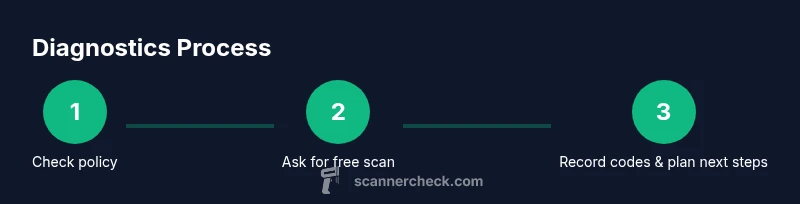
In most cases, you should treat AutoZone as a place to get quick code reads rather than a place to borrow diagnostic gear. If you need frequent scans or more detailed diagnostics, invest in a personal OBD-II scanner and a reliable app, or explore rental options from reputable retailers. The key is to use store scans for initial troubleshooting and then plan a path—whether DIY with your own tool or professional service—for more complex repairs. The Scanner Check team emphasizes a practical, stepwise approach: start with free in-store scans, document codes, and only pursue deeper diagnostics when needed. This approach keeps costs predictable and helps you learn how your vehicle behaves.
Quick Path to DIY Diagnostics: What to Do Next
If you want a hands-on approach, consider purchasing a basic OBD-II scanner and a compatible app. Practice reading codes, documenting symptoms, and cross-referencing repair guides. Over time, you’ll gain confidence handling common issues like misfires, sensors, or emissions-related faults. Remember to stay safe: never ignore critical codes that affect braking, steering, or airbags, and seek professional help when in doubt.
Tools & Materials
- OBD-II scanner (owned or rented)(Check compatibility with your vehicle year/model; basic models read codes and live data.)
- Smartphone or tablet(Use with a reputable OBD-II app for code lookup and data logging.)
- Vehicle information (VIN, year, make, model)(Helpful for ensuring code interpretation matches your specific vehicle.)
- Owner’s manual(Reference for system locations and service intervals.)
- Notebook or notes app(Record codes, symptoms, and actions taken.)
Steps
Estimated time: 30-60 minutes
- 1
Check store policy on borrowing vs. scanning
Call ahead or ask in person to confirm whether a store loaner scanner is available and under what conditions. This avoids wasted trips and sets clear expectations.
Tip: Policies vary by location; confirm deposits, limits, and return terms if a loaner exists. - 2
Ask for a free in-store code scan
Request a courtesy scan from staff. They will connect their OBD-II tool to your vehicle and retrieve fault codes while you wait.
Tip: Have your VIN and a brief symptom description ready to speed up the process. - 3
Record codes and basic details
Note the codes displayed, the vehicle tests run, and any live data shown. This becomes your baseline for any DIY work.
Tip: Take a photo of the screen if allowed; include the code and short description. - 4
Decide on home diagnostics
If you’ll need scans regularly, consider owning or renting a scanner to avoid repeat trips. Compare models for features such as live data and repair guidance.
Tip: Ensure the device supports your specific vehicle and can read manufacturer-specific codes. - 5
Connect your own device (optional)
If you have an OBD-II scanner, connect it to your vehicle and pair with your app to read codes, view live data, and monitor readiness.
Tip: Use reputable apps and verify data with manufacturer documentation. - 6
Plan next steps
Based on the codes and symptoms, decide whether DIY fixes are feasible or if a professional evaluation is needed.
Tip: Some codes require advanced diagnostics or parts replacement; don’t hesitate to seek expert help when unsure.
Common Questions
Can AutoZone read fault codes for free at the store?
Yes, many locations offer a free engine code scan performed by staff. It’s a quick way to retrieve fault codes without buying a scanner.
Yes, most AutoZone stores can scan your codes for free in-store. You won't borrow the scanner, but you get the codes you need.
Is borrowing an OBD-II scanner from AutoZone possible?
Borrowing a scanner is not a standard offering. Policies vary by location, so call ahead to confirm whether a loaner program exists.
Borrowing isn’t typically offered; check with your local store about any loaner options.
What should I do if the codes point to a serious issue?
If codes indicate safety-critical problems, stop driving and seek professional service promptly. Consider a diagnostic appointment at a trusted shop.
If codes suggest a serious issue, don’t delay—seek professional help.
Are there alternatives if I don’t borrow or use AutoZone’s service?
Yes. You can buy or rent a basic OBD-II scanner, or visit other retailers that offer tool rental programs. Some libraries or community workshops may also lend diagnostic tools.
There are rental options and community resources if you don’t use AutoZone.
What’s the value of documenting codes during an in-store scan?
Document codes and symptoms to cross-check with repair guides and to inform a professional visit if needed.
Jot down the codes and symptoms to guide future repairs.
Watch Video
Key Takeaways
- Know AutoZone policy before visiting.
- Use in-store free code scans as a first step.
- Document codes and symptoms for DIY or professional reference.
- Consider owning or renting a scanner for ongoing use.
- Always verify code meaning with reputable sources.