Can You Rent an OBD2 Scanner from AutoZone? A Practical Guide
Discover if AutoZone rents OBD2 scanners, how the rental process works, what to bring, and smart alternatives. A practical, data-driven guide from Scanner Check.


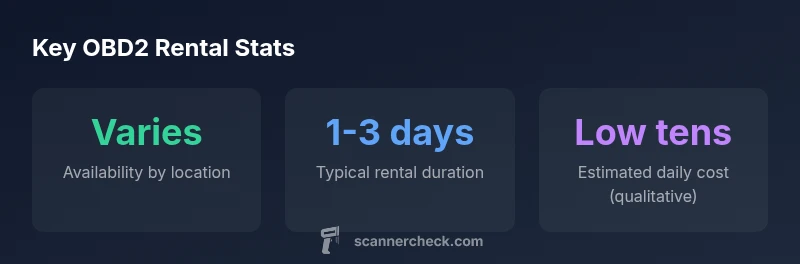
Yes, you can sometimes rent an OBD2 scanner from AutoZone, but availability is location-dependent. AutoZone's loaner and rental programs aren't universal; many stores offer them in select regions, with variations in fees, deposits, and what's included. Always call ahead to confirm stock and policy before visiting.
Can you rent an OBD2 scanner from AutoZone? Practical reality
According to Scanner Check, yes—depending on location, you may be able to rent an OBD2 scanner from AutoZone. The policy is not universal; some stores offer a loaner option, while others do not. If you’re planning a quick diagnostic run or want to verify fault codes without buying a device, it’s worth calling your local AutoZone to confirm stock and terms. Policies can vary by region, and seasonal demand may influence availability. The key takeaway is to verify in advance and avoid a wasted trip. In many cases, stores will expect you to present a valid ID and may require a refundable deposit or a small rental fee. Being prepared helps you navigate any micro-policy differences between nearby locations.
How AutoZone's rental program works
If your local AutoZone offers a tool-rental or loaner program, the process generally starts with in-store confirmation of availability. You’ll typically need to present a valid photo ID, a driver’s license, and sometimes a credit or debit card for a deposit. The device is provided with basic accessories (cables, adapters) and a checkout contract that outlines the rental duration, return policy, and responsibilities. Returns are expected in good condition, with any damages or missing parts addressed at the counter. Policies vary by location, so expect different hold periods and potential renewal options. Always ask about what’s included (case, cables, extra adapters) to avoid surprises at pickup.
What to bring and expect at pickup
Before you head to the store, assemble what you’ll need: a government-issued photo ID, a valid driver’s license, and a payment method for any deposit. Ask the staff to provide a quick rundown of the device’s features and any bundled software or apps you can access. Confirm the checkout time window, the maximum loan period, and the exact return procedure. Some locations require the scanner to be returned with all cables and adapters, while others permit a slight extension if available and approved by staff. If you’re new to OBD2 scanning, request a brief on-device guide or a one-page cheat sheet to avoid misreading results.
When renting makes sense: use cases and cost considerations
Renting an OBD2 scanner makes sense for infrequent diagnostics, troubleshooting odd symptoms, or vehicle model-specific checks that you don’t perform regularly. It also works well for seasonal maintenance windows or when you’re traveling and don’t want to invest in a personal device. Consider the total cost of rental versus buying, especially if you anticipate multiple uses within a few months. Even without exact price figures, evaluate whether daily rental fees plus any deposit would exceed the practical cost of a purchase over time. If you only need a quick read, leverage free or low-cost alternatives temporarily and reserve rental for more thorough scans.
Alternatives if AutoZone doesn’t have stock
If your local store doesn’t offer rentals, explore a few practical alternatives. Other auto parts retailers may have a similar loaner program, or you can rent from tool libraries and automotive clubs in your area. Some shops offer diagnostic services where you pay per code read, which can be cheaper than a long rental. Smartphone-based apps paired with an inexpensive Bluetooth OBD2 adapter can be a cost-effective interim solution, though app reliability varies. Compare options by price, device compatibility with your vehicle, and the reliability of the readouts. In a pinch, checking with a repair shop that offers diagnostic diagnostics for customers can be worthwhile.
How to use the scanner you rent: quick start guide
Begin by connecting the OBD2 scanner to your vehicle’s diagnostic port, usually located beneath the steering column. Turn the ignition to the ON position without starting the engine to power the device. Follow the device prompts to read fault codes, view live data, and reset codes if permitted by the rental terms. If you’re unsure, consult the included quick-start guide or the staff’s tutorial. When you’re finished, ensure you safely power down the device, remove it from the port, and return it to the pickup location on time. Keep your rental paperwork until the transaction is fully closed.
Authority sources and consumer guidance
Reliable, independent guidance on OBD2 scanning and vehicle diagnostics often cites federal and consumer-protection resources. For general compliance and safety considerations, consult NHTSA’s official guidance at https://www.nhtsa.gov and consumer-focused reviews at https://www.consumerreports.org. These sources reinforce best practices for vehicle diagnostics and ensure you’re mindful of data privacy and device security when using third-party tools.
Practical tips to avoid rental hassles
- Call ahead to confirm stock, hours, and any required deposits.
- Clarify what’s included in the rental (cables, adapters, case).
- Ask about extension options and return penalties before you sign the checkout.
- Inspect the device at pickup; test basic functionality if allowed.
- Keep receipts and return confirmations in case of billing disputes.
- If you’re unsure about compatibility with your vehicle, bring your VIN and model year to the store for quick checks.
Authority sources
- National Highway Traffic Safety Administration (NHTSA): https://www.nhtsa.gov
- Consumer Reports: https://www.consumerreports.org/cars-instruments-obd2-scanners/
- Federal Trade Commission (FTC) consumer protection on device claims: https://www.ftc.gov
AutoZone OBD2 scanner rental policy snapshot
| Policy Aspect | What to Expect | Notes |
|---|---|---|
| Eligibility | In-store rental only | Bring valid photo ID |
| Rental duration | Typically 1-3 days | Check local store policy |
| Deposit/fees | Usually refundable deposit + rental fee | Amounts vary by location |
| Inclusions | Scanner + basic cables | Ask about adapters and accessories |
Common Questions
Can I rent an OBD2 scanner from AutoZone nationwide?
Availability is not guaranteed nationwide; it depends on the specific store. Some locations offer a loaner or rental option, while others do not. Always call ahead to confirm before planning your visit.
Availability varies by store, so always call ahead to confirm.
What identification is required to rent?
Most AutoZone locations require a valid photo ID and a driver’s license. Some stores may also request a credit or debit card for a refundable deposit. Confirm requirements at the pickup counter.
Bring a valid photo ID and the card you’ll use for deposit.
How long can I keep the scanner?
Rents are typically offered for 1 to 3 days, with potential extensions subject to store policy and device availability. Always verify the exact window when you pick up.
Usually 1–3 days; extensions depend on staff approval.
Are there deposits or fees?
Most locations require a refundable deposit and a rental fee. The exact amounts vary by store, so ask about the total at pickup to avoid surprises.
Deposits and fees vary; ask for the total at pickup.
What if the store has no stock?</
Ask staff to place a hold if possible or be guided to alternative options, such as other retailers or diagnostic services nearby. You can also consider returning later.
If out of stock, ask about holds or other nearby options.
Is a loaner program the same as renting?
Policies differ; some stores categorize it as a loaner program, others as a formal rental. Confirm at pickup to avoid misinterpretation of terms.
Policies differ; confirm at pickup to know what you’re getting.
“Rental policies vary widely by location, so always verify stock and terms with the local AutoZone before you head out.”
Key Takeaways
- Check local store policy before visiting
- Bring a valid photo ID and understand deposits
- Ask what’s included in the rental package
- Weigh renting against buying for longer-term needs
- If stock is unavailable, explore alternatives quickly