Scanner 1200 DPI: Quality, Limits, and Practical Tips
Explore what scanner 1200 dpi means for scan quality, how it affects documents and images, and practical tips to maximize results with common scanners.


Scanner 1200 dpi represents a balanced resolution that offers crisp text and decent image detail while keeping file sizes manageable. For most office documents, 1200 dpi delivers clear text with sharp lines and acceptable grayscale detail. If your goal is photo-quality scans or tiny fonts, higher resolutions such as 2400 dpi or more can improve detail, though at the cost of larger files and slower scans.
What scanner 1200 dpi means for everyday work
The term 1200 dpi (dots per inch) marks the sampling density used by a scanner's optics and sensor array. In practical terms, it describes how many sample points the sensor can capture per inch when you scan a document or photo. When you select 1200 dpi, you’re asking the device to sample more detail than the basic 300–600 dpi settings, which can yield noticeably sharper text and more distinguishable fine lines. However, dpi is not the sole determinant of quality. Optical quality, bit depth, and the scanner’s processor all influence the final image. For many standard documents, the combination of 1200 dpi and a clean glass surface provides text that looks crisp on screen and in print. The exact benefit depends on the content—flat text, serif fonts, microtext, or dense graphics all respond a little differently at this resolution. It’s also worth noting that the term "scanner 1200 dpi" is most meaningful when contrasted with the scanner’s native optical resolution; if a device’s native resolution is lower, upscaling may not recover true detail.
How dpi translates to perceived clarity
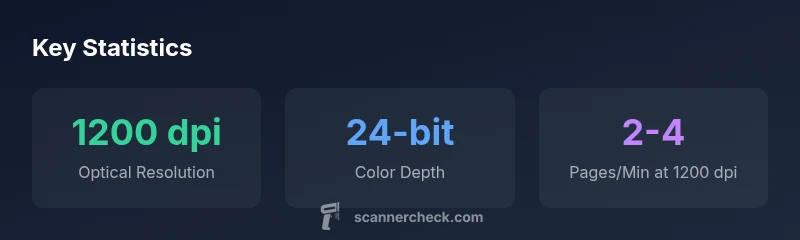
DPI is intimately tied to how the image is sampled, but perception also hinges on down-stream rendering. A 1200 dpi scan captures more detail, yet the final perceived sharpness depends on: (a) line sharpness from the optics, (b) the sensor’s color depth (typically 24-bit for consumer devices), and (c) compression or file format. An image scanned at 1200 dpi and saved as a high-quality TIFF will appear more detailed than the same document saved as a heavily compressed JPEG. The human eye also optimizes how much detail it can discern; in many office contexts, 1200 dpi offers a practical balance between legibility and file size.
Choosing between 1200 dpi and higher: trade-offs
Raising dpi improves detail but increases file size and scan time. For long batches of documents that are mainly text, 600–1200 dpi is often sufficient, with 1200 dpi providing a small margin of extra legibility for fine print. For archival photos or detailed business graphics, pushing to 2400 dpi or higher can capture subtle textures and micro-detail, but it will slow down throughput and produce larger outputs. If you routinely print or print-to-PDF text, test both 600 and 1200 dpi to see which setting meets your readability and storage goals. For color photos, a higher dpi paired with lossless or minimally compressed formats tends to preserve nuances in shadows and highlights better than aggressive compression at lower resolutions.
Practical ranges by use case
- Documents and OCR: 300–600 dpi typically suffices; 600–1200 dpi improves legibility for small fonts or poor print quality. For OCR accuracy, 600–1200 dpi is often recommended.
- Monochrome and grayscale images: 600–1200 dpi balances detail with manageable file sizes; go higher if you need finer tonal transitions.
- Color photos and graphics: 1200 dpi or higher can help preserve color fidelity and fine textures, but expect larger file sizes and longer scanning times. Consider lossless formats like TIFF or PNG when quality is paramount.
How to verify your scanner actually delivers 1200 dpi
Begin with the device’s official specification sheet and confirm the optical (true) dpi, not just advertised max. Run a controlled test: scan a standard test page or a chart that contains fine lines and a known font size at 1200 dpi, then view at 100% zoom to assess edge fidelity. Compare against scans at 600 dpi to quantify the improvement. If possible, scan the same page at multiple dpi values and measure line sharpness, corner fidelity, and text legibility. Some brands provide test targets; if not, you can print a micro-text chart and evaluate clarity at 1200 dpi.
Tips to maximize results at 1200 dpi
- Use TIFF or PNG for lossless storage; avoid aggressive JPEG compression.
- Clean the glass and lids; ensure the page lies flat to minimize perspective distortion.
- Enable features like descreening with caution; some content may look better with this turned off.
- Calibrate color profiles when scanning photos; consistent illumination helps avoid color drift.
- For batch workflows, choose a faster scan mode on the driver and only increase dpi for pages that require it.
Common myths about dpi and scanning
- Myth: Higher dpi always means better quality. Reality: results depend on the source material and optics; the incremental gain may not justify longer times or bigger files.
- Myth: 1200 dpi is the maximum you’ll ever need. Reality: some workflows—like archival scans or tiny print—benefit from even higher resolutions.
- Myth: DPI alone determines OCR accuracy. Reality: OCR accuracy also relies on contrast, font, layout, and preprocessing steps before scanning.
DPI ranges by scanner type
| Scanner Type | Optimal DPI Range | Best Use | Approx Scan Speed (pages/min) |
|---|---|---|---|
| Flatbed | 600-1200 | Documents, photos | 1-3 |
| ADF (Automatic Document Feeder) | 300-1200 | Bulk documents | 2-6 |
| Portable handheld | 300-600 | On-the-go captures | 0.5-2 |
Common Questions
What does 1200 dpi practically mean for scanned text?
1200 dpi means the sensor captures 1200 samples per inch, resulting in crisper text with finer edge definition. For most standard documents, this improves readability without generating excessively large files.
At 1200 dpi, text looks crisper and more legible without exploding file sizes, making it a good middle ground for documents.
Should I always scan at 1200 dpi?
Not always. For dense text documents, 600–1200 dpi is typically sufficient. For archival photos or tiny font sizes, 1200–2400 dpi may be beneficial, but plan for larger files and slower scans.
Only scan at 1200 dpi if you need extra detail or future-proofing; otherwise 600 or 300 dpi can be fine for most uses.
How does dpi compare with image quality features like bit depth?
DPI determines sampling density, while bit depth affects color precision. A high dpi combined with 24-bit color typically yields richer, more accurate images, especially for photos.
DPI is about sampling size, but color depth determines how many colors you can capture—both matter for image quality.
Can software enhancements fix low-dpi scans?
Software filters can sharpen edges or reduce noise, but they cannot recreate true detail lost at lower sampling rates. It's better to scan at an appropriate dpi from the start.
Software can help a bit, but it can’t truly replace the detail you lose at low dpi.
What file formats should I use at 1200 dpi?
Use lossless formats like TIFF or PNG for archival scans or documents requiring fidelity. Save final deliverables as PDFs when text searchability is needed.
For best quality, save at 1200 dpi as TIFF or PNG; use PDF when you need searchable text.
How can I verify my scanner’s 1200 dpi claim?
Check the device’s native optical resolution in the manual, run a controlled test with a known chart, and compare 1200 dpi scans against lower settings to assess edge sharpness.
Check the spec, then test with a chart and compare to ensure you’re seeing real gains at 1200 dpi.
“For most desk-based document workflows, 1200 dpi is a pragmatic compromise between speed and clarity. The benefits depend on the content and how the scans are used.”
Key Takeaways
- DPI is a sampling rate, not a guaranteed image quality.
- 1200 dpi balances detail with reasonable file sizes for most documents.
- Higher dpi increases file size and scan time; align dpi to your use-case.
- Test your actual device to verify optical resolution and output.