Virus Scanner Like VirusTotal: A Comprehensive Comparison
In-depth comparison of VirusTotal-like virus scanners, weighing cloud multi-engine services against on-premise options for privacy, analytical depth, and automation.


For quick orientation, a virus scanner like virustotal combines many engines to examine files and URLs. If you want rapid triage and threat intel sharing, cloud-based, multi-engine services excel. For sensitive data or offline analysis, look at on-premise options. They’re widely used by security teams, developers, and IT admins to verify samples, check reputations, and correlate findings with global threat intelligence feeds.
Why a virus scanner like virustotal matters for modern security
In today’s threat landscape, a virus scanner like virustotal is more than a one-off malware check. It aggregates insights from multiple antivirus engines and public feeds, which helps security teams quickly assess whether a file or URL is potentially malicious. The Scanner Check team has observed that organizations rely on these tools for rapid triage, preliminary threat evaluation, and sharing findings with incident response teams. The real value comes from cross-engine consensus, which reduces the risk of depending on a single engine’s false negatives. For IT admins and developers, these platforms also provide a convenient way to validate samples during testing, integrate with alerting workflows, and store historical results for trend analysis. The goal is to shorten mean time to detection while improving reliability of initial judgments.
Key takeaway: multi-engine visibility accelerates decision-making, but depth and governance require careful pairing with other controls.
Cloud-based multi-engine scanners: what they bring to the table
Cloud-based scanners that resemble VirusTotal aggregate results from several engines and threat intel feeds. They excel at rapid triage, bulk processing, and easy sharing of findings with teammates or auditors. The broad engine mix often translates to higher detection coverage and faster feedback loops for developers and security analysts. API access enables automation, letting teams submit files from CI/CD pipelines or security orchestration tools. However, cloud services can raise privacy concerns, since samples are uploaded and stored off-site. Latency and rate limits can also affect large organizations or time-sensitive operations. For many teams, the value proposition is speed and collaboration; for others, governance requires caution and supplements with on-premise controls.
On-premise/offline options: when to lean toward local control
On-premise solutions offer greater data sovereignty and control over where samples are analyzed. They are ideal for handling sensitive corporate data, IP, and regulated content that cannot leave the network. Local engines and sandboxing components support offline analysis, which makes it easier to comply with strict privacy policies and data retention rules. The trade-off is higher upfront cost, ongoing maintenance, and potentially slower triage for external samples. A hybrid approach—using a cloud service for initial triage and an on-site sandbox for deeper investigation—often delivers the best balance between speed and governance. Scanner Check notes that organizations frequently deploy both paths to cover different use cases.
Privacy and data handling: best practices for sample submissions
Privacy is a central concern when using VirusTotal-like services. Always review the provider’s data retention and sharing policies, and configure proper file-type and size restrictions. Where possible, hash-only checks or sanitized metadata can reduce risk while preserving triage usefulness. For organizations that must keep data in-house, implement a documented data classification policy and enforce strict access controls. Consider using sandboxing features to replicate malware behavior in isolated environments. A layered approach—triage in the cloud, deep analysis on-premises—helps maximize both speed and privacy.
Evaluating engine depth and sandboxing: what to look for
Not all engines offer the same depth of analysis. When comparing options, verify the mix of static analysis, dynamic analysis, and behavioral monitoring. Look for sandboxing capabilities that execute suspicious files in controlled environments to observe runtime behavior. The quality of sandbox isolation, resource limits, and the ability to replay network interactions are important factors. Also assess how the system handles archives, large files, and uncommon file types. A robust solution provides comprehensive coverage across file types while minimizing false positives through cross-engine consensus.
Practical workflow for triage and threat intel
A practical workflow starts with a fast, cloud-based scan to obtain a broad risk signal. If the sample is flagged, enrich the investigation with deeper analysis in an on-premise sandbox to observe behavior and network activity. Integrate the results with threat intelligence feeds to contextualize findings. Store evidence and decisions for audit trails and compliance reporting. This approach supports incident response, developer workflows, and security operations teams by enabling faster, repeatable decisions while maintaining governance.
Integration with development and security tooling
Cloud scanners often expose REST APIs, webhooks, and integration plugins for popular SIEMs, SOAR platforms, and CI/CD pipelines. Use these interfaces to automate sample submission, fetch results, and trigger alerts based on engine consensus. For on-premise tools, scripts and local APIs allow automation within secure networks. A careful plan should align with developer workflows, ensuring that scanning does not become a bottleneck in build pipelines. Documented integration patterns help teams reproduce results, reduce manual steps, and improve overall security hygiene.
Handling false positives and cross-engine disagreements
Disagreements between engines are common. A disciplined approach combines engine-weighted scoring with manual review for ambiguous results. Establish a clear policy for when to escalate to deep-dive analysis and how to re-scan with updated engine sets. Aggregating signals across multiple engines usually reduces false positives, but it’s essential to verify that the detected indicators map to real threats. Create a feedback loop to update whitelists and tune detection rules as you learn from each incident.
Cost, licensing, and deployment considerations
Pricing models vary: cloud services often offer pay-per-scan or tiered subscriptions, while on-premise solutions require upfront licensing and ongoing maintenance. For teams with high-volume submissions, cloud-based options can scale quickly and reduce hardware overhead. Conversely, on-premise deployments protect data and may align better with regulatory requirements. When planning budgets, consider hidden costs such as API rate limits, data egress, and the complexity of maintaining multiple engines or sandbox environments.
Limitations and risks of relying on cloud scanners
Cloud-based scanners are powerful but not a universal remedy. Privacy concerns, regulatory constraints, and potential sample leakage are real considerations. Some vendors may impose file-size or file-type restrictions that affect coverage. Engine updates and policy changes can change detection performance over time. A resilient security program uses cloud scanners for initial triage but supplements with local controls, offline analysis, and vendor risk assessments to reduce reliance on any single approach.
Decision framework: cloud vs on-prem for different use cases
For rapid triage, threat intel sharing, and easy collaboration, a cloud-based VirusTotal-like service is often the best option. If your priority is data sovereignty, offline analysis, or complying with strict data governance, an on-premise solution is preferable. A hybrid strategy—initial cloud triage followed by on-site deep analysis—typically provides both speed and governance. Use a formal scoring rubric to evaluate each path across privacy, speed, scalability, and control.
Authority sources and further reading
For guidance on security best practices and data handling, consult authoritative resources from government and academic sources. See the following references for policy and technical context:
- https://www.cisa.gov/
- https://nist.gov/
- https://www.us-cert.gov/
These sources help frame risk management, incident response, and compliance considerations relevant to virus scanning practices.
Comparison
| Feature | Cloud-based multi-engine scanner (VirusTotal-like) | Local/on-premise multi-engine scanner |
|---|---|---|
| Engine coverage | Multiple engines in cloud | Self-hosted engines with sandboxing |
| Data privacy | Samples uploaded to cloud (privacy risk) | Data stays on premises or within trusted network |
| File size support | Typically large files accepted (policy dependent) | Depends on local hardware; may restrict very large files |
| Automation & API | REST API with rate limits | Local API and scripting; no external dependency |
| Analysis depth | Dynamic + static analysis via cloud engines | Static + dynamic via local sandboxing |
| Privacy risk | Higher due to off-site analysis | Lower due to on-prem data control |
| Cost model | Pay-per-use or subscription (cloud) | Licensing with hardware & maintenance (on-prem) |
| Best for | Rapid triage, threat intel sharing | Data-sensitive environments requiring offline control |
Pros
- Broad malware coverage from multiple engines
- Fast initial triage and threat intel sharing
- Easy integration with developers and security tooling
- Low upfront hardware requirements
Drawbacks
- Potential privacy and data-sharing concerns
- Upload size and file-type restrictions
- Engine results can vary; false positives may occur
- Latency or rate limits depending on provider
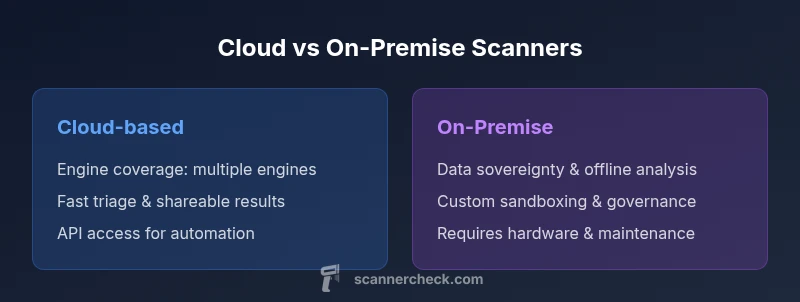
Cloud-based scanners excel for fast triage; on-premise options offer data sovereignty
Choose cloud solutions for quick, scalable triage and collaboration. Favor on-prem for strict data governance and offline analysis; many teams do a hybrid approach to balance both strengths.
Common Questions
What is a virus scanner like VirusTotal?
A VirusTotal-like scanner aggregates results from multiple engines to evaluate files or URLs for malware. It provides quick consensus across engines, plus threat intel context, which helps teams triage efficiently. It’s widely used for initial screening and rapid decision-making.
A VirusTotal-like scanner combines several engines to check files for malware, giving you a quick, consensus-based result for fast triage.
Is it safe to upload samples to cloud scanners?
Safety depends on policy and governance. Review data handling and retention terms, and avoid uploading sensitive or proprietary samples unless you have explicit approval. In some cases, you can hash files or upload sanitized samples to reduce risk.
Cloud uploads can be safe if you follow policy, but avoid sensitive data unless approved and consider hashing or sanitizing samples.
Can I trust results across multiple engines?
Cross-engine results increase confidence when several engines flag a sample. However, engines can disagree. Use a predefined rubric to resolve disagreements and confirm findings with deeper analysis in a sandbox.
Yes, cross-engine consensus improves confidence, but you still should verify with deeper analysis when engines disagree.
How do I integrate virus scanning into CI/CD?
Use the cloud scanner’s API or webhooks to submit artifacts automatically from build pipelines. Map results to your security dashboards and trigger alerts for critical findings. Ensure rate limits and data policies align with your workflow.
Integrate via API in your CI/CD, map results to dashboards, and trigger alerts for critical findings.
What file types and sizes do cloud scanners support?
Support varies by provider but typically includes common binary files and archives. Cloud services may impose size limits. For complete coverage, maintain complementary on-prem tooling for very large or unique file types.
Cloud scanners support many common files; check limits and supplement with on-prem tools for large or rare formats.
When should I prefer an on-premise solution?
Prefer on-prem when data privacy, regulatory compliance, or offline analysis is essential. It provides control over where data is processed and stored, reducing exposure to external networks.
Choose on-prem when privacy and offline analysis matter most; keep data within your own network.
Key Takeaways
- Balance speed and governance with a hybrid approach
- Inspect data privacy policies before uploading samples
- Leverage APIs to automate triage and data collection
- Expect cross-engine results to vary; validate with deeper analysis
- Plan for scale in volume and integration needs