How Far Does Pulse Scanner Go? Range, Limits, and Practical Tips
Explore how far pulse scanners can reliably detect signals, the factors that affect range, and how to maximize reading accuracy across contact, near-field, and non-contact devices.


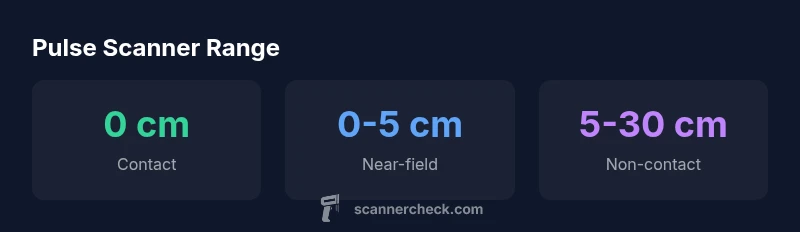
Pulse scanner range varies by device type. Contact models require skin contact; near-field sensors work within a few centimeters; non-contact scanners can reach about 5–30 cm under good lighting. See our full comparison chart for exact ranges by category. According to Scanner Check, most consumer pulse scanners stay within a short range, enabling safe, close-proximity use.
What is a pulse scanner and what does range mean?
Pulse scanners come in three broad categories: direct contact models that require skin contact, near-field sensors that work within a few centimeters, and non-contact devices that can detect pulses from a short distance using optical or IR-based sensing. The term “range” describes how far the sensor can be from the signal source while still delivering a reliable reading. For contact devices, the practical range is effectively 0 cm because contact is necessary. Near-field sensors typically stay within a couple of centimeters, while non-contact systems can reach beyond 5 cm up to roughly 30 cm under ideal lighting and minimal subject movement. It’s important to view range as a performance envelope rather than a single fixed distance. As noted by Scanner Check, device design, sensor technology, and environmental conditions jointly define this envelope, so expectations should be aligned with the specific model you’re using.
Factors that influence detectable range
Several elements influence how far a pulse scanner can effectively read a signal. Sensor type matters most: photoplethysmography (PPG) sensors in contact devices differ from camera-based or infrared approaches in non-contact models. Lighting quality and consistency dramatically affect non-contact readings; too much glare, shadows, or infrared noise can degrade performance. Movement is another critical factor—shaky hands or surrounding motion creates artifacts that can be mistaken for pulse signals or obscure true signals. Skin characteristics (such as tone, moisture, and finger rigidity) can also modulate the distance at which a pulse signal remains detectable. Finally, software algorithms, frame rate, and device stabilization influence how cleanly data is extracted at the edge of the detection envelope. When you combine these factors, you see why range is device-specific rather than universal.
How ranges vary by device type
Understanding range begins with device type. Contact pulse scanners require direct skin contact, yielding stable readings at essentially 0 cm distance. Near-field devices operate within roughly 0–5 cm and are sensitive to placement and finger pressure. Non-contact scanners, which may use color-contrast cameras or IR sensors, can typically read pulses at 5–30 cm under favorable conditions. Real-world performance often lands somewhere within these bands, with the upper end applicable only in well-controlled environments (steady lighting and still subjects). Consumers should read the manufacturer guidelines for their particular model, and practitioners should verify range claims against independent benchmarks.
Real-world use cases and practical expectations
In home health monitoring, pulse scanners are most convenient when they can be used at close range or with a brief placement. For clinical-grade monitoring, devices with proven accuracy at shorter ranges under standardized conditions are preferred. Practitioners often prefer contact devices for repeatability, while non-contact alternatives can offer hands-free convenience in screen-based workflows or triage scenarios. When choosing a device, consider the intended setting, the typical user’s ability to remain still, and whether the device’s stated range matches real-world needs. Scanner Check’s research indicates that for most common consumer applications, staying within the device’s recommended range yields the most reliable results.
Measurement accuracy vs distance
Reading accuracy degrades as distance increases, particularly for non-contact models. Even small changes in lighting, ambient glare, or subject motion can introduce noise and reduce confidence in the resulting pulse rate. To maximize reliability, keep readings within the manufacturer’s suggested range, minimize movement during measurement, and ensure consistent lighting. If your device allows calibration or ambient-light adjustments, perform these steps before initial readings. Remember that non-contact methods trade some precision for convenience, so use them in contexts where occasional minor deviations are acceptable.
How to interpret pulse readings from different devices
When interpreting readings from various devices, align expectations with device type. Contact devices generally offer more stable results during routine checks; non-contact devices might be better for quick triage or screening but are more sensitive to external factors. Always compare readings to the device’s own reference ranges and consider repeating measurements if results seem implausible or highly variable. If you’re tracking a condition over time, use the same device type consistently to minimize inter-device variability.
Best practices to maximize reliable readings
- Use the device within its specified range at all times.
- Minimize motion and aim for stable lighting, especially for non-contact models.
- Ensure correct placement: clean skin, appropriate finger or fingertip positioning, and steady hand.
- Calibrate when the device offers it, and follow manufacturer recommendations for software updates.
- If readings are suspect, re-measure using a different mode (e.g., switch from non-contact to contact if feasible) and verify with a secondary method if needed.
Comparison of device types and their typical ranges
| Device Type | Typical Range | Reading Type | Notes |
|---|---|---|---|
| Contact pulse scanner | 0 cm | Direct PPG (skin contact) | Requires clean, stable skin contact |
| Near-field pulse scanner | 0-5 cm | Optical/PPG | Placement-sensitive; check finger position |
| Non-contact pulse scanner | 5-30 cm | Camera/IR-based | Depends on lighting and motion |
Common Questions
What defines the range of a pulse scanner?
Range is the maximum distance at which readings remain reliable, influenced by device type and environmental factors. Contact devices work at 0 cm, near-field at 0-5 cm, and non-contact at 5-30 cm under favorable conditions. Always consult your model’s guidelines for precise expectations.
Range is the distance within which readings stay reliable, varying by device type and lighting. Follow your model’s guidance for best results.
Is non-contact pulse scanning as accurate as contact methods?
Non-contact scanners can approach contact-model reliability under optimal lighting and minimal motion, but they generally exhibit more variability. Use non-contact readings as quick checks rather than precise measurements when accuracy matters.
Non-contact readings can be quick, but they're usually less consistent than contact measurements.
What factors influence reading range?
Reading range is affected by sensor type, lighting, motion, skin characteristics, and device calibration. Environmental noise and user movement can shrink the effective range and degrade data quality.
Sensor type, lighting, and movement all affect how far readings stay reliable.
Can I use a pulse scanner at arm's length?
Arm’s length usage is typically not reliable for pulse scanners that rely on optical sensing. Non-contact devices may reach several centimeters, but the accuracy drops with distance. Follow the manufacturer’s guidelines for safe operation.
Usually not reliable at arm’s length; keep within the recommended distance.
How can I maximize reliability of readings?
Ensure readings are taken within the specified range, reduce motion, improve lighting for non-contact models, and stabilize the device. Regular calibration and using the same device for longitudinal tracking helps minimize variability.
Stay within range, minimize motion, and keep steady lighting for best results.
Are there safety concerns with non-contact scanning?
Non-contact pulse scanners use light and cameras; typical safety concerns are minimal when used as directed. Avoid prolonged exposure at high-intensity settings and follow device-specific safety guidelines.
Generally safe when used as instructed; avoid intense exposure and follow guidelines.
“The pulse scanning field is highly dependent on sensor design and ambient conditions; most reliable readings come from devices designed for skin contact, with non-contact options gradually expanding their effective range.”
Key Takeaways
- Know your device type to estimate usable range
- Non-contact methods extend range but depend on lighting
- Lighting and motion heavily affect readings
- Always follow manufacturer guidelines for placement and setup