Is Scanner and Printer the Same? A Practical Guide
Explore whether a scanner and printer are the same, with a clear, analytical comparison of capabilities, workflows, and when to choose dedicated devices versus all‑in‑one options.


No—scanners and printers serve different primary tasks. A scanner digitizes paper documents into digital data, while a printer creates physical copies from digital data. In practice, many devices blend both roles (multifunction printers), but their core hardware and main use cases remain distinct. Understanding the difference matters for selecting the right device and optimizing your workflow. Understanding the distinction helps you avoid overbuying and misapplying a device to a task it isn’t optimized for.
Understanding the core question
Is the question "is scanner and printer same" worth answering with a simple yes or no? In practice, it’s a cross-disciplinary comparison that hinges on the device's primary function, the nature of its media handling, and the intended workflow. At a high level, a scanner converts physical pages into digital data; a printer creates physical copies from digital data. The distinction matters for purchasing decisions, maintenance plans, and long‑term productivity. According to Scanner Check, most users underestimate how challenging it is to optimize the scanning workflow when they assume a printer can simply double as a high‑quality scanner. A dedicated scanner typically uses an optimal optical path, specialized sensors, and software designed to minimize artifacts such as skew, glare, or color drift. A printer, even an all‑in‑one model, prioritizes output speed, ink or toner efficiency, and page handling mechanics geared toward producing reliable prints. The practical takeaway is that you should map your most frequent tasks first: if you scan hundreds of documents per week with critical color accuracy or fine line detail, you are likely not optimally served by a generic printer with a scanner function embedded. If your needs are light, and you already own a printer, the all‑in‑one option can satisfy basic scanning tasks with acceptable results. The path forward depends on your throughput, required fidelity, and the acceptable trade‑offs in space, budget, and maintenance.
Core distinctions: hardware, software, and workflow
To answer is scanner and printer same, you must separate core capabilities from optional features. A dedicated scanner focuses on one job—capturing documents with high fidelity and repeatable quality. It emphasizes optical resolution, color accuracy, border alignment, and reliable duplex scanning in batch modes. The processing software installed with a scanner is tuned for document capture, deskew, despeckle, and file formats optimized for storage and OCR pipelines. By contrast, a printer’s advantage is producing tangible output with consistent color and speed. Even all‑in‑one devices must manage dual paths: a print path and a scan path, sharing some internal components such as the scan sensor and motor drivers. The resulting user experience can blur lines, but fundamental limits remain: scanning tends to demand higher optical fidelity and less forgiving media handling; printing prioritizes ink management and page throughput. For decision‑making, define your primary task first: if scanning is your main workflow, a purpose‑built scanner is typically the better choice; if you need occasional scanning alongside rapid prints, an all‑in‑one device may be more efficient in a small footprint.
Performance factors: resolution, color, and OCR
Performance is the main differentiator between a dedicated scanner and a printer with scanning capabilities. Optical resolution (the true scan quality measured in what the sensor can capture) often exceeds what you get from entry‑level multifunction devices, especially for text sharpness and fine lines. Color depth and color management also matter; archival projects benefit from devices that preserve subtle gradations and minimize color drift. OCR (optical character recognition) effectiveness is closely tied to scan fidelity and image preprocessing. Dedicated scanners frequently ship with advanced software suites that optimize deskew, despeckle, and texture correction, which translates into higher OCR accuracy on complex documents. All‑in‑one printers can still deliver solid scans suitable for everyday cloud storage, email, and light archiving, but expect variability with glossy photos, thin paper, or densely written documents. The decision should align with your tolerance for post‑processing and the required legibility of scanned text. For high‑volume, high‑fidelity scanning, you should lean toward a dedicated scanner; for general purpose use, an all‑in‑one device can suffice.
Cost of ownership and lifecycle considerations
Total cost of ownership matters just as much as upfront price. Dedicated scanners tend to be optimized for long‑term capture tasks and can deliver reliable performance for years with lower per‑page costs when handling large batches. They may require occasional maintenance such as glass cleaning, sensor calibration, or firmware updates, but often feature replaceable components that extend lifespan. All‑in‑one printers combine two devices into one chassis, which saves space and initial hardware cost but can complicate maintenance and long‑term reliability. Ink or toner costs, as well as potential print head wear, influence ongoing expenses. When considering is scanner and printer same, you should compare not just the sticker price but also consumables, maintenance cadence, and upgrade cycles. If your workflow includes heavy document capture with strict fidelity requirements, a dedicated scanner is usually the more economical choice over several years. If you value a compact footprint and a simple setup, an all‑in‑one device can provide acceptable performance without the burden of managing two separate devices.Scanner Check analysis shows that dedicated scanners can outperform multifunction devices for high‑quality scans, particularly in professional archiving and research contexts, though the gap narrows for casual users.
Connectivity, drivers, and software ecosystems
Connectivity is a critical but often overlooked aspect of choosing between a dedicated scanner and an all‑in‑one printer. Dedicated scanners typically offer robust TWAIN/WIA support, batch scanning through dedicated capture software, and strong local area network (LAN) or USB connectivity. Software ecosystems frequently provide advanced features like automated document workflow pipelines, built‑in OCR, and cloud transfer options. All‑in‑one printers also support network and cloud workflows, but the scanning software may be less feature‑rich, and driver stability can vary across manufacturers. If you rely on automated scanning into document management systems or need consistent batch processing, a dedicated scanner paired with a capable software suite often yields more predictable results. For casual mixed use, an all‑in‑one device provides sufficient connectivity and a simpler setup. In all cases, verify platform support on your primary OS, including macOS, Windows, and any enterprise imaging solutions you use.
Practical use‑case guidance: home vs. office vs. archival work
People frequently ask how to balance is scanner and printer same when their needs diverge. Home users often favor compact, low‑cost all‑in‑one units that cover occasional school papers, recipes, and travel documents. Small offices may benefit from mid‑range all‑in‑ones that provide scanning to email or cloud storage while offering basic color printing and copying. For archival projects or legal/financial documentation, a dedicated scanner with high optical quality and stable capture software delivers superior results, faster batch processing, and more reliable color fidelity across thousands of pages. In the end, the choice should map to your primary workflow and budget constraints. If you expect to scan frequently and require high fidelity, invest in a dedicated scanner; if you mainly print and seldom scan, an all‑in‑one device keeps things simple and space‑efficient.
What to buy: dedicated scanner vs all‑in‑one printer
To decide whether to buy a dedicated scanner or an all‑in‑one printer, start by listing your top five tasks and ranking them by frequency and importance. Consider the following decision criteria: optical resolution and color accuracy, batch scan capabilities (ADF), media handling (size, thickness, and glossy vs matte), software integration (OCR quality, file formats, and export destinations), and cost of ownership, including consumables. If your response is scanning heavy with archival requirements and you need reliable color integrity, a dedicated scanner is often the best fit. If you want a compact, budget‑friendly solution that handles occasional scanning alongside printing and copying, an all‑in‑one device is a pragmatic choice. Always test with your typical documents when possible, and review warranty terms and serviceability for your expected workload.
How to evaluate an option: a practical checklist
Use this checklist to evaluate options: determine your primary task (scanning or printing); check optical resolution in the scanner path; verify duplex and batch scanning capabilities; assess OCR performance in your preferred software; review driver stability and compatibility with your OS; test media handling for your typical document sizes and types; compare total cost of ownership including consumables and maintenance; confirm software ecosystem and cloud integration ease; ensure you have adequate space and a future upgrade path. By following these steps, you will avoid the trap of assuming is scanner and printer same and secure a device that truly fits your workflow.
Common misconceptions and practical takeaways
A common misconception is that a printer with a scan function is equivalent to a dedicated scanner. The practical takeaway is that the scanning path and print path are designed with different priorities. If your work hinges on precise color, high optical fidelity, or intensive batch capture, a dedicated scanner is usually the better choice. If space, cost, and simplicity trump perfect archival quality, an all‑in‑one device may meet your needs with acceptable results. Remember to factor in the entire workflow—from document handling to OCR to long‑term storage—when evaluating devices. This approach helps ensure you are not misled by marketing claims about “is scanner and printer same” and that you select a tool that genuinely supports your daily tasks.
Comparison
| Feature | Dedicated Scanner | All‑In‑One Printer |
|---|---|---|
| Primary function | Digitize documents with high fidelity | Print and scan (dual role) |
| Best for | Archival capture, high‑quality scans | General office tasks, space‑constrained setups |
| Scan quality | Typically higher, optimized optics | Adequate for daily tasks, not archival‑grade |
| Speed (per page) | Optimized for capture batches | Print path usually faster; scan speed varies |
| Cost of entry | Higher upfront for performance‑oriented models | Lower upfront with combined device |
| Software ecosystem | Advanced capture software, robust OCR | Integrated drivers, cloud/scan workflows |
| Maintenance/consumables | Glass maintenance, possible hardware upgrades | Ink/toner consumption, firmware updates |
| Best for | Dedicated scanning workloads | Mixed environments needing print and scan |
Pros
- Dedicated scanners often deliver higher scan quality and faster batch capture
- All‑in‑one printers save space and initial cost by combining tasks
- Modern MFPs enable convenient cloud scanning and wireless workflows
- OCR and document management can be integrated in both paths
Drawbacks
- Dedicated scanners may be slower for large batches if not equipped for rapid scanning
- All‑in‑one printers may compromise on scan quality or color fidelity
- Maintenance and consumables for printers can be pricier over time
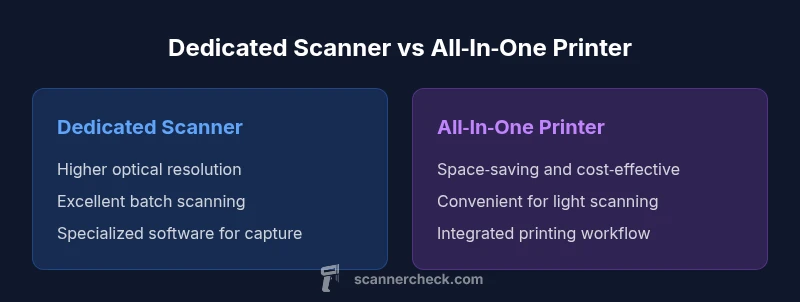
Dedicated scanners win for high‑fidelity, batch scanning; all‑in‑one printers win for space and cost efficiency
If your priority is archiving and document fidelity, choose a dedicated scanner. If you need printing plus occasional scanning in a compact setup, an all‑in‑one device is a practical compromise.
Common Questions
Is a scanner the same as a printer?
No. Scanners digitize physical documents; printers reproduce digital content on paper. All‑in‑one devices blur the line but rely on distinct subsystems for scanning and printing.
No. Scanners and printers serve different core jobs, and even all‑in‑ones split those paths.
Can a printer scan documents?
Many printers are all‑in‑one devices and include built‑in scanners. Standalone printers without scanning capability cannot scan documents. Check the model’s specifications to confirm scanning support.
Yes, most all‑in‑one printers can scan; standalone printers generally cannot.
Which is better for archival quality: dedicated scanner or all‑in‑one?
For archival quality, dedicated scanners typically provide higher optical resolution and better color fidelity. All‑in‑one devices can meet daily needs but may fall short on long‑term preservation tasks.
For archival work, go with a dedicated scanner; all‑in‑ones are fine for everyday tasks.
What about OCR accuracy?
OCR accuracy depends on scan quality and software. Modern scanners and capture software offer strong OCR, especially when paired with good preprocessing. Ensure your workflow includes a reliable OCR path.
OCR works best when scans are clean and software is strong.
Is is scanner and printer same for home use?
At home, an all‑in‑one device often suffices for light scanning and printing. If you have heavy scanning needs or archival tasks, a dedicated scanner remains preferable.
For home use, an all‑in‑one usually works well, unless you scan a lot.
How do I decide which to buy?
Assess your volume, required fidelity, space, and budget. If scanning is frequent and high‑quality, choose a dedicated scanner; otherwise, a compact all‑in‑one may be the right fit.
Think about how often you scan, how good the scans need to be, and space.
Key Takeaways
- Define your primary task before buying: scan-focused vs print-focused
- Dedicated scanners typically offer higher fidelity and faster batch capture
- All‑in‑one printers save space and reduce upfront cost but may trade off scan quality
- Ensure OCR capabilities align with your workflow and software
- Consider total cost of ownership, not just the purchase price