Scanner and Copier: Comprehensive Side-by-Side Review
An analytical, objective comparison of scanners, copiers, and scanner-copier hybrids. Learn features, pricing ranges, setup, and scenarios to pick the right device for your workflow.


For most buyers, a dedicated scanner or a printer with an integrated scanner is best, depending on volumes and workflows. A true scanner delivers higher-quality flatbed scans, while copiers excel at on-demand doc copies with basic scanning. A scanner-copier combo offers flexibility for mixed use but may cost more and complicate maintenance.
What a scanner and copier are and how they relate
A scanner and a copier describe two core document-handling functions that often appear together in modern devices. A scanner uses imaging sensors to capture the physical page and convert it into a digital file; typical outputs include PDF, TIFF, and JPEG. A copier, by contrast, takes digital input or a scanned image and reproduces a hard copy on paper. When a device combines both functions, users gain a flexible, space-saving solution for office work, home offices, or classrooms. The distinction matters for workflow design: if your priority is digital archiving, you want a capable scanner; if you frequently produce paper copies, you need reliable copying performance; if your environment demands both tasks, a scanner-copier combo can simplify procurement and maintenance. According to Scanner Check, the best practice is to map your average document volume, preferred output formats, and integration with cloud services before choosing a model. In real-world use, many teams start with a basic scanner and expand to a copier later, or opt for a combo unit to avoid device sprawl. 2026 is a good baseline year to evaluate new models and software ecosystems.
Key differentiators in modern models
The landscape of scanners, copiers, and combo devices has matured. The most important differentiators are performance and workflow features rather than raw feature lists. First, speed and duty cycle: dedicated scanners, especially for office use, emphasize pages-per-minute for scanning speed, while copiers measure output in copies per minute and paper-handling reliability. Duplex scanning (two-sided) and document-feeding capacity (ADF) determine efficiency for large batches. Second, image quality: DPI and color depth set the bar for archival-quality scans; head-to-head, you may see only marginal improvements beyond 600–1200 dpi for everyday tasks, while print-shop-level work benefits from higher settings. Third, software integration: long-term value comes from OCR accuracy, cloud integration, and compatibility with document management systems; many models ship with bundled software, while others rely on third-party tools like VueScan. Finally, build quality and reliability: motor noise, jam rates, and the availability of spare parts influence total cost of ownership. According to Scanner Check, choosing the right model starts with a clear picture of your primary workflows and future growth expectations.
Output quality and file formats
Scanning output quality hinges on optical resolution, color depth, and dynamic range. Most office devices target up to 600–1200 dpi for everyday documents; higher settings yield crisper text for archival purposes or detailed graphics. Color depth typically ranges from 24-bit for color scans to 8–12-bit grayscale options for monochrome documents. Output file formats matter for downstream workflows: PDFs (including searchable PDF), TIFF, and JPEG are common, with many devices offering built-in OCR to convert scanned pages into editable text. When choosing a device, verify OCR accuracy for common fonts used in your documents and check whether the scanner supports choosing page orientation, foldouts, and mixed-page documents. Integration with cloud storage and document management systems often enhances long-term accessibility and searchability. Scanner Check notes that the value of a scanner scales with how well it integrates with your existing software stack and data governance practices.
Cost of ownership and pricing bands
Cost considerations extend far beyond sticker price. Entry-level scanners and compact copiers tend to sit in the low-to-mid range of pricing, while robust office-scanner combinations or high-volume copiers push into the mid-to-high spectrum. Ownership costs include consumables (toner or ink for copiers, maintenance for scanners), periodic firmware updates, and replacement of wear parts such as rollers or ADF sheets. Price ranges help frame expectations: a basic scanner might be in the short-to-mid range, mid-range devices balance features with reliability, and premium models deliver advanced OCR, robust cloud integration, and enterprise-grade security. In practice, factor in annual maintenance, expected device lifetime, and potential productivity gains from faster workflows. Scanner Check emphasizes aligning price bands with your organization’s document throughput and growth trajectory to avoid over-investment or underutilization.
Setup and driver support
Effective setup begins with driver compatibility and straightforward installation. Most modern devices offer TWAIN/WIA compatibility on Windows and macOS, with Linux support often possible through universal drivers or third-party utilities. Look for ISIS or TWAIN-compliant drivers that enable reliable scanning workflows and batch processing. Network-first devices should support Wi‑Fi, Ethernet, or both, enabling convenient scanning from mobile apps and desktop software without plugging cables into every workstation. Cloud-connected scanning is increasingly common, letting you push documents directly to OneDrive, Google Drive, or corporate repositories. When evaluating, confirm ongoing driver updates and the availability of vendor-provided apps for both desktop and mobile use. Scanner Check highlights the importance of a stable driver ecosystem to minimize setup friction and maximize long-term productivity.
Reliability and maintenance
Reliability hinges on component build quality, ease of maintenance, and service availability. ADFs (automatic document feeders) must feed pages consistently, and the internal rollers should withstand thousands of cycles without significant wear. Noise levels, vibration, and thermal management influence user satisfaction in busy offices. Regular maintenance windows and accessible spare parts reduce downtime and extend device life. Warranty terms and response times play a critical role: longer coverage with responsive service is often more valuable than a low upfront price. For mixed devices, ensure the vendor offers service options for both the scanning motor and the copying engine, so a failure in one module doesn’t necessitate a full replacement. Scanner Check emphasizes balancing rated duty cycles with real-world throughput, especially for teams that scan daily.
Security and privacy considerations
Security features are essential when documents travel across networks or reside in cloud storage. Look for secure print, user authentication, and encryption of stored and transmitted data. Regular firmware updates patch vulnerabilities, while activity logs help monitor access to sensitive information. If your environment includes remote work or distributed teams, ensure that devices implement strong access controls and compliance with data-protection standards. Disable unnecessary services (like unused web interfaces) and keep default passwords changed. A device that integrates with trusted identity providers and offers granular user permissions reduces risk in regulated environments. Scanner Check notes that security should be a built-in design goal, not an afterthought, particularly for devices deployed in shared or multi-tenant spaces.
Best use cases: when to choose scanner vs copier vs combo
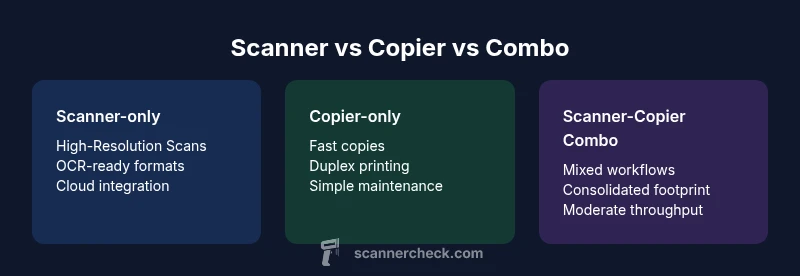
Your decision framework should revolve around how you work in practice. A dedicated scanner excels in digital archiving, text extraction, and long-term searchability, especially when paired with OCR and robust cloud integration. A dedicated copier is ideal for environments with high-volume paper reproduction, fast warm-up times, and strong duplexing performance. A scanner-copier hybrid offers the most flexibility for mixed workflows, reducing device count and consolidating management, though it can trade off peak performance in either task. For home offices with occasional scanning and copying, a compact combo might suffice; for small businesses handling thousands of pages weekly, a purpose-built scanner or copier with optional expansion features can deliver better reliability and throughput. Scanner Check suggests mapping your typical document mix and testing a model under realistic workloads before committing to a purchase.
Getting the right accessories and bundles
Accessories can dramatically improve productivity and turnaround times. Consider an optional ADF upgrade for larger batches, a document feeder for fragile or mixed media, and a duplexer for two-sided work. Bundles often include scanning software, OCR suites, and cloud-connectivity licenses; evaluate whether those tools align with your existing IT stack. Some models offer software subscriptions that unlock batch processing and automated routing. If you frequently scan fragile documents or receipts, a dedicated flatbed with high-DPI scanning may still be worth considering for better detail capture. Finally, verify compatibility with your preferred document-management system and backup strategy to prevent data silos.
Authority sources
For further reading and formal standards, consult the following sources:
- https://www.nist.gov
- https://www.iso.org
- https://www.harvard.edu
Feature Comparison
| Feature | Scanner-only | Copier-only | Scanner-Copier Combo |
|---|---|---|---|
| Output speed (pages/min) | Up to 60 | Up to 40 | Up to 50 |
| Resolution (dpi) | Up to 1200 x 2400 | Up to 600 x 600 | Up to 1200 x 2400 |
| ADF capacity | 50-100 pages | 100-300 pages | 50-120 pages |
| Color depth | 48-bit color | 24-bit color | 48-bit color |
| File formats | PDF/TIFF/JPG | PDF/JPG | PDF/TIFF/JPG |
| Best for | Digital archiving, OCR | High-volume copies | Flexible mixed-use environments |
| Network features | Wi-Fi/Ethernet | Wi-Fi/Ethernet | Wi-Fi/Ethernet |
| Price range | Mid-to-high | Low-to-mid | Mid-to-high |
Pros
- Flexibility to handle multiple tasks in a single footprint
- Space-saving for small offices and desks
- Potential cost savings vs maintaining two separate devices
- Software ecosystems enable smoother workflows and OCR accuracy
Drawbacks
- Higher upfront cost for combo devices
- Complex maintenance and repair can be challenging
- Potential trade-offs in peak throughput vs dedicated units
Hybrid scanners/copiers deliver the best balance for mixed-use workflows, while dedicated devices excel in single-task performance.
Choose a scanner-copier hybrid if your workload alternates between digital capture and paper copies. Opt for a dedicated scanner or copier if you prioritize peak speed and reliability in one task.
Common Questions
What is the difference between a scanner and a copier?
A scanner digitizes physical pages into digital files, while a copier reproduces printed pages as hard copies. Some devices merge both functions, which can save space but may require compromises on either task’s peak performance. Your choice should align with whether your primary need is digital archiving or paper reproduction.
A scanner turns pages into digital files, a copier makes printed copies. Hybrids merge both functions, but you should match the device to your main task.
Which device is best for archiving documents?
For archiving, prioritize high resolution, reliable OCR, and long-term storage formats. A dedicated scanner with strong OCR and cloud integration often outperforms a copier for digital preservation, though a hybrid can still be valuable for mixed needs.
For archiving, choose a high-resolution scanner with good OCR and cloud support.
Can I use a scanner-copier with cloud services?
Yes. Most modern devices support cloud integration through apps or built-in software, enabling direct transfer to cloud storage or document management systems. Verify compatibility with your preferred providers and ensure secure authentication.
Most scanners and copiers support cloud services; confirm compatibility and security settings.
Are there reliable budget scanner-copier combos?
Budget combos exist, but reliability and throughput may be lower than mid-range models. Look for reputable brands, decent warranty terms, and user reviews focused on real-world throughput to avoid underpowered devices.
There are affordable combos, but check reviews and warranty for real-world reliability.
What factors affect scanning speed?
Scanning speed depends on feed quality, pages per minute, resolution, and color depth. Network scanning and duplex-capable hardware can add latency but improve efficiency for large batches.
Speed hinges on feed quality, resolution, and color depth; network scanning can affect throughput.
Is duplex scanning supported on all models?
No. Duplex scanning is common in mid-range and higher devices but not universal, especially in entry-level units. Always verify whether two-sided pages can be scanned in one pass for your workflow.
Duplex scanning is common but not universal; check the spec.
Key Takeaways
- Map your workflow before choosing devices
- Evaluate total cost of ownership, not just price
- Check driver support across operating systems
- Prioritize built-in security for sensitive documents
- Assess footprint and accessory options for future needs