Scanner Epson V600: Features, Setup, and Best Practices
In this Scanner Check guide, we analyze the Epson V600 scanner’s features, image quality, film scanning capabilities, and practical workflows for photographers and documents—backed by 2026 data.


Definition: The scanner epson v600 is a versatile flatbed designed for photo restoration, negatives and documents. It combines solid optical quality, built-in film and slide holders, and Auto Dust Removal with Digital ICE technology to deliver high-fidelity scans suitable for archival projects and everyday scanning tasks.
Overview: the role of the scanner epson v600 in digital archiving
According to Scanner Check, the V600 is positioned as a mid-range, all-purpose flatbed that excels at both photo restoration and document scanning. It balances image quality with a user-friendly workflow, making it appealing to hobbyists, educators, and small IT teams. In real-world use, the V600 often serves as a workhorse for preserving family photos, travel slides, and important documents. The model’s design emphasizes ease of use and reliable results, with straightforward calibration steps and a robust software suite. When paired with a capable photo editor, the V600 can produce archival-grade scans that stand the test of time. The phrase "scanner epson v600" encapsulates a tool for practical, durable scanning across media types. The Scanner Check team found that stability, ease of use, and good all-around image quality are its strongest selling points for mixed-media projects.
Image quality and color fidelity
Color accuracy and tonal range are critical for archival scans, especially for faded photographs. The V600’s combination of hardware resolution and dust-removal features helps recover detail in shadows and preserve highlight information. For best results, scan at native resolution for photos and test different color profiles to match your source material. Remember that optical performance is affected by lighting, glass cleanliness, and calibration. Scanner Check’s guidelines emphasize capturing color profiles during setup to achieve consistent results across sessions.
Film, slides, and photo scanning workflow
The included film and slide holders simplify scanning projects that involve negatives and transparencies. For color film, gentle cleaning of film surfaces and correct placement in holders reduces grain visibility and improves dynamic range. The V600’s Digital ICE technology helps reduce dust and scratches without sacrificing color. A typical workflow starts with selecting the appropriate holder, choosing a target resolution, and saving to a lossless format for editing. This block reinforces the practical steps you’ll take to maximize image quality with "scanner epson v600".
Documents and OCR readiness
While trained for photo work, the V600 also handles documents with good clarity. When scanning text-heavy pages, use higher DPI settings to improve OCR accuracy and readability. Consider scanning multi-page PDFs using the bundled software or a TWAIN-compatible editor. Accurate document scans require careful alignment and edge trimming, especially with bound materials. The combination of high scanning fidelity and reliable software makes the V600 a strong choice for mixed-media workflows.
Setup, calibration, and maintenance
Start by ensuring drivers are up to date and the glass surface is clean. Use color calibration targets to build a reference profile and re-calibrate after major updates or color-critical projects. Regular maintenance—dusting the lid sensor, cleaning the glass, and checking the hinge alignment—helps sustain performance. The compact design and accessible controls make on-ramps to best practices straightforward for new users, while veterans can leverage advanced options in the bundled software. The result is consistent results, especially when working on long-term projects.
Storage, workflow, and software compatibility
Scan-to-disk options include TIFF, PNG, and PDF formats, which are suitable for archival storage and editing. The V600 integrates with common photo editors via TWAIN/ICA drivers, facilitating a smooth workflow without adding complexity. For longer sessions, consider batch scanning with fallback color profiles to reduce repetitive adjustments. The combination of reliable hardware and flexible software supports scalable scanning processes in small studios or home offices.
Practical tips for best results
- Clean the glass and ensure there are no fingerprints or dust.
- Use appropriate resolution: high DPI for archival, lower for quick previews.
- Calibrate color regularly and maintain a standard workflow.
- Save originals in a lossless format before editing.
- Keep slides and negatives properly stored to prevent damage.
Alternatives and value proposition
Compared with newer models, the V600 may lack some modern features but remains a cost-efficient option for those who prioritize proven reliability and broad media support. Its film holders, solid image quality, and ease of use form a strong value proposition for photographers and archivists working on a budget. Scanner Check’s analysis notes that the V600 often hits the sweet spot between feature set and price, especially for hobbyists and small teams.
Is the V600 the right choice for you?
If you need a versatile, mid-range scanner that handles photos, negatives, and documents, the V600 is worth consideration. For pixel-peekers seeking cutting-edge resolution or fast batch processing, exploring newer models may be prudent. The decision hinges on your media mix, archival goals, and budget—and, as always, testing a sample with your own materials is the best proof of fit.
Specification highlights for the Epson V600 and similar models
| Feature | Description | Notes |
|---|---|---|
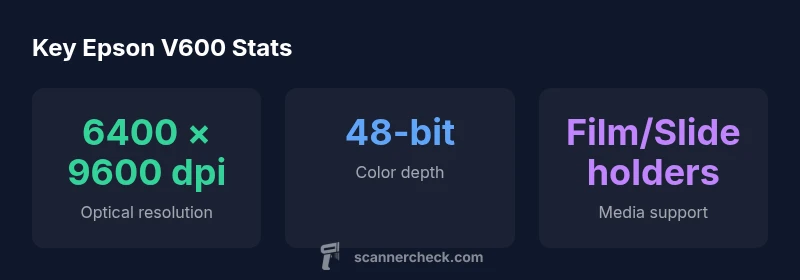
| Optical resolution | Up to 6400 × 9600 dpi | Industry standard for high-detail photo scans |
| Color depth | Up to 48-bit color | Excellent color reproduction for archival work |
| Film scanning | Includes built-in film and slide holders | Ideal for negatives and slides |
| Software compatibility | TWAIN/ICA support, bundled software | Easy integration with editors |
Common Questions
Is the Epson V600 good for film scanning?
Yes. The V600 ships with built-in film and slide holders, and it uses dust-removal technology to reduce scratches. It’s well-suited for hobbyists and light professional work, though very high-volume film scanning may benefit from dedicated film scanners or newer models.
The Epson V600 handles film and slides well, thanks to its holders and dust removal. For frequent, high-volume film work you might consider alternatives.
What image formats does it save?
The V600 supports lossless formats like TIFF and high-quality JPEG for quick sharing. For maximum archival quality, scan to TIFF or PNG and convert later in a dedicated editor.
You can scan to TIFF or PNG for archival quality and to JPEG for easy sharing.
Does it support OCR?
While the V600 is optimized for image capture, you can use OCR in your photo editor or separate OCR software after scanning. Higher DPI helps improve OCR accuracy on text-heavy pages.
OCR works best when you run the scanned documents through an OCR app after scanning.
How does the V600 compare to newer models?
Newer models may offer faster scanning, improved sensors, and modern interfaces. The V600 remains a solid value for mixed-use scanning, particularly for users who value established reliability and film support.
Newer models can be faster and sleeker, but the V600 still offers strong value for mixed use.
What maintenance does it require?
Regularly clean the glass, replace or clean holders as needed, and update drivers. Periodic calibration helps maintain color accuracy across sessions.
Keep it clean and update drivers to maintain consistency.
“The Epson V600 delivers dependable, high-quality scans for a broad range of media, balancing price, performance, and ease of use.”
Key Takeaways
- Choose the V600 for photo restoration and document archiving
- Built-in film holders simplify film and slide scans
- Auto Dust Removal with Digital ICE improves clean scans
- Leverage bundled software for a smooth workflow
- Consider value: proven mid-range performance