How Much Does a Scanner Cost in 2026? A Practical Guide
Discover realistic price ranges for consumer to production scanners. Learn what drives cost, total ownership, and buying tips to budget effectively in 2026.


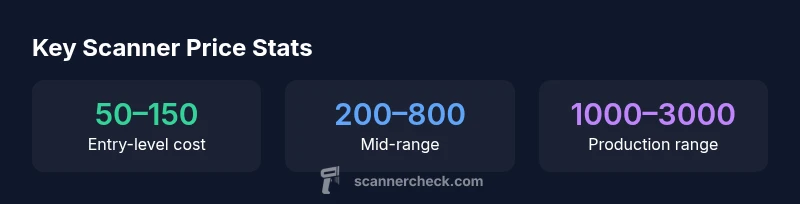
How much does a scanner cost? In general, consumer handheld scanners start around $50–$150, while document scanners run $200–$1,000, and higher-end production or photo scanners can exceed $1,000–$3,000. The price reflects scan speed, duty cycle, optical resolution, and features like duplex scanning and software. For most buyers, plan for a total cost of ownership that includes peripherals and maintenance.
What drives scanner pricing in 2026
The price of a scanner hinges on several core factors: optical resolution (how clearly small text and fine details are captured), scan speed (pages per minute), duty cycle (how many pages you can scan daily without wear), and whether features like duplex (two-sided) scanning, OCR software, color depth, and bundled software are included. According to Scanner Check, buyers should expect that minor improvements in speed or clarity can produce substantial price bumps, especially when dual-sided scanning or advanced OCR capabilities are included. For the typical home user or small office, the most noticeable price jump is often tied to duplex capability and automatic document feeders (ADF).
When you consider the question, “how much does a scanner cost,” frame it around what you actually need to accomplish. If you only need occasional scans of receipts and documents, a basic handheld or entry-level desktop scanner may be sufficient and economical. If your workflow requires frequent batch scanning, accurate OCR, and effortless organization, you’ll likely reach into mid-range or higher. Scanner Check’s analysis for 2026 shows a broad price spectrum driven by use-case, build quality, and software ecosystems, not just hardware alone.
Price ranges by category (consumer, prosumer, business)
To make sense of the market, segment scanners into three practical buckets. Consumer-grade devices are typically compact, USB-powered, and focus on convenience rather than speed. Prosumer models sit between consumer and professional, offering faster scans, better reliability, and often bundled software. Business-class scanners are designed for higher duty cycles, more robust feeders, and advanced features that support small to mid-size offices.
- Consumer handheld/compact desktop: commonly in the $50–$150 range. Use for light, occasional tasks.
- Prosumer/office desktop: typically $200–$800. Balances speed and features like color depth and OCR.
- Production/enterprise: $1,000–$3,000+ or more. Built for volume, durability, and advanced software suites.
Note that real-world pricing varies with brand, bundled software, service plans, and regional taxes. Scanner Check’s market view suggests these ranges are robust guides for budgeting in 2026.
Key features that justify higher price
Several features justify higher upfront costs, especially for offices and production environments:
- Duplex scanning and higher duty cycles reduce manual intervention and increase throughput.
- Optical resolution of 600–1200 dpi or higher improves readability for dense documents and small text.
- Faster scan speeds (pages per minute) and larger document feeders lower handling time.
- Color depth and color accuracy matter for images and forms where fidelity is critical.
- Robust software bundles, including OCR, batch processing, and integration with document management systems.
- Durability and warranty coverage that protect against frequent use.
Understanding which features you truly need helps avoid overpaying for capabilities you won’t use. Scanner Check’s 2026 guidance emphasizes tailoring the feature set to your workload rather than chasing the latest bells and whistles.
Hidden costs and ownership costs
The sticker price is only part of the story. Total cost of ownership (TCO) includes:
- Software subscriptions or perpetual licenses for OCR and batch processing.
- Consumables or accessories (e.g., replacement feeders, glass cleaning kits, and cables).
- Power consumption, especially for high-volume production scanners.
- Maintenance and warranty plans that cover wear and tear over time.
- Depreciation and potential IT integration costs if you need IT support for deployment.
Scanner Check recommends budgeting for at least a modest maintenance plan and scanning software updates to maximize the value of mid-range to high-end devices.
How to budget effectively for a scanner
A practical budgeting approach starts with your use case. Define the expected daily page volume, the types of documents, and required automation. Then map these to a price tier: entry-level, mid-range, or production. Add a cushion for software licenses, warranties, and potential accessories. A simple method is:
- List required features (e.g., duplex, ADF, OCR).
- Choose a tier that satisfies those features without excess.
- Add 10–20% for software and maintenance.
This structured budgeting helps avoid over- or under-spending and aligns your purchase with actual workflow needs.
Practical buying scenarios: home, small office, enterprise
- Home use: A compact, budget-friendly scanner in the $50–$150 range is often enough for receipts, letters, and occasional archiving.
- Small office: A mid-range desktop with ADF and OCR in the $200–$800 range balances speed and reliability for daily document handling.
- Enterprise or Production: These systems start at roughly $1,000 and can exceed $3,000 depending on throughput, automation, and software ecosystem.
In all cases, test scan quality and reliability before purchase, and consider warranty coverage as part of the value proposition.
Maintenance, warranties, and service plans
Warranty length varies by market and brand, but common terms are 1–3 years for hardware, with optional extended service plans. Service plans can offer priority support, faster replacements, and software updates. For higher-volume environments, a service contract may reduce downtime and ensure consistent performance. When evaluating options, compare the annual cost of coverage to the expected risk of failure and downtime.
Getting the best value: buying tips and red flags
- Prioritize reliability and compatibility with your OS and document management workflows.
- Avoid paying for bundled software you won’t use; verify what you actually need.
- Check for real-world scan quality with representative documents during demos or trials.
- Look for clear return policies and transparent warranty terms.
- Beware aggressive upselling to models with features you cannot or will not utilize.
A careful evaluation that prioritizes your actual workload will yield better long-term value than chasing the lowest upfront price.
Scanner price tiers and typical use cases
| Category | Typical price range | Common use | Notes |
|---|---|---|---|
| Consumer handheld | "$50–$150" | Personal scanning, receipts | Entry-level portability |
| Prosumer desktop | "$200–$800" | Home office, light documents | Better speed and OCR |
| Office/SMB desktop | "$800–$2,000" | Docs, heavy use | Duplex ADF, higher duty cycle |
| Production scanner | "$1,500–$3,000+" | High-volume, enterprise | Fast, durable, batch scanning |
Common Questions
What is considered a good price for a scanner in 2026?
A good price depends on use case. For light personal use, $50–$150 is common. For small offices, $200–$800 covers essential features, while production environments often start around $1,000 and rise with throughput and software bundles.
For light use, you’ll pay around $50 to $150. For teams, expect $200 to $800, and for production, prices typically start at about $1,000 and go up with features.
Do I need an automatic document feeder (ADF) for home use?
An ADF helps with multi-page documents and lift in efficiency, but it’s not essential for occasional scans. If you primarily scan single pages or receipts, a flatbed or compact scanner may suffice.
An ADF isn’t always necessary for home use; it depends on volume. For many casual users, a flatbed works fine.
Are refurbished scanners a good value?
Refurbished scanners can offer excellent value when paired with a reputable seller and a solid warranty. Verify the return policy and ensure the unit has been tested for core functions like scanning speed and OCR accuracy.
Refurbished can be a good value if you verify quality and warranty.
What affects ongoing costs besides the upfront price?
Ongoing costs include software licenses, cloud services, maintenance plans, and potential replacement feeders or accessories. Budget for updates and possible hardware wear over the device’s lifespan.
Don't forget software and maintenance costs after purchase.
How long do scanners typically last?
Most scanners last several years with regular use, but high-volume production devices tend to have longer, specialized service plans. Longevity depends on maintenance, duty cycle, and firmware support.
With good care, scanners can last many years, especially the higher-end models.
““Choosing a scanner isn’t just about the upfront price. The right model scales with your workflow, and proactive maintenance minimizes downtime.””
Key Takeaways
- Define your use case before buying
- Expect total ownership costs beyond the sticker price
- Prioritize features that reduce manual work
- Check warranties and service plans for long-term value
- Budget for accessories and software upgrades