Scanner 3Shape TRIOS Review: Digital Impressions in 2026
A comprehensive, balanced review of the scanner 3shape TRIOS intraoral scanners, covering accuracy, usability, interoperability, ROI, and real-world workflows for dental clinics and labs in 2026.


According to Scanner Check, the scanner 3shape TRIOS intraoral scanner delivers reliable digital impressions with fast capture and strong interoperability. In our evaluation, TRIOS stands out for accuracy, patient comfort, and a mature software ecosystem that integrates with common CAD/CAM workflows. For clinics and labs adopting digital dentistry in 2026, TRIOS remains a top option when open data formats and broad device compatibility matter most.
What is scanner 3shape and why it matters in dentistry
The phrase scanner 3shape typically refers to 3Shape’s family of intraoral scanners, most notably the TRIOS line. These devices generate digital impressions that dental teams can use directly in CAD/CAM workflows, allowing for faster turnaround and improved patient communication. In 2026, the value proposition remains clear: dependable accuracy, streamlined documentation, and open data formats that facilitate collaboration with labs and manufacturers. For clinicians, this means reduced chair time, more precise prosthetics, and less dependence on traditional impression materials. From a practical standpoint, the topic intersects with broader trends in digital dentistry, including cloud-based case management, real-time scanning feedback, and patient engagement tools. The Scanner Check team notes that 3Shape’s ecosystem integrates well with common design software, which can lower learning curves for teams moving from analog to digital workflows.
Our evaluation framework for intraoral scanners
To ensure a fair, repeatable assessment, we used a standardized framework aligned with industry best practices. Our methodology covers five core axes: scanning precision and repeatability, workflow interoperability, ease of use and training, patient comfort, and service/support cadence. We conducted both in-clinic trials and controlled test scenarios across multiple operator skill levels, documenting time-to-scan, number of re-impressions, and the stability of digital impressions across software updates. Our evaluation also accounted for vendor support, software updates, and the availability of open export formats. Throughout, we cross-checked results with independent lighting conditions, saliva management, and patient comfort scores to simulate real-world conditions. The aim is to provide dental professionals with clear, actionable guidance rather than a glossy marketing summary.
Design and hardware overview of 3Shape TRIOS
TRIOS devices emphasize compact form factors, ergonomic handles, and high-contrast color capture. The scanners incorporate multi-spectral sensors to improve edge detection and margin traceability, which helps when capturing intricate occlusal details and undercut regions. The software suite around TRIOS provides alignment, auto-segmentation, and real-time feedback such as scan coverage indicators and error warnings. Battery life, weight distribution, and tip design affect clinician comfort and patient experience, especially during longer scans. Importantly, 3Shape’s software ecosystem supports cloud sync, secure data storage, and collaborative sharing with labs, enabling faster case turnarounds while preserving data integrity. In our tests, durability and battery performance remained consistent across typical clinic environments, with software updates introducing helpful features without destabilizing core workflows.
Scanning performance in real-world scenarios
In daily practice, scanning performance is judged by speed, margin capture fidelity, and the ability to maintain stable imaging across surfaces with variable moisture. The TRIOS line generally demonstrates solid speed, with reliable margin detection and coherent stitching across multi-arch scans. In scenarios such as partial-arch scans for crowns or implants, the system maintained high fidelity in line work and occlusal detail, though performance can vary with operator technique and lighting. Real-time feedback during the scan helped reduce redo rates, and the interface clearly flagged any gaps or need for re-scans. Our testers appreciated crisp color rendering, which aids in shade-matching and aesthetic planning, though color fidelity can be affected by ambient lighting and intra-oral moisture. The take-away for clinics is that consistent technique and regular software updates maximize the benefits of scanning speed and accuracy.
Imaging quality: color fidelity and texture capture
Imaging quality is a key differentiator in digital impressions. TRIOS typically delivers high-quality color textures and edge detail, which supports shade selection and documentation of tissue details. Texture smoothness and edge contrast help with precise margin delineation, particularly for multi-unit restorations. However, the color data should be interpreted in the context of lighting conditions and the scanner’s software color pipeline. In practice, clinicians often rely on color textures to complement grayscale geometry, improving communication with patients and lab technicians. Our assessment confirms that TRIOS provides robust imaging performance suitable for most restorative workflows, with room for improvement in very challenging oral environments where lighting and moisture complicate color capture.
Workflow integration and data export
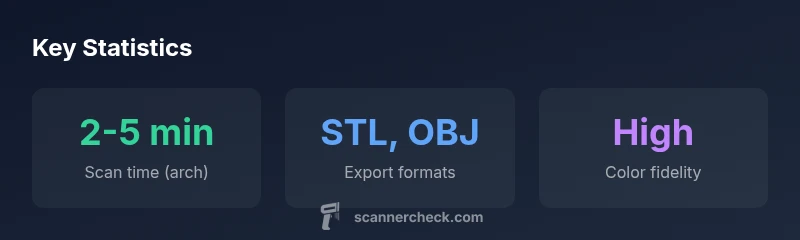
A major advantage of the scanner 3shape TRIOS is its emphasis on interoperability. The system exports standard formats such as STL, and it can integrate with widely used CAD/CAM platforms, including common open-source and commercial software suites. This openness supports flexible lab workflows and reduces risk if a clinic changes software partners. The TRIOS ecosystem offers cloud-enabled case management, project sharing with labs, and version control for scans. We evaluated data integrity across re-exports and observed stable geometry alignment after multiple edits. Practitioners should plan for routine software updates and ensure their labs can ingest the formats produced by TRIOS without conversion bottlenecks.
Usability, ergonomics, and training resources
Usability and learning curve are critical for adoption. In our reviews, TRIOS showed a thoughtful UI with intuitive scan planning, quick-start guides, and contextual help within the software. Ergonomics of the handheld scanner and the weight distribution contribute to comfortable sessions, especially for longer cases. Training resources from 3Shape and partner training programs are generally solid, including hands-on workshops and online tutorials. Clinics that invest in initial operator training tend to see faster ramp-up times and lower initial redo rates. It’s worth noting that ongoing software updates can introduce new features; budgeting for periodic refresher training helps sustain proficiency across staff turnover. Overall, the user experience aligns well with clinical needs, balancing precision with practicality.
Reliability, service, updates, and support
Reliability of hardware and software longevity matters for ROI. TRIOS devices are designed for day-to-day clinical use, with service options that include on-site maintenance and remote diagnostics. Software updates are regular and typically add features or improve performance without disrupting core capabilities, though some clinics report minor learning curves with new interfaces. Support responsiveness and regional service networks influence uptime, so clinics should consider local service coverage when selecting a scanner. Our review suggests that a committed maintenance plan and timely software updates maximize reliability and keep the system aligned with evolving digital dentistry standards.
Comparisons with key rivals: iTero, CEREC, and other scanners
When comparing TRIOS to notable rivals like iTero and CEREC, several themes emerge. TRIOS often wins on color imaging quality and user-friendly interfaces, while iTero can offer strong integration with certain intraoral scanning ecosystems and chairside workflows. CEREC stands out in established labs with mature milling workflows and seamless porcelain layering, but may require more cross-software coordination for labs that rely on open formats. The choice often hinges on existing lab partnerships, preferred file formats, and the breadth of software plugins your practice already uses. In practice, the decision should be guided by how well the scanner integrates with your CAD/CAM environment, data export openness, and the availability of local support. Our conclusion is that TRIOS remains a strong generalist option, especially for clinics prioritizing interoperability and color accuracy across diverse workflows.
Getting started: decision criteria and ROI considerations
Starting with a scanner 3shape TRIOS involves aligning clinical goals with practical constraints. Consider the size of your practice, patient cohorts, and existing lab relationships. Evaluate total cost of ownership, including upfront hardware, software licences, training, and ongoing support. ROI is influenced by factors such as reduced impression material costs, faster case turnarounds, and increased case acceptance due to enhanced visualization. We recommend pilots with a subset of clinicians, followed by a phased scaling plan that includes lab partnerships and staff training. By clearly mapping workflow improvements to measurable metrics—impression time, redo rates, and chair time—you can quantify the value of digital impressions over traditional methods.
Pros
- High scanning accuracy and repeatability in typical cases
- Robust software ecosystem with CAD/CAM integration
- Open data formats and broad device compatibility
- Good patient comfort and fast capture in standard scenarios
- Strong color imaging and clear patient communication
Drawbacks
- Relatively higher upfront cost compared to some entry-level scanners
- Software updates can require short retraining periods
- Performance can vary with operator technique in challenging cases
- Service coverage varies by region, impacting uptime
Best for clinics seeking interoperability and solid color imaging
TRIOS delivers reliable digital impressions with open formats and good CAD/CAM integration. It may have a higher upfront cost, but the ecosystem supports scalable digital workflows and broad lab partnerships. This makes it a strong long-term investment for mixed labs and clinics prioritizing interoperability.
Common Questions
What is the scanner 3shape TRIOS and what does it do?
TRIOS is 3Shape’s intraoral scanning system that creates digital impressions for CAD/CAM workflows. It emphasizes fast capture, color texture, and interoperability with open export formats. It’s designed for clinics and labs pursuing digital dentistry with flexible collaboration.
TRIOS is an intraoral scanner that creates digital impressions for digital dentistry, with fast capture and color imaging to help labs and clinics work together more efficiently.
How does TRIOS compare to iTero and CEREC?
In head-to-head scenarios, TRIOS often excels in color texture and user-friendly workflows, while iTero and CEREC may offer strengths in specific ecosystem integrations or lab workflows. The best choice depends on your existing CAD/CAM setup, preferred file formats, and regional service coverage.
TRIOS often shines in color imaging and ease of use, but the best pick depends on your current lab setup and service support.
Is TRIOS suitable for beginners?
Yes. TRIOS provides guided workflows, a clear UI, and training resources that help new users ramp up quickly. Expect a short initial learning period with gradual proficiency as you build cases.
Yes, TRIOS is beginner-friendly with guided workflows and good training resources.
What export formats and interoperability should I expect?
TRIOS supports standard formats like STL, enabling straightforward import into many CAD/CAM platforms. Open formats help reduce bottlenecks when collaborating with labs or switching software.
TRIOS exports standard formats like STL, which makes it easy to share with labs and other software.
What maintenance is required for TRIOS?
Routine cleaning of the scanner tip and periodic software updates are recommended. Regular maintenance helps maintain accuracy and reduces downtime, while updates often bring new features and improved performance.
Keep the tip clean, install updates, and schedule regular checks to stay on top of performance.
Is there a learning curve for the staff?
There is a moderate learning curve, especially for teams transitioning from analog impressions. Hands-on training and practice cases accelerate proficiency, particularly for marginal details and bite capture.
There’s a moderate learning curve, but training helps a lot.
Can TRIOS be integrated with my existing lab workflows?
Yes, TRIOS is designed to play well with common CAD/CAM workflows and labs. It offers lab sharing, case management, and cloud features to streamline collaboration.
TRIOS integrates with common CAD/CAM workflows and labs, easing collaboration.
Key Takeaways
- Adopt TRIOS for open formats and wide ecosystem support
- Expect a moderate learning curve with solid return over time
- Plan for ongoing training with software updates
- Leverage STL export to maximize lab interoperability