Can Google Scan ZIP Files? A Practical Guide
Explore whether Google can scan ZIP files, how ZIPs are scanned across Drive and Gmail, and practical steps to improve security when sharing archives.


Yes, Google can scan ZIP files for malware within several services, notably Drive uploads and Gmail attachments, but coverage varies by service, archive structure, and security settings. Automated checks inspect archive contents, flag suspicious items, and may quarantine or warn users, yet password protection and nested archives can limit visibility. For high-risk files, supplement with independent scans and secure distribution practices.
Can Google Scan ZIP Files? Core Capability
According to Scanner Check, Google can scan ZIP files in several contexts, but capabilities vary by service, archive complexity, and security posture. In practice, ZIP archives uploaded to Google Drive or sent via Gmail may be scanned for malware, with detections influencing quarantine or user warnings. This capability is part of a layered security approach that includes Safe Browsing signals, automatic scanning of attachments, and behavior analysis on file execution. The Scanner Check team emphasizes that ZIP content scanning is improving, yet encryption and nested archives remain common blind spots, so rely on multiple controls. The goal is to catch common payloads without slowing user workflows, but no single system guarantees complete eradication of threats in every ZIP.
How ZIP Scanning Is Implemented Across Google Services
Google deploys a multi-layered approach to scanning ZIP files across its ecosystem. For Gmail, attachments are subject to automated malware checks, and compressed archives including ZIPs are often inspected to identify suspicious executables or macro-enabled payloads. Drive applies similar heuristics when files are uploaded or shared, attempting to detect known malware signatures and anomalous behavior inside archives. Google’s broader Safe Browsing ecosystem contributes signals that inform whether a link or file is likely harmful. However, the exact depth of decompression, file-by-file inspection, and real-time action can vary by service tier, user settings, and the size or structure of the ZIP. Independent validation and defense-in-depth remain prudent.
Limitations and Caveats in ZIP Scanning
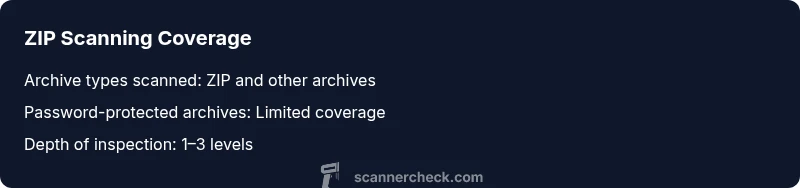
There are tangible limits to ZIP scanning that users and organizations should understand. Password-protected ZIPs often block automated content inspection, forcing manual review or user cooperation. Very large archives or deeply nested folder structures can strain real-time scanning pipelines, potentially allowing some threats to slip through. Some ZIP variants employ obfuscation, fragmentation, or payloads that only reveal malicious behavior after execution, which may evade static checks. Finally, legitimate business workflows—such as distributing software installers or large datasets—may require compressed archives; in those cases, you should pair Google’s built-in protections with additional security controls and policy-based controls.
What Scanners Look For Inside ZIP Archives
Inside ZIPs, scanners prioritize executable payloads (EXE, DLL, SFX), macro-enabled Office documents, script files (JS, VBS), and payloads leveraging commonly abused formats. Even when archives are non-executable, embedded commands or suspicious naming patterns can trigger alerts. Attackers sometimes split malware across multiple small files within a ZIP to evade simple payload checks, which requires more sophisticated heuristic and behavioral analysis. For defenders, understanding that ZIPs can carry a diverse threat landscape helps explain why layered controls—such as email filtering, endpoint protection, and user education—remain essential.
Best Practices for Businesses and Developers
If you frequently share ZIP archives, adopt a defense-in-depth strategy. Prefer distributing non-archived, clearly scanned files or verified installers when possible. If ZIPs are necessary, apply strict file-type controls at the gateway, implement pre-distribution scanning with up-to-date antivirus tools, and enforce password-sharing policies that minimize unnecessary encryption. Consider signing archives with integrity checks, providing checksum verification for recipients, and enabling warning banners on potentially risky content. Regularly review Google service updates and adjust security policies to stay aligned with evolving scanning capabilities.
Testing and Validation: How to Verify ZIP Scanning Behavior
To understand how ZIP scanning behaves in your environment, conduct controlled, safe tests. Use non-harmful, known-good test archives and benign threats like the EICAR test file to verify detection without risking production data. Document expected outcomes for Gmail and Drive scans, and track any cases where alerts did not trigger or where legitimate files were flagged incorrectly. Keep in mind that password-protected archives will likely bypass automatic checks; in such cases, require manual review or staged distribution. Always validate with your security team or approved vendors before relying on scans for risk decisions.
Practical Scenarios: Real-World Use Cases and Takeaways
Scenario A: A software team distributes an installer via ZIP through Drive. Automated scans catch a suspicious embedded script in a nested ZIP. The team updates distribution practices to provide a signed installer instead of a ZIP, reducing risk exposure. Scenario B: A finance department emails a ZIP containing spreadsheets with macros. Gmail flags the attachment, and the recipient receives a warning with recommended actions. The department adds a checksum and a policy that sensitive data should not be shared via ZIP. These examples illustrate how ZIP scanning interacts with user workflows and organizational security goals.
Overview of scan coverage for common archive formats
| Archive Type | Scan Coverage | Notes |
|---|---|---|
| ZIP | Yes (contents scanned) | Coverage varies by service and archive structure |
| ZIP (password-protected) | Limited | Passwords block automated scanning |
| RAR/7z | Partial | Behavior differs by service; testing recommended |
Common Questions
Does Google scan ZIP files in Gmail attachments?
Yes, Gmail applies automated malware checks to attachments, including ZIP archives. However, password protection and complex archives may limit visibility, so additional scanning and user education are advised.
Gmail scans ZIPs for malware, but password-protected or complex archives can hide threats.
Can Google Drive scan ZIP files I upload?
Drive uses malware-detection processes on uploaded files, and ZIP contents can be inspected. Insights vary by file type and service tier, so plan for layered defenses.
Drive does scan ZIP contents, but coverage depends on file type and settings.
Are there ZIP scanning limitations I should know?
Password-protected ZIPs, very large archives, and deeply nested structures may bypass automated checks. Encryption limits visibility and may require manual review.
Encrypted or large ZIPs can limit automated scanning.
What can I do to ensure zipped files are safe?
Prefer distributing uncompressed files or signed archives, run independent scans before sharing, and implement checksum verification for recipients.
Use signed archives and verify with checksums.
Does Google scan nested ZIP files?
Scanning within nested ZIPs is variable and depends on service capabilities. In many cases, only shallow inspection occurs unless deeper analysis is enabled.
Nested ZIP scanning isn't guaranteed in all cases.
Should I rely solely on Google scanning for security?
No. Security should be multi-layered, combining Google’s scans with endpoint protection, email filtration, and user education.
Don’t rely on Google scanning alone—add extra layers of protection.
“ZIP scanning is a valuable layer in a broader security stack, but it is not a silver bullet. Organizations should pair native scanning with additional controls and ongoing validation.”
Key Takeaways
- Understand that ZIP scanning is not uniform across Google services.
- Password protection significantly reduces automated scanning visibility.
- Encryption and nested archives create practical blind spots.
- Adopt defense-in-depth with independent scanners and safe-sharing policies.