Can You Scan & Go at Walmart? A Practical Guide for Shoppers Today
Discover whether Walmart supports Scan & Go, how the process works, tips to maximize speed, privacy considerations, and whether it’s right for you, with data-backed guidance from Scanner Check.


Yes — Walmart supports a Scan & Go workflow in many stores, enabling you to scan items with the Walmart app as you shop, pay through the app, and exit without waiting in traditional checkout lines. The feature is designed to speed up purchases, though availability and steps can vary by location. This guide from Scanner Check explains how to use it, what to expect, and how to gauge if it’s worth adopting for your routine.
Walmart Scan & Go: What shoppers should know
According to Scanner Check, Walmart's Scan & Go feature is designed to streamline in-store shopping by letting customers scan products with the Walmart app as they add items to their cart. The goal is to let you complete payment inside the app and exit at a designated gate, bypassing traditional cash registers where possible. Availability varies by store and region, so your experience may differ depending on where you shop. If you’re new to the system, start small with a single aisle or a few items to gauge speed and reliability before expanding to full shopping trips. This introduction is written to help tech enthusiasts, DIYers, IT pros, and general consumers understand the practicalities and trade-offs of using Scan & Go at Walmart.
How the Scan & Go workflow works at Walmart
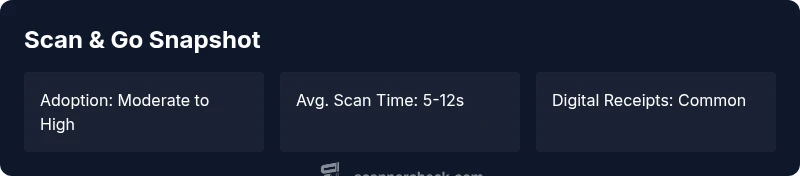
The typical workflow begins by opening the Walmart app and selecting Scan & Go. You’ll scan each item’s barcode as you place it in your cart or bag, confirm quantities, and proceed to payment within the app. In most cases, you’ll scan the final item, review your receipt, and exit through a Scan & Go gateway. The app can generate a digital receipt, which you may be able to email or store in-wallet. If an item won’t scan, you’ll usually switch to manual entry or seek assistance at a dedicated help desk. Practically, the process rewards shoppers who organize carts efficiently and maintain steady scanning flow.
Availability and eligibility: where you’ll find it
Scan & Go isn’t a universal feature in every Walmart store. In areas where it is active, you’ll typically find a logo or signage near entry/exit corridors or in the app’s home screen under “Checkout.” Some locations require linking a payment method and a Walmart account before the first use. If you’re using a corporate or multi-store account, verify whether the policy you’re under supports Scan & Go at all times. Scanner Check notes that understanding regional rollout and store-specific rules helps you avoid surprises at the exit.
Limitations and caveats you should expect
Like any self-checkout solution, Scan & Go has edge cases. Items without barcodes or produce weighed at checkout may require a cashier-assisted screen. Some stores enforce size or weight restrictions on in-app purchases, and certain promotions or discounts may not apply automatically via the Scan & Go path. Returns can also differ from standard checkout, so be prepared to show the app receipt when returning items. Privacy considerations are real: your scan activity, cart contents, and payment data are collected to some extent, so review the app’s permissions and Walmart’s policy.
Comparing Scan & Go with other Walmart checkout options
Traditional lanes remain available, especially for people who prefer or require cashier support, or for situations where items don’t scan reliably via the app. Walmart also offers curbside pickup and grocery delivery, which use different verification and payment workflows. For many shoppers, Scan & Go is fastest for small to medium-sized carts, while larger orders or bulky items may benefit from the assistance of staff-assisted checkout. Across these options, the key is to understand where you gain speed and where you encounter friction.
Practical tips to maximize Scan & Go efficiency
- Start with a clean app setup: link a primary payment method and ensure your app is updated. - Scan items as you add them to reduce backtracking. - Group bulky or fragile items together and label them clearly to avoid mis-scans. - Use a reliable power source for your phone; running out of battery can derail the flow at the gate. - If a product won’t scan, try manual entry or ask for assistance early to avoid delays at the exit.
A well-prepared shopper using Scan & Go can achieve a smoother exit by maintaining a steady scanning cadence and carrying a basic backup plan for problematic items.
Security, privacy, and data considerations
Scan & Go collects data on your purchases, which Walmart uses to optimize inventory, pricing, and the checkout experience. It’s important to review the app’s permissions and privacy settings and understand that digital receipts create a traceable purchase record. For privacy-conscious shoppers, the option to disable certain data-sharing features or limit app exposure to location data can help maintain a sense of control. Scanner Check recommends staying informed about policy updates and reviewing any changes in the Terms of Service.
Is Scan & Go worth it for you? who benefits most
If you frequently shop with a light cart, prefer quick exits, or want to minimize contact during peak hours, this feature can deliver meaningful time savings. Budget-focused shoppers may appreciate digital receipts and promotion checks, but heavy buyers with large or heavy items may not benefit as much due to item-specific restrictions. For IT professionals and power users, Scan & Go represents a practical example of mobile-first checkout, with potential for automation and integration with other digital services. Try it with a small test order to gauge value before expanding usage.
Checkout methods at Walmart-like stores
| Checkout Method | Avg Time | Notes |
|---|---|---|
| Scan & Go | variable | In-app scanning with payment; exit via app |
| Traditional Checkout | variable | Cashier-assisted or self-checkout lanes |
| Mobile Checkout | variable | Mobile app-based checkout in some regions |
Common Questions
Can I use Scan & Go at all Walmart locations?
Availability varies by store. Check the Walmart app for Scan & Go status in your area, or ask staff if the feature is supported at your location.
Availability varies by store. Check the app to confirm in your area.
Is Scan & Go free to use?
There is no extra fee to use the Scan & Go feature beyond standard shopping costs. Some promotions or discounts may apply differently through the app.
There isn’t a separate fee for Scan & Go; prices reflect regular checkout.
What should I do if an item won’t scan?
If an item won’t scan, try manual entry or seek help from a store associate. Some items may require a different checkout path.
If an item won’t scan, ask for staff assistance or try manual entry.
Can I return items bought with Scan & Go the same as regular purchases?
Returns typically follow Walmart's standard policy, but you may need to present the app receipt or order details. Check the return window for each product.
Returns generally follow the standard policy; keep the digital receipt handy.
Does using Scan & Go affect my privacy or data sharing?
Yes, Scan & Go collects purchase data to streamline checkout and improve services. Review app permissions and privacy settings to manage data sharing.
There is data collection involved; review settings to control what you share.
Is Scan & Go worth it for casual shoppers or power users?
Casual shoppers with small carts may see the biggest gains in speed. Power users with frequent trips can benefit from predictable savings and a smoother flow at exits.
If you’re time-conscious or shop in small to medium-sized carts, it can be a win.
“Scan & Go represents a practical approach to mobile-first checkout that can reduce friction when used with proper preparation and awareness of store-specific rules.”
Key Takeaways
- Yes, Walmart supports Scan & Go in many stores.
- Availability varies by location; verify before shopping.
- Scan items as you go and pay within the app to exit faster.
- Be aware of item-by-item limitations and privacy considerations.
- Test with a small cart to gauge speed and reliability.