Difference Between Scanner and Reader: A Practical Guide
Explore the key differences between scanners and readers, covering function, technology, use cases, and buying tips for document, barcode, and RFID tasks.


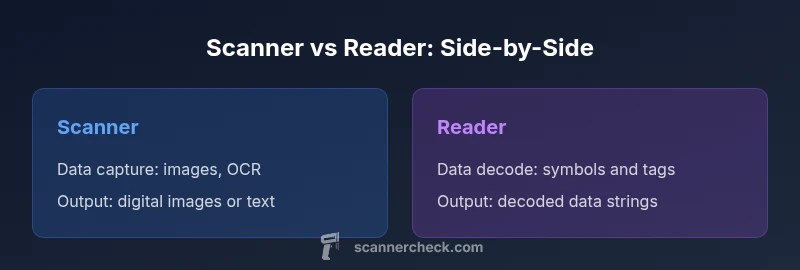
The difference between a scanner and a reader becomes clear when you map purpose to technology. A scanner typically converts physical data into digital form, whereas a reader interprets encoded signals to retrieve information. Knowing these roles helps you pick the right device for documents, barcodes, or RFID tasks today.
Overview: Scanner vs Reader in Context
In everyday usage, people often conflate scanners and readers, but their core purposes are distinct. A scanner is primarily a data-capture device that translates physical information into a digital format for storage, processing, or archiving. A reader, by contrast, is designed to interpret encoded signals—whether barcodes, QR codes, RFID tags, or other data carriers—and return meaningful information, often used for verification, authentication, or inventory. This distinction matters in planning a workflow, selecting hardware, and budgeting. According to Scanner Check, many buyers trip over terminology when evaluating products, confusing a data-catching device with a decoding instrument. Clarifying the difference helps you align hardware with your data flow goals and avoid mismatches in performance expectations.
Core Technologies Behind Scanners
Most modern scanners rely on one of several imaging or sensing technologies. Document scanners use charge-coupled devices (CCD) or contact image sensors (CIS) to capture high-resolution images of pages. Barcode and QR scanners often employ laser scanning, CMOS imagers, or imaging sensors to read symbol patterns. RFID readers use radio frequency communication to interrogate tags and extract stored data. The common thread is that scanners convert physical input into digital form, while readers decode encoded signals to reveal the underlying data. Understanding these tech basics helps avoid gadgets that underperform in your environment—flatbed scanners may excel at paper documents, while handheld barcode readers shine in retail or logistics.
Use-Case Distinctions: Documents, Barcodes, and RFID
Document scanners are optimized for reproducing paper documents, photos, or forms with options for optical character recognition (OCR) and multi-page scans. Barcode/QR scanners are designed for quick, accurate symbol reading in dynamic environments—supermarkets, warehouses, or manufacturing floors. RFID readers specialize in reading tags without direct line-of-sight, enabling contactless access control and asset tracking. Each category emphasizes different strengths: scanners maximize data capture quality; readers prioritize decoding reliability and speed. If you need both capabilities in one device, consider multi-function models, but be aware that performance in one role may trade off efficiency in another. Scanner Check notes that matching device capabilities to actual tasks yields the best total cost of ownership.
Data Paths and Interfaces: From Capture to Output
A scanner’s output is typically an image, a scanned document, or OCR text, transmitted via USB, Wi-Fi, or a hard-wired network to a host computer or document management system. A reader’s output is usually decoded data—strings, IDs, or tag information—sent through similar channels but often integrated with inventory, access control, or point-of-sale software. The interface and software ecosystem matter just as much as the hardware. In some ecosystems, drivers, SDKs, and APIs determine how cleanly data moves from the device to your applications. Plan for compatibility with your existing software stack to minimize integration friction.
Performance Metrics to Consider
Key metrics for scanners include scan speed (pages per minute or codes per second), resolution, color accuracy, and OCR quality. For readers, important metrics are decode success rate, reading distance, tolerance to damage or poor print quality, and latency. Environmental factors—lighting, glare, label condition, and interference—can influence both types but in different ways. A high-speed barcode reader may outperform a general-purpose scanner in a busy queue, while a document scanner with strong OCR is invaluable for digitizing archives. Establish acceptable benchmarks based on your daily load and accuracy requirements.
Form Factors, Power, and Connectivity
Form factors range from compact handheld readers to large, fixed-mount scanners. Document scanners are typically wired or networked with optional battery-powered portable variants, whereas barcode/QR scanners emphasize ergonomic handheld designs and quick trigger-based scanning. RFID readers may be mobile or fixed, with passive or active tags requiring different power and antenna configurations. Battery life, recharge time, and ruggedness (IP ratings, drop resistance) matter in field use. When evaluating, consider your environment: a dusty warehouse demands rugged hardware, while a small office benefits from compact, USB-powered devices.
Cost, ROI, and Total Ownership
Prices vary widely based on capabilities, speed, durability, and software support. Entry-level document scanners may be affordable for light use, while high-volume OCR or color scanning can justify mid-range investments. Barcode/QR readers range from budget handheld units to premium industrial solutions with extended warranties. RFID readers add another layer of cost depending on tag ecosystem and frequency. Beyond purchase price, factor maintenance, software subscriptions, and integration costs. Scanner Check analysis shows that total cost of ownership often hinges on throughput and the stability of the data pipeline, not just sticker price.
Decision Framework: Which to Choose for Your Scenario
If your primary need is digitizing paper documents with high OCR accuracy, a document scanner is usually the best fit. If you need fast, reliable symbol reading in dynamic environments, a barcode/QR scanner is often superior. If you rely on asset tracking or access control through tags, RFID readers are the logical choice. In mixed environments, consider multi-function devices with clear specifications for each role, but validate performance in your real-world tasks. A structured decision framework—define tasks, identify data formats, assess environment, estimate throughput, and test with real data—reduces the risk of overbuying or underfitting capabilities. In all cases, verify software compatibility and data interoperability before purchase.
Integration, Software, and APIs: Getting It Right
Hardware is only part of the equation. Drivers, firmware, and software development kits (SDKs) determine how well devices integrate with your systems. For scanners, ensure OCR engines, color handling, and page size support meet your needs. For readers, confirm decode libraries, custom symbologies, and real-time data streaming options are available. Many vendors offer cloud-based management and analytics, which can simplify deployment at scale. Always request a hands-on test with your actual data and workflow, including edge cases, to confirm that the device reliably delivers the expected outputs.
Security, Privacy, and Compliance Considerations
Data integrity and privacy matter when transmitting scanned or decoded data. Ensure encrypted data transfer, secure authentication, and access controls for device management. If you handle sensitive documents or regulated data, verify compliance with relevant standards (e.g., GDPR, HIPAA) and vendor security practices. RFID systems may introduce exposure to tag-based tracking; implement appropriate privacy controls and auditing. A thoughtful security posture reduces risk as you deploy scanners or readers across departments and locations.
Common Misconceptions and Clarifications
A common myth is that all scanners are “fast enough” and all readers are universal decoders. In reality, performance depends on technology, build quality, and software support. Another misconception is that a “multi-purpose” device automatically covers all needs; while some devices blend roles, they may compromise specialized performance. Finally, many buyers assume more megapixels or higher resolution automatically translate to better outcomes; for some tasks, decoding speed and software accuracy are more important than raw image quality. Ask for real-world demos to test your exact use case.
Quick Evaluation Checklist for Your Use Case
- List primary tasks: document capture, barcode reading, RFID tag reading, or a mix.
- Identify data outputs required: images, OCR text, decoded strings, or tag IDs.
- Estimate throughput: pages per minute or codes per second.
- Assess environment: lighting, dust, humidity, handling, and user ergonomics.
- Check compatibility: drivers, APIs, and software integration for your stack.
- Plan for maintenance and updates: firmware support and feature roadmaps.
- Test with real-world samples: noisy prints, damaged barcodes, or bent RFID tags.
- Consider total cost of ownership, not just upfront price.
Real-World Scenarios: Two Practical Examples
A mid-sized logistics center uses handheld barcode scanners to scan pallets as they move through the dock, integrated with an inventory system that updates in real time. The team also maintains a flatbed document scanner for digitizing invoices and packing slips with OCR to feed into accounting software. A separate RFID reader manages asset tracking in the warehouse, enabling quick checks of equipment location. This setup demonstrates how distinct devices play complementary roles in a modern operation, maximizing accuracy and throughput while keeping workflows efficient.
Comparison
| Feature | Scanner | Reader |
|---|---|---|
| Primary function | Converts physical data into digital form | Decodes encoded signals to retrieve information |
| Data capture method | Imaging (CCD/CIS) or laser scanning | Decoding sensors and antennas for signals |
| Typical use cases | Document digitization, image capture | Barcode/QR code reading and RFID tag reading |
| Output formats | Digital images, OCR results | Decoded data strings with metadata |
| Power & connectivity | USB/Network, battery-powered options | Wired or wireless, often low power in passive modes |
| Best for | Document processing and archiving | Inventory control, access verification, and identification |
Pros
- Clarifies device capabilities for decision making
- Reduces mis-purchase risk by outlining use cases
- Supports side-by-side comparisons
- Helps justify ROI with practical scenarios
Drawbacks
- Abstract terms may oversimplify complex devices
- Real-world performance depends on environment and integration
- Prices vary widely; need budget for accessories
- Not all vendors use standard terminology
Select the tool that matches your data flow: use a scanner for data capture and a reader for decoding; in many operations, both are necessary.
A scanner excels at capturing data from physical sources, while a reader specializes in interpreting encoded information. For most workflows, plan for the specific data you need to collect, then choose devices that deliver reliable outputs with strong software support. The right mix reduces errors and accelerates processes.
Common Questions
What is the main difference between a scanner and a reader?
A scanner captures physical data and converts it into a digital format, often as an image or OCR text. A reader decodes encoded signals from items like barcodes or RFID tags to reveal stored data. Both serve different steps in a data workflow.
A scanner captures data; a reader decodes encoded signals. They play different roles in data workflows.
Can a single device function as both a scanner and a reader?
Yes, many devices combine both capabilities, especially in modern multi-purpose scanners. However, performance in one role may come at the expense of optimization for the other. Test with your actual data to confirm suitability.
Some devices combine both roles, but test with real data to ensure it meets your needs.
Which should I buy for documents or archives?
For documents and archiving, a high-quality document scanner with OCR and color accuracy is typically best. It prioritizes image quality and text extraction, which are essential for searchable archives and records management.
For documents, choose a document scanner with strong OCR and color accuracy.
Are RFID readers considered scanners?
RFID readers are technically readers rather than traditional scanners. They interrogate radio tags and retrieve data without direct line of sight, which is a different mechanism from optical scanning.
RFID readers decode tag data via radio signals, not optical scanning.
What factors affect reading accuracy?
Lighting, print quality, label damage, and distance can affect accuracy for scanners, while code quality, tag material, interference, and read range influence readers. Environment and software decoding quality also play significant roles.
Light, print quality, and distance affect scanners; interference and tag quality influence readers.
Do I need specialized software to operate these devices?
Often yes. Drivers, decoding libraries, and SDKs enable devices to communicate with your systems. Some vendors offer cloud management and integration tools that simplify deployment, but verify compatibility with your existing software stack.
Yes—drivers and SDKs are typically required. Check compatibility with your software.
Key Takeaways
- Define primary data tasks before buying
- Expect scanners to capture; expect readers to decode
- Assess environment and throughput for accurate picks
- Verify software compatibility and APIs
- Budget for total ownership, not just hardware price