What Scanner Can Clear Permanent Codes: A Practical Guide
Learn which scanners can clear permanent codes, why many codes persist, and how to approach diagnostics safely with practical steps and expert guidance from Scanner Check.


To clear permanent codes, you typically need an automotive OBD-II scanner capable of accessing the ECU memory and performing a proper reset sequence. In practice, many permanent codes are designed to survive power cycles and are only cleared after the fault is repaired or via dealer/professional tools. Some consumer scanners can reset certain data but may not permanently erase all DTCs. According to Scanner Check, permanent codes often require repairing the root cause and a targeted reset to ensure the fault does not return.
What permanent codes are and why they matter
Permanent diagnostic trouble codes (DTCs) are a subset that sticks around even after you clear codes or disconnect the battery. In OBD-II-equipped vehicles, the ECU stores some codes in nonvolatile memory and marks them as permanent until the fault is repaired and the vehicle completes specific drive cycles. These codes are designed to ensure issues are actually addressed rather than simply reset to hide problems. For a car owner, understanding whether a code is permanent helps set expectations about what a scanner can and cannot do, and it guides whether to attempt a reset or seek professional service. According to Scanner Check, permanent codes persist to enforce fault resolution, and a casual reset is unlikely to remove them.
Why permanent codes exist and how they’re used by the ECU
Modern vehicles use permanent codes as a safeguard for safety-critical systems and emissions-related components. They protect against masking issues by requiring genuine repair or a controlled system reset. This means the scanner must access nonvolatile memory and sometimes perform a specific sequence that only higher-end tools or dealer software can initiate. In practice, if you’re chasing a permanent code, you’re usually dealing with a fault that the system wants you to fix before it can be cleared.
Tools & Materials
- OBD-II scanner with ECU access(Ensure it supports retrieving and erasing codes across multiple modules and has up-to-date firmware)
- Vehicle owner's manual(Use manufacturer-specific procedures when available)
- Smartphone or laptop with scanner software(Needed to run advanced functions or dealer-grade apps)
- Safety gear(Gloves and eye protection for handling tools around the vehicle)
- Documentation tools(Notebook or digital log to record codes before/after clearing)
Steps
Estimated time: 40-90 minutes
- 1
Identify the codes and underlying fault
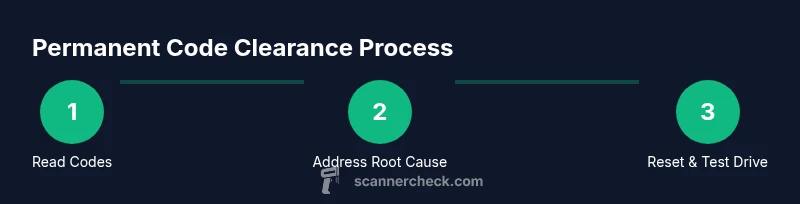
Connect your scanner to the vehicle’s OBD-II port and pull all current DTCs. Note whether they are P, B, C, or U codes and check for any freeze-frame data. This establishes the root cause before attempting any reset.
Tip: Take screenshots or photos of the codes and freeze-frame data for reference. - 2
Repair the root cause when possible
Address the fault indicated by the codes. This step is crucial because permanent codes typically require a genuine repair to clear. If the fault is unresolved, the code is likely to reappear after a reset.
Tip: Follow the manufacturer service manual for the exact repair steps. - 3
Attempt a controlled reset if permitted by the tool
Use your scanner’s erase/clear DTCs function or ECU reset option if the tool supports it for the specific module. Some vehicles require a particular sequence or a service procedure to clear permanent codes.
Tip: Only run the reset after you are sure the fault has been repaired. - 4
Run drive cycles to confirm readiness
After clearing, drive the vehicle through the manufacturer’s recommended drive cycles to allow readiness monitors to re-enable. This helps ensure the permanent code does not reappear due to an uncompleted diagnostic routine.
Tip: Keep notes on the drive conditions and durations for future reference. - 5
Re-scan to verify clearance
Reconnect the scanner to verify that no permanent codes remain and that the cleared codes do not return after a test drive. If any code remains, repeat the diagnostic check and verify repairs.
Tip: If codes persist, document the new data and consult a professional. - 6
Escalate if codes reappear
If permanent codes reappear after a drive cycle, it may indicate a deeper issue or a need for dealer intervention. Consider vehicle make-specific forums or contacting the manufacturer support line.
Tip: Gather all prior codes, repair records, and test-drive notes before contacting support.
Common Questions
What exactly are permanent codes in OBD-II?
Permanent codes are fault codes stored in the ECU that persist after a typical reset. They usually indicate a fault that must be repaired before the code can be cleared. They often require specific procedures or drive cycles, and some codes can only be cleared with dealer-level tools.
Permanent codes stay in memory until the underlying fault is fixed and proper drive cycles are completed; some require dealer tools to clear.
Can any OBD-II scanner clear permanent codes?
Most consumer OBD-II scanners can erase nonpermanent codes, but many cannot reliably clear permanent codes across all modules. Clearing them often requires repaired faults and, in some cases, OEM or dealer-level tools.
Most consumer scanners can’t reliably clear permanent codes; a repaired fault and possibly dealer tools are needed.
Why do permanent codes reappear after a reset?
If the underlying fault is not repaired, the ECU will re-trigger the diagnostic test, causing the permanent code to reappear after the reset. Drive cycles and fault resolution are necessary for permanent codes to clear permanently.
If the fault isn’t fixed, the code tends to come back after a reset because the system detects the same problem.
Is it safe to clear codes without repairing the fault?
Clearing codes without addressing the root cause can mask an issue, potentially leading to more severe problems or safety risks. Always diagnose and repair before clearing codes.
No—clearing codes without fixing the root cause can hide a real problem.
Will clearing permanent codes affect vehicle warranty?
Clearing codes in itself does not void warranties, but performing improper resets or bypassing faults can complicate claims. Always follow manufacturer procedures and consult a professional if in doubt.
Clearing codes isn’t usually a warranty killer by itself, but improper resets can cause issues.
What should I do if permanent codes return after repair?
Reassess the fault data, ensure all related systems are checked, and consider manufacturer service documentation. If unresolved, escalate to a qualified technician and document all steps taken.
If codes come back, re-check the fault and consult a professional with your notes.
Watch Video
Key Takeaways
- Understand permanent codes and their ECU memory behavior
- Not all scanners can clear permanent codes; root cause repair is often required
- Use the right tool with OEM access and up-to-date firmware
- Always perform drive cycles after clearing codes
- If codes persist, seek professional help