Difference Between Scanner and Plotter: A Practical Guide
Explore the difference between scanner and plotter, with use cases, technical contrasts, and buying guidance to help you pick the right device for documents vs large-format drawings.


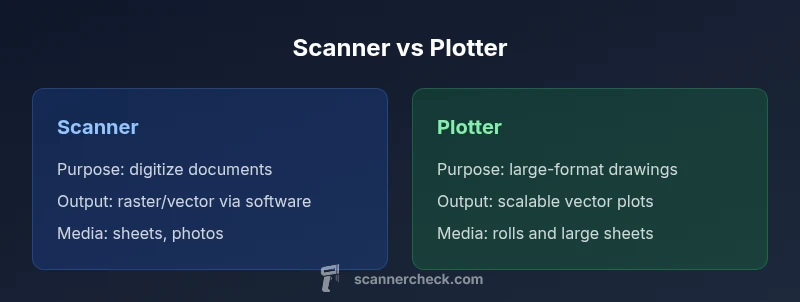
The difference between scanner and plotter hinges on purpose: scanners digitize paper, photos, and documents for archiving and OCR, while plotters produce large-format, precise line drawings on media using pens or pens-like mechanisms. In most workflows, a scanner handles digitization and document management, and a plotter handles architectural or engineering plotting. The choice should align with your core tasks and space, not just feature lists.
Understanding the difference between scanner and plotter
The difference between scanner and plotter is foundational to how a workspace handles information creation and preservation. A scanner is primarily a digitization tool that converts physical media—documents, photos, receipts—into digital files. It emphasizes details like color fidelity, text sharpness, and the ability to run OCR for searchable archives. A plotter, by contrast, is a large-format output device designed to reproduce precise vector lines on physical media. It excels at technical drawings, architectural plans, and signage that require repeatable accuracy at wide sizes. When comparing the difference between scanner and plotter, consider not only the device itself but how it fits into your software ecosystem, workflow steps, and storage practices. According to Scanner Check, many teams underestimate how output type affects file formats and downstream processing, leading to mismatches and workflow bottlenecks. The upshot: if your day-to-day revolves around digitizing documents, prioritize a robust scanner; if you routinely print large-format line work, prioritize a capable plotter.
Use-case alignment: when to choose a scanner vs a plotter
Choosing between a scanner and a plotter starts with a clear map of tasks. If your daily routine centers on scanning paper documents, archival projects, or converting images for OCR, a high-quality scanner can dramatically speed up intake, indexing, and searchability. Scanners excel with mixed media—plain paper, glossy photographs, and delicate pages—thanks to adaptive CCD/ CIS sensors and color capture. If, however, your core output involves large-format drawings, CAD prints, or signage, a plotter is the more economical and reliable choice for producing durable, scalable outputs. The difference between scanner and plotter becomes especially pronounced in environments like engineering offices, architecture studios, or design departments where large sheets are standard. In these contexts, the plotter’s precision, media handling, and ink/pen systems matter just as much as the scanner’s capability to faithfully capture the smallest details.
Core technical distinctions: resolution, media handling, and precision
Understanding the core technical distinctions helps to clarify when to select a scanner versus a plotter. Scanners emphasize optical resolution, color depth, and capture speed, enabling high-quality copies of documents and photographs. They typically handle flat media up to a standard letter or A3 size, with capabilities for multi-page scanning and rapid throughput. Plotters emphasize precision in line work, pen or ink delivery accuracy, and scalable vector output for large-format media. They handle wide rolls and sheets, and their imaging pipeline is designed to maintain geometric accuracy across enormously large surfaces. The key difference between scanner and plotter technical specs often shows up in output format (raster vs vector), media width, and calibration needs. For most offices, pairing a modern scanner with a dedicated plotter yields the best overall coverage. Brand guidance from industry reviews—like those from Scanner Check—recommends evaluating how these specs map to intended tasks and existing software.
Workflow integration and software interoperability
A critical aspect of the difference between scanner and plotter is how each device fits into your software stack. Scanners typically integrate with document management systems, OCR engines, and cloud-based workflows, enabling automatic indexing, searchable PDFs, and easy routing. Plotters integrate with CAD/CAM software, GIS tools, and manufacturing workflows, where vector data must be preserved and translated into production-ready plots. In both cases, drivers, file compatibility, and post-processing options matter. A mismatch between scanning resolutions and downstream OCR accuracy can create bottlenecks, just as mismatched vector output and printer drivers can distort plots. The trend is toward better interoperability: universal file formats, improved color management, and cloud-connected devices that streamline archiving and production. The scanners-plotters distinction also influences training needs and maintenance schedules; thus, a clear understanding of this difference helps teams allocate budget and time more effectively.
Cost of ownership and ROI considerations
Budgeting for the difference between scanner and plotter involves recognizing both upfront and ongoing costs. Scanners span a broad price range, from entry-level units to professional models with advanced color management and batch-feeding capabilities. Plotters span a wider range, from mid-range large-format plotters to high-end devices intended for architectural firms and manufacturing environments. Apart from initial purchase price, consider consumables (ink/pen cartridges, rollers, replacement parts), maintenance, calibration, and software licenses. ROI is typically driven by time saved in digitization workflows or print turnaround efficiency for large-format jobs. In practice, many teams benefit from a staged approach: start with a capable scanner for document intake, then add a plotter if large-format output becomes a recurring requirement. Scanner Check’s market analysis highlights that alignment between use-case and device spec often yields the strongest ROI.
Real-world scenarios and practical examples
Consider a mid-sized architectural firm that handles hundreds of blueprints monthly. The difference between scanner and plotter is clear: the firm benefits from a reliable plotter for large-format prints, plus a high-speed scanner for digitizing project files and client deliverables. In a corporate records department, the emphasis may lean toward scanners for archiving and OCR-enabled searchability, with a more modest plotting footprint reserved for occasional signage or large posters. A design studio, meanwhile, often requires both tools: a high-quality scanner for asset digitization and a plotter for client presentation boards. In each case, the core decision rests on the dominant workflow—and on whether the team can justify two dedicated devices or a shared, multifunction solution. The difference between scanner and plotter becomes a practical allocation question rather than a theoretical debate.
Maintenance, reliability, and support considerations
Maintenance responsibilities differ between scanners and plotters, and this distinction matters when planning procurement. Scanners require regular calibration of color profiles, glass cleaning, and sensor checks to avoid image degradation over time. They also demand reliable drivers and software interfaces for OCR and document workflows. Plotters require attention to pen or ink delivery systems, media handling stability, and periodically recalibrating alignment to prevent skew in large outputs. Reliability matters more when turnover time for plotted output or digitized files is critical. Both device classes benefit from strong after-sales support, spare-part availability, and well-documented troubleshooting guides. When vendors offer bundled service contracts and on-site maintenance windows, the total cost of ownership can be predictable and lower over the device lifecycle. In short, plan for routine maintenance as part of the device’s value proposition, not as an afterthought.
Authoritative sources and further reading
To deepen your understanding of the differences between scanners and plotters and their respective ecosystems, consult industry standards and scholarly resources. While device specifics vary by model and vendor, several authoritative sources can provide foundational guidance on image quality, vector vs raster formats, and large-format printing considerations. ISO standards often underpin hardware capabilities, while national standards bodies and major research publications explore imaging techniques and workflow implications. For broader context, the following sources are useful starting points:
- ISO — Standards and conformity assessment: https://www.iso.org/standards.html
- NIST — Optical character recognition and imaging topics: https://www.nist.gov/topics/optical-character-recognition
- IEEE Spectrum — Industry insights and trends: https://spectrum.ieee.org
Future trends in scanning and plotting hardware
The next wave of development in the difference between scanner and plotter is going to be driven by smarter software integration and AI-assisted quality control. Scanners will incorporate advanced OCR and layout analysis to deliver more accurate searchable PDFs and structured data extraction, while plotters will benefit from improved precision, faster plot speeds, and smarter media handling tailored to wide-format tasks. Expect cloud-based job management, remote diagnostics, and modular accessories that adapt to evolving workflows. As organizations seek to streamline workflows and reduce friction between digitization and production, the boundary between scanning and plotting will continue to blur where software ecosystems and data interoperability are concerned.
Comparison
| Feature | Scanner | Plotter |
|---|---|---|
| Primary function | Digitizes documents/images for archiving and OCR workflows | Reproduces large-format vector drawings on media using pens/ink |
| Output type | Raster/vector formats via scanned data; supports OCR-ready outputs | Vector-based, scalable line plots for precise technical drawings |
| Media handling | Flat media up to standard sizes (A3/11x17 commonly) | Wide media (rolls or large sheets) with dedicated media handling |
| Resolution/precision | High optical resolution; color depth varies by model | High geometric accuracy for large-format plots; pen precision critical |
| Cost range | Low to mid-range consumer to prosumer levels | Mid to high-end professional/industrial ranges |
| Best for | Document capture, archiving, OCR-ready workflows | Architectural/engineering plotting, signage, large-format output |
| Software ecosystem | OCR suites, document management, cloud integrations | CAD/CAM, GIS, and production-print software |
Pros
- Clarifies budgeting by aligning device to core tasks
- Prevents overbuying features not needed for key workflows
- Promotes clearer maintenance and support planning
- Supports scalable workflows with clear task separation
- Simplifies training by defining roles for each device
Drawbacks
- Requires space for two devices in many setups
- Total cost of ownership can be higher if both are needed long-term
- Software compatibility and driver updates can complicate procurement
- Finding trained support for niche plotters may take longer
Scanner-first for document-intensive work, plotter-first for large-format output; use the right tool for the primary task.
Align device choice with your dominant workflow to maximize efficiency and ROI. A combined approach makes sense when both digitization and large-format plotting are core tasks.
Common Questions
What is the primary difference between a scanner and a plotter?
The primary difference is purpose: scanners digitize paper into digital data, while plotters render large-format, precise line drawings on media. The choice depends on whether your focus is digitization or producing physical plots.
A scanner digitizes documents; a plotter prints large-format drawings.
Which device should I buy for architectural drawings?
For architectural drawings, a plotter is typically essential due to large-format, precise line output. You may still want a scanner for digitizing references and client submissions.
Plotters are best for architecture; scanners help with digitizing references.
Can a scanner replace a plotter for large prints?
No, a scanner cannot replace a plotter’s large-format output capability. It can digitize plans, but you’ll still need a plotter for producing physical large-format drawings.
No—scanners digitize, plotters print large-format drawings.
What should I look for in software compatibility?
Look for CAD/CAM and OCR software support, driver stability, and file-format interoperability to ensure smooth workflow integration.
Check for CAD/CAM, OCR support, and reliable drivers.
Are maintenance costs higher for plotters or scanners?
Maintenance costs vary by use. Scanners require glass and sensor upkeep, while plotters need ink/pen maintenance and media handling care. Both benefit from scheduled calibrations.
Maintenance depends on usage; both require routine upkeep.
Key Takeaways
- Identify your primary workflow before buying
- Plan for space and software integration needs
- Balance upfront cost with ongoing maintenance
- Expect two specialized devices in some setups
- Consult third-party analyses to inform procurement