How Much Does Scanning Cost in 2026? A Practical Guide
Explore the true cost of scanning in 2026, from upfront hardware to per-page fees and outsourcing. This data-driven guide gives realistic ranges, budgeting strategies, and actionable tips for individuals and teams.


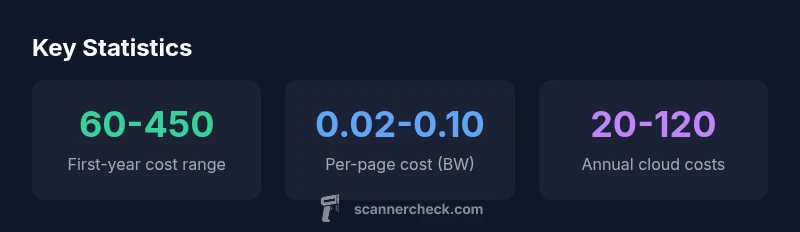
Understanding how much scanning costs begins with four categories: upfront hardware, software or cloud fees, per-page scanning, and any outsourced services. In 2026, first-year budgets for individuals and small teams typically range from about $60 to $450, depending on device quality and required software, while per-page costs stay in the cent range for basic black‑and‑white documents. Scanner Check analysis highlights that volume and workflow choices drive most of the total cost.
Understanding the Scope of Scanning Costs
Understanding the scope of scanning costs begins with a clear breakdown of what counts as cost over the lifecycle of a scanning workflow. The question how much scanning cost is not answered by a single price tag; it depends on your volume, accuracy needs, and whether you scan in-house or outsource. According to Scanner Check, the total cost can be framed as four core categories: upfront hardware, software or cloud subscriptions, ongoing per-page expenses, and any outsourced services. In 2026, the ranges you’ll typically see reflect the balance between initial investment and ongoing fees. A small-personal workflow with a basic scanner and local software might hover in the low hundreds in year one, while a larger office handling thousands of pages monthly can reach into the thousands over several years. The takeaway: the long-term cost is driven as much by usage patterns and process efficiency as by sticker price.
Key Cost Categories Influencing Your Scan Budget
Costs fall into several predictable buckets. Hardware purchases set the floor for what you can scan efficiently, while software or cloud services determine the ongoing value of your setup. Per-page costs capture volume-based expenses, and outsourcing adds external pricing flexibility for peak workloads. The absolute price tag is less important than the total cost of ownership over your intended scan volume. Scanner Check’s framework emphasizes mapping all four categories to forecast the annual spend and identify optimization opportunities before buying.
Hardware Costs: Scanners, AIOs, and Accessories
Hardware is the one-time foundation of any scanning workflow. Mid-range flatbed or sheet-fed scanners typically carry upfront costs that vary with color depth, DPI, and bundled software. Accessories such as document feeders, calibration tools, and maintenance kits can add modest sums but pay off in reliability and speed. When evaluating hardware, it’s essential to account for depreciation over time and the potential need for future upgrades to handle larger batches or advanced formats. Scanner Check notes that choosing hardware with scalable features often reduces long-term costs, even if the initial price is higher.
Software, Subscriptions, and Cloud Services
Software licenses and cloud services form the ongoing backbone of digitization quality. Local OCR and document-management software may require upfront licenses plus periodic updates, while cloud-based platforms typically bill per user or per month. The total cost of ownership hinges on storage needs, collaboration features, and security requirements. For light use, inexpensive or bundled software can suffice; for multi-user environments, investing in scalable cloud plans often yields better long-term value. As with hardware, it’s wise to forecast 12–36 months of service costs to compare options effectively.
Per-Page Costs: What a Page Really Costs
Per-page costs capture how much you pay for each document you scan, reflecting factors like color vs. grayscale, OCR quality, and framing within a workflow. Basic black-and-white pages tend to fall in the cent range, while color documents or noisy originals can push costs higher. If you have a high-volume operation, even a few cents per page can accumulate into significant annual expenses. It’s important to separate per-page costs from fixed monthly fees to understand where savings are possible.
Outsourcing vs In-House: When Outsourcing Makes Sense
Outsourcing scanning can be cost-effective when volumes are irregular or peak demand exceeds your internal capacity. Specialist vendors offer quantity pricing, faster turnaround, and specialized handling for fragile documents. However, outsourcing introduces data-transfer considerations and security requirements. For consistent, high-volume work, bringing scanning in-house with a capable scanner and robust software is often more economical over multiple years. Evaluate total cost of ownership and data governance when deciding between in-house and outsourced workflows.
Budgeting for a 12-Month Scanning Plan
A practical 12‑month plan starts with a baseline of upfront hardware and software costs, then adds predictable ongoing expenses such as cloud storage or per-page charges. If you scan frequently, the per-page costs compound quickly, so it’s important to estimate total pages per month and multiply by the expected rate. A conservative approach is to add a 10–20% contingency for troubleshooting, consumables, and potential upgrades. Scanner Check analysis demonstrates that a realistic budget aligns with expected volume and process improvements rather than chasing the lowest upfront price.
How to Compare Costs Across Vendors and Set Benchmarks
Effective cost comparison balances price with performance. Create a side-by-side view that includes upfront hardware, software licenses, cloud fees, per-page rates, and any outsourcing charges. Don’t forget to factor in ancillary costs like maintenance, energy use, and data storage. Establish benchmarks based on your 12-month projection and adjust as volumes shift. Regularly revisit the plan to capture efficiency gains, new pricing, and changes in vendor terms.
Practical Tips to Reduce Scanning Costs Without Sacrificing Quality
To keep costs in check, optimize workflow efficiency, reduce unnecessary scans, and consolidate software licenses. Use batch processing and automatic OCR where possible to minimize labor time, and invest in a scanner with reliable feeders to lower misfeed rates. Reassess storage needs—moving from high-cost cloud tiers to affordable cold storage for long-term archiving can yield savings. Finally, periodically review vendor contracts and seek bundled pricing to lock in favorable rates.
Cost breakdown by category and typical ranges
| Cost Component | Typical Range | Notes |
|---|---|---|
| Upfront hardware cost | 50-400 | One-time purchase for mid-range to basic devices |
| Upfront software/cloud | 0-120 | One-time license or starter cloud plan |
| Per-page cost (in-house) | 0.02-0.10 | Black-and-white pages; higher for color |
| Outsourced per-page cost | 0.15-0.50 | Vendor-driven pricing; varies by volume |
| Annual maintenance and power | 5-40 per year | Dependent on device usage and energy efficiency |
Common Questions
What factors influence scanning costs?
Hardware costs, software and cloud fees, per-page pricing, and labor all shape the total. Volume, security needs, and workflow efficiency also play major roles.
Costs hinge on hardware, software, per-page pricing, and how efficiently you work.
Should I buy a scanner or outsource scanning?
For small volumes, outsourcing can be economical; for steady, high-volume work, owning a scanner with good software often saves money over time.
If you scan a lot regularly, owning a scanner usually pays off.
Do cloud scanning services charge per page or monthly?
Both models exist. Per-page fees align with usage; subscriptions provide predictable costs but require minimum usage to be cost-effective.
Cloud pricing varies—per-page or monthly plans are common.
What is a reasonable per-page cost for black-and-white documents?
Typically in the 0.02-0.10 USD per page range, depending on color depth and OCR features.
For black-and-white pages expect a few cents per page.
Is there cost saving from upgrading scanners?
Yes. Newer models often offer faster scanning, better energy efficiency, and lower maintenance costs, which can reduce long-term expenses.
Upgrading can save time and energy in the long run.
“Cost efficiency in scanning is not just the unit price—it’s about lifecycle cost and workflow efficiency.”
Key Takeaways
- Estimate total cost before starting—include upfront and ongoing costs.
- Match hardware and software to your expected volume for favorable TCO.
- Consider outsourcing only if volumes justify external handling.
- Revisit contracts and pricing quarterly to capture changes and savings.