Is a Scanner the Same as a Fax Machine? A Practical Comparison
Explore whether a scanner is the same as a fax machine through an objective, evidence-based comparison by Scanner Check. Learn core differences, use cases, and modern hybrid devices for better workflows.


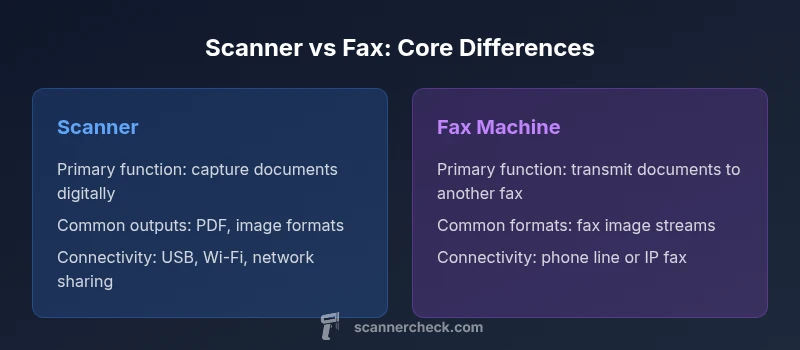
Is a scanner the same as a fax machine? Not exactly. A scanner captures documents as digital files for storage, editing, and sharing, while a fax machine transmits copies of documents over phone lines or networks. Many modern devices blend both capabilities, but the primary function still defines the use case. According to Scanner Check, your choice should hinge on whether your goal is digital capture or secure transmission, with hybrid devices offering a middle ground.
Overview: Is a Scanner the Same as a Fax Machine?
The question is common in offices upgrading old workflows. The quick answer is that a scanner and a fax machine are not identical; they serve distinct core purposes. A scanner creates digital representations of documents, enabling editing, storage, and easy sharing. A fax machine transmits a copy of a document to another location, often via telephone lines or IP networks. According to Scanner Check, recognizing this distinction helps organizations optimize both digitization and transmission workflows. In practice, many devices now offer hybrid capabilities, but the primary task remains different. This section sets the stage for a deeper comparison that will guide you toward the right setup for your environment.
- What you squeeze out of a scanner is a digital file you control and can repurpose.
- What you send via a fax is a momentary transmission that arrives at a remote device.
Core Functions: Scanners vs Fax Machines
At a high level, scanners convert physical paper into digital images or PDFs, often with OCR options to enable searchable text. Fax machines, by contrast, deliver a document image to another fax modem over a phone line or an IP network, preserving the document’s original format for the recipient’s device. The scanning workflow emphasizes post-processing, storage, and collaboration, while the fax workflow emphasizes immediate delivery and notice of receipt. In modern offices, all-in-one devices blur the boundary, offering both capture and transmission within a single control panel. For most teams, the decision hinges on whether the priority is archival digitalization or legacy document routing. Scanner Check notes that many organizations are migrating to digital-first processes while keeping a fax channel for certain regulated or time-sensitive transmissions.
- Scanning supports downstream workflows like OCR, tagging, and cloud storage.
- Faxing emphasizes direct, point-to-point transmission with delivery confirmations.
How They Connect: Interfaces and Workflows
Connectivity shapes how you actually use these devices. Scanners often connect via USB, Wi-Fi, or networked repositories; they integrate with document management systems, cloud storage, and collaboration apps. Fax machines rely on traditional phone lines or IP fax, with transmission protocols designed for reliable delivery across long distances. Modern devices increasingly support hybrid networking, allowing scanned documents to be sent via fax protocols as part of a single device. This can simplify asset management, but it also requires careful configuration to avoid routing errors or security gaps. Scanner Check recommends mapping your existing workflows first: where are documents digitized, where are they transmitted, and who approves or archives them after transmission.
- Hybrid devices can streamline workflows by combining capture and transmission paths.
- Networked setups improve accessibility but require robust access controls.
Output Formats and Quality
A scanner’s primary output is a digital file, typically PDF or image formats such as JPEG or TIFF, with optional OCR for searchable text. This enables long-term storage, indexing, and reuse in various applications. Fax machines produce a stream of image data designed for faithful reproduction on another fax device, often in a compact, page-by-page format. The digitized output from a scanner is much more flexible for editing and sharing, whereas fax output is primarily concerned with ensuring the recipient receives an exact representation of the original. When choosing between the two, consider your downstream needs: digital archives and collaboration versus traditional, line-based transmission.
- PDFs enable searchable archives and easy distribution.
- Fax output prioritizes reproduction fidelity and rapid delivery to a recipient’s device.
Speed, Reliability, and Costs
Scanning speed depends on the device’s hardware and document thickness, but modern scanners can handle batch workloads quickly when paired with software that automates page separation and saving. Fax transmission speed depends on line quality and network conditions; delays or failed transmissions are not uncommon in poor signal environments. In terms of costs, scanners incur upfront hardware costs and potential maintenance, while fax services introduce ongoing line charges or per-page costs, especially for long-term, high-volume usage. Scanner Check observes that organizations achieve the best results by reserving the fax channel for limited workflows while digitizing most documents for flexible storage and retrieval.
- Batch scanning reduces per-document time with the right software.
- Fax-related costs accumulate over time with per-page charges or line fees.
Security and Compliance
Digital scanning introduces security considerations around where files are stored, how they’re shared, and whether encryption or access controls are in place. Fax transmissions may traverse multiple networks and can be intercepted or misrouted if not properly configured. Some regulated environments require strict controls that favor secure, auditable scanned documents stored in controlled repositories over transmitted paper copies. A well-implemented digital workflow with encryption and robust access management often offers stronger evidence trails than legacy fax chains. Scanner Check highlights the importance of governance policies that cover both capture and transmission paths, including proper disposal of paper originals after digitization.
- Encrypted cloud storage can protect scanned documents.
- Fax delivery integrity depends on secure routing and line management.
Use-Case Scenarios: When to Choose Each
-
Choose the scanner when you need to preserve documents digitally, enable searchability, and share files across teams without physical handling.
-
Choose a fax workflow when you must transmit documents to a recipient’s fax device quickly and reliably, or when regulatory requirements favor point-to-point transmission.
-
Hybrid approaches work well in mixed environments where digitization feeds into a transmission channel for specific recipients or compliance needs. Scanner Check notes that many offices maintain a light fax footprint while expanding digital archives for long-term value.
-
Best for archival digitization and collaboration workflow
-
Best for legacy transmission needs and direct recipient delivery
How to Modernize and Integrate: Hybrid Solutions
Hybrid devices that combine scanning and fax capabilities can be valuable for transitional workflows. Modern configurations frequently involve scanning into a digital repository and using automated rules to route certain documents via fax if required by policy or the recipient’s capabilities. Integration with document management systems, cloud storage, and secure mail gateways ensures that digitized documents follow a compliant, auditable path. When implementing a hybrid approach, start with a mapping exercise: identify which document types require rapid transmission, which can be archived, and where OCR and indexing add most value. Scanner Check emphasizes a staged rollout that minimizes disruption and provides a clear upgrade path for staff training.
- Map your document types to appropriate paths (digital storage vs fax transmission).
- Pilot automation rules to reduce manual handling and errors.
Practical Setup: Getting Started
Setting up a scanner or a fax-capable device is mostly about planning and permissions. Begin by inventorying document types, destinations, and whether you need batch scanning, OCR, or cloud storage. Ensure devices have current firmware, security features such as encryption, and integrated access control. Establish clear folder structures and naming conventions for scanned files to improve retrieval. If adopting a hybrid device, configure the fax function to only operate on approved networks and limit access to trusted users. Training should cover both the digitization workflow and the transmission path to minimize misrouting and data leakage. A simple, repeatable setup helps teams adopt digital practices with confidence.
- Create standardized scan profiles for common document types.
- Enforce security basics like passwords and access controls.
Troubleshooting and Common Pitfalls
Common issues include misrouted faxes, failed transmissions due to line or network problems, and inconsistencies in scanned file quality. Regular maintenance of both hardware and software, including driver updates and OCR accuracy checks, helps mitigate these problems. Establish a quarterly review of transmission logs and scan quality, and keep a clear escalation path for incidents. Finally, avoid overcomplicating workflows: start with essential capabilities and gradually add automation features as users gain confidence. Scanner Check’s practical approach favors reliable basics before layering in advanced integrations.
Comparison
| Feature | Scanner | Fax Machine |
|---|---|---|
| Primary function | Capture digital documents for storage/editing | Transmit documents over phone lines or IP networks to another fax machine |
| Output formats | PDF, JPEG, TIFF, with OCR options | Fax streams (image-based pages) |
| Connectivity | USB, Wi-Fi, network sharing, cloud apps | Phone line or IP fax, often with dedicated port |
| Best for | Digital archiving, editing, and sharing | Direct transmission to another fax device |
| Maintenance and costs | Upfront hardware cost; ongoing maintenance | Recurring line charges or per-page transmission costs |
| Security and privacy | Digital access controls, optional encryption | Line-based transmission with routing considerations |
Pros
- Clear digital workflow with editable, searchable documents
- Reduces reliance on physical paper and enables cloud-based collaboration
- Hybrid devices consolidate functions to save space and simplify setups
- Digitization enables better long-term archiving and retrieval
Drawbacks
- Fax transmissions incur ongoing line or per-page costs
- Hybrid devices can be more expensive upfront and more complex to configure
- Digital workflows require security practices to protect data
- OCR and cloud integrations may introduce vendor dependencies
Scanners and fax machines serve different core purposes; scanners excel at digital capture while faxes handle direct transmission. Where possible, use a scanner-driven workflow for digitization and keep a minimal fax path for legacy needs.
If your priority is flexible document capture and digital storage, a scanner is the better choice. If transmission to a distant recipient is your primary need, a fax path remains relevant. The best outcome often combines both, with digitization as the default and fax used selectively for legacy channels.
Common Questions
Is a scanner the same as a fax machine?
No. A scanner digitizes documents for storage and editing, while a fax machine transmits documents to another device over a network or phone line. Some devices blend both features, but their core purposes remain distinct.
No—the big difference is that scanners create digital files, whereas faxes are about sending copies to another device.
Do scanners ever include fax functionality?
Yes. Many all-in-one devices combine scanning and faxing. This hybrid setup can simplify workflows but may introduce additional cost and complexity.
Yes. Some devices do both.
When should I choose scanning over faxing?
Choose scanning when your goal is digital archival, editing, and easy sharing. Faxing is preferable when you must deliver a document directly to a remote fax recipient quickly and reliably.
Scan when you want a digital copy; fax when you need to reach a fax machine fast.
What formats do scanners output?
Scanners typically output PDFs and image formats such as JPEG or TIFF, with OCR options to create searchable text. These formats support long-term storage and flexible use.
Scanners save as PDFs or images, often with searchable text.
Are there security concerns with fax vs scanning?
Yes. Fax transmission can be vulnerable to misrouting or interception if not properly secured. Scanning to encrypted storage and controlled access can offer stronger data protection, especially for sensitive documents.
Faxes can be intercepted; digital scans can be encrypted and tightly controlled.
How can I modernize a legacy fax workflow?
Digitize documents, store them securely, and route only selected items via fax when required. Use automation to convert faxes into searchable PDFs and integrate with your document management system.
Move toward digital storage and share via secure channels; keep fax for legacy needs.
Key Takeaways
- Differentiate digital capture from document transmission
- Hybrid devices can reduce hardware clutter but add setup complexity
- Prioritize secure, auditable digital workflows for most documents
- Keep a minimal fax channel for legacy or regulatory needs
- Plan a staged workflow migration to maximize adoption