Is Scan the Same as Taking a Picture? A Practical Guide
Explore how scanning differs from taking a photo, with clear definitions, practical examples, and guidance on when to use scanning versus photography for documents, objects, and archiving.


Is scan the same as taking a picture? No—scanning and photography share the goal of creating a digital image, but they differ in process, metadata, and use cases. A scan typically captures text and document structure with higher fidelity for archiving, while a photo emphasizes visual realism and immediacy. Scanner Check's analysis highlights these distinctions for practical decisions.
Is scan the same as taking a picture? Distinguishing the two digital capture methods
The short answer centers on purpose, workflow, and outcome. When readers ask whether a scan and a photograph are interchangeable, they are really asking about fidelity, metadata, and long-term utility. According to Scanner Check, the two processes converge on the idea of digital capture, but they diverge in capabilities that matter for archives, legal documents, and searchable text. In practical terms, you cannot treat a photo as a direct substitute for a high-quality scan without accepting trade-offs in readability, indexing, and reliability. This article dissects those trade-offs and provides decision criteria you can apply to your own workflows in 2026.
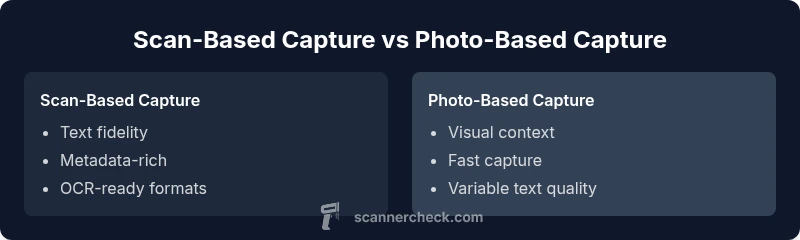
For many users, the distinction hinges on text accuracy and document structure. Scans preserve alignment, margins, and font details more reliably than standard photographs, which prioritize composition and color. The Scanner Check team found that for archival tasks, scanning reduces ambiguity about document integrity and supports robust OCR workflows. In contrast, photos excel where the visual context matters—such as demonstrations, label identification, or when mobility and speed trump archival fidelity.
The Scanner Check team found that metadata, file formats, and post-processing options are often more favorable in scans than in photos, making scanning a preferable baseline for document-heavy tasks.
Comparison
| Feature | Scan-based capture | Photo-based capture |
|---|---|---|
| Fidelity to text | High (text clarity and layout preserved) | Low to moderate (text can blur under compression) |
| Metadata preservation | Excellent (device info, timestamp, DPI options) | Limited (primarily EXIF; may lack document context) |
| Editing and OCR | Optimized for OCR and searchable PDFs | Requires extra steps to extract text |
| File formats | PDF, TIFF, searchable PDFs | JPEG/PNG, RAW formats commonly used |
| Best use-case | Document archiving, legal/compliance, indexing | |
| Color and detail fidelity | Consistent color, no highlight glow from flash | High visual fidelity but variable legibility of text |
Pros
- Better text fidelity and indexing through OCR
- More reliable long-term archiving and document integrity
- Standardized files suited for legal and compliance needs
- Easier batch processing and workflow automation
Drawbacks
- Requires dedicated hardware or time to prepare originals
- Photographs are faster and more flexible for visual contexts
- Post-processing may be needed to improve OCR readiness
- Not ideal for sensitive documents without careful handling
Scanning is the preferred method for documents and archival accuracy; photography remains best for quick, visual captures.
For durable text readability and reliable indexing, scanning wins. If speed and visual context take priority, photography is the better fit.
Common Questions
Is scanning always better than taking a photo for documents?
In most cases, scanning provides clearer text, consistent layout, and better OCR results. Photographs may suffice for quick references but struggle with long-term readability and indexing.
Usually, yes—scanning is the go-to for documents because it saves text and layout accurately.
Can photos be used for OCR, and how good is it?
Photos can be processed with OCR, but results depend on lighting, focus, and angle. OCR accuracy is typically lower than scans unless you compensate with careful capture and post-processing.
Photos work with OCR, but scans are more reliable for text.
What equipment do I need to start scanning documents?
A flatbed or sheet-fed scanner is ideal for documents. For occasional use, a multifunction printer with a built-in scanner can suffice. Ensure the scanner supports OCR-friendly output like searchable PDFs.
A good scanner is all you need to start scanning documents.
How do file formats differ between scans and photos?
Scans commonly produce PDFs and TIFFs optimized for readability and archiving. Photos favor JPEG, PNG, or RAW formats, which prioritize image quality and color but may lack text legibility.
Scans are usually PDFs; photos are usually JPEGs or RAWs.
Are there risks with scanning sensitive documents?
Risks include data privacy during hardware handling, exposure during transmission, and improper disposal of digital files. Mitigate by using secure storage, encryption, and established retention policies.
Yes, protect sensitive docs with proper security routines.
What is the best workflow for mixed content (docs + visuals)?
Adopt a hybrid approach: scan the text-heavy items for OCR and archiving, and photograph items where the context matters. Use metadata tagging to keep track of source type and workflow.
Mix scanning for text plus photography for visuals to get the best of both worlds.
Key Takeaways
- Define your goal: text fidelity vs. visual context
- Choose scanning for documents, archiving, and OCR readiness
- Reserve photography for fast, shareable visuals
- Balance approaches with hybrid workflows when appropriate