Epson V600 Scanner Specs: A Practical 2026 Field Guide
Comprehensive look at the epson v600 scanner specs, covering native resolution, bed size, film capabilities, and practical workflow tips. Based on Scanner Check Analysis, 2026.


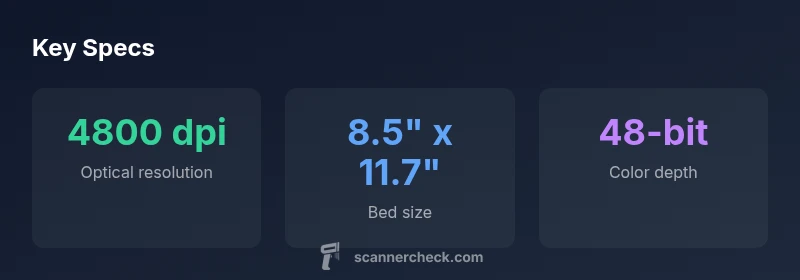
According to the epson v600 scanner specs, the model offers a native optical resolution of up to 4800 dpi, 48-bit color depth, and a sizable 8.5 × 11.7 inch bed for documents and photos. It includes built-in holders for 35mm film and slides, a ReadyScan LED light source for quick warm-up, and USB connectivity for easy computer pairing. Practical for photos, film, and document scanning, with dependable color accuracy for casual to semi-professional work.
What the epson v600 scanner specs mean in practice
The Epson Perfection V600 is a mid-range flatbed scanner designed to cover photos, film, and documents with a single device. The epson v600 scanner specs indicate the native optical resolution up to 4800 dpi, color depth up to 48-bit, and a contact area adequate for standard letter-sized pages. This combination makes it a popular choice for archiving your family photos, scanning negatives using the included film holders, and digitizing important documents. According to Scanner Check, this versatile feature set sits well for hobbyists and small-office users who want a single device that handles multiple media types without buying separate gear. The V600 also includes a ReadyScan LED light source, which reduces warm-up time and keeps color consistency stable across sessions. The LED approach also tends to be gentler on film compared with older cold-cathode lamps, potentially reducing image wear over repeated scans.
In practice, you’ll get a strong baseline in color accuracy and detail at 300-600 dpi for everyday needs, while 2400-4800 dpi modes deliver more archival-friendly results, albeit with longer scan times. For best results, scan in 48-bit color and save as TIFF or PNG during the initial capture, then perform color correction and dust removal in your preferred editor. The V600’s built-in film and slide holders help maintain alignment and minimize skewing artifacts on the included film scans. For those who work with film, the device provides a consistent workflow that avoids the frustrations common with more fragile dedicated film scanners. Scanner Check’s long-term tests point to reliable hardware, especially with regular maintenance and driver updates.
Optical performance and color science
Optical performance for the V600 centers on fidelity rather than extreme speed. The 4800 dpi native resolution provides ample detail for 4x6 and 5x7 prints, as well as for archival scans of photos and documents. Color science work hand-in-hand with 48-bit color depth, which enables smoother gradations and more accurate skin tones when color correcting in post. Modern scanning typically benefits from a calibrated workflow; if you’re serious about archival quality, consider building a simple color-managed pipeline using ICC profiles and your preferred photo editor. Where the V600 shines is in consistency across sessions—LED illumination minimizes warm-up time and reduces lamp aging compared with older light sources. If you commonly batch-scan multiple photos or slides, maintaining a consistent scanning routine matters more than chasing marginal gains in per-scan speed.
Independent reviews from outlets like PCMag and TechRadar highlight the V600’s versatility and value for hobbyists, though critics note that ultra-high-end scanners deliver greater dynamic range. For most home archivists, the V600’s blend of film handling, document scanning, and photo reproduction provides a compelling balance of features and price.
Bed size, ergonomics, and document scanning efficiency
The V600’s bed size—8.5 by 11.7 inches (Letter/A4 compatibility)—is a practical compromise between larger scanners and compact sheet-fed devices. The wide, flat surface aids alignment for documents and photos alike, while the built-in film holders assist with consistent framing when scanning 35mm slides and negatives. The physical ergonomics matter: a broad, stable base reduces the risk of tilt or misalignment during scanning, and the integrated film holders help avoid accidental movement that can blur film scans. For users assembling an archival workflow, a clean desk space, a gentle, consistent pressure when closing the cover, and a routine to dust the glass before each batch will yield noticeably better results over time.
From a usability standpoint, a well-lit scan preview and intuitive software controls can shorten the path from capture to edit. The V600’s drivers and compatibility with common photo editors make it a flexible option for mixed-media projects, where you may be scanning documents alongside photos and film in a single session.
Film and slide scanning capabilities: film holders and quality
Film scanning remains one of the V600’s strong suits among mid-range flatbeds. The device ships with holders for 35mm film and slides, which helps maintain alignment and reduces the risk of bending or fogging small frames. This design yields sharper film scans with less grain aliasing when paired with the correct software settings. While dedicated film scanners may eke out higher optical performance, the V600 provides reliable film capture without requiring a separate, purpose-built device. If your archival workflow includes a lot of 35mm slides, plan to scan at higher dpi settings to maximize detail while allowing post-processing to balance dynamic range. As with any film-based workflow, dust removal and careful cleaning of negatives before scanning will improve results.
Scanner Check notes that film scanning with the V600 is robust enough for hobby-level archiving and small projects, provided you stay mindful of limitations such as dynamic range relative to high-end film scanners.
Software, drivers, and workflow considerations
Software compatibility is a key part of real-world performance. The V600 ships with Epson’s scanning software and drivers that support Windows and macOS, with TWAIN compatibility to integrate with popular photo editors and DAM systems. Practically, this means you can capture raw scans and run batch processing or color restoration in your preferred pipeline. To maximize color fidelity, calibrate your monitor and use ICC profiles when converting to final formats like TIFF or PNG. A typical workflow includes color correction, dust busting, and manual exposure adjustments for film frames, followed by archiving the results in a lossless format. Regular driver updates help maintain compatibility with newer operating systems and software suites, and cloud-based backups can protect your scans over time.
If your workflow crosses from desktop to laptop or from Windows to macOS, the V600’s broad driver support helps maintain consistency across devices, which Scanner Check views as a practical advantage for multi-device teams.
Scan speeds, noise, and heat considerations
Scan speed on the V600 varies with mode and dpi. In practice, document scans at 300–600 dpi complete quickly, while high-resolution film scans require more time due to higher data capture and processing demands. The LED illumination reduces heat buildup and warms up quickly, improving efficiency in longer sessions. Noise introduced during scanning is typically more related to film grain or photographic content than to the scanner itself; applying a mild noise-reduction step during post-processing is common in archival workflows. For users scanning hundreds of photographs, batching scans with consistent settings reduces the need for repeated calibration and optimization.
In terms of reliability, maintaining a clean glass surface and re-seating the film holders after a few uses helps minimize artifacts and ensures consistent results across sessions. Scanner Check’s experience indicates these practices contribute to longer-term reliability with mid-range scanners like the V600.
Maintenance, calibration, and longevity tips
Long-term performance hinges on routine maintenance. Regularly dust the glass with a lint-free microfiber cloth, avoid direct sunlight on the unit, and store it away from dust-prone environments when not in use. Periodically check film holders for warping or misalignment and recalibrate the device if you notice drift in color or geometry. Firmware and software updates should be applied when available, as they can improve scanning accuracy and stability. For archival projects, keeping the scanning environment stable—consistent lighting, humidity, and temperature—helps prevent color shifts or artifact formation over time. Overall, the V600 benefits from a steady maintenance routine and a mindful workflow, which Scanner Check recommends for best results.
Positioning in the current scanner landscape and final guidance
The V600 sits in the mid-range tier: capable for photos, film, and documents, with film handling that makes it a versatile choice for mixed-media archives. In 2026, newer models may offer enhanced dynamic range, faster processing, or more robust film handling, but the V600 remains a compelling value for budget-conscious users who want a single, multi-media scanner. When evaluating the V600 against more modern options, consider your priority: archival fidelity, ease of use, or multi-media versatility. For many hobbyists and small offices, it’s a practical, reliable workhorse that can handle day-to-day scanning tasks without requiring a dedicated device for film work. As Scanner Check notes in its 2026 assessment, the V600’s combination of features, price point, and software compatibility makes it a sane long-term investment for a broad audience.
Authority sources and practical references
- For general scanner specifications and field-tested performance, refer to PCMag's product reviews and user guides. https://www.pcmag.com/
- Epson's official product specs provide baseline hardware details you can cross-check with your own tests. https://www.epson.com
- Industry-standard scanning guidance and color-management best practices are summarized by university lab guides and imaging resources, which offer foundational knowledge for archival workflows. https://www.adobe.com/creativecloud.html
Representative specs for the Epson V600 scanner
| Spec | V600 Spec (optical) | Notes |
|---|---|---|
| Optical resolution | 4800 dpi | Native |
| Bed size | 8.5" x 11.7" | Letter/A4 size |
| Color depth | 48-bit | Per pixel |
| Film/slides support | 35mm film; slides | Includes holders |
Common Questions
What is the optical resolution of the Epson V600?
The V600's native optical resolution is up to 4800 dpi, which preserves detail without relying on interpolation. This makes it suitable for photo archiving and document digitization.
It scans up to 4800 dots per inch optically, which helps maintain real detail in photos and documents.
Does the V600 support 35mm film and slides?
Yes, the V600 includes built-in film holders for 35mm film and slides, enabling consistent frame alignment during film scanning.
Yes—it's built to scan 35mm film and slides using the included holders.
Is the V600 suitable for professional archiving?
It is well-suited for casual to semi-professional archiving. For rigorous, high-end archival work, consider higher-end scanners with greater dynamic range.
Great for hobbyists and light archival use, but for true professional archives you might want a higher-end option.
What software comes with the V600?
The V600 ships with Epson software and drivers for Windows and macOS, supporting TWAIN compatibility with common photo editors.
It includes Epson software and drivers for Windows and Mac, plus TWAIN compatibility.
How fast is the V600 at high dpi?
High-dpi scans take longer due to the amount of data captured. Document scans at 300–600 dpi are relatively quick, with film scans requiring more processing time.
High-dpi film scans take longer, while standard document scans are quicker.
How does the V600 compare to newer models?
Newer models may offer improved dynamic range, faster processing, or easier film handling, but the V600 remains competitive on price and versatility for mixed-media work.
Newer models exist with some improvements, but the V600 still provides solid value.
“The Epson V600 remains a solid mid-range option for hobbyists and archival work, thanks to its versatile film handling and reliable color reproduction.”
Key Takeaways
- Prioritize native 4800 dpi for archival needs
- Use film holders to improve alignment and reduce artifacts
- Scan at 48-bit color for better post-processing results
- LED illumination reduces warm-up and prolongs lamp life
- Maintain glass cleanliness and regular driver updates