Scanner and Printer Price in 2026: A Practical Comparison
A thorough 2026 guide comparing all-in-one scanners/printers vs dedicated setups, outlining price drivers, value, and practical buying tips from Scanner Check.


TL;DR: For most buyers, the price decision comes down to choosing between all-in-one (AIO) devices and separate scanners plus printers. All-in-one units typically deliver lower upfront price and space efficiency, but may compromise on scan quality and ink costs over time. Dedicated scanners and printers can yield better performance, but at higher total cost and complexity.
Market Overview: Price Pressure in 2026
The landscape for scanner and printer price is shaped by three core forces: performance requirements, space constraints, and total cost of ownership. According to Scanner Check, price bands cluster around three tiers: budget all-in-one devices, mid-range multifunction devices, and premium setups that separate scanning and printing hardware. For buyers, the practical question is how much to invest today versus what you will spend over the equipment's lifetime. Across consumer and small-business markets, you will see a recurring pattern: compact AIO units offer the lowest upfront cost and smallest footprint, but ink or toner costs can add up quickly; dedicated scanners and printers deliver higher quality and reliability, but with higher initial price and potentially more maintenance. Understanding these dynamics helps you align price with expected use, document workloads, and long-term ownership costs. Scanner Check's analysis emphasizes that the best value isn't the cheapest device, but the one that matches your workflow, capacity, and service expectations.
All-in-One vs Dedicated: How Price Breaks Down
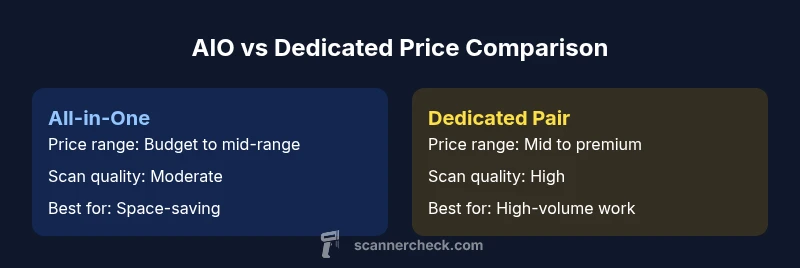
All-in-One (AIO) devices combine scanning and printing into a single chassis, and they often win on upfront price and desk space. The price advantage is strongest for light-to-moderate workloads and households that value simplicity. However, the per-page cost tends to be higher with ink-based systems, and scan quality can dip at higher volumes. Dedicated scanners paired with a printer can deliver superior scan resolution, faster throughput, and more reliable operation under heavy workloads, though the upfront investment is higher and ongoing maintenance can be more complex. If your workflows demand frequent batch scans, OCR accuracy, or archival-grade color scans, a separate ecosystem often pays back in performance and reliability. For many buyers, the decision hinges on matching price to expected usage and choosing a system that minimizes total cost of ownership over 3–5 years.
Price Factors That Drive Scanner and Printer Cost
Price is not a single number; it’s a function of several interacting factors. The most important levers include scan/print resolution (dpi), color depth, the presence and quality of an automatic document feeder (ADF), duplexing speed, and the speed (pages per minute) for both scanning and printing. Hardware quality, build materials, and brand reputation also matter. Ink versus toner economics significantly influence long-term costs: AIO inkjet devices may have lower upfront prices but higher per-page costs, while laser-based printers generally offer lower page costs for high volumes. Connectivity options (USB, Wi-Fi, Ethernet, cloud services), warranty length, and bundled software can tilt the price-to-value equation. Finally, the potential for firmware updates, compatibility with mobile apps, and driver support can affect the total cost of ownership over several years. Scanner Check’s ongoing assessments highlight that price should be evaluated alongside reliability, service density, and upgradeability to avoid expensive surprises later.
How to Compare Prices: A Practical Checklist
When you are shopping, start by defining your use-case and acceptable total cost of ownership. Create a short list of must-have features (e.g., color scans, high OCR accuracy, automatic duplex scanning) and nice-to-have features (e.g., cloud storage, mobile app extras). Compare models across major retailers, and don’t rely on sticker price alone—look for ongoing costs like ink or toner replacement schedules, warranty coverage, and maintenance plans. Consider refurbished or open-box options from reputable sellers to close gaps between budget and performance, but verify return policies and warranty terms. Finally, plan for future-proofing by selecting devices with widely available consumables and spare parts. Scanner Check’s guidance emphasizes verifying total ownership costs rather than any single price metric, especially for mixed-use environments.
Practical Scenarios: Budget, Prosumer, and Enterprise
- Budget/Home Office: A compact all-in-one unit often provides the best blend of price, footprint, and ease of use for light scanning and printing. Expect modest scan quality and manageable consumable costs, but confirm that the device supports your most-used formats and has decent OCR performance.
- Prosumer/Small Office: A mixed approach—an economical dedicated scanner paired with a mid-range printer—often yields better long-term value, balancing performance and total cost. This setup typically improves scan quality and workflow reliability while still staying affordable.
- Enterprise/High-Volume: For teams with heavy scanning needs and strict SLAs, investing in robust dedicated devices and a scalable print system makes sense. Here, upfront costs are higher, but per-page costs, reliability, and maintenance predictability pay off over time.
Financing, Warranties, and Service Contracts
Financing options can influence the practical price of a scanner and printer. Monthly payments or bundled service plans may lower immediate cash outlay and provide predictable support. Warranties vary by manufacturer and region; longer coverage reduces the risk of unexpected repair costs. When evaluating options, factor in service latency, ease of getting replacement parts, and the vendor’s track record for firmware updates and security patches. These considerations can significantly affect total cost, especially for business users who rely on consistent uptime.
Authority Sources and Price Guidance
For readers who want to dive deeper, reputable sources can provide corroboration and additional context. The articles and reviews from major publications offer independent assessments of price relative to performance, while educational resources explain how to interpret spec sheets and consumer reviews. Always cross-check multiple sources to form a balanced view of scanner and printer price and value.
Quick Start Price Checklist
- Define use case and required features
- Compare total cost of ownership, not just sticker price
- Consider refurbished or open-box options with solid warranties
- Check consumable costs and service terms
- Look for devices with broad compatibility and easy maintenance
Authority Sources
- https://www.consumerreports.org (general appliance and electronics safety/value considerations)
- https://www.pcmag.com (hands-on reviews and price-performance analysis)
- https://www.cnet.com (buying guides and price comparisons)
Comparison
| Feature | All-in-One (AIO) Scanner-Printer | Dedicated Scanner + Printer |
|---|---|---|
| Price Range | Budget to mid-range range | Mid-range to premium range |
| Scan/Print Resolution | Moderate (up to mid-high) | High (professional-grade) |
| Speed (ppm) | Lower to moderate for both scan and print | Higher scan/printer throughput in dedicated devices |
| Total Cost of Ownership | Generally higher ink costs over time | Lower per-page costs with toner in many cases |
| Best For | Space-saving, entry tasks, casual use | Heavy workloads, archival-quality scans, reliability |
Pros
- Saves space and upfront cost for small offices
- Simplifies buying and maintenance in a single ecosystem
- Good for lightweight, everyday documents
- Easier integration with home or small-business workflows
Drawbacks
- Ink costs can accumulate for AIOs with high volume
- Potential compromises in scan quality vs dedicated systems
- Limited upgrade paths compared to separate devices
- Resale value may be lower than single-purpose gear
All-in-One devices are generally best for budget-minded buyers; dedicated scanners plus printers suit performance-focused buyers.
If you need compact, all-in-one convenience and light throughput, go with an AIO. If your priority is scan quality, reliability, and long-term efficiency, choose separate devices and plan for higher upfront costs but lower per-page expenses.
Common Questions
What is the difference between all-in-one and dedicated scanner/printer setups?
All-in-one devices combine scanning and printing in one unit, usually at a lower upfront price and smaller footprint. Dedicated scanners and printers separate functions, often delivering higher performance and lower long-term operating costs but with a higher initial investment.
All-in-one units save space and money upfront, while dedicated devices deliver higher performance and potentially lower ongoing costs.
Do all-in-one devices really save money overall?
They often save money initially, reducing desk space and bundle costs. However, ink or toner costs and potential compromises in scanning quality can increase total ownership costs over time.
AIO devices save upfront, but long-term costs depend on usage and consumables.
How should I evaluate ink vs toner when price-shopping?
Inkjet inks in AIOs tend to cost more per page in high-volume use, while laser toners provide lower per-page costs for heavy workloads. Consider your monthly page volume and color needs when choosing.
Inkjet inks are convenient but pricey per page; toners are cheaper for high volumes.
Are refurbished scanners or printers a good value?
Refurbished devices can offer substantial savings if they come with a solid warranty and a reputable seller. Verify return policies and confirm that consumables and parts are readily available.
Refurbished gear can be a smart buy if the warranty and seller reliability are solid.
What features most influence price differences?
Key drivers include scan/print resolution, color depth, DPI, ADF capability, duplex speed, connectivity options, and warranty coverage. Higher-end features drive price more than basic document support.
Resolution, ADF, and connectivity largely drive price differences.
Key Takeaways
- Compare total ownership costs, not just upfront price
- Choose AIO for space and budget constraints
- Choose dedicated devices for higher throughput and better scan quality
- Consider refurbished options with solid warranties
- Plan for future consumable costs and upgrades