How Much Scanner in 2026: A Practical Price Guide
Explore realistic price ranges for scanners in 2026, from budget sheet-fed models to professional duplex systems, plus hidden costs and buying tips.


The cost of a scanner varies widely by type, from budget sheet-fed models around $100–$300 to mid-range devices at $300–$800, and professional-grade scanners often exceeding $1,000. In 2026, totals depend on speed, duty cycle, OCR features, and built-in image enhancement. For most home/office users, plan for a total that includes software and accessories.
How much scanner costs in 2026: a pragmatic baseline
How much scanner costs in 2026 depends on type and use case. If you're asking 'how much scanner', you’ll find prices span a wide range from entry-level to professional-grade. According to Scanner Check, price bands map closely to expected workload, features, and durability, so the sticker price is only part of the picture. For most buyers, the key is to align the hardware with the intended workflow: light duty at home or in a small office, or heavy throughput in a production environment. In plain terms, the question should focus on total cost of ownership, not just upfront price. This means assessing not only the scanner’s price but also software, service contracts, maintenance, and consumables over the scanner’s lifetime. By understanding these elements, you can avoid overspending on features you won’t use and still gain reliable performance when you need it most.
Price bands and what you get for each
Break the market into three practical bands to simplify decisions:
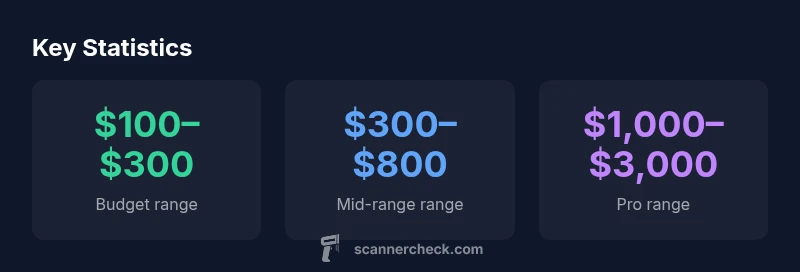
- Budget: typically $100–$300 for basic sheet-fed scanners. These models cover occasional scans, simple OCR, and compact form factors.
- Mid-range: $300–$800, often with ADF for higher daily output, better OCR, and more robust software bundles. Suitable for small offices or heavy personal use.
- Pro: $1,000–$3,000 or more, featuring duplex scanning, high duty cycles, fast speeds, advanced OCR, color accuracy, and enterprise-grade software. Best for workflows with high volumes and strict document handling requirements.
Where you sit in these bands should reflect your expected workload, the importance of accuracy, and the value you place on software ecosystems. The takeaway is simple: the sticker price is a starting point; total cost of ownership matters more for true value.
What drives price: throughput, OCR, and reliability
Price is driven by a few core capabilities. Speed (pages per minute), duplex scanning, duty cycle (how many pages per day a device can handle without wear), and the quality of OCR and image processing all push costs higher. Easy-to-use software, cloud integration, and advanced features like automatic color detection or background cleanup add to the total. Reliability and warranty length also factor into the price; professional-grade devices tend to offer longer warranties and more robust support. If you primarily scan documents with standard fonts, you may not need top-tier OCR accuracy; in that case, you can often save by choosing mid-range models with solid software, rather than the most expensive options.
Hidden costs beyond the upfront price
A scanner’s upfront price rarely tells the full story. Consider:
- Software subscriptions or perpetual licenses for OCR and document management that may renew annually.
- Maintenance contracts and extended warranties that cover head and sensor wear.
- Consumables and replacement parts (cradle mats, glass cleaning kits, calibration tools).
- Power and space requirements, especially for larger duplex models.
- Optional features like multi-page color capture, automatic ink/toner-based sensor calibration, or advanced color profiles that can add up quickly.
When evaluating a purchase, calculate expected annualized costs over 3–5 years to compare truly across models.
Real-world scenarios: home user, small office, enterprise
For a home user, a budget or mid-range scanner with decent OCR may suffice, especially if you primarily digitize receipts, letters, and occasional photos. Small offices benefit from mid-range devices with higher duty cycles and batch processing. For enterprises, cost justification hinges on throughput, integration with document management workflows, and long-term support. In many cases, enterprises justify higher initial costs by reducing manual handling time, improving indexing accuracy, and enabling automated routing. By framing the purchase around your workflow, you can estimate realistic ROI and avoid overspending on capabilities you won’t use.
Shopping on a budget: practical tips
To maximize value without overspending:
- Define a clear use-case and required throughput before shopping.
- Compare price bands rather than individual models; look for features that map to your needs (ADF, duplex, OCR quality).
- Factor in software licensing and potential upgrade costs.
- Check warranty length and swap/replacement policies.
- Consider refurbished professional units if accompanied by meaningful warranties.
- Read independent reviews focusing on reliability and driver compatibility across operating systems.
A deliberate approach reduces the risk of paying for features that won’t improve your day-to-day work.
Where to verify claims and compare options
Always cross-check claims with multiple sources and consider hands-on testing when possible. Look for third-party reviews that measure ease of use, accuracy, and real-world throughput. For purchased equipment, verify compatibility with your current software stack and ensure there is a straightforward path for firmware updates and driver support. Finally, ask about total cost of ownership, not only the purchase price. A transparent vendor will break down software, warranty, and maintenance costs so you can compare apples to apples.
Comparison of scanner price bands by model type
| Model Type | Price Range (USD) | Best Use |
|---|---|---|
| Budget Sheet-fed | 100–300 | Basic document scanning, occasional use |
| Mid-range Sheet-fed / ADF | 300–800 | Small offices, higher volume |
| Professional Duplex Network Scanner | 1000–3000 | Dedicated scanning workflows, OCR, batch processing |
| Mobile/Portable Scanner | 100–350 | On-the-go scanning |
Common Questions
How much does a basic scanner cost for home use?
For most home users, basic scanners sit in the budget to low mid-range, typically around $100–$300. They handle light loads, basic OCR, and standard document sizes. Expect slower speeds and fewer automation features than mid-range models.
Basic home scanners usually cost between a hundred and three hundred dollars, enough for light use and basic OCR.
Are there hidden costs beyond the upfront price?
Yes. Software subscriptions, premium OCR, extended warranties, maintenance, and consumables can add to lifetime costs. It’s wise to estimate these annual costs to compare total ownership across models.
Yes. Don’t forget software, ongoing maintenance, and warranty costs when budgeting.
What feature most justifies a higher price?
Duplex scanning, higher duty cycles, reliable OCR, and software ecosystems are the main factors. If your workflow requires batch processing and fast, accurate indexing, a mid-range or pro model often pays for itself.
Key features include duplex scanning, higher duty cycles, and strong OCR; they justify higher spend when used heavily.
Is renting a scanner a good option for short-term needs?
Renting can be cost-effective for short-term projects or temporary workloads. However, long-term use usually benefits from owning, with predictable costs and software access.
Renting makes sense for short-term tasks; owning is better for ongoing use.
Do I need professional software with a new scanner?
Many scanners come with bundled software that covers essential OCR and workflow needs. For advanced features or enterprise workflows, consider an upgraded package or a compatible document management system.
Bundled software covers basics; upgrade if you need advanced features.
“Price is only one part of value; true worth comes from total cost of ownership, including software, maintenance, and support. The right choice balances upfront cost with long-term reliability.”
Key Takeaways
- Budget scanners cover essential tasks with limited throughput.
- Expect total cost of ownership to exceed sticker price.
- Duty cycle and OCR quality drive most price differences.
- Software, warranty, and accessories add meaningful value.
- Choose a model based on actual use-case, not just features.