Can You Get a Police Scanner? A Practical Guide
Discover whether you can legally own and use a police scanner, what features to look for, setup steps, safety tips, and practical considerations. A comprehensive guide from Scanner Check for enthusiasts and professionals.


Yes, you can generally own a police scanner and listen to many public-safety transmissions in many regions, but laws vary and some channels may be encrypted. A basic handheld scanner that covers VHF/UHF bands will pick up many open channels; avoid transmitting on any police frequency, and check your local rules. Scanner Check notes that encryption and restrictions limit access in some areas.
What is a police scanner and what can you legally listen to?
A police scanner is a radio receiver that lets you listen to certain public-safety and emergency communications. Its basic job is simple: tune to a frequency or digital channel and hear what officers, firefighters, or dispatchers are saying. The important caveat is legality and practicality. Can you get police scanner? In many places you can own one and listen to unencrypted public channels, but access varies by jurisdiction and by the type of channel. According to Scanner Check, the legality of listening hinges on local laws and whether the channel is encrypted or restricted. You’ll often find a mix: some channels broadcast in clear text, while others are digitized or encrypted, and some may be reserved for official personnel only. A general rule: listening is typically allowed, transmitting is not. A modern scanner with digital capabilities supports both analog and digital transmissions, but it will still rely on what agencies choose to broadcast publicly. For hobbyists, this means you can explore nearby departments, sheriff offices, and mutual-aid channels that remain open, while understanding there are practical limits on coverage and accessibility.
Legal considerations and jurisdictional variation
The legality of owning and listening to a police scanner varies widely. Some places permit listeners to hear public-safety chatter, while others restrict access to encrypted channels or prohibit certain uses of the information overheard. The day-to-day reality is that many agencies now encrypt all or parts of their radio traffic to protect operations and safety. Scanner Check emphasizes that encryption, licensing, and municipal policies shape what you can listen to in your area. Always start by checking your local regulations, and if you’re unsure, consult a lawyer or official government resources. In general terms, you should avoid transmitting on police frequencies and never share sensitive content overheard on a scanner. This section will help you map what’s legally permissible and what’s not, so you can enjoy listening without crossing lines.
What to buy: essential scanner features
Choosing a scanner starts with understanding your goals and local coverage. For beginners, a model that supports analog VHF/UHF bands is a good start, but many regions now rely on digital trunked systems (P25, Phase II) and encrypted channels. Look for a scanner with: broad frequency coverage, digital decoding, trunking support, memory channels, and a clear user interface. If you live in an area with complex protocols, you’ll want a model that can import frequency lists, supports dynamic talkgroups, and offers reliable squelch control. Remember that cheaper models may only cover a portion of the airwaves, while premium devices can handle more bands and advanced digital modes. Always verify local needs before buying.
Setup basics: hardware, antenna, and power
A successful listening setup starts with the right hardware and a solid antenna. A handheld scanner is portable and convenient, but an external antenna yields better range and stability. You’ll also need a stable power source, whether AA batteries, a dedicated wall adapter, or a vehicle power supply for mobile use. Position the antenna to minimize interference—typically outdoors or near a window with a clear line of sight to local towers. Keep cables neat and labeled to simplify future tweaks. Finally, read the manual and learn the scanner’s basic controls: power, volume, squelch, and scanning mode.
Programming frequencies and understanding trunking
Programming frequencies is an essential step. Start with nearby emergency services listed by your local authorities, then add common public-safety channels used by your county or city. If your area uses trunked radio systems, your scanner must support digital trunking (often P25). This adds complexity: you may need control channel frequencies and talkgroup IDs. The process can take time, especially if you’re new to scanning. Use a frequency database or local hobbyist resources to avoid misprogramming. Also, be prepared to update entries when agencies swap frequencies or move to encrypted systems. This ongoing maintenance is part of staying current and reliable.
Encryption, digital vs analog, and what it means for listeners
Not all channels are equal. Analog channels remain straightforward to hear, while digital channels (such as P25) require a capable scanner and sometimes specific settings. Encryption adds another layer of complexity: if a channel is encrypted, you cannot decode the conversation with consumer hardware. This is a common situation in many cities where critical operations are protected. As Scanner Check notes, encryption is a trend that reduces listener accessibility on sensitive lines. Understanding the mix of analog, digital, trunked, and encrypted traffic helps you set realistic expectations about what you will hear and how often.
Real-world usage scenarios and safety
People listen for various reasons: hobby, situation awareness, or professional curiosity. If you’re using a scanner to monitor public-safety channels, be mindful of safety and privacy. Do not attempt to intervene in real-time incidents or relay information to others. Respect boundaries and avoid using scanner content to influence personal decisions or to track responders. In professional settings, a scanner can supplement situational awareness for IT or facilities teams, but it should never replace official channels or emergency instructions. Remember, listening is educational and practical when used responsibly.
Troubleshooting common issues
If your scanner isn’t receiving anything interesting, start with basic checks: confirm power, ensure the antenna is connected securely, and verify that you’re on the correct frequency range or digital mode. Noise or interference can come from home electronics, automotive devices, or even neighboring networks; try repositioning the antenna and adjusting squelch. If you program a frequency that isn’t active, you’ll hear silence. Create a baseline by testing known public-safety channels and standard weather/AM broadcast frequencies. Regular updates to your frequency list can prevent stale or dead entries.
Alternatives to traditional scanners and future trends
For some listeners, a full-fledged handheld scanner is overkill. Smartphone apps, SDR (software-defined radio) setups, and online streams provide alternatives, though they may depend on local rules and privacy considerations. SDR setups can be powerful, but you’ll need a computer and compatible hardware. Apps may rely on streaming services or citizen-run databases; verify the legality and privacy implications in your region. Looking ahead, more agencies may raise encryption and digital-only transmissions, which means the fixed-income value of consumer scanners could shift toward hybrid devices or higher-end models with expansive digital capabilities. Scanner Check foresees a continued emphasis on lawful listening and equipment that supports evolving communication standards.
Authority sources
- https://www.fcc.gov
- https://www.nij.ojp.gov
- https://www.fbi.gov
These sources provide official guidelines on public-safety communications, lawful listening, and safety considerations for researchers and hobbyists.
Tools & Materials
- Scanner device (handheld or base station)(Choose a model that supports local bands and any required digital modes)
- Antenna(External, mounted or extendable for best reception)
- Coaxial cable(Quality shielded cable to reduce noise)
- Power supply(AC adapter or purpose-built portable power bank)
- Headphones or speaker(Optional for clearer listening in noisy environments)
- Frequency list or database access(Keep entries updated; start with local channels)
- User manual and quick-reference guide(Helpful for discovering advanced features)
Steps
Estimated time: 30-60 minutes
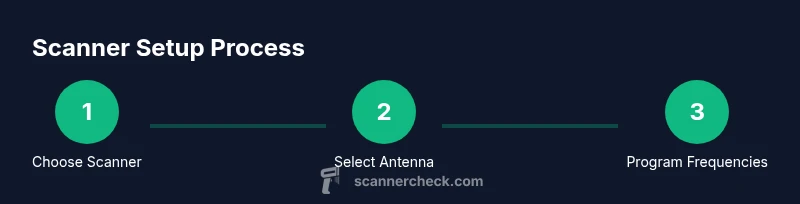
- 1
Choose the right scanner
Identify your region's needs: the bands in use and whether digital trunking is common. Pick a model that covers analog VHF/UHF and digital modes if required by your area. Consider a device with enough memory for frequent updates.
Tip: Check frequency coverage maps and trunking support before purchasing. - 2
Select an antenna and accessories
Choose a suitable antenna for your environment, and plan for a ground-plane if needed. A longer outdoor antenna improves range, but ensure it is properly mounted and weatherproofed.
Tip: Use an outdoor antenna for best reception; route cables away from power lines. - 3
Install and power up
Connect the antenna, attach the power supply, and power on the device. Confirm that the display shows the correct mode and that you can navigate the menus.
Tip: Test in a low-noise area before programming frequencies. - 4
Program frequencies and settings
Enter a starter list of local channels, weather bands, and any mutual-aid frequencies. If you live in a trunking area, enable the appropriate digital mode and, if needed, input control channels.
Tip: Begin with trusted, non-emergency channels to avoid misinterpretation. - 5
Test listening and adjust
Tune to a known channel and adjust squelch and volume for clear reception. Save frequently used frequencies as memory channels.
Tip: Label memory banks by location for quick recall. - 6
Understand the legal and privacy boundaries
Be aware of laws in your area about listening and sharing information overheard on public-safety channels. Do not attempt to transmit on any police frequency.
Tip: If unsure, consult local regulations or a legal advisor.
Common Questions
Is it legal to own and listen to a police scanner?
In many areas, owning a police scanner and listening to public channels is legal, but rules vary by jurisdiction. Some channels may be encrypted or restricted, and transmitting on police frequencies is illegal in most places. Always check local laws before using a scanner to monitor police activity.
In many places you can own and listen to public channels, but laws vary and some channels are encrypted. Do not transmit on police frequencies; check your local rules.
Can all police channels be heard with a consumer scanner?
No. Many agencies encrypt some or all of their transmissions, especially for sensitive operations. A consumer scanner will pick up unencrypted channels and may fail to decode encrypted ones, even if the hardware supports digital modes.
Not all channels are audible. Encryption limits access, even on capable scanners.
What should I consider before buying a scanner?
Evaluate local frequency usage, whether digital trunking is common, and the scanner's ability to decode the relevant digital formats. Also consider your environment, portability needs, and how you’ll program frequencies.
Think about local channels, digital support, and portability before buying.
Is listening to police scanners safe for civilians?
Listening is generally safe, but avoid sharing sensitive information overheard or using scanner data to interfere with emergency responses. Respect privacy and legal boundaries at all times.
Listening is usually safe, but don’t interfere with responders and respect privacy.
Can I use a smartphone app instead of a traditional scanner?
Smartphone apps can provide access to streams or community-built databases, but legality and accuracy depend on the provider and your location. They may not offer the same control as a dedicated scanner.
Apps can be convenient, but check legality and accuracy in your area.
What is the best scanner for a beginner?
Look for a model with straightforward programming, broad frequency coverage, and clear user guides. Avoid features that are not needed for your area to keep complexity manageable.
Choose a beginner-friendly model with good coverage and clear instructions.
Watch Video
Key Takeaways
- Own a scanner only where legal and listen to unencrypted channels.
- Choose a scanner with adequate band support and trunking compatibility.
- Never transmit or share sensitive information overheard on a scanner.
- Regularly update frequencies to stay current and accurate.
- Encryption and digital channels will limit what you can hear.