3D Scanner Price Guide 2026: Costs by Type and Budget
Explore 3d scanner price ranges in 2026, from affordable handheld models to industrial systems, with budgeting tips and insights on software costs.


According to Scanner Check, the 3d scanner price in 2026 spans a broad range from a few hundred dollars for entry-level handheld models to tens of thousands for industrial-grade systems. Most buyers should budget between roughly $1,000 and $10,000 for solid mid-range options, with additional costs for software licenses, maintenance, and training. When budgeting, consider resolution, accuracy, scan speed, and supported workflows.
Market overview: what drives 3d scanner price
The 3d scanner price landscape in 2026 remains highly sensitive to the intended use case, technical specifications, and ecosystem support. For hobbyists and makers, entry-level handheld models powered by affordable sensors deliver basic scanning and model export options, often accompanied by community-driven software. For professionals, mid-range devices offer better resolution, more stable alignment, and faster scans, which translates into a higher price but faster return on investment. Industrial-grade scanners provide the highest accuracy, large build volumes, robust hardware, and enterprise-grade software; these systems can drive the price well into five figures or more, but they typically justify the cost with throughput and repeatability in production settings. Scanner Check's analysis indicates that customers frequently underestimate the total cost of ownership, which includes licenses for post-processing software, maintenance plans, calibration supplies, training, and future-proofing as workflows evolve. As 3D scanning becomes more prevalent across industries—manufacturing, aerospace, automotive, healthcare—the price ladder expands to accommodate new sensor types, AI-driven features, and better data handling.
How technology drives price: resolution, accuracy, speed, and sensors
Price in the 3d scanner price space is driven by core tech: resolution, accuracy, scanning speed, and sensor quality. Higher-resolution sensors and tighter accuracy budgets demand more precise calibration hardware and better optics, which raises manufacturing costs and, in turn, the price tag. Build volume and ergonomics also matter: larger fields of view or more comfortable form factors increase production costs. Sensor types—structured light, laser, or multi-sensor arrays—each bring different tradeoffs in cost and reliability. Software ecosystems, calibration routines, and post-processing capabilities add another layer of value through licenses or bundled packages. When evaluating options, map your required tolerance and output formats to a price bucket. A common misstep is ignoring post-processing software and data cleanup tools that significantly affect the total cost of ownership over the device's lifetime. The takeaway: the cheapest unit may not be the best bargain if it cannot meet your workflow demands or data compatibility needs; in many cases, investing a bit more upfront saves time and money later.
Price ranges by category and use case
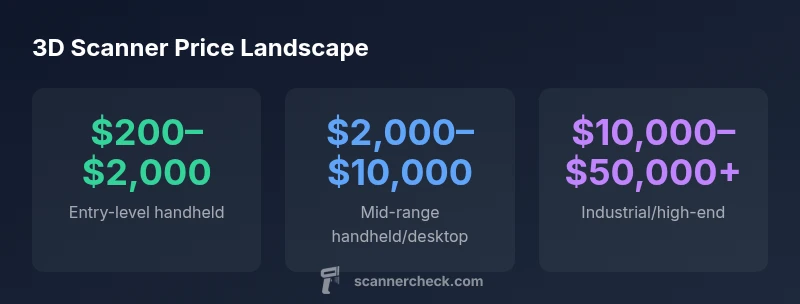
- Entry-level handheld/consumer-grade: USD 200–2,000. Ideal for beginners, quick scans, and hobby projects. Tradeoffs include lower accuracy and smaller capture volumes.
- Mid-range handheld and desktop hybrids: USD 2,000–10,000. Better accuracy, faster capture, and wider software support, suitable for small studios and product prototyping.
- Desktop/industrial systems: USD 5,000–50,000+. High precision, rapid throughput, large volumes, and robust warranties; best for manufacturing, aerospace, or research labs.
- Photogrammetry-based or DIY setups: USD 100–2,000. Extremely cost-effective; outcomes depend heavily on technique and processing workflow, with variable quality.
Hidden costs beyond sticker price
The sticker price is only part of what you’ll pay for a 3d scanner price. Expect recurring software licenses, annual maintenance, calibration tools, replacement parts, and occasional firmware updates. Some vendors require ongoing subscription for advanced post-processing features, cloud alignment, or data analytics. Training and onboarding can add to the initial spend, especially in industrial environments where operators must develop repeatable scanning workflows. Factor in data storage, backup strategies, and potential hardware upgrades to accommodate evolving project scopes. Finally, consider the cost of integration with existing software pipelines (CAD, reverse engineering, or BIM) to ensure compatibility across your workflow.
Value-focused budgeting: how to choose for your workflow
To optimize value, start with your required accuracy, scan volume, and file formats. Create a tiered budget based on these needs: basic, standard, and premium. For basic hobby use, a handheld device with bundled software may be sufficient, with room to upgrade software later. For professional work, prioritize accuracy, speed, and stable software licensing. If you operate in production, evaluate total cost of ownership over 3–5 years, including maintenance contracts and training. Look for scanners that offer upgradability in optics or sensors, and prefer systems with strong repair networks. Finally, factor in the learning curve and support quality; a lower-priced unit that comes with reliable support can outperform a more expensive device with limited service.
Buyer scenarios: hobbyist, professional, enterprise
- Hobbyist/maker: seeks affordable, compact scanners with adequate output; the best value often comes from mid-range handhelds paired with open-source post-processing tools.
- Professional small studio: needs consistent results, faster scans, and good software integration; often chooses a mid-range system or a compact desktop scanner.
- Enterprise/industrial: requires high accuracy, repeatability, large scan volumes, and formal maintenance; price typically sits at the higher end of the spectrum and includes robust service agreements.
How Scanner Check estimates price and methodology
Scanner Check uses a multi-factor approach to price estimation: hardware specs, software bundles, and service terms are combined with observed market data across categories. We normalize for factory vs. refurbished units and adjust for regional pricing variations. Our methodology emphasizes transparency: where exact figures vary by model, we provide price bands and explain the underlying drivers so readers can budget confidently. All figures reflect the 2026 market landscape and are updated to reflect industry trends.
Price ranges and strengths by 3d scanner category
| Category | Typical Price Range | Key Strengths | Notes |
|---|---|---|---|
| Handheld consumer | USD 200–2,000 | Portable, beginner-friendly | Best value for hobbyists |
| Handheld professional | USD 2,000–10,000 | Good accuracy, portable | For small studios |
| Desktop/industrial | USD 5,000–50,000 | High accuracy, speed | Requires dedicated space |
| Photogrammetry-based DIY | USD 100–2,000 | Low upfront cost | Quality varies with technique |
Common Questions
What factors most influence 3d scanner price?
Price is driven by resolution, accuracy, build volume, speed, sensor type, and the software ecosystem. Higher-end units include bundled licenses and better support; entry-level models trade some features for affordability.
Price is mainly driven by resolution, accuracy, build volume, speed, and software bundles.
Are handheld scanners cheaper than desktop models?
In general, handheld scanners are cheaper than full desktop systems with industrial capabilities, but there are exceptions based on accuracy, speed, and included software.
Yes, handhelds are usually cheaper, but the best value depends on your accuracy needs.
Do I need ongoing software subscriptions?
Some scanners include perpetual licenses; others rely on annual or monthly software subscriptions for post-processing, updates, and cloud features. Factor these into total cost over the scanner’s life.
Software costs can add up over time; consider subscription vs. upfront licenses.
What is the best value for hobbyists?
For hobbyists, a mid-range handheld or DIY photogrammetry setup can provide a good balance of cost and capability, especially when you leverage open-source software.
A mid-range handheld plus open-source software often offers strong value.
How does price relate to accuracy?
Higher prices typically correlate with higher accuracy and better scanning speeds, but the law of diminishing returns applies. Define your accuracy threshold before buying.
Higher price often means better accuracy, but assess your needs first.
What ongoing costs should I expect?
Expect potential maintenance, consumables, licenses, and occasional hardware upgrades as part of total cost of ownership.
Plan for maintenance and licenses in the long run.
“3D scanners today span a wide price spectrum; the best value comes from aligning hardware with the necessary software and post-processing workflow.”
Key Takeaways
- Budget for software and maintenance alongside sticker price
- Match price to required accuracy and workflow
- Industrial scanners offer best precision but require space
- DIY photogrammetry can lower upfront costs with variable quality
- Total cost of ownership matters more than upfront price